

Editorial source: Zoho Desk published plans, reviewed October 28, 2026. The scenarios below are evaluation guidance, not results from a private paid account.
Zoho Desk approaches customer support as a system of accountable tickets, queues, escalation rules and reporting. It has a genuine entry-level free edition and several paid options, but the features that matter to a complex organization are divided across editions. Its connection to the wider Zoho ecosystem is useful only when data ownership and implementation effort are properly understood.
📊 Zoho Desk Review 2026: Summary
Verdict: Well suited to teams that need formal ticket routing, departments, reports and ties to Zoho business apps. Its low entry price is appealing, but advanced automation, telephony and Zia capabilities require the correct edition and configuration.
🏆 EDITORIAL FIT: A FEATURE-LAYERED PER-AGENT HELP DESK WITH A BROAD ECOSYSTEM AND GROWING WORKFLOW SOPHISTICATION
Best for: Growing B2B, SaaS and service teams needing a structured help desk, SLA discipline and possible integration with Zoho CRM or other Zoho applications.
Consider another product if: A business that needs only a simple website chat bubble or wants enterprise departments and AI controls without administrative ownership.
💰 Zoho Desk Pricing, Plans and Cost Structure
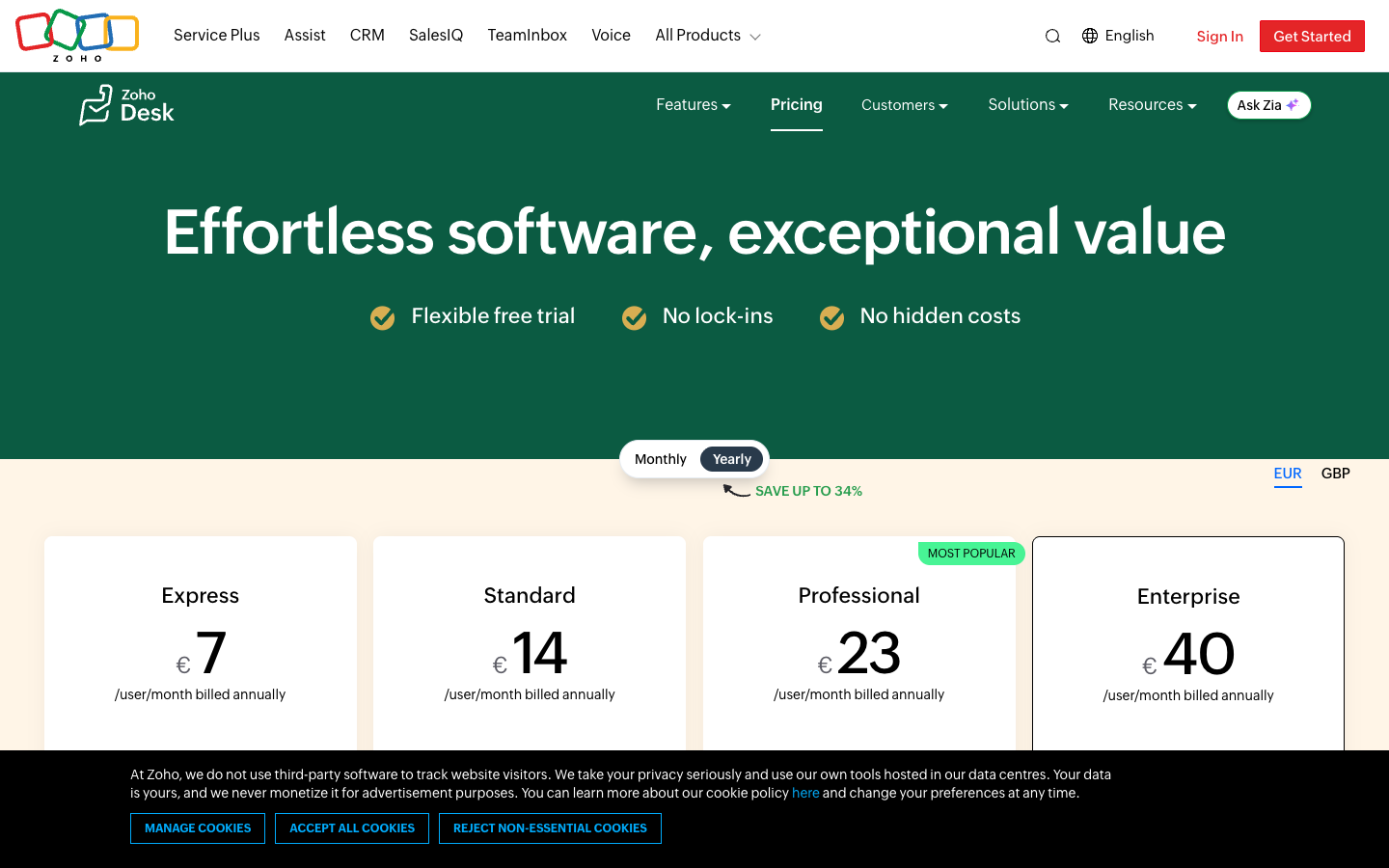
Zoho Desk displays rates per agent; the $7, $14, $23 and $40 references here are monthly equivalents under annual billing. Count actual licensed agents, edition-specific features and possible telephony costs before comparing yearly totals. Source: official Zoho Desk pricing.
| Plan | US pricing reference | Core focus | Important caveat |
|---|---|---|---|
| Free | $0/month | Up to 3 users | Email-led ticketing and limited features |
| Express | $7/user/month annually | Micro-business essentials, up to 5 users | Check edition/region and monthly billing |
| Standard | $14/user/month annually | Messaging, knowledge base and reporting | Higher-tier workflow needs may require upgrade |
| Professional | $23/user/month annually | Zia AI, Blueprints, telephony and departments | Confirm AI and telephony allowances |
| Enterprise | $40/user/month annually | Skill routing, multi-brand features and sandbox | Check external integrations and contract |
⚡ Quick Verdict: When Zoho Desk Is Worth Considering
Growing B2B, SaaS and service teams needing a structured help desk, SLA discipline and possible integration with Zoho CRM or other Zoho applications. Well suited to teams that need formal ticket routing, departments, reports and ties to Zoho business apps. Its low entry price is appealing, but advanced automation, telephony and Zia capabilities require the correct edition and configuration. Zoho Desk is most defensible when tickets must survive department changes and formal approval steps. Choosing between Standard and Professional should start with required Blueprints, Zia, telephony and departmental ownership—not with the cheapest seat rate.
Who should pause: A business that needs only a simple website chat bubble or wants enterprise departments and AI controls without administrative ownership. This Zoho Desk review keeps the limitations visible because the support workload is more important than the presence of an attractive automation demonstration.
🧭 The ticket record is the organizing unit
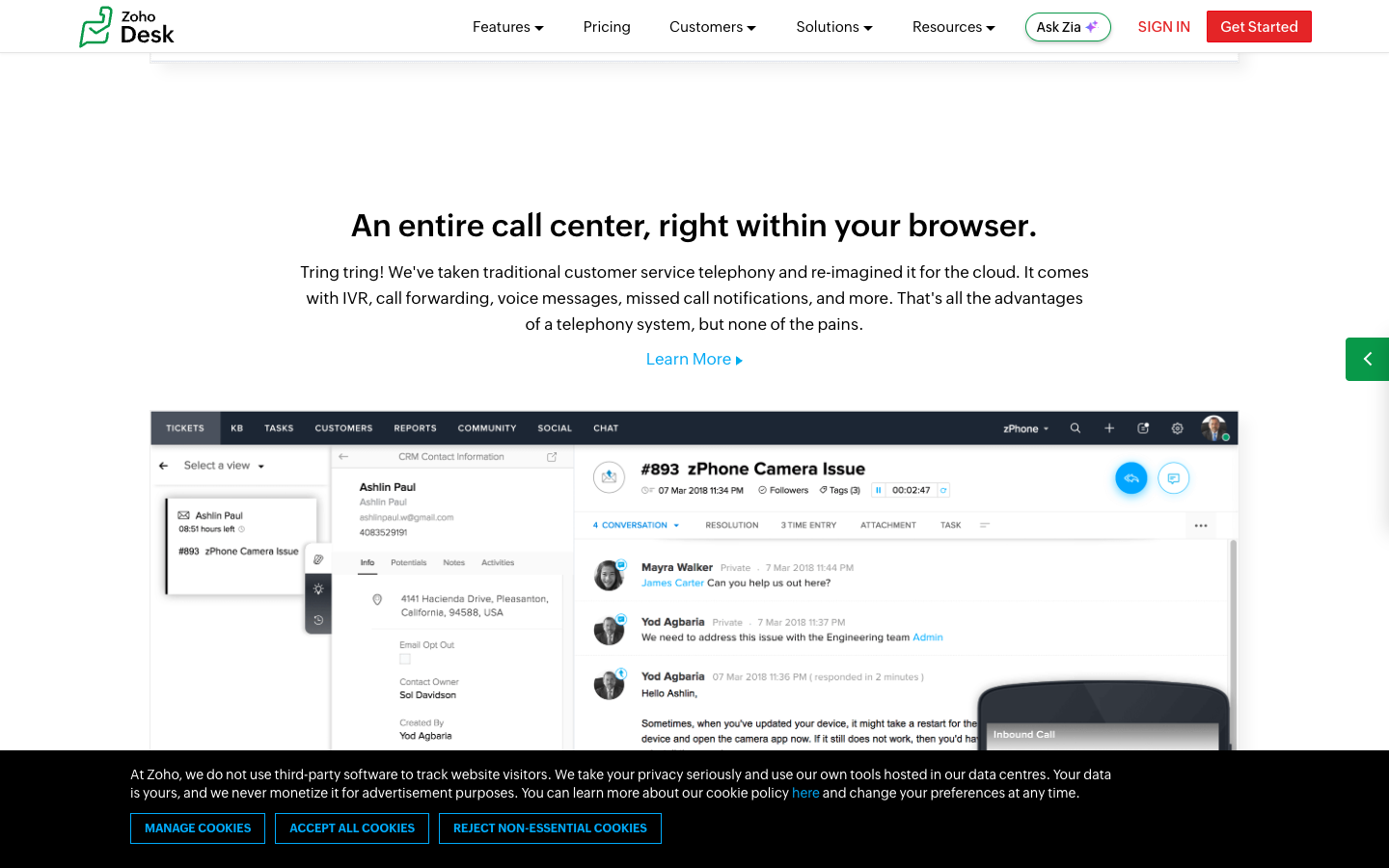
Zoho Desk centers support work on a durable ticket that can carry status, ownership, requester context and history. That persistent record matters when a case sits unresolved over a weekend or passes between billing and technical specialists. A company should decide what makes a ticket resolved before automating closure, otherwise dashboards can reward employees for marking work complete prematurely.
Create a customer issue that starts by email, needs a specialist approval and reopens after a follow-up. Check original timestamps, internal notes, assigned agent and changes of state. A reliable record should make the decision path understandable to a supervisor who did not handle the original contact.
🏷️ What Free and Express really offer
Zoho Desk's Free edition supports three users. Express is positioned for micro-businesses and offers an annual per-user entry price with a small-user cap. These options are useful starting points, but they should not be described as including the broad feature range advertised for Professional and Enterprise.
Try a three-agent pilot with email intake and basic assignment. Then list the exact missing requirements: chat, richer reporting, multiple departments and AI. Use that list to select the lowest eligible paid plan rather than equating the free tier's existence with suitability for a growing support operation.
💰 Standard, Professional and Enterprise
Standard adds business messaging, knowledge base and reporting, Professional adds deeper workflow components such as Blueprints, multi-department operations and Zia AI, while Enterprise introduces advanced routing and multi-brand capabilities. The distinction matters more than a small monthly price difference when one missing control blocks deployment.
Build a matrix with every required department, case workflow, approval and channel. For each, record the minimum Zoho Desk edition and any outside service cost. An honest procurement sheet should show the complete required tier rather than list a low Standard price next to an Enterprise demonstration.
🔄 Agent-based budgeting
Unlike workspace or ticket-metered products, Zoho Desk's core subscriptions scale per user. The annual equivalent rates differ from flexible monthly pricing, and light-agent terms may depend on plan. Seat planning should distinguish frontline agents from occasional specialists who only need to consult a case.
Model a team of eight full-time agents, two supervisors and a rotating group of finance approvers. Ask which require paid full-agent seats and which may use light-agent access on the chosen edition. Calculate annual payment obligations separately from monthly equivalents and add taxes and telephony.
🤖 Zia AI as an operational aid

Professional includes Zia AI capabilities, with predictive and generative functions subject to edition and available data centers. Teams should distinguish suggested replies, sentiment labels and automated decisions. A good Zia summary can help the next agent understand a long conversation; the service issue itself remains open until the approved action is completed.
A suitable Zia evaluation would use a long, ambiguous ticket involving a disputed invoice and inspect its suggested summary. Check whether the summary preserves dates and the unresolved issue. An employee must verify facts before refunding or changing account permissions, and managers should review the error patterns rather than rely on a claimed accuracy metric.
📚 The role of knowledge base and self-service
Standard and higher plans include knowledge features, offering a route for customers to resolve routine questions without opening a ticket. The difficult part is keeping article links, language versions and service policy updates synchronized. A high-quality library should improve both human answers and any AI suggestions based on those articles.
Search a published support article using wording a customer might use, not the internal department name. Update a policy in a draft and confirm public versions do not leak. Review whether suggestions show outdated material and create an editorial owner for sensitive information.
⏱️ SLA calendars and escalation
Zoho Desk's automation and escalation options can support structured service obligations, but time-based policies must reflect real business hours and exception handling. A priority flag is only useful if somebody is notified and has the authority to act when its deadline approaches.
Simulate a ticket arriving just before the end of a regional shift, then escalating while the assigned employee is unavailable. Check the timer, the backup owner and the reporting consequence. If the receiving department cannot act until the next business day, customer communication should make that expectation explicit.
💬 Multichannel does not mean interchangeable channels
Email, messaging, web forms and telephony can feed support operations, but their consent requirements and handling times differ. Zoho Desk plan scope controls which channels are accessible. Companies should avoid building a single response-time rule that treats asynchronous email and a live telephone call as equivalent.
Test a customer who sends an email, follows up through WhatsApp and then asks for a phone call. Confirm how identities are associated and which plan supports the required path. A conversation should not expose records simply because two messages share a similar name.
📈 Department ownership and handoffs
Professional supports multi-department organization and workflow control, making it useful when support cases cross sales, billing and technical teams. A transfer should preserve what was already promised and indicate who owns the next action, otherwise departmental separation increases confusion.
Create a subscription cancellation request that technical support must verify and finance must approve. Follow it across both departments and inspect each status change. The customer should receive one coherent outcome rather than conflicting messages from different employee queues.
What to verify in the pilot: Zoho Desk should let a supervisor retrieve a case history, explain why an automated rule fired and show whether the receiving agent actually solved the customer’s problem. Make this observable rather than accepting an abstract promise.
🔐 Reporting should focus on customer outcomes
Zoho Desk offers increasing reporting capabilities by edition, yet the useful dashboard depends on operational definitions. A decline in average handling time can represent stronger processes or rushed closures. Track reopen rates, repeat contacts and case quality alongside time and volume.
Ask supervisors to review five randomly selected resolved tickets each week, checking whether the documented action matches the customer's original request. Compare these results with dashboard trends after introducing a new Blueprint or AI summary feature. A good metric should reveal unintended effects.
👥 Integrating Zoho CRM and business records
Zoho's broader application ecosystem can reduce context switching, but a CRM lead and a service requester are not automatically the same permissioned identity. Data synchronization, deduplication and authorization must be designed carefully. Many organizations benefit from one shared customer record only when they know which system owns each field.
Use a trial CRM account with two contacts at one organization, each having different service permissions. Check what ticket agents can see and edit from CRM. Simulate a sync conflict and verify which application wins without overwriting a correct service note.
📤 Migration from another ticket system
Moving to Zoho Desk involves preserving original case history, attachments, tags, statuses and customer identifiers. Historical SLA dates and private notes are especially easy to mishandle when exporting to a different data model. A reversible cutover is more important than a fast import.
Move a test batch containing open, reopened and escalated tickets, then verify timestamps, note privacy and assignment. Keep the previous desk available for a short overlap period and route one monitored inbox before changing all customer-facing help addresses.
🧾 Roles, permissions and data retention
The more sophisticated Zoho Desk editions support different forms of access administration. An agent should not have the same export or configuration privileges as the account owner, and an AI assistant should not gain rights that human agents lack. Data residency and retention settings also require review by the organization.
Create separate accounts for agent, team lead and administrator. Attempt exports, confidential internal notes and account data deletion requests. Check the vendor's actual region and contractual processing terms; a security page is helpful, but it does not replace a documented access policy.
🔌 Blueprints for repeatable workflows
Blueprints in Professional can help enforce required ticket states and transitions, which is useful for regulated or high-risk service requests. The trade-off is process complexity: too many mandatory steps can make agents search for workarounds instead of solving a problem.
Model a product replacement needing serial-number verification, manager approval and customer confirmation. Run the workflow with one missing document and one exception. Determine whether an authorized supervisor can handle exceptions without breaking the audit trail.
📊 A team budget example
At the displayed annual equivalents, eight Standard seats total $112 per month and $1,344 in first-year subscription commitments; eight Professional seats total $184 per month and $2,208 for a year. These simple figures exclude taxes, telephony, outside integrations and any extra service packages.
A buyer should use the eight-seat illustration only as a starting point. Add paid supervisors, regional requirements and future headcount, then compare the cost of automations that might replace manual handling. The real decision depends on whether the advanced edition saves enough operational time to justify its added complexity.
⚖️ Zoho Desk versus the field
Freshdesk and Zendesk are sensible counterparts for structured ticket management. Crisp is a different kind of alternative, emphasizing shared conversation channels. The comparison should match agent counts, service levels, reporting needs and contract terms before drawing conclusions.
Give all contenders an unresolved billing issue that changes department twice. Check timeline clarity, escalation accountability and reportability. A more expensive tool can be justified if it prevents missed cases; a cheaper one can win when the team only needs straightforward ticket ownership.
⚠️ When the platform becomes too complex
A Zoho Desk administrator may be tempted to add custom fields and Blueprints immediately. First identify a real bottleneck—such as billing tickets awaiting finance approval—so each added rule has a clear purpose. Every customization creates maintenance work after staff changes. Start by solving the most frequent failure in support, then justify each new rule.
Review a pilot after thirty days and count abandoned forms, duplicate tickets and escalations nobody owned. Remove unused fields and rules. If employees routinely paste workarounds into private notes, the configured process may need simplification regardless of how impressive it looks in a product demo.
🧪 Final evidence and recommendation
This Zoho Desk review is based on published vendor information rather than personal testing of a private production deployment. Actual value depends on the edition, integration quality, workflow owner and customer-service requirements. Public pricing should be validated against the current checkout and geography.
Choose Zoho Desk when formal case ownership and cross-team accountability are important enough to manage. Start at the lowest edition that fully supports the requirements and upgrade only for specific missing controls. If real-time chat is the entire task, test a lighter alternative before accepting a complex setup.
⚖️ Zoho Desk vs Freshdesk, Zendesk, Crisp: Competitor Comparison
| Platform | Main strength | Cost model | Buyer fit |
|---|---|---|---|
| Zoho Desk | Structured ticketing and workflows | Per agent by edition | Multi-department support teams |
| Freshdesk | Help desk automation and triage | Per agent by edition | General customer service operations |
| Zendesk | Enterprise-ready service ecosystem | Per agent, suite and add-ons | Teams needing broad governance |
| Crisp | Collaborative conversational inbox | Per workspace plus limits | Teams focused on messaging channels |
Zoho Desk versus Freshdesk
Freshdesk is another structured help desk with paid agent editions. Compare automation triggers, knowledge management and reporting at the same staff count; advertised entry prices conceal considerable feature differences.
Zoho Desk versus Zendesk
Zendesk brings a mature service-operations ecosystem, but may require different per-agent spending and add-ons. Zoho Desk can be an efficient choice for teams already using Zoho apps if the needed edition supports every workflow.
Zoho Desk versus Crisp
Crisp emphasizes conversational teamwork and an omnichannel inbox priced by workspace. A team whose primary requirement is accountable, cross-department ticket management should test the ticket workflow depth before switching from Zoho Desk.
📌 A sample billing escalation
A customer reports duplicate charges and then replies with a cancellation request. The case must remain accountable while technical support verifies the account and finance considers a refund. This is a useful Zoho Desk trial because it tests approvals, status tracking, internal notes and customer communication rather than just data entry.
🧩 Comparing Standard with Professional
The price difference may look small for one agent, but for larger teams it compounds annually. The buyer should list exactly which Professional features are essential: Zia, telephony, departments, Blueprints or advanced automation. A feature not used by the real workflow is not a reason to upgrade.
🎯 Questions for a Zoho sales call
Request a written tier matrix for messaging channels, Zia AI, Blueprint limits, security roles, integration entitlements and telephony. Confirm the number of full and light agent licenses and billing period. Ask how data can be exported if the company later changes service platform.
💡 The migration acceptance test
Import a mix of open and closed tickets and compare both tools side by side. Check attachments, private notes, requester identities, timestamps and owners. Have a manager attempt to audit an old escalation. The import is not ready merely because all rows appear in a new table.
🛠️ A careful approach to Zia AI
Start with agent-facing summaries and suggestions before allowing any automation to take customer-visible actions. Human review should catch invented account details and missing policy exceptions. Monitor the actual cases that escalate instead of trusting a single vendor-wide AI accuracy claim.
🔍 For companies already using Zoho CRM
A consistent customer data model may make Zoho Desk especially convenient, but only after defining which application owns billing, support history and contact identity. Limit integrations to fields employees truly need and test access after a role change or customer-record merge.
✅ Our recommendation
Zoho Desk belongs on the shortlist for structured service teams that can maintain ownership rules, SLAs and knowledge resources. Once required editions, external calls and setup work are included, the cheapest headline plan may no longer be the least expensive operating choice. Compare effective first-year cost and real ticket outcomes before rollout.
🔎 Zoho Desk Research Methodology, Limitations and Next Steps
Our sources are Zoho Desk public product, pricing and help pages. We have not tested a private support workspace for this article. Buyers should validate plan availability, access rights and their own handoff cases before signing a contract.
For Zoho Desk, the trial should follow an unresolved complaint across departments and compare Zia assistance with a reviewed human record. Make the edition decision from those controls, then calculate the actual seat commitment.
🧠 Zoho Desk Deeper Buying Questions, Hidden Costs and Practical Checks
What three free users can accomplish
The Zoho Desk free plan three agents can be enough to test a basic email ticket workflow before a company commits to recurring seats. Create realistic issues that need assignment, status changes and clear communication. Do not mistake a workable starter inbox for access to Professional features like multi-department Blueprints or the full Zia capability set. Note the actual feature gaps before choosing an edition.
The Express user cap matters
Zoho Desk Express plan five users targets micro-businesses with lightweight service requirements. Its annual per-user headline price is attractive, but a team approaching six agents should forecast the change of edition rather than treating the current subscription as indefinitely scalable. Ask which existing automation and customer history will carry forward on an upgrade. The cheapest present-day tier is not always the cheapest two-year operating plan.
Standard versus Professional
The Zoho Desk Standard vs Professional decision is often about process rather than a small per-agent price delta. Professional introduces features such as Zia, Blueprints, telephony and multi-department work. If several employees must approve customer changes, those tools may justify the additional spend. If the business simply needs email intake and a help center, paying for advanced configuration may be unnecessary.
Understanding Zia AI features
Zoho Desk Zia AI features combine assistance, interpretation and potentially automated work depending on edition and available region. An AI-generated summary can help an agent triage a complicated request, but factual errors in dates, entitlements or identity can be costly. Put a review step between an AI suggestion and an action that changes an account. Track errors by case type and revise the process before scaling.
Blueprints are useful when rules matter
Blueprint workflow automation in Zoho Desk suits cases with defined steps, permissions and sign-offs. A refund or service restoration might require identity verification and a supervisor's explicit approval before closure. The danger is building an elaborate process that agents bypass under pressure. Test the workflow with missing documents and emergency exceptions, then check whether supervisors can understand each transition.
Departments should not become silos
Zoho Desk multi-department ticketing can make specialized support more accountable, but it can also create transfers without ownership. Choose a primary case owner and define what constitutes a completed handoff. Use a billing dispute that moves from technical diagnosis to finance approval as a test. The requester should receive one coherent narrative, not conflicting messages from separate queues.
Design escalation around working hours
Zoho Desk SLA escalation rules need calendars, staffing and customer-facing expectations. A high-priority case arriving before a holiday is not well served by an alert sent to an unattended team. Create realistic shift coverage and escalation backups before treating an SLA configuration as a promise. Review every missed target alongside the underlying quality of resolution.
Reporting needs outcome metrics
Zoho Desk customer support reports can surface workload and agent performance, but good governance requires more than closure counts. Compare repeated contacts, reopened cases and customer-confirmed resolution after a policy change. Managers should review sample tickets where automation ran incorrectly or a department failed to own the next step. Numbers become useful when they inform a specific operational decision.
Where Zoho CRM helps and where it can hurt
A Zoho Desk Zoho CRM integration can bring relevant account context into support, provided customer identity and field ownership are clear. Service staff may need contract status but not unrestricted control over billing details. Test duplicate contacts and a data-sync conflict. Decide which application is authoritative before trying to build one universal customer record.
Enterprise isn't automatically necessary
The Zoho Desk Enterprise sandbox and advanced routing capabilities can support more complex organizations, but they also introduce implementation responsibility. A small company may not need those features at all. Identify the exact compliance or workflow problem that justifies Enterprise before purchasing it. Test a change in sandbox and verify that it can be promoted or rolled back through the supported method.
The migration decision checklist
A Zoho Desk ticket migration checklist should include requester identities, closed and open case histories, private notes, attachments, status transitions and time-zone-sensitive timestamps. Import a small batch, then have the team audit the results against the previous desk. Preserve a rollback path and obtain explicit approval for the final cutover. A successful import is more than a count of new database records.
✅ Zoho Desk Practical Acceptance Criteria
| Area | Required decision | Verification |
|---|---|---|
| Paid agents | Count frontline responders separately from occasional reviewers | Confirm full versus light licensing |
| Edition scope | Match messaging, reporting, department and automation requirements | Select Standard, Professional or Enterprise accordingly |
| Zia availability | Check AI capability and data-center support for the chosen plan | Human-review an ambiguous disputed invoice |
| Blueprints | Require explicit states and manager approvals only where useful | Test an exception that must not stall the case |
| SLA calendars | Set regional working hours and substitute owners | Run a holiday escalation scenario |
| CRM context | Restrict synchronized account fields to service needs | Test duplicate contacts and conflicts |
| Migration | Verify private notes, historical timestamps and unresolved states | Sign off a representative import batch |
A Zoho Desk implementation needs a named owner for departments, SLAs and workflow rules. The procurement decision should start with the minimum edition that can support the approved service process, not an attractive but incomplete entry price.
Purchasing Notes for a More Accurate Comparison
The core Zoho Desk ticketing advantage is continuity: a case should retain its owner, priority, internal notes and decision history even when it moves across departments. A trial needs an unresolved escalation and a reopened ticket, not only a demonstration of receiving an email.
Teams looking at Zoho Desk alternatives should compare actual service processes against Freshdesk, Zendesk and a shared inbox. A low per-agent price matters only after selecting the edition that covers required automation, reporting, messaging and security controls. The winning product should make ownership clearer, not merely generate more reports.

Frequently Asked Questions
Can three agents use Zoho Desk free?
Zoho Desk’s Free edition provides three user licenses for basic support work. It is a useful ticketing pilot, but organizations should map the missing automation, messaging and reporting features before treating it as a full production edition.
What are the Zoho Desk Express limits?
Express is marketed to micro-businesses with an annual per-user price beginning at $7 and a small team limit. Check the user cap and the next edition before hiring a sixth employee or introducing a more complex queue.
Which Zoho Desk edition has Zia AI?
The current pricing comparison highlights substantial built-in Zia capabilities at Professional. Other editions may offer narrower AI-related functions. Evaluate exact entitlements, region restrictions and any additional AI usage or model costs.
When should a company choose Professional?
Professional adds tools such as Blueprints, telephony, multi-department operations and advanced automation beyond Standard. A team should select it because a required workflow depends on those controls, not simply because it occupies the middle of the pricing chart.
What is the purpose of Blueprints?
Blueprints can guide tickets through required states, approvals and transitions. They are helpful for a repeatable escalation process but need exception handling and a designated administrator; excessive mandatory steps can slow agents unnecessarily.
Can Zoho Desk enforce service levels?
The product offers escalation and workflow options, subject to plan. Configure business calendars and backup owners before promising SLAs, and sample actual ticket outcomes to make sure meeting a timer also corresponds to meaningful resolution.
Can Zoho Desk integrate with Zoho CRM?
Zoho’s ecosystem offers integrations that can enrich support context. Verify what customer fields synchronize, which application owns each record and whether an agent’s permissions prevent unauthorized changes to commercial information.
Does Zoho Desk include telephone support?
Telephony integrations and relevant service features appear in higher editions, notably Professional. Costs from the telephone provider and geographic limitations can be additional; request a complete quote rather than relying on a plan headline.
What is the Enterprise edition for?
Enterprise adds broader controls such as advanced routing, multi-brand features and sandbox support. It is most useful when complex departmental operations justify an administrative owner and the extra annual per-agent cost.
How is Zoho Desk priced for eight users?
At the displayed annually billed equivalent rates, eight Standard agents are $112 per month and eight Professional agents $184 per month before tax and services. These are subscription illustrations, not a complete contracted implementation budget.
Can historical tickets be imported?
A migration project should validate old timestamps, requester identities, internal notes, attachments and unresolved escalations. Test a sample and preserve an accessible copy of the previous system until new ticket routing has been verified.
📚 Sources and Related DigiOffly Reviews
Primary vendor source: official Zoho Desk pricing and plan information; secondary reading: DigiOffly Customer Support & Help Desk category. For cross-functional planning, see Software Cost Calculator, Compare Software and E-commerce & Online Selling.
EXPLORE NEXT ON DIGIOFFLY
Explore Your Customer Support Stack
Find related customer experience, collaboration and automation tools. DigiOffly links to completed reviews only; unpublished help desk drafts are not displayed as published articles.
Explore related help desk guides
- Customer Support & Help Desk — Compare team workflows and support models.
- Software Directory — Browse currently published product reviews.
- Compare Software — Evaluate comparable documented features.
- Best Software — Choose software by operational scenario.
Plan your customer service budget
- Software Cost Calculator — Model annual seat commitments and subscriptions.
- Best Value Advisor — Explore product capabilities by task.
- Productivity & Collaboration — Coordinate internal service ownership.
- Automation & No-Code — Consider reliable workflow integrations.
Connect related business tools
- E-commerce & Online Selling — Understand customer order and checkout context.
- Growth & Marketing — Join customer acquisition with post-sale support.
- Hosting & Websites — Understand site reliability and customer issues.
- Tools Hub — Explore DigiOffly software tools.