

📊 Runway Review 2026 Summary
A striking Runway preview is not yet footage an editor can ship. A generated shot still needs consistent movement, usable faces, accurate brand details and a defined place in the timeline. The economic question is how many accepted seconds a creator gets from a limited monthly credit allowance. This review examines Runway’s 2026 video workflow and the move from Unlimited to Max, including what Free, Standard, Pro and Max credits actually mean. The illustrations come from public vendor pages; we do not present them as footage from our own paid production test.
⚡ Quick Verdict: Runway
Runway is appealing when a creative team needs visual exploration or short synthetic shots that would otherwise require stock searches or difficult filming. It becomes costly when a ten-second scene needs many attempts to preserve a character or product label. Max is not the old unlimited-generation promise; it is a high-credit plan with defined allowances. Before committing, specify one shot, its reference image, model, duration and acceptance criteria. If most candidates are unusable, the price per generation is a misleading buying metric. Plan to finish work in a conventional editor.
👍 What We Love
- ✅ Text-to-video and image-to-video models
- ✅ iterative prompting
- ✅ creative effects
- ✅ expanding model access and professional production workflows.
👎 Where It Falls Short
- ❌ Credit burn during retries
- ❌ model-specific limits
- ❌ inconsistent continuity
- ❌ rights questions
- ❌ and the retirement of the old Unlimited model.
🏆 EDITORIAL VERDICT: Runway
For creatives generating new short visual shots, with credits budgeted per approved result.
💰 Runway Pricing 2026: Free, Standard, Pro and Max credits
| Plan | Reference price | Published allowance or distinction | Buyer context |
|---|---|---|---|
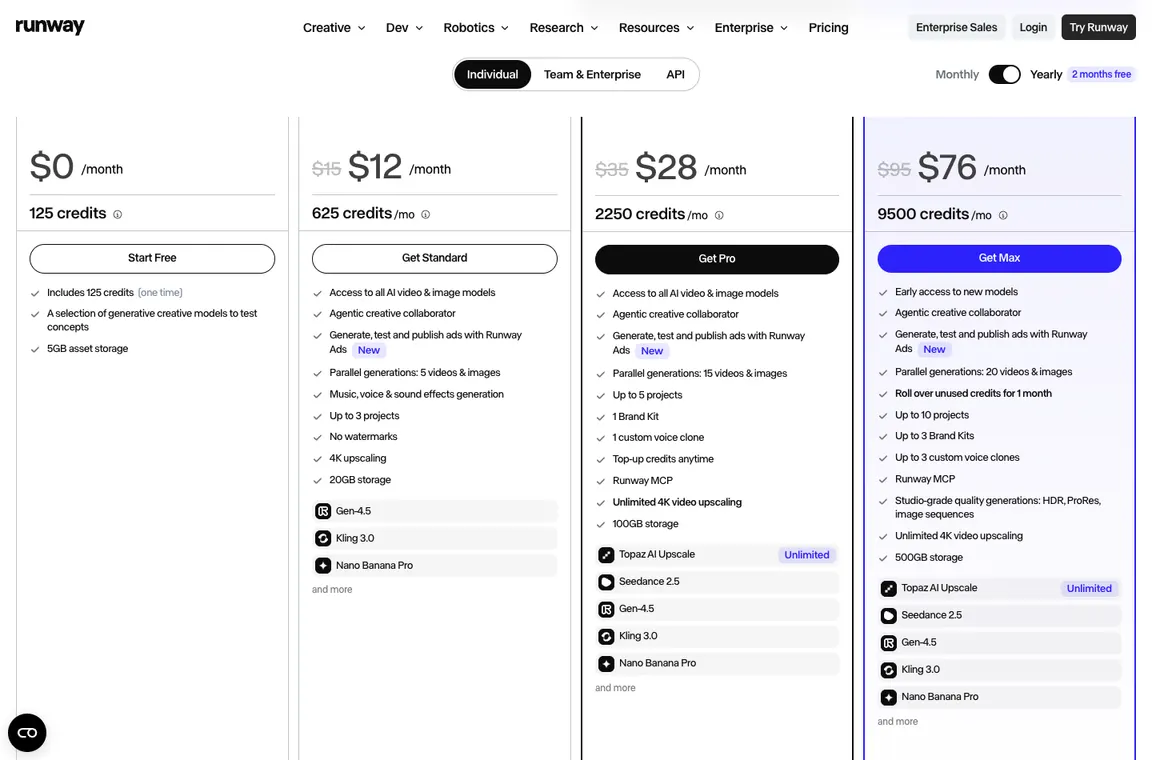
| Free | $0 | 125 one-time credits, watermark | Model experimentation |
| Standard | $15/month | 625 monthly credits | Occasional production |
| Pro | $35/month | 2,250 monthly credits | Recurring projects |
| Max | $95/month | 9,500 monthly credits; rollover rules | Heavy production |
| Team | See pricing | Shared credit pools | Creative workspaces |
| Enterprise | Quote | Enterprise controls and scale | Large studios |
Runway introduced Max in 2026 and is phasing out Unlimited. Eligible legacy Unlimited subscriptions remain through November 30, 2026, when monthly subscribers migrate to Max at the $95/month rate or cancel. Don’t call Max unlimited: credits and rollover are defined. A 125-credit Free allotment is one-time, not renewable each month.
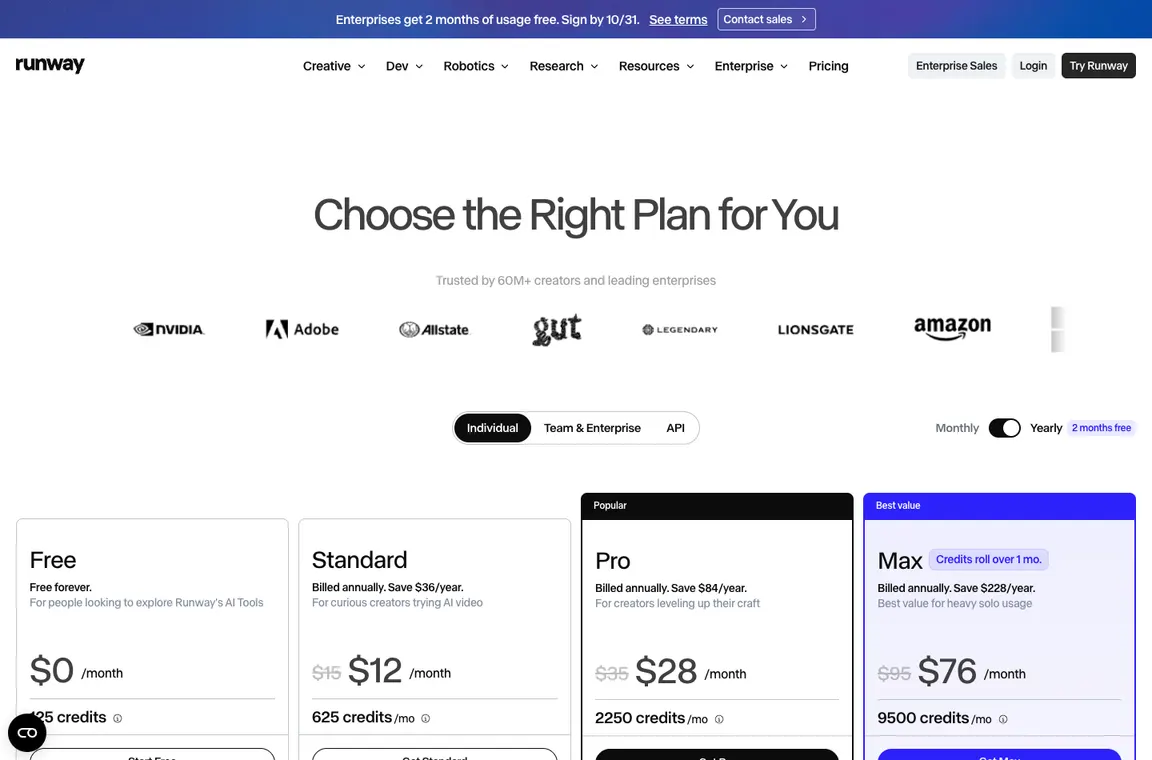
The most important Runway price distinction is between monthly credit allowances and annual-payment equivalents. Standard and Pro provide 625 and 2,250 credits a month, while Max currently lists 9,500 with limited rollover rules; Free includes 125 one-time credits. Each video model consumes credits at its own rate. Calculate a shot budget using the actual model and clip duration, then add a realistic allowance for failed generations. A lower yearly equivalent may not suit a creator who only needs a few experimental scenes each quarter.
🎯 Who Runway Is Best For
The best fit is a designer or video editor who needs exploratory shots and can judge continuity, rights and technical quality. A small marketing team might buy Standard for occasional concepts, while a production studio should budget the actual Pro or Max credit needs per campaign. An HR department producing presenter-led training could get better results from Synthesia. A social media manager captioning existing footage may need VEED instead. Runway is not a sensible purchase if the real task is editing, adding subtitles or correcting an existing timeline.
| Buyer situation | Recommended starting point | Decision to verify |
|---|---|---|
| Visual artist testing a shot concept | Free then Standard | Are 125 initial credits enough for meaningful exploration? |
| Freelance video producer | Pro when recurring work justifies credits | What is cost per accepted second of footage? |
| Studio making many generative shots | Max with defined shot budget | How many retries does each final approved clip require? |
| Social editor mostly captioning existing files | Potentially choose VEED instead | Does the task need generation at all? |
🧩 Generative video tools, models and limits
Runway AI video generation workflow
Runway starts with a creative prompt, optional reference media and model settings. The difficult part is not pressing Generate; it is making an output that can survive an edit without visual discontinuities. Describe one clear subject, action and camera move before adding adjectives. For client work, save every prompt, seed where available and accepted clip version in a shot log.
Runway 2026 pricing and credits
A storyboard calling for three six-second Gen-4.5 clips illustrates the credit calculation more clearly than a broad list of tiers. At the published reference rate of 12 credits per second, those three first attempts use 216 credits, leaving 409 from the 625-credit Standard monthly allocation. But if each shot needs three tries before the editor accepts one, the same 54 generated seconds cost 648 credits, already beyond Standard. This is why Runway 2026 pricing is better assessed by approved footage rather than seconds requested. Check the model’s live estimate, because other models charge different rates and durations. Keep a contingency for consistency failures and treat post-production, rights review and any annual subscription prepayment as separate costs.
For Runway Free tier users, the 125 credits are one-time, not monthly. Runway Standard and Runway Pro use recurring allowances; Runway Max credits are larger but still finite, so approved output cost depends on retries.
Runway Max replacing Unlimited
Older articles often say Runway Unlimited allows unlimited relaxed-speed video exploration. That is no longer a sound description of new purchases in October 2026. Runway announced Max as the replacement and published a transition deadline of November 30 for eligible legacy accounts. Max uses a large credit pool and limited rollover provisions. Production budgets should not assume uncapped generations merely because a previous plan had that name.
A Runway Unlimited migration budget should account for the scheduled move to Max. A Runway annual plan lowers the effective monthly figure but should not be mistaken for unlimited fresh credits every month.
Runway Gen-4.5 and model choice
A model such as Runway Gen-4.5 can interpret text or image inputs, but availability and output constraints vary across models. The published Gen-4.5 guide lists 12 credits per second at supported durations from 2 to 10 seconds. A six-second attempt therefore costs 72 credits before retries or subsequent edits. A useful shoot plan reserves budget for unsuccessful generations instead of treating a generated second as a finished second.

Prompting for camera movement and consistency
Prompts should prioritize physical actions and temporal sequencing. Specify the intended subject, a single camera motion and the visual change over the clip. Too many concurrent events tend to make evaluation ambiguous. Keep the same reference image when comparing different movement settings. For character continuity, compare face shape, clothing, lighting and background between successive shots rather than relying on apparent similarity at thumbnail size.
For Runway video prompts, describe the subject and camera movement before styling. Runway video licensing still requires attention to source material, consent and commercial terms even when the generated scene looks original.
Runway audio and output finishing
AI-generated video frequently needs a conventional editing pass. Timing, color, sound and captions must match the final deliverable. Export model footage and inspect actual pixel dimensions, frame rate and artifacts. Do not assume a preview file equals final-quality footage. Third-party models offered inside Runway may have distinct generation costs, permissions and feature restrictions.
Runway licensing and commercial risks
Generative video can resemble brands, personalities or copyrighted aesthetics even when the user did not ask for direct imitation. Client campaigns require a policy for reference images, likeness consent and permissible output. Review commercial-use terms for the selected product tier and model provider. Keep evidence of inputs, prompts and approvals. A video’s technical quality does not settle the rights question.
Runway vs Synthesia for business video
Runway suits stylized shots and visual exploration; Synthesia emphasizes repeatable presenter-style videos, avatars and localization. A corporate training department may value easily translated scripts more than cinematic motion. A creative agency may need bespoke B-roll where a fixed avatar feels inappropriate. Run the same deliverable brief through both approaches and compare approved production time, editability and total cost.
📋 Runway Features: What Needs Verification
| Capability | Vendor fact or evaluation method | Evidence to collect |
|---|---|---|
| Model and duration | Check Gen-4.5 12 credits/second and available durations | Shot-level credit estimate |
| Reference continuity | Same character across edits and camera angles | Review full clips frame-by-frame |
| Max plan | 9,500 credits and limited rollover, not unlimited generations | Current terms at checkout |
| Finishing | Generated clips exported to Premiere/Resolve | Frame rate, technical artifacts and rights |
🛠️ Storyboard-to-delivery trials and production economics
Turning a storyboard frame into a usable shot
Runway makes it possible to turn a short prompt or reference image into moving imagery, but a campaign needs more than a visually striking first attempt. Imagine a six-second shot of a person walking past a neon storefront. The brief must specify whether the camera tracks, remains static or pans; what should stay in the frame; and which brand elements are not allowed to change. Start with one reference frame and one movement instruction. Multiple simultaneous actions can make it difficult to understand why a generation failed. Keep the input and generated clips in a shot log so an editor can compare versions.
The useful acceptance test is whether the result fits the intended sequence. A clip may look impressive by itself but change the person’s face, remove a storefront sign or break continuity with the next shot. Review the entire duration frame by frame rather than judging a thumbnail. Record how many candidates were rejected before selecting one for editing. Those rejected attempts are part of Runway’s real cost and should be included in a production estimate.
Credits per second and failed generations
Runway’s public pricing currently lists 125 one-time credits on Free, 625 credits monthly on Standard, 2,250 on Pro and 9,500 on Max. The credit cost depends on the chosen generation model and output duration. Its published Gen-4.5 example is 60 credits for five seconds, or 12 credits a second. That means five unusable attempts at a ten-second shot can consume far more than a single accepted clip. Treat credits as a production budget, not a vague measure of how many prompts the user can try.
Start with a short draft clip and reserve part of the allowance for revision. Track the model, length, reference files and accepted output, then calculate credits per approved second of video. Different models and image outputs can have different rates, so a blended estimate should be based on the actual shot list. Standard’s advertised monthly equivalent on annual billing is distinct from the month-to-month rate. A production manager should know both the upfront payment and expected generation spend.
The switch from Unlimited to Runway Max
An older review may recommend Runway Unlimited as a way to explore generations without a fixed credit ceiling. That description does not apply to new purchases in late 2026. Runway introduced Max to replace Unlimited and communicated a November 30 migration for eligible legacy subscriptions. Max has a large 9,500-credit monthly balance, a limited rollover window and additional creative functionality, but a finite allowance. Customers retaining an older plan should check the migration notice in their own account rather than expecting the historical terms to continue indefinitely.
For an agency, this changes how a campaign is budgeted. A project with many exploratory shots may need more approval checkpoints before credits are spent. Agree on a first creative direction, then generate a smaller set of candidates to test motion and framing. Do not promise a customer an unlimited number of revisions unless the contract separately accounts for credit purchases and editor time. Compare the expected use to Max’s actual current terms, not to a retired product name.
Continuity across characters, camera and lighting
AI-generated shots frequently look persuasive in isolation and inconsistent in sequence. A subject may change clothing between frames, a hand may deform during motion, or a background object may move in a way no camera move explains. Runway allows reference-based creation, but continuity still needs a human eye. Write down visual invariants: face shape, costume colors, location layout, props and the relative direction of movement. For each take, evaluate those elements instead of judging only overall atmosphere.
A practical exercise uses the same character reference to produce three adjoining shots: wide, medium and close-up. Check whether the visual identity survives different framing and lighting conditions. When a scene does not match, it may be more efficient to adjust the storyboard or use conventional footage than to generate dozens of additional attempts. Consistency is a creative constraint and a budget issue, particularly for branded assets where even small departures from an approved design are visible.
Video output, upscaling and the edit timeline
Runway-generated clips are ingredients for a finished video. A practical post-production workflow still includes choosing takes, trimming awkward transitions, adding sound, managing color and checking output specifications. Exported files should be inspected for dimensions, frame rate, encoding and artifacts. Upscaling may improve delivery resolution but cannot guarantee that a distorted face, unreadable label or incorrect action becomes usable. The editor must determine whether a flaw can be fixed conventionally or requires another generation.
Plan an edit that mixes AI sequences with other assets when appropriate. Add filenames and version numbers that identify which reference and prompt produced an accepted clip. If clients request a revision, the team needs to know which shot is being replaced and whether it can be regenerated consistently. Runway may accelerate concept development, but conventional editorial discipline remains necessary to deliver material that is accessible, on-brand and compatible with the destination platform.
Commercial rights and likeness permissions
A realistic person appearing in a generated commercial may resemble somebody who has not consented to the use of their image. A prompt that references a trademark or distinct artist style may also raise approval questions. Runway’s available creation tools do not themselves determine whether a campaign has the necessary rights. Teams should verify the terms of the specific model and plan, maintain permission records for uploaded reference material and make sure clients approve any synthetic portrayal that could be misleading.
Keep a production record showing source image ownership, named likeness releases where needed, selected generation models and the final approved cut. Avoid telling clients that generative output is automatically risk-free or uniquely owned just because it did not originate from filmed footage. Legal review belongs before distribution, especially for advertising, political content or materials involving identifiable people. A commercially usable result must satisfy both creative requirements and the organization’s rights standards.
Using Runway alongside Premiere or DaVinci Resolve
Runway is best viewed as a source of generated shots and creative iterations, not a substitute for a complete finishing suite. Adobe Premiere Pro and DaVinci Resolve provide editing, audio, color and delivery workflows that may be more predictable once the creative asset exists. A studio should define where files move between applications and how versions are approved. The cost comparison therefore includes the editor subscription or license, asset storage and staff effort, not only the Runway credit line.
A simple mixed-workflow pilot might generate three short b-roll shots in Runway, then cut them into a thirty-second promotional video using an existing editor. Review the final export for inconsistent motion, readability of text overlays, and captions. Measure whether generated footage reduced stock searches or reshoots, and whether it introduced extra cleanup. If conventional production is faster for a particular scene, there is no reason to force AI into every shot.
Model choice without treating every model as equal
Runway offers access to multiple creative models and generation methods, but they do not share one universal credit rate or the same support for references, aspect ratios and output characteristics. A five-second cinematic test that works well in one model may be unsuitable for another. Keep a small model-selection table for each project: required movement, output size, maximum duration, reference support, approximate cost and licensing assumptions. The first model choice should follow the brief, not the ranking of a demo reel.
For comparisons, generate the same scene on eligible models with controlled prompts, then judge motion fidelity, facial continuity, scene composition and post-production effort. Note that randomized output makes one-to-one judgments imperfect. Use several trials with consistent evaluation criteria. A supposedly cheaper model may be more expensive if it requires many retries to achieve the same usable footage. The objective is predictable creative throughput under an explicit budget.
Planning a client project with capped credits
Consider an agency that needs ten short shots for a product launch. It should decide how many initial candidates and revisions are permitted per shot before generation begins. Estimate credit consumption using the specific models and durations, add a contingency for failures, then communicate what is included in the client fee. A flat promise of unlimited creative exploration is hard to reconcile with credit-based pricing. A sensible project sheet tracks requested assets, approved visual references, generation attempts, selected versions and delivery deadlines.
At the end of the job, compare credits spent with the number of seconds actually used in the final edit. Record any work rejected for continuity, rights or technical problems. That produces a realistic purchasing decision for Standard, Pro or Max. For a team that rarely needs generated video, a smaller plan or project-specific top-up may be more economical than continuously paying for the highest allowance. The strongest outcome is controlled experimentation that finishes as a shippable piece of media.
Text, logos and product labels inside generated footage
Product marketers often need a specific package design, readable label or legally required disclaimer. AI video generation can struggle with exact typography and brand geometry during motion. Use Runway to explore the lighting, background and camera movement, then consider adding verified product text and logos in a conventional editor. Inspect every frame where a logo appears; a distorted mark might be unsuitable even when the scene looks convincing. Keep the authentic reference assets separate from the generated background. This approach uses generative video for visual invention while maintaining precise control of claims and required labels. It can reduce retries aimed at forcing a model to render exact copy.
Archiving prompts and approved output versions
Reproducibility is more difficult when a generative model is updated or its available features change. An agency should store the prompt, reference images, model selection, settings and creation date alongside each accepted Runway clip. Use descriptive filenames for the final edit and note which candidate received approval. If a client requests the same scene next quarter, a saved prompt is a starting point, not a guarantee of identical output. Keeping production records also helps explain disputed likeness or licensing choices. The archive should include unused generations only for as long as the organization’s retention policy permits, since discarded references may contain confidential client material.
⚖️ Runway vs Alternatives: Head-to-Head
| Alternative | What it emphasizes | Decision criterion |
|---|---|---|
| Synthesia | Presenter-led avatar video and training | Choose avatar versus cinematic generation |
| Adobe Premiere Pro | Editing and finishing existing footage | Compare generation against manual editing |
| VEED | Browser editing and captions | Compare finished deliverable efficiency |
Synthesia is built around script-led presenter videos, avatars and repeatable business content. Runway is more useful for stylized visual scenes or creative b-roll. An internal training department might value easy updates to localized narration, while a film editor needs control over movement, composition and unusual shots. Neither is categorically better. Compare the same intended deliverable and count approved seconds, corrections, rights review and subscription or credit cost. A cinematic demo cannot substitute for evaluating what the team actually needs to publish.
Adobe Premiere Pro handles conventional editing, sound, timeline organization and delivery more predictably than a video-generation service alone. Runway can provide visual material that Premiere then cuts into a campaign. The comparison is therefore about build versus finish rather than about identical feature lists. Check whether generated clips have suitable format, resolution and continuity, and how much manual cleanup they require. For a team that already pays for Premiere, adding Runway makes financial sense only when the generated assets replace enough other work.
VEED emphasizes browser-based editing, captions and repurposing for social content. Runway focuses more on producing new AI imagery and motion. A marketer whose task is adding accurate captions to existing footage may be better served by VEED, while somebody exploring a visual concept may need Runway. Include the time spent reviewing output and correcting names, brands or subtitles. A solution that produces more creative possibilities is not automatically the quickest route to a publishable clip. Clarify whether the team needs new footage or simply editing.
📋 Runway Procurement Checklist
- Write a shot list with duration, reference images and camera movement.
- Choose Gen-4.5 or another model based on the actual visual brief.
- Set a maximum credit spend for first drafts and discarded outputs.
- Count accepted video seconds, not the number of generations.
- Verify Max terms instead of relying on obsolete Unlimited claims.
- Check faces, limbs, labels and continuity throughout each clip.
- Document reference-image ownership and necessary likeness consent.
- Test final export compatibility with the existing editing timeline.
| Decision test | Evidence to retain | Pass condition |
|---|---|---|
| Visual continuity | Three related cuts and shared character reference | Face, props and lighting remain usable |
| Credit predictability | Model, duration and attempts log | Approval cost matches budget |
| Technical export | Clip opened in target video editor | Correct format and no critical artifacts |
| Rights | Input permissions and client approval | No unresolved likeness or trademark issue |
| Delivery | A complete short edited sequence | Time saved after cleanup remains positive |
🏆 Final Verdict on Runway
Runway’s value should be measured in approved visual assets, not impressive first attempts or the number of generations made. Keep a shot list with duration, model, references, used credits and the reason a take was rejected. Validate likeness permissions and client rights before distributing final footage, and inspect exports in the target editor. A predictable workflow may justify Pro or Max; irregular experiments may fit a lower tier. Avoid treating the retiring Unlimited plan as an available new subscription. A great concept has to survive continuity review and the actual project budget.

Frequently Asked Questions
Does Runway have a free tier in 2026?
Yes. Its pricing page lists 125 one-time credits on Free. They aren’t a fresh monthly allowance, so plan a short experiment instead of assuming you can continually regenerate a clip at no cost.
How many credits are included in Standard, Pro and Max?
Runway lists 625 monthly credits for Standard, 2,250 for Pro and 9,500 for Max. A model’s cost varies by generation type and duration; those balances don’t translate into a fixed number of finished videos.
Is Runway Unlimited still a current purchase option?
Runway announced a migration away from legacy Unlimited toward Max. Don’t assume a new Max subscription gives uncapped generations. Users on an old plan should check their specific transition notice and renewal terms.
What does Runway Max cost?
The current public US monthly figure is $95, with a lower monthly equivalent when billed annually. Max includes 9,500 monthly credits and limited rollover rules. Verify the selected billing term before comparing prices.
How much does a ten-second Gen-4.5 video cost in credits?
At a published example rate of 12 credits per second, a ten-second generation would use 120 credits before any retries. The actual rate depends on the chosen model and settings; verify the in-app estimate.
Can Runway maintain the same character across clips?
References can help, but continuity is not guaranteed. Check faces, clothing, props and lighting across all frames. A single attractive preview doesn’t show whether a sequence will cut together.
Does Runway generate a finished advertisement automatically?
It can provide short generated shots, yet captions, brand labels, sound, rights approval and delivery may still need conventional editing. Count that finishing time when assessing the cost of an AI-generated clip.
Are Runway outputs always suitable for commercial use?
Not automatically. Confirm plan and model terms, reference-image rights and consent for identifiable people. Generated likenesses and trademarks require the same careful approval as other campaign assets.
How is Runway different from Synthesia?
Runway is usually a better fit for visual exploration and cinematic footage. Synthesia focuses on scripted avatar-led presentations and multilingual training. Pick based on the deliverable, not a general ‘best AI video’ label.
Can I edit Runway clips in Premiere Pro or DaVinci Resolve?
Yes, provided the exported format fits the editor. Inspect resolution, frame rate, visual artifacts and sound before adding the material to the final timeline.
What is the best way to budget Runway credits?
Specify the number and duration of shots, generation model, planned candidates and revision contingency. Calculate cost per accepted second, including rejected generations; don’t base a client’s fee on the first successful preview.
EXPLORE NEXT ON DIGIOFFLY
🔍 Compare AI Tools & Software
Validate features, plans and workflow fit for Runway before committing to another subscription.
Find AI & Tech reviews
- AI & Tech Offers — Explore the full category.
- Midjourney review — Image-generation alternative.
- ChatGPT review — General-purpose AI workflows.
- Synthesia review — Compare cinematic generation with scripted avatar videos.
- Adobe Premiere Pro review — Explore professional editing after generating footage.
- VEED review — Consider simpler browser editing and captions.
Compare verified options
- Software Directory — Find tools and plans.
- Compare — Compare products directly.
- AI Software Finder — Match features to a task.
Plan what to buy
- Cost Calculator — Work out first-year spending.
- Best Value Advisor — Explore price and capabilities.
- Deals Hub — Check verified offers and terms.
- TubeBuddy — YouTube topic research, metadata workflows and thumbnail evaluation
Pricing and product capabilities can change after publication. Confirm subscription terms, regional tax and account eligibility with the provider.