

Screaming Frog SEO Spider research update, October 30, 2026: Vendor pricing and product references were consulted for this article about Screaming Frog SEO Spider. The illustrated public pages are not evidence of private-account testing. Check the current vendor documentation for Screaming Frog SEO Spider before making a purchase.
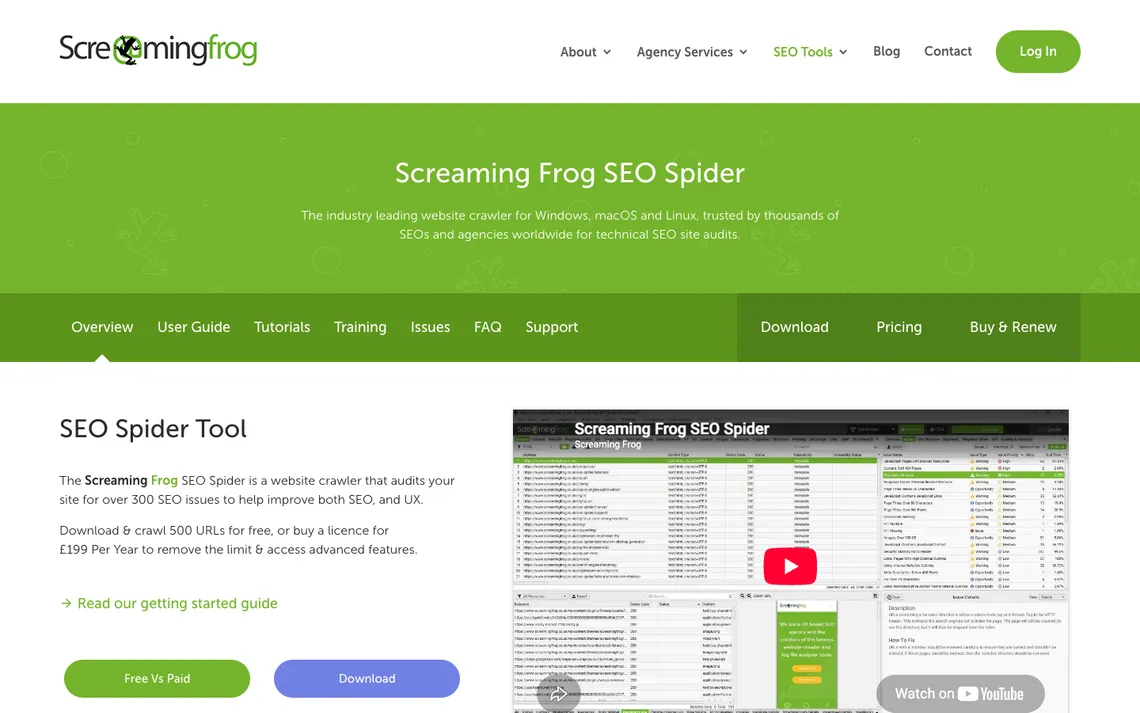
Screaming Frog’s SEO Spider runs as a desktop crawler. It can investigate technical website problems, but it cannot promise higher search rankings. Its purpose is to make a website’s crawlable structure auditable: response codes, canonical hints, internal links, duplicate pages and many other signals. The most useful result is a list of prioritized technical fixes that a developer can reproduce, rather than a large spreadsheet of warnings that nobody owns.
Screaming Frog SEO Spider is a desktop audit tool, not a service that can promise higher Google rankings. It can reveal technical evidence—redirect chains, canonical declarations, internal links and inconsistent metadata—that a developer can verify and fix. Our Screaming Frog review explains when the free 500-URL crawl is sufficient, what the annual licence changes, and how to prioritize the output. The screenshots show public vendor pages rather than a live crawl conducted for this article.
DigiOffly may earn a commission from qualifying links about Screaming Frog SEO Spider, at no additional cost to the reader. Confirm all current vendor terms before buying.
📊 Screaming Frog SEO Spider Review Summary
This desktop crawler is particularly useful to teams willing to investigate the URLs behind a technical SEO warning. Its free edition is useful for a focused crawl of up to 500 URLs; the annual paid licence supports advanced configuration and deeper audits. The operator still needs to interpret and prioritize the exported findings.
- Best fit: Technical SEO teams investigating site architecture, crawling and indexability with repeatable desktop audits.
- Budget: Verify the applicable usage and seat tier in the detailed pricing section
- Strength: Detailed local crawl diagnostics and exports
- Trade-off: Requires practical technical SEO interpretation
- Evidence: Pricing and product claims checked against official sources, not a private account benchmark.
⚡ Quick Verdict: Is Screaming Frog SEO Spider Worth It?
Choose SEO Spider when a developer or technical SEO specialist needs reproducible data on status codes, redirects, canonical declarations and internal links. Save the crawl settings, compare a representative HTML and JavaScript-rendered sample when appropriate, and review issues against Search Console before assigning fixes. Neither the number of warnings nor a paid licence establishes a ranking improvement.
🧭 Contents and Navigation
🧠 What Is Screaming Frog SEO Spider?
🛠️ Features, Workflows and Practical Limits
Plan crawl scope
A faceted product catalogue can create hundreds of URLs from one category page through size, color and sorting parameters. Before opening Screaming Frog SEO Spider, decide which paths should be crawled and whether query parameters are relevant to the audit. Otherwise the report may be dominated by variations that were never intended to rank. Start with one representative folder, save the crawl configuration and inspect a few URLs manually before increasing the scope.
A crawler can waste an entire morning on a catalogue that exposes every colour, size and sorting combination as a separate URL. In Screaming Frog SEO Spider, that is not automatically a sign of a large indexable site; it may be the consequence of parameterised navigation. List the intended canonical category pages before the crawl, then test how the spider follows a few faceted links. The point is to understand what the website exposes to bots, not to manufacture the largest possible URL count. The Screaming Frog website crawler will reflect the URL rules it is given, even when those rules capture unwanted combinations.
Start with a representative subfolder and excluded query patterns to test your configuration before unleashing a full-site extraction. Setting up URL exclusion rules in advance ensures the crawler bypasses unnecessary parameter strings and keeps your exported datasets clean and actionable. This methodical starting phase guarantees that subsequent developer fixes target actual structural vulnerabilities rather than filter noise.
Free limit versus licence
Deciding whether a 500-URL run is sufficient depends heavily on the overall scale and navigational complexity of your target domain. While the complimentary tier offers a helpful glimpse into how the desktop tool operates, small enterprise sites will instantly exhaust that threshold before reaching core product categories. Understanding this limitation prevents premature conclusions about a site’s overall health based on truncated data.
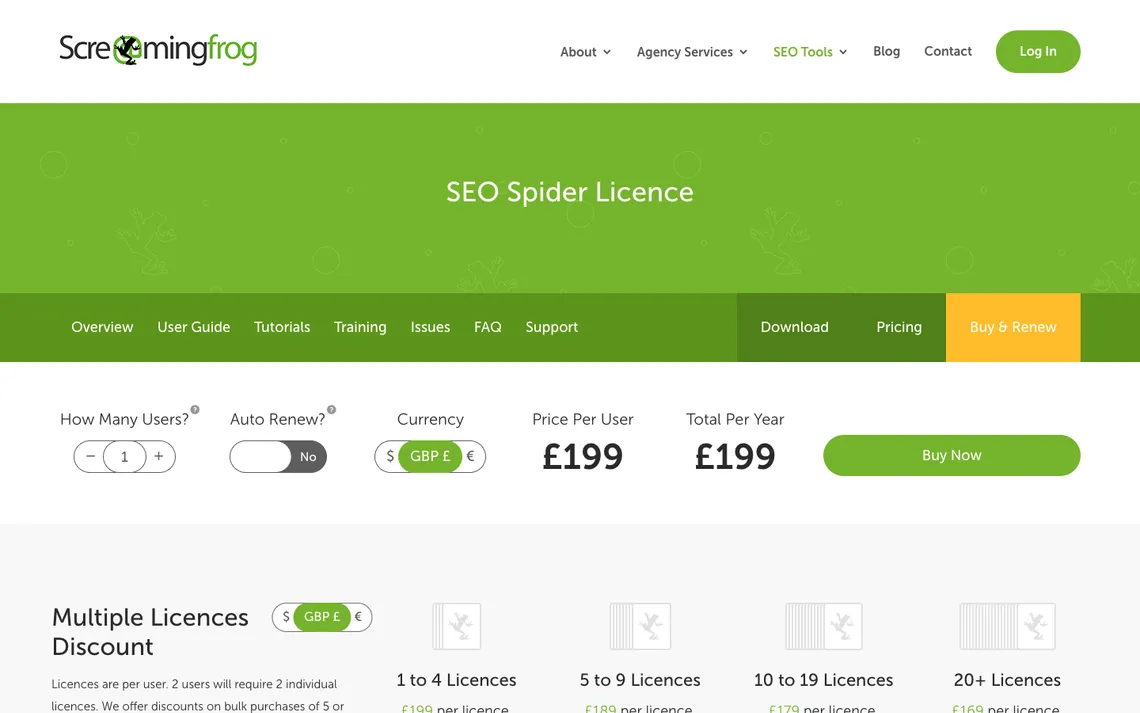
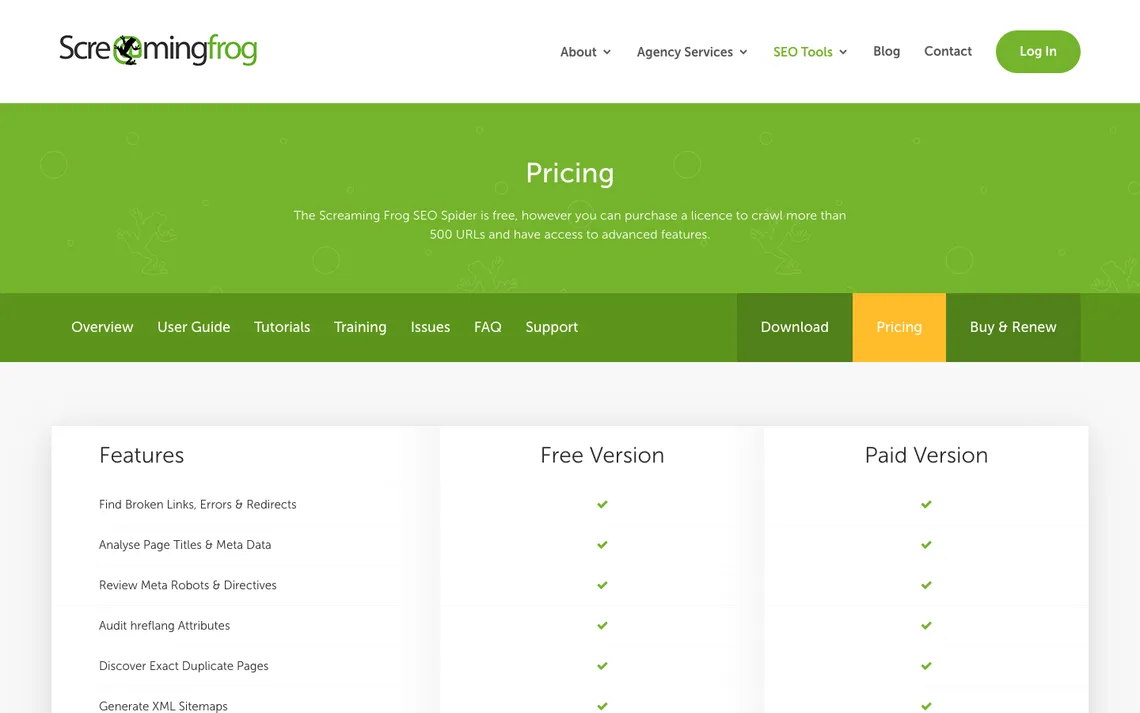
The 500-URL free Screaming Frog limit is useful for answering a narrow question: ‘Do links from our main product pages resolve correctly?’ It is much less useful when a retailer has tens of thousands of paginated and parameterised URLs. The £199 annual per-user licence removes the free crawl cap and enables features such as saved crawls, advanced configuration and JavaScript rendering, according to the vendor. For a one-off small-site check, buy only if a feature behind the licence is actually required. For anyone comparing the Screaming Frog SEO Spider free edition with a licence, the missing configuration and crawl-save features may matter more than the raw URL count.
A small sample might miss deep pagination or orphan content that resides entirely outside the primary main-menu pathways. Count total indexable URLs and sampling coverage meticulously to gauge whether your initial trial runs are representative of the wider site architecture. Bridging that gap between a basic trial scan and a licensed, deep-dive crawl is essential for thorough technical optimization.
Response codes and redirects
Finding broken product links after a migration is one of the most common and valuable applications for this desktop crawling software. When structural updates shift category paths or retire old inventory, remnants often linger as unexpected dead ends for visitors and search engines alike. Identifying these gaps quickly helps restore a smooth browsing experience and preserves organic search equity across your catalog.
During a domain migration, a redirect report should tell a developer where the journey goes wrong, not just show a red error count. Take an old product URL, follow every hop and ask whether the final destination is an equivalent live page. A chain ending at the home page may return a technically successful status while frustrating the shopper. Screaming Frog can export the links leading to broken URLs; use those source pages to replace outdated internal links instead of relying solely on permanent redirects.
Export the source page for every 404 and inspect multi-hop redirects so developers know which links and targets to correct. Examining the precise originating pages lets your team fix internal navigation links directly at the source rather than relying solely on catch-all redirect rules. This proactive maintenance keeps site architecture lean, fast, and fully navigable for users.
Canonical and indexability
Canonical conflicts are easy to misunderstand. Screaming Frog SEO Spider may report that two URLs declare the same canonical or that a page points elsewhere, but this does not prove Google chose that URL for indexing. Compare the tags with the site’s intended page structure and with Search Console’s indexing data. A developer should fix inconsistent declarations when they contradict the publishing strategy, not automatically remove every apparent duplicate.
Canonical elements, meta directives, and robots controls can be compared side by side within the crawler’s interface to spot conflicting instructions. A canonical tag is a hint, not proof Google selected the intended URL, meaning search engines may occasionally ignore your declarations if supporting signals contradict them. Recognizing this distinction prevents false confidence in tags that lack reinforcement from internal links. Screaming Frog custom search can help locate repeated template elements, but the query needs a documented matching rule.
A canonical report is a map of publisher instructions, not Google’s final indexing decision. If a filtered product page points to the base category, Screaming Frog can expose that declaration. The next step is to decide whether the filter ought to have its own indexable page at all, then check the relevant Search Console evidence. A crawler warning becomes a task only when it conflicts with the site’s intended URL strategy. Bulk-changing canonical tags before making that decision can create more problems than it fixes.
JavaScript rendering
Auditing a modern single-page app requires moving beyond basic static HTML extraction to understand how client-side frameworks assemble content for visitors. Modern web applications often load core navigation and product listings dynamically through scripts, hiding vital elements from traditional scrapers. Utilizing the right rendering engine ensures your technical audits reflect what real users actually encounter in their browsers.
Paid mode can render pages through Chromium, allowing the desktop software to execute scripts and uncover elements injected after the initial document load. Client-rendered links may differ from raw HTML crawls significantly, meaning static analysis alone will miss content that depends entirely on asynchronous execution. Capturing this dynamic layer is critical for accurate optimization of JavaScript-heavy websites. The Screaming Frog Google Search Console integration can add performance context, provided URL canonicalization and properties are aligned.
For a JavaScript-heavy site, compare exactly the same sample in HTML-only and rendered crawling modes. Record which product links, headings and canonical values are missing from the initial response but appear after client-side rendering. Screaming Frog’s licensed JavaScript rendering is helpful here, yet the resulting difference is diagnostic evidence rather than proof that Google cannot crawl the page. Review the relevant rendered output and indexing evidence before assigning an engineering fix.
Internal links and architecture
Identify important pages buried five clicks from home by examining structural depth metrics across your entire site inventory. When critical conversion paths require excessive navigation steps, both users and search bots struggle to reach valuable content efficiently. Pinpointing these buried assets allows information architects to flatten hierarchies and distribute internal equity more effectively.
Link counts and crawl depth can expose weak navigation paths where high-value sections are starved of internal pointing references. A high inlink count does not prove search importance if those links originate from low-value utility footers rather than contextual content. Analyzing the placement and context of internal links reveals the true priority your site assigns to different sections. Screaming Frog crawl analysis should compare internal links and crawl depth with business-critical page priorities.
Click depth deserves a practical interpretation. A category page that takes six internal links to reach may be important, or it may be a seasonal archive that nobody needs on the main navigation. Group URLs by template and business purpose before arguing that ‘three clicks’ is an SEO law. Screaming Frog’s inlink exports can identify actual source pages, allowing an editor to add relevant navigation from the right places rather than flooding every page with unrelated footer links.
Titles and content duplicates
When auditing large websites, technical professionals often need to identify repeated page titles and near-duplicate templates that can dilute search engine evaluation. The Screaming Frog SEO Spider addresses this requirement through robust metadata extraction capabilities that systematically pull page titles, meta descriptions, and header elements during a standard crawl. By examining these extracted fields, practitioners can quickly surface instances where multiple distinct URLs share identical or overly similar descriptive strings, helping to uncover structural inefficiencies before they impact search visibility.
However, analysts should exercise caution because repeated template text may not always constitute a genuine search problem. Modern content management systems frequently generate boilerplate elements across navigation menus, footers, or category listings, which naturally appear as duplicates within raw crawler output without harming organic performance. Distinguishing between benign template repetition and problematic duplicate content requires a deeper understanding of how search engines evaluate unique page value, ensuring that engineering teams do not waste valuable development resources modifying harmless structural boilerplate. A Screaming Frog web crawler can expose metadata duplication; separate intentional category templates from genuine competing pages.
Duplicate-title and near-duplicate-content reports contain legitimate repetitions as well as problems. Product variants may share a template while offering distinct sizes, and legal pages may repeat standard wording on purpose. Inspect representative URL pairs, check their canonical intentions and decide whether the user can tell the pages apart. Screaming Frog is good at surfacing candidates for review; it is not a substitute for a content decision about whether both pages deserve to exist.
Structured data and hreflang
Structured data and hreflang are separate checks, even when they appear in the same technical crawl. Screaming Frog can help inventory the relevant annotations, but a syntactically valid schema block may still describe content that is missing from the visible page. Likewise, a language alternate needs a matching target URL and a coherent regional strategy. Validate a sample with Google’s applicable tools before turning a crawler warning into a site-wide engineering task.
Despite this comprehensive extraction, specialists must remain aware that syntactically valid markup can still conflict with visible content on the live page. A schema block or language tag might pass automated parsing checks while failing to match the actual text displayed to users, leading to search engine confusion or manual validation warnings during indexing. Relying solely on crawler validation without inspecting the surrounding context can create a false sense of security regarding how search engines interpret structured data elements and regional variants. As a Screaming Frog SEO tool, the desktop crawler is an audit aid rather than evidence that a markup error will change rankings.
A structured-data warning should be investigated on the visible page. Screaming Frog may collect schema markup, but a syntactically parseable Product object can still describe a price or review that visitors cannot see. For hreflang, check that alternatives point to genuinely equivalent language pages rather than a generic home page. Validate a short list using the appropriate Google tools and inspect rendered HTML before making a site-wide recommendation. The exported issue count is a starting queue, not an authoritative verdict.
| Operational checkpoint | Evidence to request | What could go wrong |
|---|---|---|
| Input | schema and language annotations can be crawled | Unreliable or incomplete inputs |
| Control | test representative URLs against Google’s relevant tools | No tested exception process |
| Owner | Named account or project administrator | No one can repair an unexpected change |
| Outcome | Repeatable result and documented limits | syntactically valid markup can still conflict with visible content |
API connections to analytics
Connecting technical crawl data with real-world performance metrics is critical for understanding how site errors translate into lost revenue or diminished user engagement. The Screaming Frog SEO Spider supports this holistic evaluation because Search Console, Analytics, and PageSpeed data can enrich reports by integrating external metrics directly into the desktop interface. By pulling impression counts, traffic statistics, and performance scores alongside internal crawl details, technical teams gain immediate visibility into which broken links or slow pages are actively damaging business outcomes.
Nevertheless, practitioners must exercise caution during data integration because misaligned URL normalization can easily misjoin metrics from disparate sources. Differences in trailing slashes, protocol handling, or subdomain declarations between the crawler and external analytics platforms can lead to mismatched records or entirely orphaned data points. If the underlying URL structures do not align perfectly, the resulting combined reports will present distorted performance insights, potentially misguiding executive stakeholders regarding where technical remediation efforts should focus first. Screaming Frog pricing is quoted as a per-user annual licence, which should not be compared to monthly cloud-tool fees without conversion.
When combining Screaming Frog crawl data with Search Console exports, URL normalisation can quietly wreck the analysis. A row ending in a slash may not join to the same record as a tracking-parameter URL; HTTP and HTTPS versions can also be accidentally mixed. Run a ten-row manual join and compare clicks, canonical declarations and source URLs before merging thousands of records. Prioritisation should follow verified affected pages, not a spreadsheet lookup that silently dropped the most valuable landing pages.
Scheduling and crawl comparison
After a deployment, a crawl comparison is useful only if the input settings stayed consistent. Screaming Frog’s scheduling and comparison features can highlight newly broken links, changed canonicals or missing titles, but a different user agent or crawl limit can also change the report. Keep the prior configuration and export available. Review differences by affected template and business importance rather than handing developers a raw count of changed URLs.
However, analysts must interpret comparative reports carefully because a crawl difference may be caused by an altered user agent or robots rule rather than an actual change in production code. If crawler configuration settings drift between sessions, the resulting discrepancies reflect artificial barriers rather than true content updates, leading to wasted investigation time. Understanding the exact parameters used in each audit is essential for distinguishing between genuine site modifications and administrative inconsistencies within the crawler setup itself. Calculate Screaming Frog cost alongside the labour required to interpret exports and implement technical fixes.
A before-and-after crawl comparison is only defensible when the conditions match. Keep the seed URLs, user agent, rendering mode, robots handling and scope exclusions with each Screaming Frog export. Otherwise a reported increase in missing titles might be caused by a different JavaScript setting, not a production regression. When a genuine difference remains, trace it to the affected page template and deployment. The useful output is a reproducible change with an owner, not a chart showing that the issue count went up.
Storage, memory and large sites
Executing comprehensive technical audits on enterprise-scale websites requires careful management of hardware resources to avoid losing progress mid-crawl. The Screaming Frog SEO Spider accommodates large domains because hybrid storage modes depend on machine and drive resources, allowing data to be written efficiently to disk rather than relying solely on volatile random-access memory. This architectural flexibility enables technical auditors to process extensive site architectures without encountering abrupt application crashes caused by memory saturation during massive URL discovery phases.
Even with advanced storage options, operators must remain cautious because a million-URL crawl can exhaust memory or disk unexpectedly if hardware limitations are ignored. Processing deep site structures generates immense quantities of resource records, response headers, and link graphs that can rapidly consume available system storage or overwhelm local drives. Failing to monitor local resource consumption during extended crawling sessions risks corrupting project files and forcing operators to restart lengthy data collection processes entirely from scratch.
To safeguard audit data against unexpected system failures, a necessary practical check involves setting deliberate limits and saving a reproducible configuration before launching large-scale crawls. Future purchasers should configure appropriate memory allocations, establish sensible depth restrictions, and export configuration profiles that can be reloaded if hardware constraints require restarting the application. Implementing these preventative measures ensures that long-running technical evaluations remain stable, predictable, and protected against catastrophic data loss.
Prioritize the audit report
Transforming an extensive list of technical warnings into a coherent, actionable remediation plan is one of the greatest challenges in enterprise SEO auditing. The Screaming Frog SEO Spider assists this workflow because exports group URL problems into logical categories, helping technical teams visualize where structural errors cluster across the site. However, these raw exports cannot assess business impact alone, meaning that raw issue counts must be interpreted through the lens of actual traffic patterns and commercial objectives before developers begin coding solutions.
Specialists must therefore approach raw warning counts with caution because the scariest warning count may not represent the largest potential revenue loss. A minor template error affecting thousands of low-traffic archive pages may generate an alarming alert volume while causing negligible harm to overall organic performance, whereas a subtle canonical issue on a primary product category could silently devastate key revenue streams. Relying strictly on raw error quantities without contextual evaluation inevitably leads engineering teams to prioritize the wrong fixes.
To establish an effective and rational remediation schedule, a vital practical check is to assign an owner, template, and search evidence to each identified issue. Future purchasers should filter exported crawler findings to connect specific error types with concrete page templates, responsible departments, and organic traffic metrics. This structured methodology bridges the gap between raw crawler diagnostics and engineering execution, ensuring that technical resources are directed toward fixes that protect organic visibility and drive genuine business value.
💰 Screaming Frog SEO Spider Pricing, Plans and Real Cost
The SEO Spider free version crawls up to 500 URLs per crawl and restricts save/crawl settings and advanced features. A paid licence is currently £199 per user per year for one to four users, with multi-licence discounts from five users. This is an annual desktop licence, not a monthly SaaS membership; taxes and currency conversion may affect checkout.
| Decision item | Current evidence | Procurement check |
|---|---|---|
| Official pricing basis | Current official plan documentation linked in this review | Verify selected tier, country, billing and seat count |
| Free plan or trial | Refer to the vendor source; eligibility and quotas differ | Confirm sender, recipient, profile, crawl or credit limits |
| Operational add-ons | Some functions, usage or seats may be charged separately | List every required function before checkout |
| Migration and support | Data export, support and permissions vary | Test a sample import and rollback |
⚖️ Screaming Frog SEO Spider vs Alternatives
| Product | Primary comparison angle | Important question |
|---|---|---|
| Screaming Frog SEO Spider | Technical SEO teams investigating site architecture, crawling and indexability with repeatable desktop audits. | start with a representative subfolder and excluded query patterns |
| Sitebulb | Alternative scope and integration fit | Does Sitebulb provide the specific crawl visualization and handoff needed by the team? |
| JetOctopus | Alternative scope and integration fit | Would JetOctopus better suit distributed or very large recurring crawl jobs? |
| Semrush Site Audit | Alternative scope and integration fit | Are Semrush Site Audit’s cloud-based checks sufficient without a local export workflow? |
✅ Pros, Cons and Who Should Choose It
- Advantage: Detailed local crawl diagnostics and exports
- Advantage: Free 500 URL diagnostic entry point
- Advantage: Paid configuration and JS rendering for advanced audits
- Limitation: Requires practical technical SEO interpretation
- Limitation: Large crawls depend on local machine resources
- Limitation: No substitute for real search performance data
A useful Screaming Frog SEO Spider pilot starts with one subfolder and repeatable crawl settings. Export the URL response codes and redirects, then inspect a small set of pages whose canonicals or internal links can be checked manually. Where JavaScript rendering is necessary, compare the HTML crawl with a rendered crawl using identical URL scope and settings. The result should be a short list of reproducible issues for the site owner, not a ranking prediction. For larger projects, confirm local storage capacity, scheduling requirements and the annual licence terms before scaling up.
🧪 Evaluation Method and Evidence Boundaries
The Screaming Frog SEO Spider description here relies on the vendor’s public licence terms and documented crawler features. We have not run a proprietary large-site crawl or verified changes to live Google rankings. A technical SEO review must distinguish what a spider reports from what search engines index and from what a developer actually fixes. The recommended tests therefore describe reproducible crawl experiments, not measured ranking gains.
A sensible SEO Spider test would crawl one representative site section with fixed settings, export status codes and compare canonical declarations against a sample of Search Console URLs. Introduce a known redirect or temporary missing resource on a test site, then recrawl with the same user agent. The point is to verify reproducible diagnostics and useful exports, not to claim that fixing every warning automatically improves organic traffic.
🏆 Final Verdict
Screaming Frog SEO Spider offers unusually detailed desktop crawling for teams capable of interpreting URLs, redirects, metadata and indexability. The free 500-URL allowance can serve a focused audit, while larger or JavaScript-heavy projects justify checking the paid annual licence. The tool’s value depends on prioritizing real site defects and implementing fixes; its crawl totals alone are not evidence of SEO growth.

Frequently Asked Questions
What is Screaming Frog SEO Spider best suited for?
Technical SEO teams investigating site architecture, crawling and indexability with repeatable desktop audits.
Does Screaming Frog SEO Spider offer a free plan?
Screaming Frog SEO Spider has a free edition limited to 500 crawled URLs per crawl. Advanced crawler settings and licence-dependent features are excluded.
How does Screaming Frog SEO Spider pricing work in 2026?
Budget the specific activity described under api connections to analytics, including relevant seats, usage and add-ons. See the pricing section for the plan structure checked for this review; verify current checkout currency, allowances and renewal terms with the provider.
Can small teams use Screaming Frog SEO Spider?
Yes, for a focused first project. Start by checking whether your team can audit a site with faceted filters and thousands of URL variations, then confirm that the chosen plan covers the actions, permissions and expected volume.
Which Screaming Frog SEO Spider features should I check first?
Prioritize free limit versus licence, canonical and indexability and internal links and architecture. Test whether the features operate as expected together rather than reading a feature grid as a promise of results.
What is the biggest limitation of Screaming Frog SEO Spider?
The practical risk is that a canonical tag is a hint, not proof Google selected the intended URL. A second concern is that a crawl difference may be caused by an altered user agent or robots rule. Those are reasons for explicit safeguards, not proof the product always fails.
How should I migrate data into Screaming Frog SEO Spider?
Begin with a small, reversible sample. Preserve identifiers, consent or access records, and a rollback path. As a practical check, assign owner, template and search evidence to each issue. Keep the original workflow available until the new system handles both normal and exceptional cases.
What should I compare against Screaming Frog SEO Spider?
Compare Sitebulb, JetOctopus, Semrush Site Audit for the same specific job. Price, product scope, deployment effort and data ownership matter more than a broad generic feature count.
Is Screaming Frog SEO Spider suitable for agencies?
It depends on whether separate client accounts, permission boundaries, exports and billing match the agency model. An agency should prototype a representative client instead of assuming that a single-workspace trial covers multi-client work.
How can I evaluate Screaming Frog SEO Spider without a misleading test?
Choose one workflow, document its starting state and verify the expected output. For example, test sample joins before ranking a remediation backlog. Record what you can independently confirm and what is a vendor-documented claim.
Where can I verify the latest Screaming Frog SEO Spider limits?
Use the official pricing page and vendor documentation. Screenshots in this review are dated and may not match a later checkout.
Primary sources: Official pricing · Product / plan documentation. Screenshots in this review are dated October 30, 2026.
EXPLORE NEXT ON DIGIOFFLY
🔍 Explore More on DigiOffly
Continue exploring published Growth software reviews and choose complementary tools for your workflow.
Explore categories
- Growth & Marketing — Browse email, SEO, outreach and retention tools
- Software Directory — Find related published software reviews
- Software Stacks — Choose a minimal set of complementary tools
Compare your shortlist
- Compare Software — Compare documented features and plan differences
- AI Software Finder — Build a task-specific shortlist
- Cost Calculator — Separate per-seat and usage-based costs
Related Growth reviews
- SE Ranking — Read an existing published Growth review
- Surfer SEO — Read an existing published Growth review
- Mangools — Read an existing published Growth review