

Surfer SEO — 2026 pricing and specifications: Pricing and plan terms checked against the vendor's public site on 10 October 2026. Figures are in US dollars where shown, and plans, limits, availability, taxes, billing periods and regional terms can change. Always verify on the official checkout page. Check the vendor’s latest plan terms.
An editor can follow every suggestion in an optimization sidebar and still publish a bad page. That is the uncomfortable starting point for assessing Surfer SEO: its Content Editor can make a draft more complete against a sampled search landscape, but it cannot decide whether your argument is useful, your facts are current, or your screenshots prove anything. For a team shipping twelve articles a month, the useful question is not whether a score turns green. It is which steps the software removes from research, revision and quality control.
In this Surfer SEO review, Alex Wright examines where Surfer SEO fits into a real team workflow, what published plan limits mean in practice, and when an alternative is the smarter purchase. This is a source-led editorial evaluation, not a claim that DigiOffly conducted a controlled live-account benchmark.
We are reader-supported. Some links on DigiOffly may earn us a commission at no additional cost to readers.
📊 Surfer SEO Review Summary
Surfer SEO is a specialist platform for content optimization, research and editorial improvement. Its strongest use case is a repeatable publishing workflow where a qualified editor already knows what readers need.
This Surfer SEO review 2026 examines the current subscription tiers, Content Editor, AI visibility features, content refresh methods and the actual work a team must still do outside the software.
Our conclusions are based on published product documentation and transparent buyer scenarios, not a claimed hands-on benchmark of a live paid Surfer account.
⚡ Quick Verdict: Is Surfer SEO Worth It in 2026?
The strongest case for Surfer is an editorial operation with repeatable briefs, a clear owner and enough publication volume to justify paying for optimization capacity. The weakest is a founder writing two posts a quarter who expects one tool to produce trustworthy expert opinion on autopilot.
It is a stronger fit for teams refining content week after week than for an occasional blogger who needs technical SEO diagnostics or expects rankings from a green score.
🎯 Is Surfer SEO the Right Content Optimizer for Your Team?
A content recommendation is useful only when a knowledgeable editor can accept, reject or verify it. The real test is whether Surfer reduces the effort needed to publish an accurate, complete page—not whether it increases a proprietary score.
If the missing feature is rank tracking, technical auditing or backlink analysis, begin with a wider SEO platform rather than assuming Surfer replaces the whole category.
👍 What We Love
- ✅ Practical Content Editor: Term and structure guidance can help an editor spot coverage gaps.
- ✅ Refresh Workflows: Particularly useful when teams maintain a large backlog of search-focused articles.
- ✅ Research Context: Related topics and intent questions can inform briefs before writers start.
- ✅ Shared Review Language: A common workflow can make cross-editor revisions easier to discuss.
👎 Where It Falls Short
- ❌ Scores Are Not Evidence: Following suggested terms cannot guarantee originality, correctness or rankings.
- ❌ Additional SEO Tools Needed: A content optimizer does not replace technical crawling, link analysis or rank tracking.
- ❌ Subscription Capacity: Plan quotas, add-ons and human review time can increase total editorial costs.
🏆 EDITORIAL VERDICT: BEST FOR CONTENT-FOCUSED SEO TEAMS
Best For: SEO content editors, specialist publishers and agencies refining substantial article libraries.
🧠 What Is Surfer SEO — and What Does It Actually Solve?
Surfer is a specialist layer used while planning, editing and updating search-oriented content. It analyzes content patterns and exposes topic suggestions to writers who must still make their own factual and editorial decisions. Teams should position it beside, rather than in place of, a crawler, analytics account and independent source library. Its current pricing also bundles work on AI-search visibility, so a buyer should decide whether that reporting capability is part of the job.

Official Surfer SEO Content Editor screenshot published by the vendor. This is an illustrative product interface, not a DigiOffly hands-on benchmark.
🖥️ Ease of Use & The Editorial Workflow
The central experience is not an automated publishing engine. A writer works from a brief, evaluates suggested term coverage and makes editorial decisions. Subject-matter review and fact-checking still sit outside the scoring interface.
Start with the content bottleneck
A Surfer SEO review becomes much more useful when it begins with a page, not a feature list. Imagine an agency with forty help articles and three editors. One guide has lost clicks, but nobody knows whether the page is outdated, its search intent has shifted, or competitors now answer a question it misses. Before opening Surfer, identify the exact editorial problem. For that guide, collect the last ninety days of Search Console queries, the date of the latest revision, support tickets, and the vendor documentation behind every major claim. Only then create a Surfer Content Editor for the target query. Its suggestions may reveal missing terms or sections, but the team’s job is to explain the actual product accurately. If the issue is indexing or a broken redirect, stop: this is technical SEO work, not something a content score can repair. That distinction determines whether the subscription deserves a place in the budget.
Define a realistic article-refresh pilot
I would evaluate Surfer SEO with three existing pages rather than asking whether its dashboard looks polished. Choose one outdated pricing comparison, one how-to article with declining clicks, and one page that already performs steadily as a control. Note the baseline before editing: factual errors, hours spent researching, search impressions, reader questions left unanswered and, where available, qualified leads. Give the same editors the same approval standard. With Surfer, inspect competitor selection and the suggested topical terms; without it, use a documented manual SERP and source-review checklist. The comparison should reveal whether the software saves meaningful editorial time or finds omissions that humans missed. Don’t call a Content Score increase a traffic win. Organic results require a longer observation window and can change for unrelated reasons. A useful pilot produces a traceable revision history, not an anecdote about a page turning green.
Assign writers, reviewers and approvers
There is an important difference between having Content Editor access and owning the truth of the article. The SEO writer can check topical gaps, but a subject specialist must still validate plan names, limits and technical claims. The editor decides whether Surfer’s recommended terms fit the paragraph; the publisher checks that the links and CTA lead to the intended destination. A team that skips these handoffs may publish a very tidy article that confidently describes a feature the vendor removed last month. I would establish three simple permissions in the workflow: propose changes, verify evidence and approve publication. Put dates and source URLs in the shared brief. When a suggestion conflicts with official documentation, documentation wins. Surfer is most helpful when it brings clarity to a process that already has a responsible owner; it cannot supply editorial accountability on its own.
🧭 How to Evaluate Surfer SEO Before Paying
1. Select a real content problem
Choose an existing article with a measurable gap in completeness or usefulness. Verify its current search intent and performance first.
2. Prepare the brief and verified sources
Collect authoritative documentation, subject-matter notes and questions readers actually ask. Do this before opening Content Editor.
3. Optimize without surrendering editorial judgment
Review the suggested topics and terminology, but reject repetitions, unsupported claims and irrelevant keyword suggestions.
4. Review, publish and measure independently
Log human revisions and track Search Console and qualified actions over a sensible time window. An optimization score is not an outcome.
🛠️ Key Surfer SEO Features and Their Limits
📄 Content Editor: structure without keyword stuffing
Surfer organizes SERP-derived terms and structural suggestions beside the article. That helps when writers miss an essential subtopic or keep repeating a broad keyword. However, a recommended word count is a description of the compared pages, not a rule for ranking. Avoid turning natural copy into mechanically repeated phrases.
🔎 Topical research and AI answer visibility
Research tools can expose adjacent questions and help plan related content. The current product lineup also promotes AI visibility monitoring. Keep this distinct from conventional Google rankings: being mentioned in a generated answer is not the same metric as acquiring qualified visits to your site.
🔄 Content refreshes and team handoffs
For teams updating dozens of URLs, a single review process matters more than one-off AI drafts. Use a change log, source links and a human fact check. A useful Surfer workflow is to identify an outdated paragraph, rewrite it for the reader, then use the editor only as a final gap check.
✍️ AI drafting and factual responsibility
AI-assisted generation saves assembly time but raises the burden of checking comparisons, copyright, product details and original examples. Surfer's output should never be treated as evidence that a service was tested. Publish source-backed claims and disclose when the article is based on documentation.
How to Use Surfer SEO Content Editor on a Real Article
Here is how to use Surfer SEO Content Editor without letting a numerical target take over. Start with one verified draft and choose its primary keyword, location and intended reader. Surfer examines competing results and supplies term, topic and structure guidance while showing its changing scores. Read the top-ranking pages yourself before accepting their shared vocabulary as a shopping list. An article about CRM pricing should explain seats, billing periods, cancellation and add-ons; forcing a phrase into that explanation merely because the sidebar recommends it makes the guide worse. Surfer’s Content Editor documentation also describes manual writing, assisted drafting, review and export steps. I would use the suggested terms as questions to research, then keep only the answers a buyer genuinely needs. The test passes when the finished article is clearer, not simply longer.
Surfer SEO AI Tracker: AI Visibility vs Organic Clicks
Surfer’s AI Tracker is worth separating from ordinary Google ranking reports. The product monitors selected prompts across AI services, then displays metrics such as mentions, cited sources and prompt-level visibility. A cited page is not necessarily a website visit or a qualified lead. In the official AI Tracker guide, Surfer says Standard refreshes this data weekly, while Pro and higher eligible tiers provide daily updates. That difference matters more than a screenshot of an impressive chart. I would first define a handful of recurring buyer questions, record which answers mention the brand, and compare those findings with Search Console and actual enquiries. The language model may change its answer without any improvement to the site. Treat the dashboard as a way to spot missing explanations and citation opportunities, not proof of incremental revenue.
Editorial collaboration and revision ownership
A helpful Surfer workflow follows a specific page through every handoff. Take a comparison draft about project-management apps: the SEO editor notices that rival pages explain data export, the researcher confirms which vendors actually provide it, and the writer updates the table with dated links. The managing editor then checks the new claims and signs off. Surfer can assist with the middle of that process, but a source log and approval queue are still necessary. This matters especially when an agency handles several clients. One client’s brand voice, compliance rules or pricing assumptions must not quietly leak into another brief. Keep the final source library outside the optimizer so it survives a subscription change. A smoother content handoff is valuable; a prettier score without a reliable sign-off process is not.
AI writing quotas and human quality control
Surfer AI and Auto-Optimize are not the same thing as an editor’s judgment. The generated draft may be useful as an outline or first pass, while Auto-Optimize proposes additional relevant terms inside existing copy. Surfer’s Auto-Optimize documentation describes reviewing proposed edits before accepting them. I would use that review screen to inspect each added assertion, especially comparisons, statistics and prices. An innocent-looking sentence can turn a conditional feature into a promise. Check the current plan’s document and AI usage allowances before building a production calendar around these tools. Credits, editor capacity and human checking all have costs. For a specialist review like this one, reliable vendor evidence matters more than a fast first draft.
🔍 Surfer SEO vs. an All-in-One SEO Platform
Should you buy an optimizer if you already use Search Console or a broader SEO suite? Only if it solves a distinct editorial bottleneck.
Surfer concentrates on planning and improving individual pages. A broader platform such as SE Ranking covers different needs: ranking history, site auditing and competitive discovery. A team may legitimately need both, but not because one is automatically superior.
Test the same article-refresh task with existing tools before adding a subscription. Keep factual reviews, link checking and editorial sign-off independent of the content score.
👾 Content Quality & SEO Reality Check
One procurement question Surfer rarely resolves by itself is who gets to overrule the optimizer. In specialist fields, a junior writer may be prompted to add adjacent terms that make an article sound more comprehensive but make an expert less confident in it. Give the named editor veto power over every suggestion. A second question is whether the tool can distinguish three pages targeting different moments in the buying journey, or merely makes them resemble the same high-ranking competitors. Review internal-link intent and cannibalization with Search Console. A page that ranks for extra phrases while losing qualified inquiries is not a success.
Surfer is an optimization layer rather than a complete technical SEO suite. It does not replace crawling, backlink inspection, Search Console or a defensible measurement plan. AI-search metrics and plan allowances change quickly; older articles quoting Essential and Scale may reflect a retired offer rather than the current pricing page.
Before subscribing, choose two real pages: one underperforming existing guide and one new article. Give the same writer a source pack and record editing hours, research gaps caught, factual corrections and post-publication outcomes. If the only difference is a prettier optimization score, the subscription has not earned its place.
Data permissions and content retention
For an agency, the sensitive part of Surfer SEO may be the material imported into it, not the published blog post. A working brief can contain unpublished product launches, customer examples or early pricing decisions. Before connecting Google Search Console or copying a client document into the editor, check who in the workspace can read it, whether third parties can be invited, and how the organization removes access when a freelancer leaves. The vendor’s current terms and privacy documents, rather than a sales demonstration, should determine the answer. Keep the final factual source log and client approval record in an agreed system of record. That way an article can be audited even if the team later stops using Surfer. This is a practical procurement safeguard, not a claim that a particular Surfer security control failed during our testing.
A failure test for the content workflow
Try one deliberately awkward Surfer SEO scenario before paying for a full year. Give the editor an otherwise good article whose plan table contains a false price. The draft may still score well for topic coverage. Would your team notice the price error before publishing? Now try a second case: the optimizer suggests a related heading that duplicates a point already explained. The correct response is to reject it, even if the score rises. Finally, have someone other than the original writer review the source trail and reproduce the approval decision. These exercises expose the human work that remains necessary. If the team cannot catch a wrong price or repeated paragraph with a simple checklist, a content optimizer is being asked to solve the wrong problem.
💰 Surfer SEO Pricing Plans & Real ROI
| Plan | Advertised starting price / term | Published fit or allowance |
|---|---|---|
| Discovery | $49/month equivalent on annual billing | Smaller entry point for drafting and optimizing documents |
| Standard | $99/month equivalent on annual billing | Content workflow, AI visibility and collaboration |
| Pro | $182/month equivalent on annual billing | Expanded content and AI-search capabilities |
| Peace of Mind | $299/month equivalent on annual billing | More capacity and advanced control |
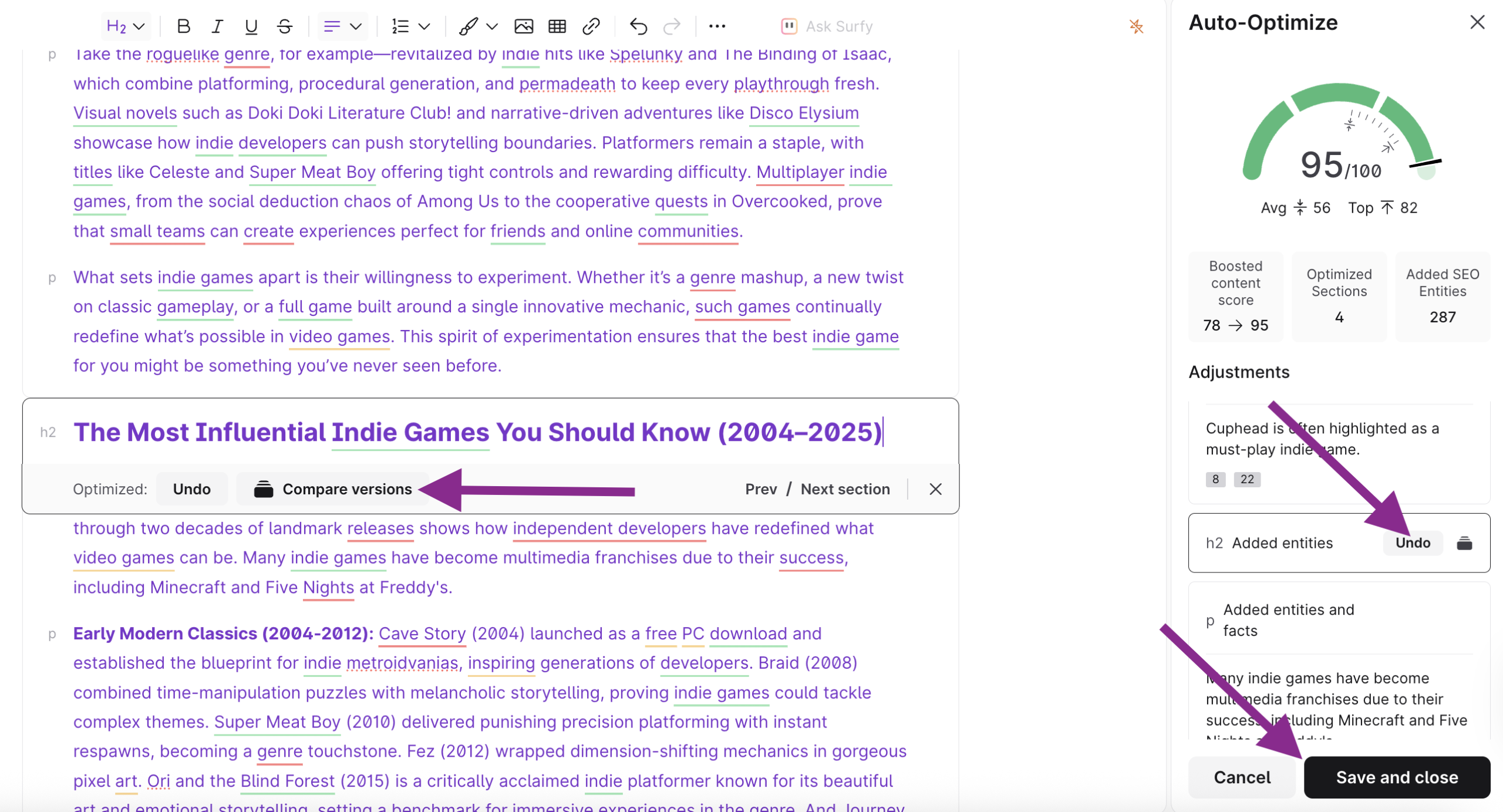
Official Surfer SEO Auto-Optimize screen from vendor documentation. Interface and score are examples supplied by Surfer, not results from our testing.
Discovery: start with actual document limits
Discovery is the budget entry point in Surfer SEO’s current lineup, advertised at $49 per month equivalent with annual billing at the time of this review. That is not the full monthly checkout price for every customer. It is aimed at individual creators who primarily need the basics of article optimization. Before choosing it, count the new briefs and existing-page updates you will actually run each month, then compare that workload with the currently advertised allowance. Surfer’s pricing FAQ says unused limits do not roll over. Someone producing a handful of articles in a quarter might find even an entry subscription hard to justify. The most expensive plan is not necessarily the best one; the right tier matches real activity rather than projected enthusiasm.
Standard: pay for demonstrable production needs
Standard starts at $99 per month equivalent with annual billing on the official 2026 pricing page. The important difference is the move beyond basic optimization toward a more regular content-and-visibility workflow. According to Surfer’s documentation, AI Tracker is included in Standard, with weekly rather than daily data refresh. A team might want that visibility if it has enough important prompts to track consistently. But for a small publisher whose primary question is whether one article needs factual revision, a weekly AI mentions report will not replace Search Console. List the features you will use every week, not those that simply sound futuristic. Then compare the annual commitment, seats, document capacity, integrations and taxes in the actual checkout. Upgrade only when a limitation repeatedly slows a useful process.
Pro and Peace of Mind: when more capacity matters
Pro, advertised at $182 per month equivalent on annual billing, is positioned for agencies and businesses managing more than one brand. Peace of Mind, advertised at $299 on the same billing basis, targets higher-volume operations and advanced API needs. Surfer’s AI Tracker help pages distinguish daily refresh at these tiers from the weekly Standard cadence. That is useful if a team has a defined process for acting on fast-changing AI-search mentions; it is wasteful if the reports are never reviewed. Before upgrading, ask whether you are blocked by editor capacity, tracked prompts, document production or a specific integration. Model the annual cost against the hours saved and the number of pages genuinely improved. The fact that a plan sounds enterprise-ready is not evidence that a ten-person agency needs it.
Editorial labor beyond the subscription
The subscription price is only one line of the Surfer SEO budget. Consider a guide that takes six hours to research and write, then two hours for fact-checking and approval. If Content Editor reduces the initial research step by forty minutes but adds twenty minutes of term-cleanup, the net saving is modest. If it helps an editor identify one important missing buyer question, that improvement can be more valuable than the time saved, but it should still be documented. Do not add a speculative revenue uplift to justify the purchase. Count the actual billable writer and editor hours, any AI-related credits, and the ongoing need for rank tracking, technical audits or other tools. A defensible business case can be small: fewer avoidable revisions on every monthly batch of articles.
🎯 Who Should Use Surfer SEO?
Best for repeat publishers, in-house SEO leads and agencies that need repeatable content quality checks. Not ideal for a team that primarily needs rank tracking, link intelligence or technical audit tools.
Picture a B2B agency refreshing a guide about CRM migration. Organic visits slipped after a competitor expanded its comparison table. Surfer may highlight missing terminology and related topics; it cannot tell the agency which migration warning to lead with. The sensible experiment is to revise one section based on actual customer interviews, use the editor to check topical coverage, and monitor conversions rather than merely the content score.
⚖️ Surfer SEO Alternatives
Compare SE Ranking when the missing capability is a broader SEO dashboard. Pair with Notion for source libraries or Writesonic if you are evaluating AI draft generation rather than content optimization. For keyword discovery and lighter rank monitoring, see our Mangools review; Mangools is not a substitute for Surfer’s dedicated Content Editor.
Surfer SEO vs SE Ranking: Choosing the Right Tool
Surfer SEO vs SE Ranking is less of a winner-takes-all contest than many comparison charts suggest. Surfer’s core job is helping a writer improve topical coverage and content structure against a chosen search landscape. SE Ranking is a broader SEO workspace for monitoring rankings, running site audits and investigating competitors. An agency may want SE Ranking to diagnose a traffic decline, then Surfer to help rewrite one affected page. A sole blogger might use Search Console, official sources and a careful editorial checklist instead of paying for another optimization subscription. Compare the point in the workflow where each tool changes a decision. If the bottleneck is missing canonical tags or redirect chains, Surfer’s Content Editor is not the first fix. If the bottleneck is inconsistent draft quality across five writers, it becomes more relevant.
Agency adoption across a shared content library
Consider a four-writer agency that maintains eighty articles for several clients. Its biggest problem is rarely discovering yet another keyword. It is making sure each writer can find the current brief, understand the audience and cite the correct product version. With Surfer, I would standardize the setup of a Content Editor, but keep client-specific voice notes, evidence links and approval ownership separate. Decide who may alter competitor selections and who reviews the final sections; changes to that setup affect the recommendations other writers see. Pilot one content refresh and one new draft from each writer, then compare correction rounds. If four different voices all start producing identical headings, the workflow has become too mechanical. Surfer should make quality checks more consistent without making every article sound like the same author explaining the same SaaS purchase.
Surfer SEO Free Trial and a Thirty-Day Evaluation
A thirty-day Surfer SEO trial should end with a decision, not a collection of screenshots. In week one, collect baseline Search Console performance and choose three representative pages. In week two, run the Surfer-assisted revisions and record every suggestion you accepted or rejected. In week three, ask a second editor to check the claims, pricing and reader usefulness without looking at the Content Score. In week four, review the hours, errors caught and editorial friction. Thirty days is not enough to attribute organic growth confidently, so treat rankings as context rather than a verdict. Surfer’s official pricing FAQ also advertises a seven-day Pro trial for new users; the eligibility and cancellation terms should be checked at signup. Use that window to test the core workflow, then decide whether a paid month adds enough value to continue.
When a subscription is worth renewing
Would I renew Surfer SEO for a small editorial team? Only if it solved a repeated problem that the current stack left untouched. A positive case might be that editors identify missed buyer questions faster and writers deliver fewer incomplete drafts. A negative case might be that the team spends hours massaging an article to reach a higher score while overlooking stale prices and weak evidence. Keep a simple log of before-and-after examples, correction time and decision quality. Compare Surfer with an ordinary manual review on at least one article. If the program has barely used its document capacity and cannot name a better outcome, pause the subscription. The best endorsement of an SEO tool is not an impressive dashboard; it is a publishing process whose improvements you can explain and repeat.
📖 Closer Look: Six Questions About Surfer SEO
A content score can improve while an article becomes less useful
The most expensive mistake in a Surfer rollout is to make the editor's numerical feedback the publication target. A draft might gain suggested terms, grow in length and match competing page structure while losing the very advice a buyer came to read. Consider a comparison of two email platforms. Search results may contain extensive descriptions of deliverability, sequencing and warmup, but the article still needs a clear answer about which plan can support the team's actual contact volume. If the writer adds more keyword-adjacent paragraphs without explaining those allowances, the editing exercise has increased topical coverage without improving the purchase decision. Build two independent review columns. One checks factual accuracy, the quality of examples, date-specific prices, the appropriateness of evidence and whether the recommendation follows from the analysis. The other uses Surfer to identify potentially missing topics. If the columns disagree, a named editor should choose the reader-focused result and record why. This is not opposition to optimization; it is the difference between using optimization as input and treating it as authority. In a niche where information changes quickly, an accurate, shorter explanation may be more valuable than following every suggested phrase. Score movement should be kept in an editorial log but should not become the sole measure of success.
How to use Content Editor during a refresh, not just a new draft
Most demonstrations begin with a blank page, yet many established publishers have a larger problem: existing URLs that once served readers well have become incomplete. A responsible Surfer refresh begins with Search Console data. Select a page that has meaningful impressions and a visible shift in traffic or click-through rate. Check whether rankings, snippets, seasonality or the offer itself changed before blaming the text. Read support questions and competitor pages to identify what is truly missing. Only after that should the Content Editor provide a second perspective on topic coverage. For an illustrative refresh, imagine a guide to VPN pricing in which a vendor renamed its plans. The urgent action is correcting names, limits, screenshots and links. Adding recommended SEO terms is secondary. Record the old plan table, update the source links, note the publication date, and have a second editor check it. Then assess whether Surfer helps with overlooked comparison dimensions such as device limits or regional access. One benefit of a structured content tool is that it can make a checklist shareable across writers; a disadvantage is the temptation to use the same outline for every product. Keep a page-specific decision brief to prevent that sameness.
The difference between SEO research and AI-search monitoring
Surfer's marketing increasingly discusses visibility in AI-generated answers alongside more conventional content work. These are related disciplines but not interchangeable measurements. Being named by an assistant does not prove that the mention drove a qualified visitor, and a rank-tracker screenshot does not establish whether a source was quoted correctly in a generated response. For procurement, ask exactly which prompts, engines, countries and sampling frequencies the product monitors. Check whether the report identifies citations, brand mentions or inferred sentiment; those measures answer different questions. Preserve your Search Console reporting as a separate source of truth for website clicks. A useful experiment is to define five buyer-intent questions before opening a dashboard. Record the brand and source exposure, then repeat at a consistent cadence. Note that generated answers vary with language, location, time and model version. If a mention appears once and vanishes, do not rewrite a cornerstone article without corroborating evidence. The most defensible use of AI-visibility data is to find missing or misrepresented factual explanations that you can improve for readers, not to chase a volatile score. Teams should confirm whether advanced monitoring consumes a separate quota or sits inside the specific Surfer subscription they intend to purchase.
Surfer versus an integrated SEO suite: where the boundary sits
A content editor is only part of the search workflow. Imagine an agency asked to diagnose why twenty service pages fell in visibility. Before drafting changes, the team may need to investigate indexing, redirects, canonical tags, competitors, internal links, crawl accessibility and server responses. Those tasks are not made unnecessary by Surfer's topical suggestions. A broader suite such as SE Ranking brings different functions into the workflow, including rank tracking and audits. Some teams may choose both, but that is a budget decision involving distinct responsibilities rather than a question of which logo has a more comprehensive checklist. Keep the distinction visible in the purchasing memo. Assign technical findings to the tool and person that can actually validate them. Assign content research to the writer and subject-matter reviewer. Use Surfer once the team has evidence that a page's information or presentation needs improvement. For small publishers, an inexpensive combination of Search Console, manual SERP review and a documented editorial checklist may be sufficient. For agencies producing many drafts, a specialized editor can be worthwhile because consistency becomes costly to manage. The right comparison is the total effort of reaching a trustworthy page, not the length of each vendor's feature list.
A 90-day content program and a defensible success metric
To evaluate Surfer fairly, avoid a one-week before-and-after story. Content changes can take time to be crawled, tested and reflected in organic search results. Choose a set of comparable pages and document their baseline traffic, search intent and prior revisions. Reserve one group for the existing editorial process and another for a Surfer-assisted process if workload and fairness permit. Both groups should receive the same factual review and publication standards. Record writer hours, editor changes, missing subtopics discovered, source-checking mistakes and the proportion of pages that actually reached publication on schedule. At thirty days, review workflow measures rather than declaring rankings won. At sixty days, assess indexing and whether key sections answer support questions. At ninety days, review eligible search performance and any qualified conversion trends, acknowledging that market competition and algorithm changes can affect both groups. An agency might discover that the editor saves one hour per article but adds review time; another team might save no time but improve the completeness of technical explanations. Both findings are valid. Build the decision around the outcome that matters for your organization and the ongoing cost of the chosen plan. We would reject claims of guaranteed traffic growth based solely on an optimization score.
A sample editorial audit for an existing software comparison
Suppose the site has a comparison page that receives impressions but few enquiries. The first task is to learn whether the search query matches an actual software buying decision. Examine the current page title, competing results and the above-the-fold answer. Then list every factual claim about vendors and check it against dated documentation. Only once the article is accurate should the Surfer content guidance enter the process. Ask whether the tool identifies a missing use case, unclear feature distinction or terminology that real buyers expect. A suggested phrase that does not help answer the decision should remain optional. Have one editor maintain a revision table showing old section, reason for change, evidence link and review date. A second editor should reject claims introduced purely to satisfy an optimization score when the source does not support them. After publication, watch Search Console queries and qualified on-site actions for a sensible interval, noting seasonality and ranking changes. The audit is successful if readers receive a more precise, complete explanation and the editorial team can reproduce the reasoning. It is unsuccessful if the article simply becomes longer and more uniform. This distinction is why our assessment treats Surfer as an editing aid and not a substitute for specialist reporting, actual product testing or genuine experience.
🧪 How We Evaluated Surfer SEO
Alex Wright’s DigiOffly editorial assessment uses the official vendor pricing and product information, published feature descriptions and the workflow and cost considerations set out above. We distinguish those public facts from our own recommendations. We did not have a controlled end-to-end customer-account benchmark for this draft; any future hands-on findings must be added and labelled separately.
We cite vendor-published information and explain illustrative workflows as scenarios. No first-person product testing claim is implied by this review. Before buying, confirm current limits and feature access on the official checkout page.
🏆 Final Verdict: Is Surfer SEO Worth the Money?
Our editorial choice would be to trial Surfer on a refresh backlog with an accountable human editor, not to buy it for automatic article production. The real benefit is a disciplined content workflow; the danger is confusing conformity to SERP-derived terms with genuine subject-matter knowledge.
Our recommendation is conditional: put Surfer alongside a human-led process for accurate content updates, and continue measuring the business outcome outside its interface. A disciplined pilot is more persuasive than an unverified ranking promise.

Frequently Asked Questions
Is Surfer SEO worth it for a small blog?
Only if article production is consistent enough to justify a recurring subscription. Test whether it reduces meaningful revisions, not just time spent watching a score.
What happened to the Essential and Scale plans?
Pricing and package names have changed. The official site currently features Discovery, Standard, Pro and Peace of Mind; always verify the current checkout.
Does Surfer guarantee higher Google rankings?
No. Search performance depends on relevance, content quality, competitors, links and technical factors beyond any editing tool.
Can Surfer replace SE Ranking?
Not as a one-for-one replacement. Surfer focuses on content and AI visibility, whereas SE Ranking covers broader rank tracking, audit and competitive research.
Can I publish AI-generated Surfer articles without checking them?
That is risky. Verify sources, pricing, examples and any first-person testing claims before publishing.
🔍 Explore More on DigiOffly
If you found this Surfer SEO review 2026 helpful, check out our other guides on choosing SEO software and building evidence-based publishing workflows:
- Growth & Marketing Software Comparisons — Read buyer-oriented comparisons across the full Growth stack.
- SE Ranking review — See how a wider SEO research platform approaches tracking and audits.
- ClickUp review — Assign implementation tasks, timelines and a measurable owner.
- Notion review — Save source-backed research notes, trial findings and approval checklists.
- Canva review — Prepare clear supporting visuals and campaign diagrams.
- Writesonic review — Compare AI drafting tools without treating generated copy as independently verified research.