

Research updated October 30, 2026. This Baserow review compares official cloud pricing, self-hosting documentation and available no-code modules. Screenshots were captured from vendor pages. DigiOffly did not install a production Baserow server or perform a security penetration test. Any example below is a workflow design, not an outcome measured in a paid account.
A repair business keeps one workbook for jobs and another for customers. When a customer changes address, dispatch edits the jobs sheet but finance uses the old address from a different tab. A relational setup avoids copying contact details into every job: each booking refers to one customer record, and address changes can be managed in that record.
Baserow offers a no-code database, application builder, dashboard builder and automation builder within the same platform. It can be delivered as Baserow Cloud or installed on infrastructure the customer controls. Spreadsheet familiarity is useful, but the decisive requirements are related tables, controlled editing rights and an application that can safely display the same records.
Quick verdict: Baserow is a strong candidate for teams that want customizable data workflows and the option to self-host. Cloud Free is useful for small prototypes, but the 3,000-row, 2GB and 2,000 automation-credit allowances matter. Premium and Advanced expand limits; they should be chosen based on database growth, permission needs and the actual application design.
📊 Baserow Review Summary
| Buying question | Answer from official sources |
|---|---|
| Category | No-code database, application, dashboard and automation builders |
| Cloud Free | $0, 3,000 rows and 2GB per workspace |
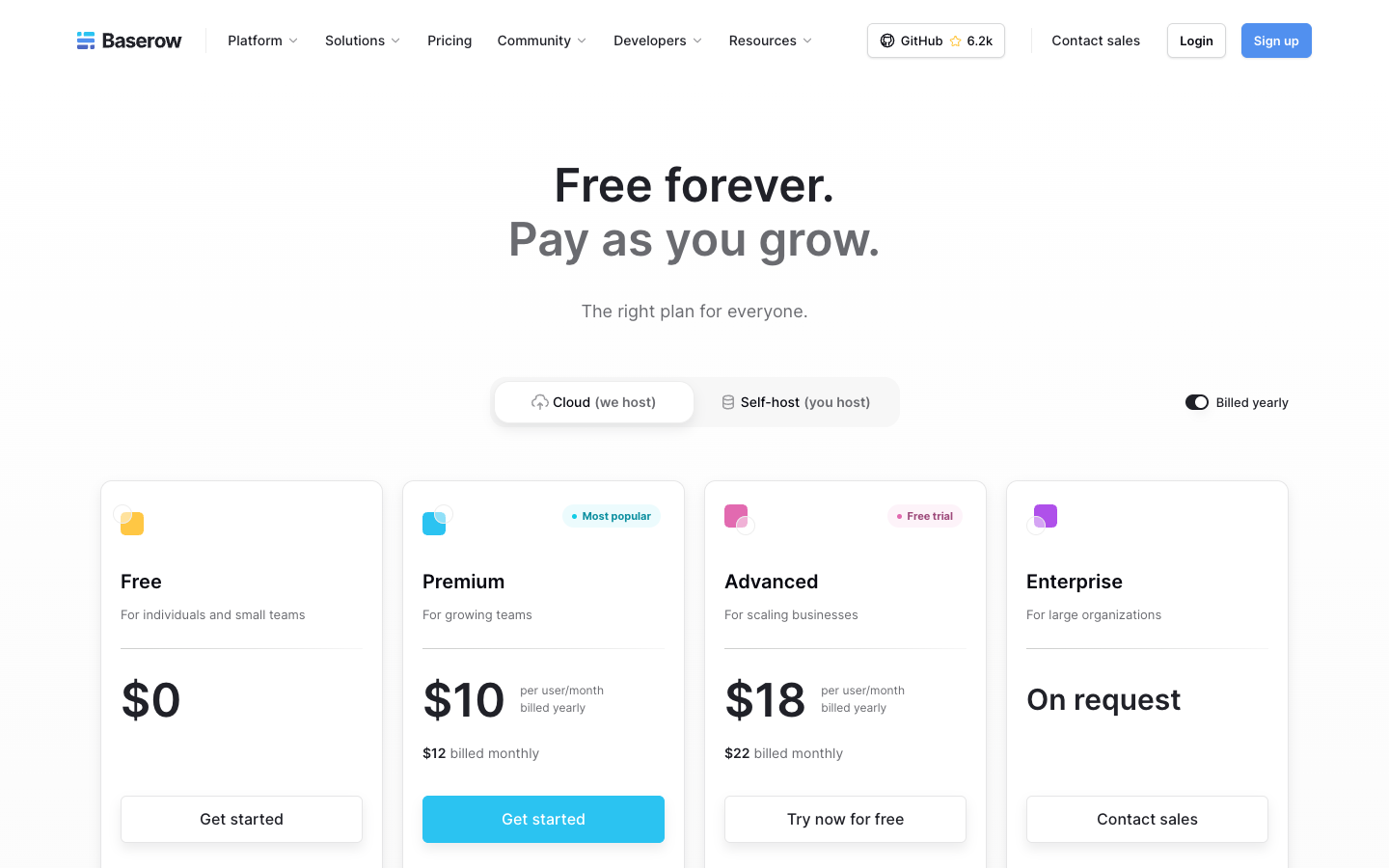
| Cloud Premium | $10 per user/month annually or $12 monthly |
| Cloud Advanced | $18 per user/month annually or $22 monthly |
| Enterprise | Custom pricing and expanded controls |
| Automation credits | 2,000 Free; 100,000 Premium; 500,000 Advanced |
| Deployment | Hosted cloud or self-hosted |
| Strongest use | Structured data shared across custom internal tools and portals |
| Evidence | Vendor documentation, not a real deployment audit |
🧭 Contents and Navigation
Jump to features, pricing, comparisons, practical scenarios, and official sources.
🧠 What Is Baserow and Who Is It For?
Baserow’s database layer lets users define tables and fields without writing a traditional backend application. A customer table can contain contact details, while a jobs table refers to customers and employees. Views help teams focus on records relevant to their tasks. Once the relationships are defined, the application builder can expose selected information to staff or external users.
In a flat job register, the same customer name can be typed differently dozens of times. A customer table with a stable ID allows the team to correct the source record rather than chase every spelling variation. The benefit depends on the data model: if staff can create unlimited duplicate customer records, the database will still inherit the spreadsheet’s confusion.
Baserow is most suitable when a team can describe the entities and who should edit each one. Marketing operations, recruitment administration, inventory and internal approvals are common candidates. A company requiring complex accounting or regulated medical record systems should not assume that building a custom form turns Baserow into a compliant industry-specific product.
💰 Baserow Pricing 2026: Cloud Free, Premium and Advanced

The official Baserow Cloud schedule shows Free, Premium, Advanced and Enterprise. On annual billing, Premium is $10 per user per month and Advanced $18; their month-to-month equivalents are $12 and $22 respectively. Public limits apply per workspace for cloud rows and storage. The number of paid editors and user roles affects the total cost.
| Cloud plan | Billed annually, per editor/month | Billed monthly | Rows/workspace | Storage/workspace | Credits/month |
|---|---|---|---|---|---|
| Free | $0 | $0 | 3,000 | 2GB | 2,000 |
| Premium | $10 | $12 | 50,000 | 20GB | 100,000 |
| Advanced | $18 | $22 | 250,000 | 100GB | 500,000 |
| Enterprise | Quote | Quote | Custom, listed up to 1m | Custom | Contract-specific |
The Cloud figures belong to hosted workspaces. A self-hosted installation has a different mix of licence and infrastructure obligations, so copying the Cloud per-user rate into a server budget would produce a misleading comparison. Record the selected deployment and billing period beside every price.
How Baserow bills members
The vendor describes billing for active members who are not viewers. A company may have forty people opening reports and six staff editing tables, but it must review which users need paid access in its chosen subscription. If an external customer opens an application interface, that is not necessarily the same as adding a paid database editor. Verify user entitlements and the external-user allowances that apply to the selected plan.
For a six-editor team, the Premium annual equivalent is about $60 per month, while the monthly-billed rate is $72. This simple estimate excludes taxes, self-hosting infrastructure, support and any extra credit purchase. It also assumes all six users are billable under the same workspace arrangement. Keeping those assumptions visible prevents an attractive per-user price from becoming an inaccurate full-company forecast.
Row, storage and credit limits
The Free allowance of 3,000 rows per workspace is often enough for a demonstration. It can become restrictive in a workflow that stores one record per transaction, log event or survey answer. If a company processes 200 cases per week and keeps every case, it can accumulate more than 3,000 records within four months. Records from connected tables count toward usage under vendor rules; check the current account meter rather than relying on the number of visible filtered rows.
Baserow Premium raises the public cloud limit to 50,000 rows and 20GB; Advanced to 250,000 rows and 100GB. A company storing 12,000 jobs and 2,000 customer records should compare the combined row count with its plan limit before treating unlimited databases as unlimited storage. Unlimited databases do not mean unlimited rows, file storage or automation credits.
⚖️ Cloud vs Self-Hosted Baserow
A self-hosted open-source deployment gives a business more control over infrastructure and data location, but also transfers responsibility for updates, backups, TLS, monitoring and disaster recovery. Baserow documentation distinguishes the cloud quota model from self-hosted usage. That does not mean every paid feature is free after installing the software: licences, editions and support terms still apply.
For a small operations team without DevOps capacity, the managed service may cost less after considering server maintenance, backups, secure user onboarding and operational support. An organization with established Kubernetes or Docker operations might prefer to keep records in a defined environment, subject to its security and licensing review.
The right comparison is the total five-part cost: subscription or licence, infrastructure, maintenance labour, incident response and business continuity. Self-hosting can be inexpensive until a failed update requires emergency engineering time and a backup restoration.
🛠️ Database Builder: Tables, Relationships and Views
Imagine a booking operation with Customers, Appointments and Staff tables. The Appointments table should relate to one customer and one assigned staff member; a rescheduled appointment changes its date, not the customer record. Field types and relation rules matter more than whether the grid resembles Excel. Decide which fields are required, which values are constrained and whether historical changes can be audited.
A record may move through statuses such as Requested, Confirmed, In Progress and Complete. If any employee can change it directly from Requested to Complete, an automation that creates an invoice on completion can bill for work that never happened. The schema and permission model must reflect the business process. Baserow makes the structure approachable; it does not choose it correctly on behalf of management.
Views provide role-specific perspectives. A dispatcher may need a calendar, an analyst may use a grid with filters, and a manager may want a dashboard showing cases overdue by more than two days. These are different readings of the same underlying records, not separate copies that require manual synchronization.
🛠️ Application Builder and Client Portals
Baserow’s application builder can create interfaces on top of its database, including forms, tables and action buttons. This reduces the need to send everyone directly into the full database editor. For example, a client could submit a maintenance request while employees manage assignments in a restricted internal interface.
A client portal needs more than a login screen. The team must ensure Customer A cannot change a URL parameter and retrieve Customer B’s records. Security depends on how the application, data sources and row-level permissions are implemented in the selected version. Test two distinct account identities and attempt cross-account record access before accepting a customer-facing application.
For internal tools, a button might update a job status and trigger an email. Define which status changes require approval and who owns the automated side effect. An interface is easy to prototype; a reliable state machine requires deliberate design.
💰 Baserow Automations and Monthly Credits
Baserow’s automation builder supports workflows using data triggers, service actions and integrations. The vendor states that monthly credits are shared at workspace level. Free comes with 2,000 credits, Premium 100,000 and Advanced 500,000; reaching the limit can stop workflows. A team should model the number of event runs and actions rather than assume an automation is unlimited because the database has room for more rows.
A service business might automate a status update when a customer submits a form and send a confirmation email. If the event triggers another update, make sure it does not create an infinite loop or a redundant second email. Use event conditions and deduplication keys. This matters particularly when failed workflows are retried after a connectivity interruption.
Monitor credit consumption near the cap and document what happens after usage stops. An automation that sends customer booking confirmations must not silently go quiet because a noncritical reporting workflow used the remaining credits. Consider separating critical and experimental activity where the product’s workspace structure and business policy allow it.
🛠️ Dashboard Builder and Management Reporting
A dispatcher needs to know which repair requests missed the two-day response target, not how many blank columns exist in a table. Define the start and completion timestamps first, then build a dashboard that counts only the relevant records. If a reopened request resets its clock, that business rule needs to be documented before people trust the chart.
Baserow dashboards can show data from the same database used by operations, limiting manual reporting exports. But finance and sales stakeholders should agree on metric definitions before designing visualizations. A chart based on an overdue flag is only reliable if the workflow updates that flag at the correct time.
When comparing dashboards to a dedicated business intelligence tool, ask whether trend analysis, joins across external data sources or advanced governed metrics are required. Baserow’s built-in visuals may be enough for an internal team’s operational indicators without replacing the enterprise analytics platform.
📝 Baserow Forms, Intake and Validation
A form used to collect customer requests should ask only for the data required to begin the process. If it collects a phone number, the destination table needs a defined format. If it captures a file, size and retention limits become relevant. Before publishing a public form, check how the platform handles repeated submissions and potentially malicious inputs.
An intake form that saves records in Baserow can work well for internal requests. However, it does not automatically provide the conversational one-question-at-a-time experience associated with Typeform. Choose the interface based on the respondent’s needs and how the data will be used afterward.
For customer-sensitive workflows, limit which information appears in public views and email confirmations. A form confirmation containing a full identification number or private address may create an unnecessary privacy risk, even if database storage itself is properly controlled.
📝 AI, Formula Fields and Data Quality
Baserow documents AI-assisted formula generation, content processing and application creation. Those features can reduce configuration effort, but generated formulas and AI output still need verification. For example, an AI-generated priority rule might label a customer request urgent based on a phrase but miss contractual service-level commitments. A deterministic escalation should be based on verified customer tier and elapsed time.
The simplest useful validation test is to compare known input records with the output of a formula or model for edge cases: blank dates, expired contracts, different currencies and duplicate names. A generated formula that works on one demonstration record may fail on missing or inconsistent historical data.
When AI processes customer text, evaluate provider terms, privacy and whether sensitive data is sent to a third-party service. The fact that the AI feature appears inside Baserow does not by itself establish suitability for confidential or regulated records.
🔐 Permissions, Audit Logs and Security
Consider a service desk where dispatch can assign jobs, contractors can update their own jobs and clients should only view their requests. Those are three distinct access paths. The Advanced permission and audit features may matter, but buying that tier is not sufficient: test access with three separate identities, including an attempted cross-client record lookup.
Audit logs help explain who changed a record, but businesses must still decide how long evidence is retained and who can export it. A record edit made by a departed employee may need to be reviewed after their user access has been removed. Check retention against company policy and any applicable compliance requirements.
Self-hosted security adds a separate checklist: server patching, database backups, encrypted transport, firewall rules, identity integration and recovery testing. It is risky to treat self-hosting as automatically private or secure simply because files remain on company infrastructure.
⚖️ Baserow vs Airtable, Notion, Softr and Glide
| Product | Distinctive use | Main purchase question |
|---|---|---|
| Baserow | Structured no-code database, apps and automations, self-hosted option | Does the team need relations and deployment control? |
| Airtable | Collaborative cloud database and app/workflow ecosystem | Which views, integrations and permissions matter? |
| Notion | Documents, connected knowledge and lightweight databases | Is the underlying need a knowledge hub or transactional records? |
| Softr | Client-facing apps and portals atop supported data sources | Does the team need a polished frontend more than a database backend? |
| Glide | Mobile-friendly apps from connected data | Is quick app delivery more important than database control? |
These options overlap but are not interchangeable. A knowledge-management team might prefer Notion, while an agency needing relational project records and an external client portal may evaluate Baserow or Softr. Avoid the false assumption that every platform’s “database” is built for the same transaction volume and permission model.
🗂️ Baserow Migration, Imports and Data Portability
An import should begin with a record map: which column is the permanent identifier, which names are duplicates, and how jobs are linked to customers. A job sheet that identifies customers only by email will fail when two company contacts share an address or a person changes their email. Assign a durable key and validate it before creating relations in Baserow. A CSV import can carry values without preserving the intended data model.
Run a dry import using a small representative dataset, including blank fields, repeated contacts, non-English names and historical records. After import, compare record counts and relational links against the source. Do not destroy the original data until the new process has completed a reconciled cycle.
An exit plan matters too. Determine which tables, attachments and application definitions can be exported and which custom logic would require rebuilding elsewhere. Portability is a practical cost for an app that becomes the day-to-day operating system of a department.
🛠️ Baserow Pros and Cons
| Strengths | Cautions |
|---|---|
| Visual database with related tables and several view types | Good data modelling remains the buyer’s responsibility |
| Cloud and self-hosting choice | Self-hosting requires operations and security ownership |
| Application, automation and dashboard builders | Credits and cloud quotas can affect production workflows |
| Free tier and published per-user paid plans | Additional editors and storage may change the budget |
| Advanced permission and audit features | Access rules must be tested against sensitive data |
🧪 Evaluation Method and Verdict
This assessment draws from Baserow’s official pricing and documentation, not an authenticated implementation. An effective pilot should model two related tables, an intake form, a limited-access application and a workflow that sends a confirmation. Use real-looking but synthetic customer records and test one duplicate, one missing field and one unauthorized record request.
Record the database schema, active paid users, row growth, storage consumption and automation credits. If an app becomes important, set backup ownership and a recovery test before broad deployment. The most valuable outcome is a data process that is easier to explain and maintain, not a visually impressive demonstration.
Baserow is worth shortlisting for structured no-code operations, especially when self-hosting or application-building flexibility matters. Its cost is competitive at small scale, but the correct plan must be based on record growth, permissions, automation usage and technical responsibility.
🗂️ Modelling Baserow Inventory Without Creating Duplicate Records
A small equipment-rental company may have one table for assets and another for rentals. Every rental refers to an asset and a customer, while the asset record stores serial number and current status. A spreadsheet often repeats serial numbers across every rental, creating contradictory descriptions over time. With a relational Baserow design, the rental history can refer to the same canonical asset.
The important rule is to never confuse current state with historical events. An asset marked Available today may have been checked out last month. Past rentals should preserve their checkout and return dates instead of changing when the current asset status changes. Test a lost-item incident, a partial return and a corrected asset identifier before relying on the new database to report utilization.
🛠️ Baserow Application Access for External Clients
A contractor portal may let each client view its own work orders. The interface can be simple, but the underlying permissions must be tested with two independent user identities. If changing a numeric record ID in the URL reveals another client’s order, the application is not suitable for external deployment. The team must test both the visible interface and any APIs or shared data sources it uses.
A safer design restricts data at the source and treats every requested record as potentially unauthorized. Hiding a button with a visual rule is not enough. The operation to update or retrieve a row must also verify the user’s right to that row. Document how disabled accounts are handled and whether historical attachments remain accessible through previously shared links.
🏢 Calculating Baserow Rows for a Growing Business
A team processing 300 incoming requests per month creates 3,600 request records in a year before counting customers, comments, related tasks or audit records. That would exceed a 3,000-row cloud Free allowance when stored in one workspace. It might be acceptable for a short pilot, but not as a reliable production capacity plan. Estimate rows by data type and retention policy rather than just current visible grid size.
For example, a customer may submit one request that creates three follow-up tasks. At 300 requests, that could mean 1,200 new records per month across several tables. Storage also grows if every request includes photos or documents. A Premium upgrade may be economically sensible, but a data-retention policy and archival design should be decided before buying capacity without understanding the cause of growth.
💰 How Automation Credits Affect Baserow Operations
A single incoming request can trigger several actions: create a row, assign a case, send a confirmation and notify the responsible team. Each automated step may contribute to workspace credit usage under the current Baserow meter. If the team has two independent workflows reacting to the same row update, one request may trigger both, consuming more capacity and potentially causing a loop.
Record the number of actions in an ordinary and a peak-month scenario. The vendor warns when usage reaches 80% and stops automation at the available limit. That makes credit monitoring a service-level issue for time-sensitive forms and customer requests. An operational team should have a fallback for cases received when automation is paused rather than assuming a scheduled reset will resolve an urgent customer problem.
🖥️ Evaluating Self-Hosted Backup and Recovery
Self-hosted Baserow can be attractive to a business with a private data center or strict location requirements. The administrator must still determine how databases, uploaded files, credentials and configuration are backed up consistently. Restoring only a SQL database may not restore referenced attachments or running application configuration. A backup is valuable only when it can be recovered.
Define a realistic recovery objective, take an encrypted backup and restore a copy in an isolated environment. Verify that relational links, file attachments and account permissions still work. Then simulate a failed upgrade and document how to roll back without losing newly collected records. Those steps represent the real operations cost that a managed cloud subscription typically absorbs.
🗂️ Database Migration From Airtable or Spreadsheets
A CSV can move rows, but not necessarily the relationships and business rules that made them usable. Map each source field to a destination type, establish a stable customer or asset identifier and test a small import containing duplicate names, blank dates and attachments. Only then should the team import the full history.
Use a representative sample that includes empty cells, duplicate names, multiple currencies and records containing accents or Cyrillic characters. Verify row totals and relationships after import. Once the team has completed one full business cycle, reconcile new records to the source and determine what historic documents must remain archived. After migration, staff need to find an old job, see its customer record and explain the change history without returning to the original workbook.
🗂️ Baserow as a Departmental System of Record
A repair-workflow app can succeed without storing employee payroll data in the same workspace. Keep each system responsible for the data it actually owns: the job database can track an approved expense reference while payroll remains in dedicated software. That reduces the permissions a typical dispatcher needs and makes incidents easier to contain.
A practical architecture may use Baserow for equipment requests and status tracking while payroll remains in a dedicated service. An automation may copy a non-sensitive completion flag between them without sharing the underlying salary or personal banking data. This separation keeps the no-code platform useful without making it responsible for every regulated business process.
📚 Official Sources
- Baserow cloud pricing
- Baserow pricing and billing documentation
- Baserow product modules
- Baserow automation credits
- Baserow Application Builder

Frequently Asked Questions
Is Baserow free in 2026?
Baserow Cloud Free includes 3,000 rows, 2GB storage and 2,000 monthly automation credits per workspace under published terms. Self-hosting has different operating costs and limits.
How much does Baserow Premium cost?
The published Cloud rate is $10 per user/month on annual billing or $12 on monthly billing, subject to eligibility and taxes.
How much does Baserow Advanced cost?
The Cloud rate is $18 per user/month with annual billing or $22 when billed monthly.
Is Baserow open source?
Baserow has an open-source and self-hosted offering. Paid editions and enterprise services have separate licence and support conditions.
Can Baserow replace Airtable?
For some relational data workflows it may, but compare specific views, integrations, automations, permissions and migration needs.
Does Baserow have an application builder?
Yes. It supports visual applications and portals connected to Baserow data, with entitlement and access rules that require verification.
Can Baserow automate tasks?
Yes. Automation Builder supports workflows subject to monthly workspace credit limits and available services.
What happens when Baserow automation credits run out?
Vendor documentation says workflows stop running when their monthly credit allowance is exhausted until capacity resets or is expanded.
Does Baserow support self-hosting?
Yes. You can operate Baserow on your own infrastructure, taking responsibility for backups, upgrades, monitoring and security.
Can Baserow be used for a client portal?
It can power portals using Application Builder, but test authentication, record visibility and data-source permissions before exposing sensitive customer records.
What is the main reason to upgrade from Free?
Growing row/storage limits, more automation capacity, premium views or advanced permission and audit features are common drivers.
EXPLORE NEXT ON DIGIOFFLY
🔍 Explore More on DigiOffly
Compare automation and no-code tools by actual workflow needs and documented usage limits.
Category and discovery
- Automation & No-Code — Compare capabilities and relevant alternatives
- Software Directory — Compare capabilities and relevant alternatives
- Software Stacks — Compare capabilities and relevant alternatives
Selection tools
- Compare Software — Compare capabilities and relevant alternatives
- AI Software Finder — Compare capabilities and relevant alternatives
- Software Cost Calculator — Compare capabilities and relevant alternatives
Related reviews
- Airtable — Compare capabilities and relevant alternatives
- Softr — Compare capabilities and relevant alternatives
- Glide — Compare capabilities and relevant alternatives
- Bubble — Compare capabilities and relevant alternatives
- Tally — Flexible forms, conditional intake and integrations
- Typeform — Conversational surveys, quizzes and lead qualification
Pricing and limits may change; verify current terms with the provider before purchase.