

Last editorial fact check: October 24, 2026. Prices refer to the currently advertised US Bubble Web & Mobile plans unless explicitly marked otherwise; annual equivalents are not month-to-month prices. This is a researched comparison of public specifications, not a claim of private account testing or a contract quote.
A booking MVP needs provider listings, a customer reservation flow and a small admin dashboard. The first version of the database is harder. What happens when one customer should only see their own booking, or when a scheduled reminder retries after an error?
Bubble approaches this kind of project as a visual application development platform. It joins screens, workflows, database records and hosted deployment. That makes it quite different from a landing-page builder. A non-developer can create meaningful application behavior, but avoiding traditional code does not remove application design, testing or operating costs.
This Bubble review 2026 focuses on web projects and Bubble native mobile apps, the Free-to-Team plan ladder and the cost of workload units. Instead of claiming to have built a profitable startup with Bubble, we work through an illustrative membership portal and highlight the tests a serious buyer should perform before launching.
📊 Product at a Glance

| Buying criterion | Editorial finding |
|---|---|
| Product | Visual development for web, iOS and Android apps |
| Free plan | Development-only; includes 50,000 workload units/month on the displayed Web & Mobile comparison |
| Web & Mobile Starter | $59/month equivalent, annually billed |
| Web & Mobile Growth | $209/month equivalent, annually billed |
| Web & Mobile Team | $549/month equivalent, annually billed |
| Usage metric | Workload units (WU); allowances and add-on tiers vary by plan |
| Best for | Custom marketplaces, portals, booking tools and workflow-heavy MVPs |
| Primary risk | App security rules, usage-based spend, maintenance and lock-in |
| Testing status | Official product and Bubble documentation review only |
🎯 Who Should Use It — and Who Should Not
Founders validating a product concept. Bubble provides the freedom to model user records, bookings and permissions without starting from a framework or arranging separate hosting. The Free plan helps examine whether the data design makes sense. That is a better first milestone than spending on a branded domain before anyone wants the product.
Small agencies and internal product teams. A team may use Bubble for a client portal or operations application where a custom screen and application state matter more than preset templates. The visual editor still requires version control, careful releases and someone who understands the application’s logic.
Applications with many relationships. Bubble makes more sense when a customer, a booking, an invoice and a staff member have different relationships and permissions. A lightweight spreadsheet-backed solution such as Softr or Airtable may be simpler when needs are mostly forms and views.
Who should be cautious. Teams requiring extensive native code control, unusual infrastructure obligations or self-hosting should test whether Bubble’s managed platform can satisfy them. Low-code flexibility is not equal to owning an ordinary source-code application.
💰 Pricing and Licensing Explained
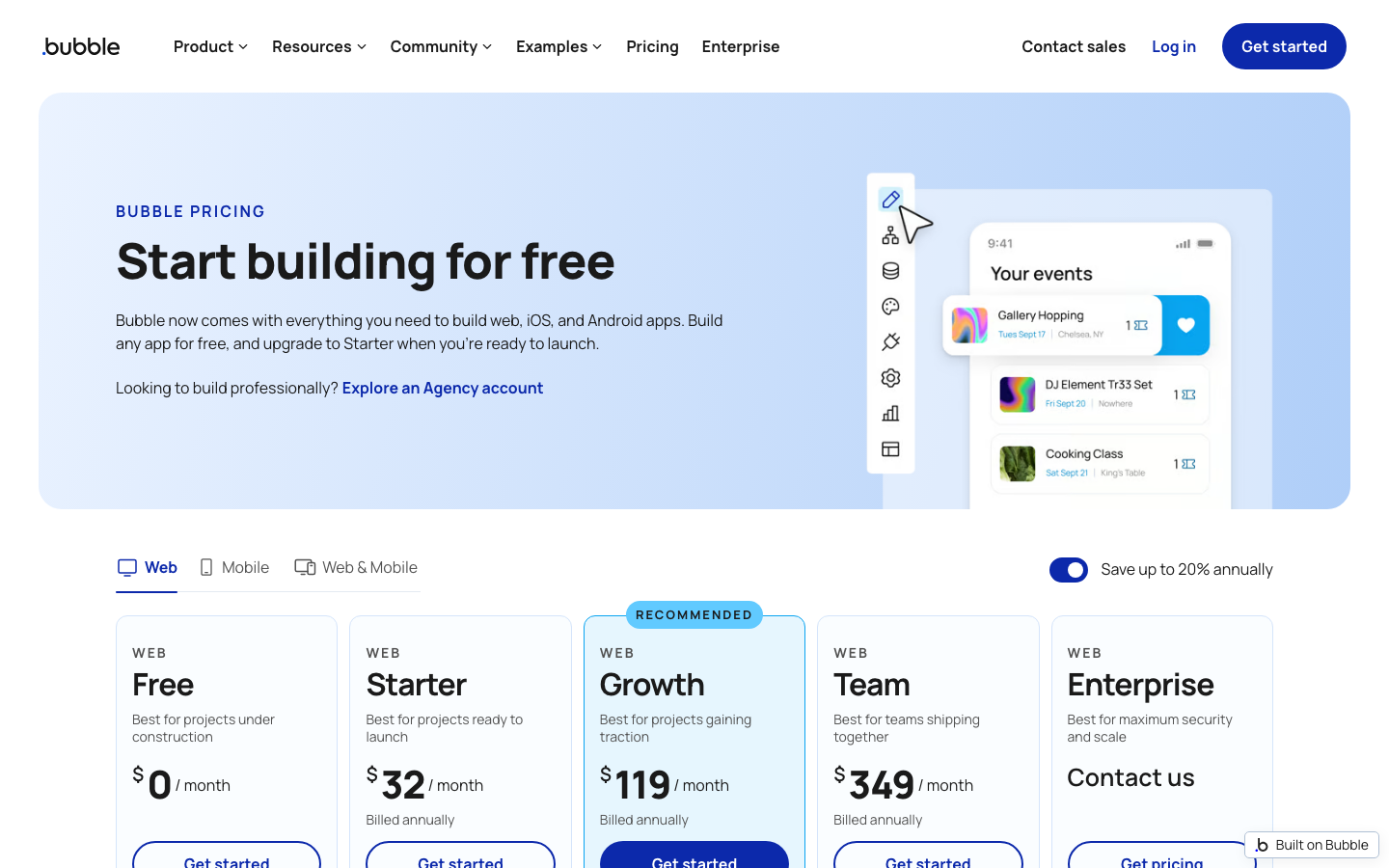
The live Bubble pricing page defaults to Web & Mobile. In October 2026 the displayed annual-rate equivalents are $59 Starter, $209 Growth and $549 Team per application project. Bubble also offers Web-only and Mobile-only configurations at different prices; the project-level plan matters because one project can encompass both platforms.
Free is suitable for constructing and testing a development version; it is not the same thing as a published production product. Starter includes live web deployment, a custom domain, recurring workflows and 175,000 monthly WU under the displayed Web & Mobile tier. Growth adds more workload and editors. Team adds further collaboration and release capabilities. The price is not “per user” in the normal SaaS seat sense; usage can still increase the bill.
| Plan / platform | Annual-billed monthly equivalent | Published monthly-billed reference | Notable scope |
|---|---|---|---|
| Free (development) | $0 | $0 | Development version, 50K WU/month |
| Starter, Web only | $32 | $39 (current Oct 20 pricing; confirm checkout) | Web deployment; no native mobile deployment |
| Starter, Web & Mobile | $59 | $69 | 175K WU/month; one editor and launch tools |
| Growth, Web & Mobile | $209 | $249 | 250K WU/month; two editors, ten branches |
| Team, Web & Mobile | $549 | $649 | 500K WU/month; five editors, 25 branches |
| Enterprise | Contact sales | Custom | Custom infrastructure, capacity and support |
Bubble has updated its plan displays in some documentation and product pages; for Web-only Starter, a Bubble blog dated October 20, 2026 also shows $32 annually and $39 monthly, which conflicts with the older official documentation table of $29/$32. We have therefore deliberately treated the Web-only row as subject to live checkout verification. For authoritative final checkout use live Bubble pricing. Annual-billed calculations in this article use the live Web & Mobile prices, avoiding ambiguous Web-only quotations.
🧮 First-Year Cost Scenarios
Think of Bubble pricing per app as the first layer of the budget. App plan charges are joined by workload overages, additional workload tiers, external APIs, payment-provider fees and design or development work. Consider a single project with one deployed application.
| Illustrative choice | Calculation | First-year reference cost |
|---|---|---|
| Web & Mobile Starter, annual billing | $59 × 12 | $708 |
| Web & Mobile Growth, annual billing | $209 × 12 | $2,508 |
| Web & Mobile Team, annual billing | $549 × 12 | $6,588 |
| Web & Mobile Starter, monthly billing | $69 × 12 | $828 |
| Web & Mobile Growth, monthly billing | $249 × 12 | $2,988 |
| Starter plus one Tier 1 annual workload option | ($59 + $26) × 12 | $1,020 |
The last example assumes the extra Tier 1 workload package shown on the official pricing page: 200K additional workload units for $26/month when billed annually. Bubble’s overage rates and workload tier prices can change. The amount your app will consume cannot be reliably inferred from the number of users alone. Review actual development usage and simulate a busy day before turning on automatic overage behavior.
⚙️ Main Capabilities: What Actually Matters
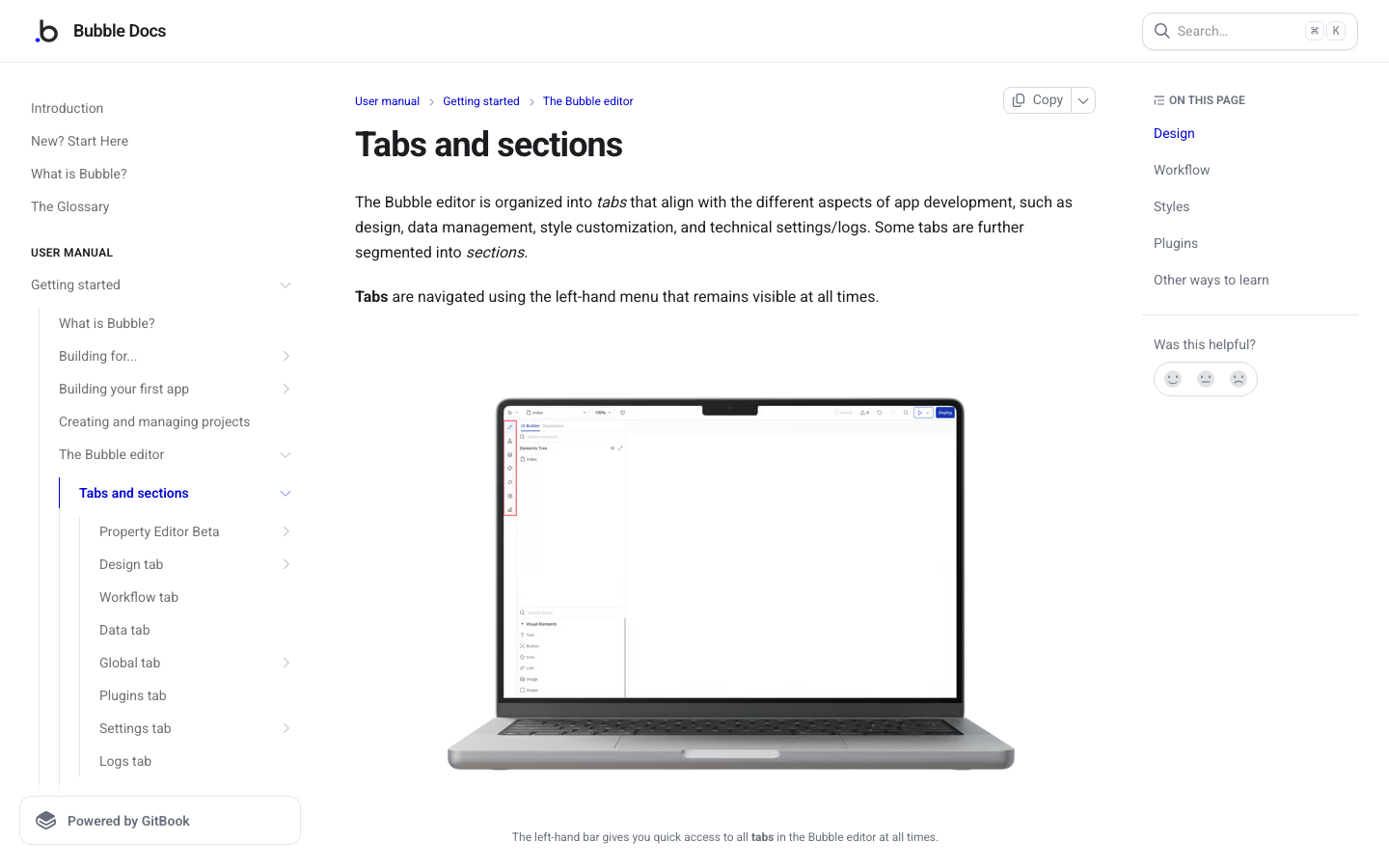
Visual UI and reusable elements. Bubble uses a visual editor to assemble responsive pages, reusable components, data bindings and conditional states. This can be faster for a small customer portal than designing every screen with code. Yet a page that looks complete may still have accessibility or mobile-layout problems, so test keyboard focus and narrow screens.
Integrated database. Bubble’s database is a central part of the product. Define entities and field types deliberately. For our marketplace illustration, a business account, listing, booking and payment record should not all be placed into one giant generic object. Better data modeling improves security rules, search and maintainability.
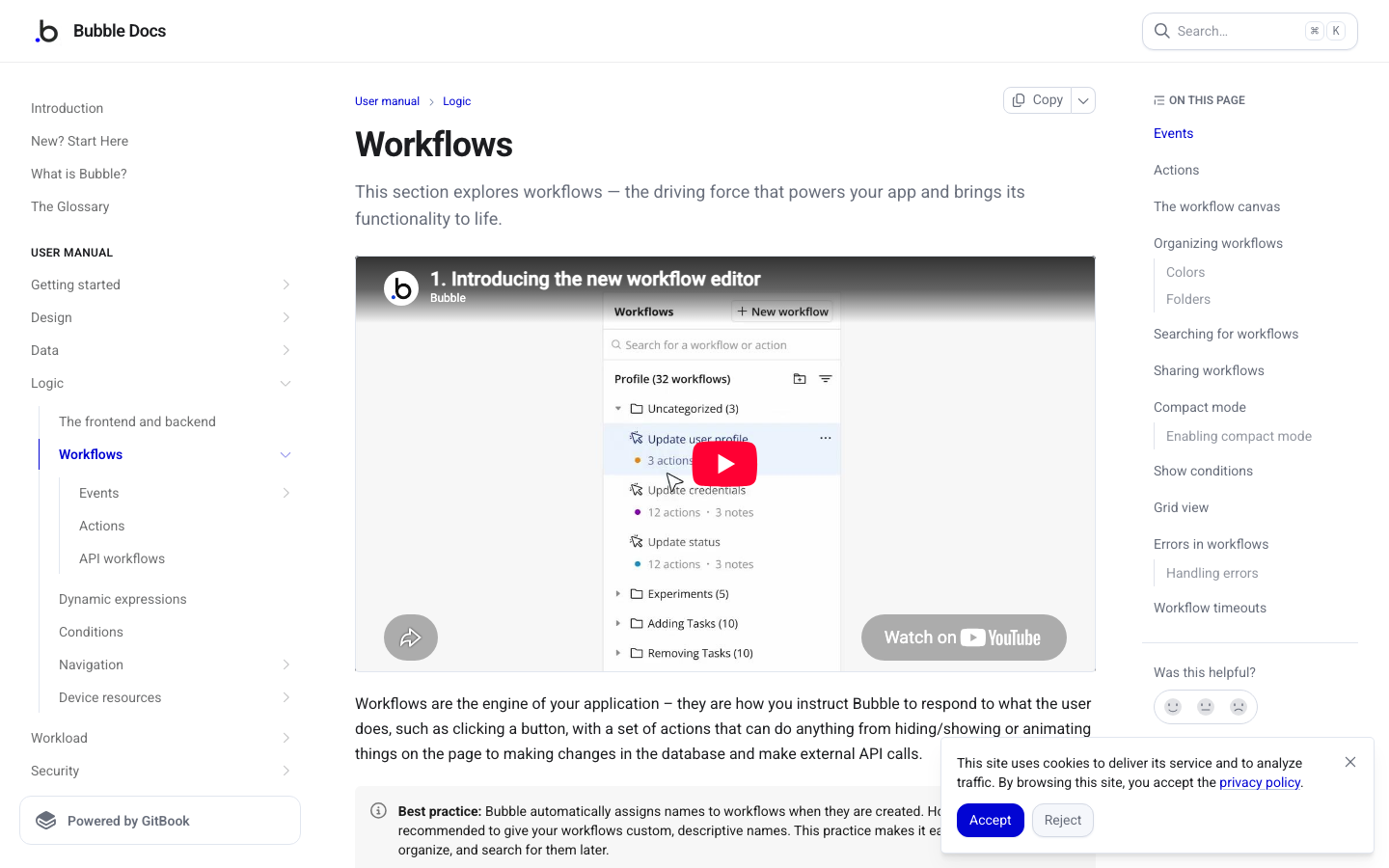
Backend and recurring workflows. Bubble can process server-side actions and scheduled work, subject to plan access and workload charges. A booking reminder scheduled for the wrong timezone or a failed webhook that retries twice can cause duplicate messages. Draft a state diagram before relying on visual workflow steps.
Web and native mobile delivery. The pricing matrix differentiates Web-only, Mobile-only and a shared Web & Mobile project. Native mobile builds, on-device testing and the number of allowed submissions depend on plan. An app-store approval is separate from the plan’s ability to produce a build.
Version control and collaboration. Team features are more sophisticated on Growth and Team. It is possible for two editors to change the same process in ways that are logically incompatible, even when a visual editor has branches. Use a release checklist and a sample dataset so testers can reproduce the behavior.
🛠️ A Practical Workflow to Evaluate
The following Bubble no-code marketplace tutorial is an evaluation exercise, not a claim that DigiOffly ran Bubble’s editor. Build a small booking application with two user roles.
- Create business and customer user records, listings, booking requests and booking statuses as separate data types.
- Create a listing page, a booking form and a private owner dashboard; design first for a narrow phone screen.
- Add privacy rules: customers see only their own requests, while business owners can see bookings for their listings.
- Build a server-side workflow to acknowledge a request, avoiding duplicate notifications from repeated button presses.
- Use test payments or fake paid status only; do not collect live card data or charge customers during the demo.
- Inspect workflow execution and workload units while making twenty sample bookings with varied outcomes.
- Simulate a deleted owner account, a stale listing, a declined booking and a malicious attempt to read someone else’s record.
A buyer should compare the final workflow with the same prototype in an alternative platform, including the engineering time spent on data access rules. A pretty first page is not proof that an application is ready to launch. Prioritize secure data isolation and recoverable workflows over visual novelty.
🔐 Security, Access and Data Governance
With a hosted visual builder, security configuration is shared work: the vendor provides a platform, while the app owner decides which users may read and write a given record. Bubble’s privacy rules are therefore central, not an optional cosmetic setting. A hidden button does not protect an underlying database query.
For a Bubble privacy rules test, create two unrelated customer accounts and two unrelated business accounts. Attempt to fetch record IDs across roles. The expected result is denial at the data-access level, not merely absence of a screen link. Retest after changes to nested data relationships.
Backups, export methods, access to server logs and hosting region vary by plan and contract. Before entering regulated or personal data, investigate data residency, subprocessors, deletion behavior and available audit records. Review any third-party plugin or API connector’s credential storage.
🤖 AI, Integrations and Automation Limits
Bubble includes AI-assisted building features, such as an AI page builder or agent functionality, with feature maturity and credit entitlements varying. Use AI assistance to sketch a page, then configure booking permissions and payment rules yourself.
The Bubble API connector can connect external services, but every call adds possible external cost, latency and data-sharing questions. Rate limits, payment API charges and external LLM tokens are independent of Bubble’s app plan. Make a usage budget for both Bubble WU and the third-party API.
An app may consume workload for database searches, workflow steps, server operations and network requests. One hundred users can generate widely different WU totals depending on searches, workflows and backend actions. One inefficient search can matter more than hundreds of light page views. Consult Bubble’s workload guide.
⚠️ Limitations, Hidden Costs and Migration Risks
Workload billing uncertainty. Bubble compresses different server activities into WU. This is convenient at first but adds another dimension to capacity forecasting. Document which actions consume the most resources using actual usage measurements.
Platform dependence. A Bubble project is not equivalent to a conventional codebase you can simply deploy on any server. Export and migration planning should be evaluated early if independence is a requirement.
Security is a design responsibility. Misconfigured privacy rules can undermine a well-designed interface. Test access restrictions with separate accounts before accepting real user data.
Release and collaboration limits. One editor can be enough for a founder; multiple branches and structured deployment may push a growing team into Growth or Team. That is a legitimate cost of operational maturity, not merely an arbitrary upgrade.
Plugin dependencies. Attractive plugins can add subscriptions, slow down pages or create maintenance risk. Check whether a required feature is native or tied to an external developer.
⚖️ Alternatives and Side-by-Side Comparison
Editorial comparison: Bubble, Glide, Softr and Retool are often grouped as no-code or low-code builders, yet they solve different application problems. The useful comparison is whether your real product requires complex customer-facing logic, structured records, or access to an existing backend.
| Platform | Ideal first project | Application approach | Cost variable | Main trade-off |
|---|---|---|---|---|
| Bubble | Booking marketplace or custom SaaS MVP | Visual app, database, workflows | Plan plus workload units | Logic and privacy complexity |
| Glide | Structured internal operations app | GlideOS AI-supported builder | Apps, members, credits | Custom UI/logic limits |
| Softr | Data-backed customer or member portal | Prebuilt portal patterns | User and feature tiers | Less bespoke application control |
| Retool | Admin tool on existing SQL/API data | Developer-led internal application | Builder and internal-user seats | Needs technical ownership |
Buyer decision matrix
| Decision question | Bubble | Glide | Softr | Retool |
|---|---|---|---|---|
| Consumer marketplace | Custom logic fit | Simpler processes | Portal patterns | Not primary focus |
| Data location | Bubble app database | GlideOS project data | Connected sources | Existing APIs/databases |
| Backend workflows | Built-in visual logic | AI-supported workflows | Varies by plan | Technical workflows |
| Team skill needed | Data modeling and logic | Business process expertise | Template setup | Developer / API knowledge |
| Usage to forecast | Workload units | Credits and app limits | Seats and plan limits | Builders and runs |
Bubble vs Glide
A complex marketplace with multiple customer states may justify Bubble's deeper control over records and workflows. GlideOS can be faster for a company that simply needs to replace a spreadsheet-driven process. Prototype the same booking cancellation, permissions test and external integration; watch Bubble WU and Glide credit usage separately.
Bubble vs Softr
Softr is a pragmatic alternative when a portal mostly displays, filters and updates structured records using familiar templates. Bubble offers more freedom when the business model needs custom states, marketplace transactions or novel interfaces. That flexibility comes with additional testing responsibility, especially privacy rules and migrations.
Bubble vs Retool
Retool is oriented toward operational screens built around databases and APIs that a technical team already controls. Bubble is a more natural candidate for a consumer-facing product needing user registration and custom app behavior. Test whether you are building a product or an internal console before comparing subscription prices.
See the already-published Softr review and Airtable review for adjacent data-backed workflows. For a faster team-focused build, read our Glide review. For database-backed admin consoles, see the Retool review.
🧠 The Hidden Work Behind a No-Code MVP
A Bubble app can look like a finished product while its data model still resembles a prototype. That gap matters because an app’s most expensive mistakes often begin with relationships rather than interface design. Consider a fictional booking marketplace. Its public pages show service providers, available slots and a booking button. Behind the scenes it needs to understand that a service belongs to a provider, that a booking involves exactly one customer, and that a cancellation may release capacity without deleting the financial record.
Before creating screens, sketch the core objects: User, Provider, Service, Availability Slot, Booking, Payment Reference and Activity Log. Give each object a clear owner and a purpose. A booking should not rely only on a text field named “customer email”; a relationship to the customer record makes it possible to manage account changes consistently. The system still needs to snapshot certain historical details, such as the agreed price, so a later catalog change does not rewrite yesterday’s contract.
A meaningful Bubble no-code app builder review should investigate the cost of maintaining this structure. Adding a field in a visual editor may be simple. Updating every workflow, privacy rule and connected page that assumes the old field is not necessarily simple. Document dependencies whenever the data model changes, especially before production records are introduced.
Separate visible conditions from authorization
Many beginners hide a Delete button from customers and assume their booking record is protected. That is a presentation rule, not a complete security policy. An attacker may know a record identifier or trigger an action through an alternative route. Bubble privacy rules and backend workflow access need their own evaluation. Build two unrelated provider accounts and verify that each is unable to read or alter the other’s booking data, even when navigating to a guessed URL or otherwise manipulating a request.
In the same test, check data exports and searches. A search that returns only the correct provider’s rows is not enough if an associated object or reusable component exposes private notes. Review attachments and file URLs, too. An internal PDF with a booking address or customer phone number should not become publicly accessible merely because its link was hidden in the interface.
📐 Performance, Queries and Workload Unit Forecasting
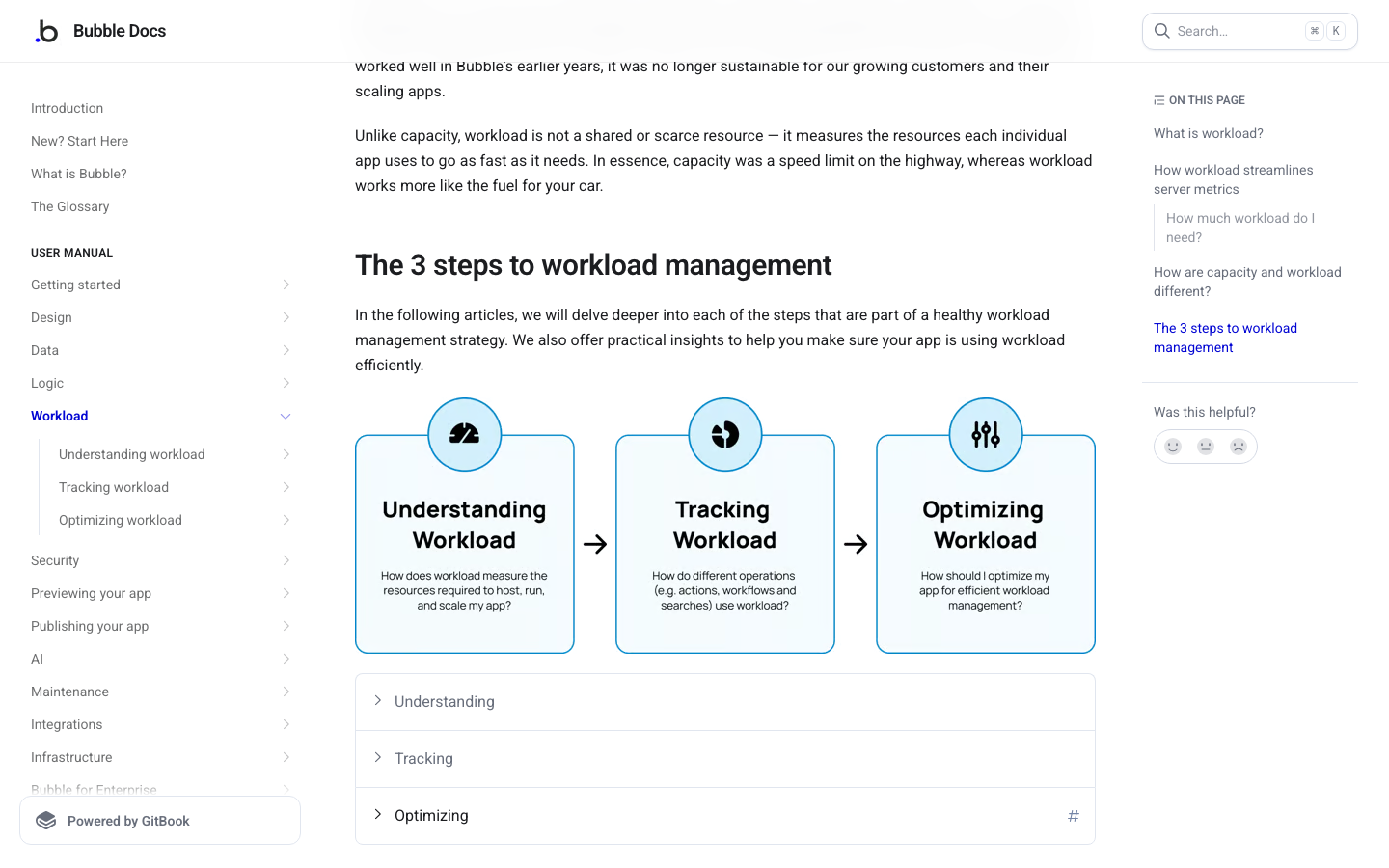
Bubble workload units measure server resources consumed by application activity. The relevant purchasing metric is not simply visits per month. A single page may run several searches, calculated expressions and backend actions, while another page serves cached or relatively light content. As a result, two applications with the same traffic can have very different workload patterns.
Create a small usage experiment before paying for extra capacity. Prepare a set of fictional users, providers and bookings. Record the account’s WU reading, then perform a known number of operations: twenty searches, ten booking attempts, five cancellations and a batch of notifications. Record the ending reading and repeat the sequence after making one design change. The difference is evidence about that particular application, not a universal “WU per customer” benchmark.
The experiment should test more than the happy path. Include a search returning no results, a query that retrieves hundreds of records, and a failed external API call that is retried. Inspect whether the same operation is unintentionally triggered by both page load and element state change. Poorly structured searches or duplicated backend workflows can be a larger workload driver than the interface’s total number of pages.
What happens at the workload limit?
The official Bubble pricing page says users can disable overages, and paid Starter, Growth and Team projects can choose workload tiers or pay-as-you-go overages. Bubble also describes notifications around 75 percent and 100 percent of available workload. Those controls are useful only if someone monitors them and understands the business effect of a cap.
Imagine a booking app that receives a burst of new traffic from a newsletter. If automatic overages are enabled, the bill may rise when the project consumes more WU. If overages are disabled, the app may face limits at a moment when customers expect service. Neither outcome is universally right. A prototype might cap spending aggressively; an operational booking system might need headroom and a documented alert response. Build a budget policy before a campaign launches.
A practical Bubble workload units pricing spreadsheet should therefore have three cases: ordinary demand, a busy marketing week and a failure/retry incident. Multiply observed work per operation by each estimated workload scenario, and compare that with the plan allowance. Label every modeled WU total as an assumption until actual tenant measurements exist.
💳 Payments, External APIs and Transaction Boundaries
A marketplace prototype often adds a payment plugin early because checkout is visually convincing. But a payment screen alone does not prove the payment workflow is correct. The application should treat the payment provider as the authority for payment status rather than assuming success because a customer returned to a Thank You page. Webhooks, signed event verification and repeat-event handling belong in the test plan.
Suppose a customer clicks Pay, their browser loses connectivity and the payment provider still completes the charge. A naïve app may create a second charge after the customer tries again. Define a transaction identifier and make follow-up actions idempotent. If the customer is charged but the booking fails, provide a path for human reconciliation or an appropriate reversal under the provider’s rules. Do not automatically mark a booking confirmed merely because a workflow action completed locally.
External integration costs need their own line in the budget. Payment processors may charge per transaction, maps and geocoding services can charge by request, and email or SMS services may charge by volume. AI APIs also have usage limits and token-based billing. Bubble’s plan price does not erase those external costs. Track both the Bubble workload consumed by an API-driven workflow and the charge incurred at the other provider.
Responsible API credential management
Do not put an unrestricted API key in a client-visible text element or expose a privileged backend endpoint to anonymous visitors. Test how Bubble’s API Connector handles secrets and which operations run on the server. Use limited-scope credentials where the integration supports them, and rotate keys after testing. A production dependency list should include its owner, purpose, rate limit and method of disabling access when compromised.
When processing customer data, send only the fields that the connected service actually requires. An AI summarization request about a support ticket should not include financial identifiers or the entire customer record unless there is a deliberate, documented reason. Configure retention and consent flows appropriate to the application and its users.
📱 Web Versus Native Mobile: An Architectural Choice
Bubble’s pricing is offered for Web only, Mobile only and Web & Mobile projects. A web page displayed on a phone is not equivalent to a native application installed through an app store. Native distribution raises additional questions about build submissions, update cadence, store review, push notifications and mobile device capabilities.
A founder should map the target workflow before choosing the platform combination. If customers only need to browse providers and submit a booking, a responsive web application may meet the requirement. If the application needs reliable push notifications or a mobile-device feature that is not adequately supported in a browser, native delivery may be worth investigating. Compare total first-year cost, not merely the difference in plan prices: app-store accounts, device testing and release support require resources too.
With a combined Web & Mobile project, Bubble’s documentation states that the apps share backend data and workflows, and that WU from both delivery channels counts toward the project’s total workload. That is useful for avoiding duplicate infrastructure, but it also means mobile usage can affect the web app’s available resource budget. Define a release strategy that tests the same account state in both interfaces.
🧪 A Release Checklist for a Real Customer Application
Use a predictable testing sequence before moving from Free development to a paid live application. First, validate the database: imports, required fields, relationship constraints and duplicate detection. Second, test privacy with unrelated customer and provider accounts. Third, exercise every important action with invalid inputs, delayed responses and multiple clicks. Fourth, verify the mobile layout and keyboard navigation. Fifth, check a full export and document how an incident can be investigated using available logs.
Then conduct a timed release rehearsal. Create a separate test version if the plan provides the required version tools, introduce a minor booking workflow change and deploy it using the normal process. Make one synthetic booking before and after the change. If the new workflow breaks, explain exactly how the previous behavior can be restored and how affected bookings will be reconciled. A successful synthetic booking after deployment gives a better release check than a clean version-history screenshot.
Agencies should plan handover just as carefully. A client should know which Bubble project is theirs, which service subscriptions they are paying for, who owns the domain and whether the agency retains privileged access. A useful contract explains future edits, data exports, service-level expectations and which outages the vendor rather than the agency controls.
When Bubble's flexibility becomes a liability
Bubble is appealing precisely because so much behavior can be authored visually. That freedom also means there may be several ways to implement a simple operation. If a team uses page workflows, backend workflows, custom events and plugins without a convention, troubleshooting becomes difficult. Establish naming rules, document important invariants and prefer one auditable implementation of each business operation.
No-code should reduce avoidable implementation work, not the discipline required for operating a product. A founder comparing Bubble vs Retool or Softr should build the same narrow workflow in each finalist and record setup time, recurring cost, permission clarity and change effort. The most feature-rich tool is not necessarily the fastest or safest one to maintain.
📉 A Buyer-Ready Ownership and Exit Plan
Before the application has real customers, decide what would happen if the business must leave Bubble. What records can be exported? Which file attachments need separate handling? How will authentication identities map to a replacement product? Are integrations documented independently of the visual editor? Application logic is not the same thing as data, and exporting records is not equivalent to exporting an executable source-code project.
Retain a structured field dictionary, the current privacy rules, environment variables, integration endpoints and an inventory of scheduled workflows. These are useful for onboarding new maintainers even if the team never migrates. Finally, ask for a quote that includes the chosen Bubble tier, realistic WU scenarios, paid plugins, third-party APIs, and at least one person responsible for repairs. That is a more meaningful estimate of Bubble total cost of ownership than the attractive Starter price alone.
✅ Pros and Cons
✅ What We Love
- Combines data, UI, workflows and hosting in one platform
- Free development tier lets teams test an idea
- Supports web and native mobile project types
- Custom application behavior without writing a traditional frontend
- Incremental capacity and collaboration options
⚠️ Where It Falls Short
- Workload-unit billing can be difficult to forecast
- Production deployment requires a paid plan
- Privacy rules and application logic need careful testing
- Migration away from the platform may require redesign
- Editors and branch limits may force higher tiers
🧪 How We Evaluated This Software
The editorial team reviewed Bubble’s public live pricing, official pricing FAQ and workload definitions as of October 24, 2026. Prices above explicitly distinguish the Web & Mobile display from the Web-only documentation discrepancies. No performance or security audit of a real customer app was performed.
For a defensible hands-on review, we would create the same synthetic booking portal on Free, run a defined workload test, document WU per operation and test cross-account data access. Those test instructions are not presented as outcomes.

Frequently Asked Questions
Is Bubble free to use?
Bubble offers a Free development tier. A published live app or custom domain needs the relevant paid plan.
How much does Bubble Starter cost?
The live Web & Mobile Starter annual-billed equivalent is $59/month; the live monthly-billed reference is $69. Web-only and Mobile-only tiers differ.
What are Bubble workload units?
WU measure server work across operations such as database searches, requests and workflows. They are not simply the number of app users.
Can I launch a marketplace on Bubble?
Bubble can model listings, accounts and workflows; a safe launch still requires permissions, reliability and payment testing.
Can Bubble create mobile apps?
Yes, Bubble supports native mobile editing and builds, with deployment and submission limits varying by plan.
Does Bubble host the app?
It is a managed platform that bundles hosting for supported deployments; separate API services and plugins can still incur costs.
What is Bubble Growth pricing?
The current Web & Mobile Growth annual equivalent is $209/month, billed annually, before workload add-ons and other costs.
Is Bubble better than Softr?
Bubble is generally stronger for deeply custom app workflows; Softr may be simpler for data-backed portals built from standard patterns.
Does Bubble have AI app building?
Bubble advertises AI-assisted page or app building capabilities; check current eligibility and limitations.
How should I test Bubble security?
Use unrelated dummy users to confirm that privacy rules prevent unauthorized reads and writes, even when IDs are known.
Can I export my Bubble app’s source code?
Do not assume it operates like an ordinary exportable source-code project. Investigate portability and required rebuild effort before committing.
🏁 Final Verdict
Bubble earns a place on a shortlist when the application requires more than a form and a few conditional views. It makes a custom product possible for teams without a conventional engineering department, but it does not eliminate the need to understand data permissions and running costs.
Build the smallest complete workflow on Free. Measure WU and test data isolation. Then choose the cheapest deployment combination that covers web or native mobile requirements and leaves room for growth. If the project needs only a structured data interface, compare Softr and similar products before paying for Bubble’s greater flexibility.
📚 Official Sources and Disclosures
- Live Bubble pricing
- Bubble official pricing and plans
- Bubble workload documentation
- Bubble workload and pricing FAQ
- Bubble October 20, 2026 Web-only pricing reference
Five screenshots of official public vendor pages were captured on October 24, 2026, and placed in relevant sections with source captions. No private-account screenshots or independently run performance results are represented in this draft.
EXPLORE NEXT ON DIGIOFFLY
Find the Right Software, Not Just the Next Subscription
Compare Bubble with the tools that already support your workflow. Start with requirements, then look at annual costs and practical alternatives.
Explore automation
- Automation & No-Code reviews
- Make automation review
- Zapier review
- n8n workflows review
- Development & DevOps — Explore reviews of code, APIs, app backends and deployments
- Supabase — PostgreSQL, authentication and app backends
- Firebase — Firestore and Google-backed app services
Compare your options
Build a practical stack
- Software Directory
- Airtable review
- Softr app builder
- Verified software deals
- Baserow — Relational no-code databases and custom apps
Editorial comparisons are independent. Confirm prices and access permissions before changing your subscriptions.