

Pricing and specifications checked 2026-11-09 against vendor primary sources. Conditions, billing cycles and regions may change.
Building an autonomous drone is rarely held up by a single algorithm. The difficult part is persuading the flight controller, sensors, companion computer and ground station to work together reliably across software revisions. One mismatched firmware image can turn a straightforward bench test into a day of debugging. NXP Robotics SDK is designed to organize that work for a defined range of NXP reference hardware and upstream projects. In this NXP robotics SDK review, we examine the public code and documentation, where the workflow could help an engineering team, the hardware and integration costs, and the boundaries of the vendor's launch claims. This is a researched assessment, not a report from a flight test.
No affiliate links are used in this review. Vendor claims are distinguished from independently observed tests.
📊 NXP Robotics SDK Review Summary
NXP Robotics SDK gives teams working with selected NXP drone reference boards a common route through firmware manifests, builds and deployment artifacts. The interesting part is not a brand-new autopilot; it is the possibility of reproducing a working combination of existing ones. The strongest case is a lab with supported hardware and engineers who can verify each integration step. Reference-board availability and the limits of the public compatibility table are the main reasons to evaluate it before making a larger commitment.
⚡ Quick Verdict: Is NXP Robotics SDK Worth It?
There is a credible use case here: a development team that already favors NXP silicon could save time keeping upstream firmware revisions and board builds aligned. The public GitHub repository makes that proposition inspectable. The bigger question is not whether the SDK can start a demo, but whether its supported board combinations match your project well enough to reduce custom integration work. Our verdict is to shortlist it for an instrumented prototype, compare the results with a direct upstream workflow, and let those results guide the next purchase.
🏆 VERIFIED PRODUCT OVERVIEW — NXP Robotics SDK
An open-source coordination layer for NXP robotics reference designs — not a turnkey autonomous drone.
Best for: Embedded teams with supported NXP drone reference hardware who need repeatable firmware builds and traceable revisions.
🧠 What Is NXP Robotics SDK?
NXP Robotics SDK is a public, Apache-2.0-licensed coordination project associated with the NXP Robotics Platform, not a new replacement for PX4, ROS 2, Zephyr or AM32. Its repository describes a glue layer that pins upstream revisions via west manifests, dispatches builds to the appropriate system and provides a route to prebuilt artifacts. It does not claim ownership of those upstream firmware sources. The NXP product page lists technologies such as ROS 2 Jazzy, PX4, CogniPilot Cerebri, Zephyr, NuttX, AM32, Zenoh, MAVLink, DShot and RPMsg. However, the SDK's actual supported board-by-stack table is narrower. That difference matters whenever a team assumes that a named protocol will run across every reference board. The NXP Robotics Platform also includes distinct hardware reference designs for autonomy compute, flight management, sensor networking and motor control. The NXP Modular Drone Platform is a system-level design context rather than a subscription product. Do not confuse this late-2026 SDK with the separate NXP Robotics Edge Platform, which provides a Yocto-based ROS 2 distribution for supported i.MX evaluation kits. A buyer should compare the exact silicon, target board, firmware matrix and supported workflow rather than matching brand names.
🖥️ Ease of Use & The User Interface
There is no consumer-style browser dashboard to evaluate here. The interface is a developer workflow involving Git, Docker, the west meta-tool and embedded target utilities. The official repository explains how to list the available platforms and stack combinations, acquire or build an environment, and then deploy board-specific artifacts. A typical engineer needs to understand west manifests, a sizeable Docker image, target flashing, debug serial connections and compatibility between a board revision and an SDK revision. The NXP Robotics SDK system requirements specify a Linux host; the repository validates the Docker-based build process on Ubuntu 24.04 LTS and calls for at least 25 GB free space where Docker stores data. A corporate proxy or private artifact token can add another setup step. These requirements make the process more reproducible for an embedded team than for a novice purchasing a consumer drone. We cannot assign a measured setup time because we did not run the commands on fresh hardware. Evaluate the end-to-end procedure, including a clean build, flashing, logs, restart behavior and repeated builds, rather than timing a single installation command.
🧭 How to Use NXP Robotics SDK for Beginners
For NXP Robotics SDK installation, begin with the board-and-stack compatibility table, then build the documented combination on a supported host. The sequence below follows NXP's published repository instructions and is intended for a controlled lab. Board-specific manuals govern flashing, power connections and any work involving motors.
1. Choose a documented platform/stack pair
Start from the official NXP Robotics SDK GitHub repository rather than a reseller's generic robotics description. Open the current supported-platform matrix and decide whether your evaluation uses MR-NAVQ95, MR-VMU-TROPIC, MR-MCXN-T1 or another specifically listed target. Record the board part number and revision, expected stack, debugger and power needs. Also read the NXP NavQ95 reference design or other board manual, especially any preproduction warning. A different reference board may call for a different firmware path.
2. Prepare a compatible Linux and Docker environment
The NXP Robotics SDK system requirements specify Linux and Docker, with the public repository recommending a validated Ubuntu 24.04 LTS host. Install Git, verify the Docker service and budget at least 25 GB free where Docker stores images and intermediate files. Confirm access to GitHub and any vendor artifact locations. In managed networks, have your security team approve proxy and certificate handling; do not simply disable TLS verification to make a build work.
3. Inspect the manifest before building
Clone the official NXP Robotics SDK GitHub repository and follow its current README. Review the west manifests, selected upstream revisions, release notes and available command reference. The SDK's accepted platform flags should come from the published west SDK listing, not from guessing a product abbreviation. Capture the repository commit and chosen build options before producing artifacts. A reproducibility notebook is often more valuable than a one-off successful build.
4. Build and stage a target-specific image
Use the documented SDK build workflow for the selected target. The NXP Robotics SDK Docker build can download large toolchains and dependencies; allow for network and disk constraints. Inspect the resulting image name, checksum, license notices and any required Nexus credentials for prebuilt artifacts. Do not flash arbitrary images or copy an example intended for another processor. Hardware should remain in a bench-safe configuration while firmware and communication are validated.
5. Validate telemetry and recovery before field trials
Follow NXP's board-specific flashing and debug documentation using the appropriate utilities, which can include uuu, LinkServer, MCU-Link or pyOCD. Ground-station workflows may use QGroundControl and MAVLink where supported. Check boot logs, sensor identity, firmware version, watchdog operation, command timeout behavior and safe power cycling. Only a trained team with a defined physical safety plan should consider subsequent motor or flight testing. Record both successful and failed bring-up results.
🛠️ Key Features That Actually Matter
The advantage of NXP robotics development here is coordination: specific upstream revisions, known build entry points and reference designs that engineers can inspect. These capabilities are useful when the selected target appears in the public compatibility matrix. The matrix, rather than the broader product announcement, is the practical source for deciding what to build next.
Pinned upstream revisions and west manifests
The NXP Robotics SDK GitHub repository describes a coordination layer that pins exact upstream revisions with west manifests rather than maintaining its own copies of each firmware codebase. That matters when a laboratory needs two developers to build the same software combination or reproduce an old defect. A manifest can identify which branch or revision of an upstream stack was selected, reducing accidental version drift between a companion processor and a flight controller. It does not magically eliminate integration problems: version pinning only helps when the team records board revisions, toolchain versions, image hashes and test results alongside the manifest. Before relying on the SDK for a release, inspect its west configuration, note which repositories are fetched, document your fork policy and verify that a fresh machine reproduces the same artifacts. Treat source pinning as a foundation for traceability, not an independent security guarantee.
Official source: Vendor documentation.
Board-aware build orchestration
NXP's repository publishes a table connecting supported reference boards with software stacks. At the time of our review it identifies MR-NAVQ95 with PX4, MR-VMU-TROPIC with PX4 and Zephyr, an MR-ESC-AM32-MCXA133 path with AM32 and MR-MCXN-T1 with Cerebri and Zephyr. That matrix is materially more useful than a generic list of supported operating systems because it tells an engineer where build automation should actually be expected to work. The west SDK commands enumerate the accepted platform identifiers and stack combinations. Compatibility must still be rechecked against each release; a checked box does not prove functionality on a different PCB revision, expansion card or third-party peripheral. The SDK may shorten glue-code work where the specific hardware is listed, but unknown boards will need their own integration plan.
Official source: Vendor documentation.
PX4 flight control without replacing the autopilot
PX4 remains an independent upstream autopilot project. The NXP Robotics SDK packages a supported route into that ecosystem for selected NXP reference boards, rather than offering an alternative flight-control algorithm that an engineer can evaluate in isolation. The NXP Modular Drone Platform pairs autonomy compute with flight-management and motor-control components, while the public SDK matrix defines the firmware combinations. For evaluation, the key questions are whether the selected PX4 target builds without local patches, which telemetry transport is expected, how the ground station exchanges commands and how software updates are validated. QGroundControl appears among NXP's deployment tools, but the public listing alone does not establish radio compatibility or safe flight behavior. A flight test should come only after the mechanical, power and control risks are assessed by competent personnel.
Official source: Vendor documentation.
ROS 2 Jazzy and distributed robot integration
The NXP Robotics Platform product page includes ROS 2 Jazzy, the Zenoh messaging family, MAVLink, uORB and RPMsg inter-core connectivity among the technologies in its broader software and middleware portfolio. They address different layers of a robotics application: high-level robot communication, low-level flight control and messaging across processor boundaries. This is useful context for an architecture team evaluating sensor distribution and autonomy compute, but it is not a promise that every SDK board exposes a complete ROS 2 deployment image. NXP Robotics SDK ROS 2 Jazzy support must be evaluated together with the board matrix, the Linux environment and the actual example applications. Teams should map each message boundary, identify which component owns time synchronization and error recovery, and document bandwidth assumptions before relying on the advertised middleware in a safety-sensitive design.
Official source: Vendor documentation.
Docker-based build isolation
The NXP Robotics SDK Docker build flow gives a team a defined host toolchain environment, reducing the number of manual package installations on every developer's workstation. The public README validates Ubuntu 24.04 LTS and requires Docker, Git, sufficient local storage and network access to download build components. NXP also lists the west meta-tool, Arm GNU tooling, CMake and Ninja in its broader system requirements. The container is a convenience, not a guarantee of hermetic reproducibility if dependencies are downloaded from mutable locations or build parameters change. Record image digests, check free disk space, use a reviewed network/proxy configuration and confirm the provenance of fetched binaries. For a corporate team the most important ease-of-deployment question may be whether the security team permits the container and its artifact download destinations.
Official source: Vendor documentation.
Reference designs for compute, control and sensors
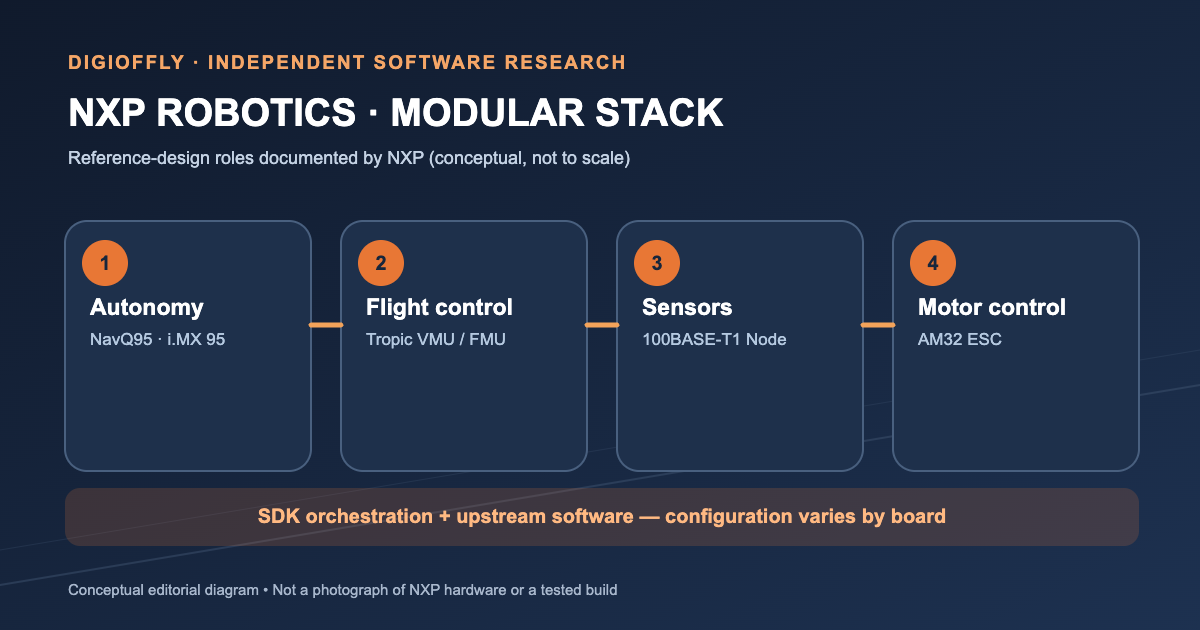
The NXP drone reference designs divide the system into understandable engineering functions. The NXP NavQ95 reference design combines autonomy computing and flight-control capabilities around the i.MX 95 family. A Tropic VMU/FMU is associated with deterministic flight-management functions; a 100BASE-T1 intelligent sensor node uses an MCX N947 family controller; an AM32-compliant electronic speed controller uses an MCX A13 family device. NXP positions the designs as modules that can be evaluated together instead of independently invented from the component level. This is valuable to an integration engineer, but the preproduction notices deserve equal attention. Confirm the exact orderable part number, board revision, electrical limits and readiness of each subsystem with the vendor before using the published block diagram as a production bill of materials.
Official source: Vendor documentation.
Open-source inspection and component licensing
A public repository is a meaningful practical benefit: engineers can inspect manifests, scripts, dependencies, commit history and license files without relying only on screenshots or sales presentations. The NXP Robotics SDK license on GitHub is Apache-2.0. That description belongs to this orchestration repository and should not be projected onto every imported component, board design file or commercial support service. A deployment review should inventory each upstream repository, review license compatibility, generate or check the software bill of materials and monitor published security updates. NXP's website may also link to account-restricted downloads, so public code visibility does not imply equal access to all prebuilt artifacts. The most useful test of openness is whether your team can independently rebuild and inspect the actual binaries it plans to put on a vehicle.
Official source: Vendor documentation.
✅ Pros & Cons of NXP Robotics SDK
Pros
- Public Apache-2.0-licensed SDK coordination repository with inspectable manifests and scripts.
- Specific published matrix of supported NXP board and firmware-stack combinations.
- One vendor reference-design context for compute, sensor networking, flight and motor control.
- Uses established PX4, Zephyr and other upstream ecosystems instead of hiding them.
- Documented Linux/Docker prerequisites help a team plan a reproducible lab evaluation.
Cons
- Not a turnkey drone or browser application; embedded expertise and suitable hardware are required.
- Preproduction reference boards and regional hardware pricing introduce procurement uncertainty.
- Vendor rapid-integration claims are not third-party validation or safety certification.
- Actual stack coverage varies by target, despite a much broader umbrella platform feature list.
- Toolchains, upstream licenses, flashing and secure update policies remain engineering work.
👾 Limitations & Reality Check
The SDK's greatest practical constraint is the gap between a broad robotics-platform announcement and the specific combinations implemented today. Its GitHub compatibility table is narrower than the list of technologies mentioned in the launch materials. Some associated reference designs carry preproduction notices, and the code used by the SDK comes from several upstream projects with their own licenses and release schedules. Hardware is also a separate purchasing decision: the public repository does not tell you what a complete prototype will cost or when every board will ship. NXP's rapid drone bring-up demonstration is promising as an illustration of the workflow, but it cannot substitute for a team's own reproducibility measurements. Safety architecture, cybersecurity and regulatory qualification are substantial separate tasks; we discuss those controls in the dedicated section below.
💰 Pricing Plans & Real Costs
NXP Robotics SDK pricing needs to be evaluated like an embedded development project, not a SaaS subscription. The public NXP Robotics SDK GitHub repository is Apache-2.0 licensed, so engineers can inspect its orchestration code without paying for a subscription to that repository. That is only the first line of a budget. The prototype may call for separate boards, sensors, a power system, radios, batteries, debug probes, shipping and engineering hours. Certain prebuilt artifacts may also require an NXP Nexus token. In the materials reviewed, we did not find a verified US-dollar price for a complete modular drone assembly, so the table below separates source-code access from hardware procurement and project work. For a realistic comparison, request part-number quotes and lead times, then track the labor required for a fresh build, integration, recovery testing and security review. A team can benefit from open-source software and still face a sizable hardware and validation bill.
| Plan | Cost / billing model | Region / billing period | Vendor source checked |
| Public SDK orchestration repository | Public source; Apache-2.0 license. No standalone subscription fee listed in the cited repository. | United States; source repository available globally; Not applicable; open-source source access | https://github.com/NXP-Robotics/robotics-sdk (2026-11-09) |
| NXP drone evaluation hardware | No single verifiable public bundle price found; request current quotes for exact reference designs and accessories. | US supplier or authorized distributor; One-time equipment purchase, if available | https://www.nxp.com/design/design-center/development-boards-and-designs/MODULAR-DRONE-PLATFORM (2026-11-09) |
| Engineering and compliance work | Variable and not published as an NXP SDK plan; calculate internal labor, test equipment and regulatory needs separately. | Project-specific; Project-dependent | https://www.nxp.com/design/design-center/development-boards-and-designs/MR-NAVQ95 (2026-11-09) |
🎯 Who Should Use NXP Robotics SDK?
Consider two development teams. The first has already chosen an NXP flight or companion-compute board and wants several engineers to produce the same firmware image from a documented revision. For that team, the NXP Robotics SDK could become a useful part of the daily build process. The second team is still choosing silicon and mainly wants to fly a consumer-style drone this month. An extra vendor-specific integration layer could slow that team down. University laboratories and industrial research groups sit somewhere between the two: the value depends on whether their experiments use supported boards, whether they can maintain the toolchain and what they gain from reproducible firmware. A practical selection test is to compare the time needed for a clean build, board bring-up and recovery procedure against the team's current PX4 or ROS 2 approach. This tells a purchaser more than a generic list of industries.
⚖️ NXP Robotics SDK Alternatives
NXP Robotics SDK vs PX4 is not an apples-to-apples product contest: PX4 is an autopilot stack, whereas the NXP project can orchestrate PX4 builds on compatible targets. A ROS 2-first custom system also represents a project approach rather than a comparable boxed kit. NXP Robotics Edge Platform is a distinct distribution focused on i.MX and industrial ROS 2 workflows. The right choice hinges on target hardware, the team's expertise, required protocols and the stage of the project.
PX4-first custom stack vs NXP Robotics SDK
Choose and maintain PX4, a flight controller and supporting tools directly. This can minimize dependency on a vendor integration layer when existing hardware is already supported, but the team owns more cross-board versioning and build integration.
ROS 2-first integration vs NXP Robotics SDK
Begin with the ROS 2 ecosystem and build the necessary sensor, navigation and control bridges. It can offer greater architectural freedom for non-drone systems, but distributed communication, real-time boundaries and target firmware must be assembled deliberately.
NXP Robotics Edge Platform vs NXP Robotics SDK
A separate NXP robotics software distribution focused on Yocto, ROS 2 Jazzy and real-time/industrial integration for listed i.MX evaluation boards. It is not the same SDK product and its published board support and use cases differ.
Comparison: NXP Robotics SDK vs Alternatives
These rows compare ways to assemble an embedded robotics stack, not interchangeable subscription products. PX4 provides an autopilot, ROS 2 supplies robotics middleware, and NXP's SDK organizes selected combinations around NXP hardware. Which route is simpler depends on the board already on the bench and the software the team needs to maintain.
| Consideration | NXP Robotics SDK | Alternatives |
| Primary role | Coordinates specific NXP robotics boards and upstream firmware stacks | Direct PX4: autopilot stack; direct ROS 2: robotics middleware; NXP Robotics Edge Platform: i.MX distribution |
| Supported hardware | Check the public NXP SDK board-by-stack matrix | Each alternative has its own hardware and release compatibility lists |
| Build workflow | west manifests and Docker-based NXP workflow | Depends on chosen project, distro, board and toolchain |
| Ownership of integration | NXP packages a defined starting point; team still validates the system | Direct upstream route gives team more integration ownership |
| License and pricing | Public SDK orchestration repo Apache-2.0; hardware quoted separately | Licenses and equipment pricing depend on each upstream project and chosen hardware |
| Safety validation | Independent project verification remains mandatory | Independent project verification also remains mandatory |
NXP NavQ95 Reference Design: What the Board Actually Represents
The NXP NavQ95 reference design sits at the intersection of autonomy compute and flight control. NXP describes its i.MX 95-based architecture as a route to onboard perception, navigation and real-time execution while keeping size and integration complexity manageable. The documentation also names PX4 and ROS 2 in the surrounding software ecosystem. None of this establishes that every application on an off-the-shelf NavQ95 board is prevalidated for production use. NavQ95 is explicitly labelled preproduction, with specifications subject to change. Engineers considering the NXP NavQ95 reference design should verify board revision, boot media, processor pinout, available I/O, compatible cameras, power input and currently obtainable design files. A reasonable first milestone is a repeatable boot and basic sensor telemetry session, not autonomous flight. If procurement cannot confirm the board's availability or a future migration path, count that as a project risk rather than an unspecified future benefit. The board's integrated design may reduce the number of interfaces to develop, but it concentrates responsibility for debugging and recovery on a complex multi-core target.
The Drone Component Stack: Tropic, Sensor Networking and Motor Control
The NXP Modular Drone Platform description shows several subsystems that must be assessed separately. The NXP Tropic VMU FMU handles flight-management roles built around the i.MX RT1064; an intelligent NXP 100BASE-T1 sensor node uses an MCX N947 microcontroller; and an AM32-compliant electronic speed controller uses a device in the MCX A13 family. Their presence in a vendor system diagram does not mean they share one firmware binary or identical safety characteristics. In fact, the public SDK matrix identifies different supported stacks per board, which is exactly why a coordination layer can be useful. During design review, map the command chain from autonomy computer through flight-control logic to actuators, then map every sensor and telemetry path separately. Ask how each link behaves when packets stop arriving, clocks disagree or power drops. Validate power isolation and proper motor disable behavior on a physically safe test fixture. Confirm orderable part numbers and preproduction caveats before purchasing accessories. That process reveals whether the NXP reference-design approach genuinely reduces integration work for your actual architecture.
Version Management and the Hidden Cost of Firmware Drift
A robotics prototype often works on one engineer's desk and fails when another developer rebuilds it two weeks later. The symptom may look like a sensor problem when the underlying cause is a changed upstream library or an altered board-support package. The NXP Robotics SDK's west manifests give teams a mechanism for pinning upstream revisions, but a complete release record needs more than one file. Capture the host OS, Docker image digest, toolchain version, source manifest, board revision, chosen stack, build options and artifact checksum. Store a short verification report alongside the binary. If you branch away from the published SDK for a custom peripheral, document the difference and make sure changes can be rebased when upstream security updates arrive. A library of reproducible failures is as valuable as reproducible successes. This is where the SDK may offer engineering leverage: its orchestration structure can turn a fragile manual process into something easier to review and automate, provided a team follows through with proper release discipline.
Security, Functional Safety and AI: Keep the Claims in Their Lane
Physical AI brings perception and decision-making closer to motors, batteries and people. That makes the interfaces between software and hardware as important as the model running on the processor. For a drone prototype, start with a threat model for firmware provenance, update signing, debug access, radio commands and the ground station. Separately, map the failure paths that could energize propulsion unexpectedly, ignore a sensor disagreement or leave the aircraft without a controlled response to lost communication. NXP documents processors and reference designs with security and real-time capabilities, but the integrated aircraft still needs system-level evidence. A sensible boundary is to develop perception experiments independently of flight-control qualification until the safety case and recovery procedures have been tested. The SDK may help keep software configurations consistent while engineers carry out that work.
A Seven-Day Evaluation Plan with Measurable Exit Criteria
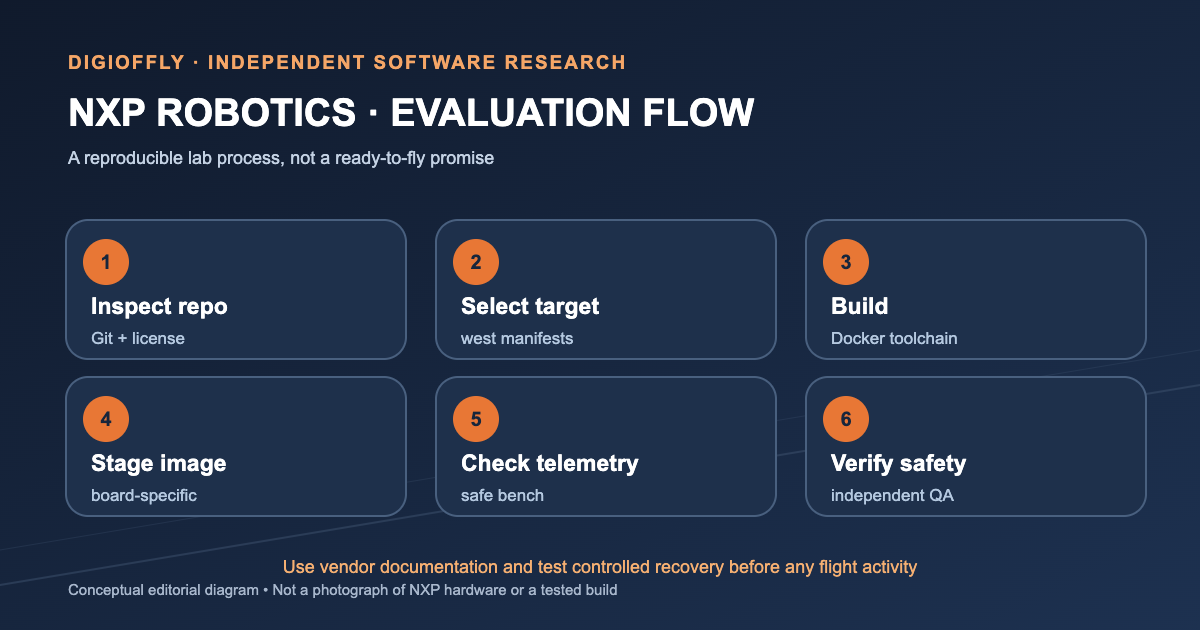
Day one: choose the exact supported NXP board and stack, save the source links and request a component quote. Day two: prepare the specified host and capture a clean Docker build log. Day three: reproduce the firmware artifacts and record the full dependency versions. Day four: conduct a controlled bench bring-up with the recommended debugger and serial logging. Day five: inspect telemetry, restart behavior and recovery from lost commands with hazardous actuators disconnected. Day six: check the licenses, exposed interfaces, update process and any board-revision risks. Day seven: compare engineering hours and repeatability against the team's existing workflow. The useful result is a small evidence package: a repeatable build, a hardware revision record, recoverable bench behavior and a realistic procurement plan. Keep the supplier's advertised 30-minute demonstration separate from your own logged measurements; the two describe different conditions.
Who Should Avoid the SDK — and What to Ask NXP First
NXP Robotics SDK is an awkward fit for a team that needs a consumer flying product, a hosted fleet dashboard or an already qualified industrial control system. An industrial mobile-robot project may also be better served by the separate i.MX-focused NXP Robotics Edge Platform. If the hardware is a plausible match, ask NXP five concrete questions: Which exact board revisions are supported by the SDK tag? Which firmware stacks work on each target? What are the current supply lead times? Who handles security updates for bundled upstream components? Which build artifacts require restricted access? Add the cost of your own integration and test equipment to the quote. Clear answers move the SDK from an interesting repository to a viable engineering option; vague answers are a reason to extend the evaluation rather than commit the design.
🧪 How We Evaluated NXP Robotics SDK
Our assessment draws on material available November 9, 2026: the NXP Robotics SDK product page and GitHub repository, the Modular Drone Platform and NavQ95 documentation, NXP's announcement and the separate Robotics Edge Platform reference. We checked the published build prerequisites, hardware support matrix, licenses and preproduction notices. DigiOffly did not receive hardware, compile an SDK image, access restricted artifacts or conduct flight, security or performance tests. Consequently, we do not assign measured build times, power consumption, flight reliability or financial savings. NXP's rapid-demo statements are attributed to the vendor. The practical recommendations in this review are an evaluation framework readers can reproduce and document in their own lab.
Method: documentation-based analysis of published vendor sources; no independent product access or benchmark is claimed.
🏆 Final Verdict: NXP Robotics SDK Review
The appeal of NXP Robotics SDK is easy to understand if you have ever watched a project drift between supposedly identical build environments. West manifests and target-aware build tooling address a real and unglamorous problem: knowing which firmware went on which board, and being able to rebuild it. The published repo provides a more useful starting point than the launch headline alone. We would begin with one supported board, record the exact toolchain and firmware versions, and compare a clean build and bench bring-up with the team's existing approach. If that comparison shows fewer integration surprises, the SDK has earned a place in the workflow. If the supported hardware does not fit your design, using PX4 or ROS 2 directly may keep the system simpler. For now, it is a worthwhile development candidate, not a verdict on a finished flying product.

Frequently Asked Questions
What is NXP Robotics SDK used for?
It helps engineers coordinate firmware revisions and builds for selected NXP robotics reference boards. The NXP Robotics SDK repository brings together manifests and build workflows for supported upstream software, including specific PX4 targets. Think of it as a way to organize a reproducible embedded build, not a complete flight-control application.
Is the NXP Robotics SDK free and open source?
The public NXP Robotics SDK GitHub repository uses the Apache-2.0 license and does not list a subscription fee for reading its source. Hardware, restricted build artifacts and dependencies are separate questions. Open the repository’s license file and each upstream project’s terms before distributing a finished product.
Where can I download the NXP Robotics SDK?
Use NXP’s official Robotics Software Development Kit page to reach the NXP Robotics SDK GitHub repository. The README and manifest files explain how to find supported targets and build options. Pin the release or commit you evaluate so colleagues can reproduce the same result.
What are the NXP Robotics SDK system requirements?
For the documented NXP Robotics SDK Docker build, NXP validates Ubuntu 24.04 LTS and recommends at least 25 GB of free space in Docker’s data location. The workflow also uses the west meta-tool. Your board, software stack and access to prebuilt artifacts may introduce further prerequisites; consult the README for that exact release.
Does NXP Robotics SDK work with PX4 autopilot?
Yes, for particular reference boards listed in the NXP SDK compatibility table, including NavQ95 and Tropic VMU/FMU. PX4 remains the upstream autopilot. Before selecting hardware, confirm the board revision and PX4 combination in the current matrix; being part of the wider NXP Robotics Platform is not the same as having SDK build support.
Does NXP Robotics SDK support ROS 2 Jazzy?
ROS 2 Jazzy appears in NXP’s wider Robotics Platform materials, but its availability in your build depends on the target board and packaged interfaces. Check the board-specific SDK examples rather than assuming every target includes the ROS 2 runtime. NXP Robotics Edge Platform is a separate i.MX-focused product with its own ROS 2 support.
What is the difference between NXP Robotics SDK and NXP Robotics Edge Platform?
NXP Robotics SDK coordinates selected embedded firmware and drone reference-board builds. NXP Robotics Edge Platform is a separate distribution aimed at supported i.MX industrial and robotics workloads, including Yocto and ROS 2. The practical difference is the intended board family and the software image you need to maintain.
What is the NXP NavQ95 reference design?
NXP NavQ95 is an i.MX 95-based reference design combining autonomy-compute and flight-control functions in the modular drone context. NXP marks it as preproduction. That makes its current board revision, availability and documentation particularly important to check before planning a long-running project.
Can the NXP Robotics Platform make a drone fly in 30 minutes?
NXP describes a demonstration of rapid initial drone functionality in about 30 minutes. We have not replicated that setup, and the advertised result should be read as a vendor demonstration rather than a typical development schedule. A useful benchmark is the time your own team needs to rebuild, deploy and recover a supported configuration.
How much does an NXP Robotics SDK drone prototype cost?
There is no single verified US-dollar price for an entire modular drone prototype in the official sources reviewed. The public SDK code is Apache-2.0 licensed; boards, sensors, accessories and engineering time are separate expenses. Ask suppliers for current part-number pricing and build a bill of materials for your exact design.
Is NXP Robotics SDK ready for production robots?
It offers a starting point for development and lab evaluation, but production suitability depends on your hardware revision, supported firmware, security testing and applicable safety requirements. Some reference boards are explicitly preproduction. We would make a production decision only after a reproducible prototype and documented qualification plan.
EXPLORE NEXT ON DIGIOFFLY
🔍 Explore More on DigiOffly
Read the original NXP release
The dated DigiOffly Intelligence news report explains what NXP announced, what was previewed earlier and which claims remain untested.
Explore the related guideCompare developer software
Compare repository workflows in our GitHub review and GitLab review before selecting the rest of your embedded toolchain.
Explore the related guideBrowse the software directory
Find complementary tools and software categories without treating a prototype reference design as a finished SaaS subscription.
Explore the related guidePrimary sources and verification dates
- NXP Robotics SDK product page and system requirements — verified 2026-11-09
- NXP Robotics SDK GitHub repository and Apache-2.0 license — verified 2026-11-09
- NXP Modular Drone Platform and reference-design components — verified 2026-11-09
- NXP NavQ95 reference design and preproduction notice — verified 2026-11-09
- NXP Robotics Edge Platform (distinct product) — verified 2026-11-09
- November 9 NXP launch announcement distributed by GlobeNewswire — verified 2026-11-09