

Instantly.ai — 2026 pricing and specifications: Pricing and plan terms checked against the vendor's public site on 10 October 2026. Figures are in US dollars where shown, and plans, limits, availability, taxes, billing periods and regional terms can change. Always verify on the official checkout page. Check the vendor’s latest plan terms.
A founder may buy cold-email automation because it promises unlimited mailboxes, then discover the real constraint is a spreadsheet of 1,000 prospects. Instantly makes this distinction unusually important: the number of connected sending accounts, the monthly sending allowance and uploaded-contact capacity are different meters. That does not make the platform bad; it makes the buying decision more operational than a headline price suggests.
In this Instantly.ai review, Alex Wright examines where Instantly.ai fits into a real team workflow, what published plan limits mean in practice, and when an alternative is the smarter purchase. This is a source-led editorial evaluation, not a claim that DigiOffly conducted a controlled live-account benchmark.
📊 Instantly.ai Review Summary
| Question | DigiOffly editorial finding |
|---|---|
| Best fit | Cold Email Automation teams; suitability discussed below |
| Main buying criterion | Budget one representative cold email automation workflow before upgrading |
| Current official plans | Outreach Growth; Outreach Hypergrowth; Outreach Light Speed |
| Biggest caution | Check Outreach Growth limits, subscription terms and integration requirements |
⚡ Quick Verdict: Is Instantly.ai Worth It in 2026?
Instantly can be a sensible outreach engine for a team that already has permission-aware data hygiene, domain administration and a measured follow-up process. It is not a shortcut around deliverability, laws, or the work of writing messages that people actually want to answer.
🎯 Is Instantly.ai Right for Your Outreach Team?
Instantly is useful when sender infrastructure, a relevant audience and human response handling are already planned. It is not a shortcut to a qualified pipeline: start by checking why anyone would want the message.
👍 What We Love
- ✅ Campaign Sequences: Build multi-step outreach with follow-ups and message variations.
- ✅ Mailboxes in One Workspace: Coordinate multiple sending identities without switching apps.
- ✅ Reply Management: Route interested responses for a human sales follow-up.
- ✅ Outreach Reporting: Compare replies, bounces and qualified meetings by campaign.
👎 Where It Falls Short
- ❌ Not Unlimited Sending: Monthly sending and lead-storage allowances still apply.
- ❌ Deliverability Is Not Guaranteed: Warmup cannot replace relevant targeting and sender hygiene.
- ❌ Extra Costs: Mailboxes, prospect data, credits and team review may add to the subscription.
🏆 EDITORIAL VERDICT: BUILT FOR RESPONSIBLE OUTBOUND TEAMS

Best For: B2B outreach teams managing multiple sender accounts and carefully qualified prospect lists.
🧠 What Is Instantly.ai — and What Does It Actually Solve?
Instantly.ai is a system for managing cold-email campaigns across connected mailboxes, with adjacent lead research and sales products. Its email plans combine contact-list storage, message quotas and warmup capacity. Those separate quantities matter because follow-ups consume sends while unique prospect records consume storage. Campaign effectiveness ultimately rests on data accuracy, audience fit, sender compliance and the ability to recognize when to stop contacting someone.
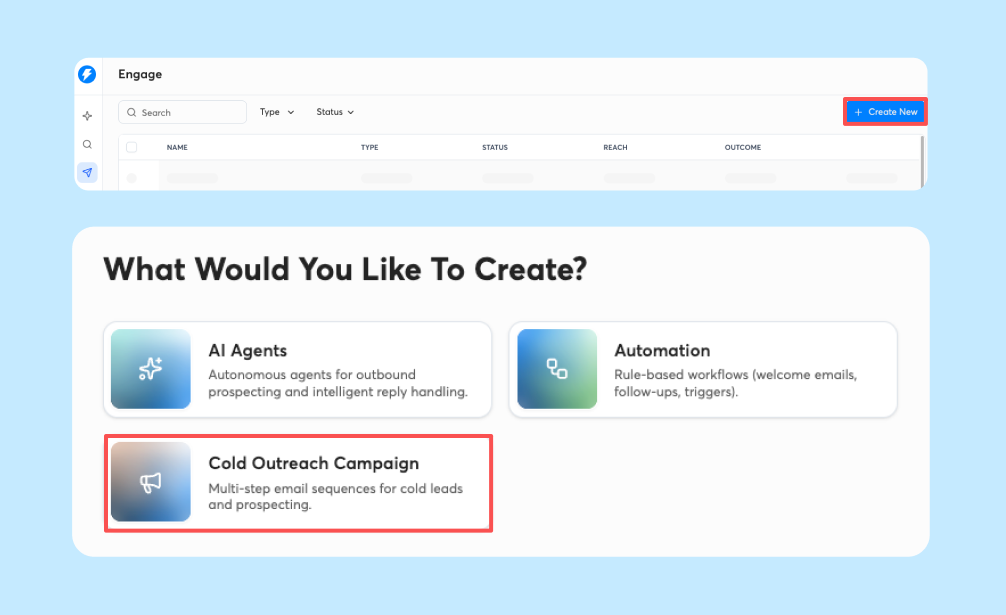
Instantly Engage campaign setup, pictured in the official Instantly Help Center. Vendor-provided interface image, not a screenshot from a DigiOffly test account.
🖥️ Ease of Use & Outreach Workflow
Start with the audience and campaign objective
Think about the first 300 people on your list rather than the first 30 email accounts you could connect. Say you sell booking software to independent clinics. Is the contact the practice owner or a clinician? Does your message explain a concrete workflow that changes for that person? Instantly.ai can schedule the touches, but it cannot supply the reason for the recipient to care. For a first campaign, write down the intended industry, job role, pain point, proof behind your claim and desired next action. Remove contacts who fall outside that definition. Keep a separate suppression record for opt-outs and existing customers. In the EU, do not assume a general B2B label automatically satisfies GDPR or local direct-marketing rules; get legal guidance for the countries you target. A small, defensible list is a better starting point than a database purchase followed by thousands of generic introductions. Only after the offer and lawful contact basis are clear does an outreach sequencer become a useful purchase.
Define a contact-limited outreach pilot
An Instantly trial should expose three separate bottlenecks: how many unique people you can load, how many messages you can send and how many human conversations your team can handle. Consider three carefully defined prospect groups of 300 contacts, each with its own relevant offer. Growth currently advertises room for 1,000 uploaded contacts and 5,000 outbound emails a month. That appears sufficient for 900 records, but three follow-ups per person could consume 3,600 messages before any resends or additional tests. You would still need to plan sending pace by account, validate addresses and monitor bounce and complaint levels. Run the campaign as a controlled pilot, not as a promise of inbox placement. Record valid replies and meetings, plus negative responses and reasons to stop. The results that matter are whether your offer resonates and whether reps can respond promptly. If a plan quota is reached before the test can finish, that is an honest signal to revisit scope or pricing, not proof you need more connected inboxes.
Assign list verification and reply ownership
Here is the handoff that often gets lost in cold-email platform demos. One person chooses the industry and verifies the records. A second checks the message claims, the contact basis and the suppression rules. Someone else may own domain authentication and monitor mailbox health. Then a named rep handles incoming interest. Instantly’s Unibox can simplify reply visibility, but centralizing a thread is not the same as resolving it. Define which statuses mean interested, not now, referral, wrong person and unsubscribe; make sure an unsubscribe cannot accidentally enter the next campaign. If you connect a CRM, map fields before enabling synchronization so reply status does not overwrite a salesperson’s notes. Run the process on ten non-sensitive sample records, including one opt-out and one bounced address. The sign of a usable setup is that the next owner knows what to do without searching through multiple inboxes. Buying more capacity will not repair a broken ownership chain.
🧭 How to Use Instantly.ai: Four Practical Steps
1. Define the right audience and legitimate outreach basis
Define one ideal customer profile and a legitimate outreach basis for your market.
2. Authenticate sender accounts and check reputation
Authenticate sender domains and review mailbox reputation before importing contacts.
3. Import a small list and set up follow-ups
Load a small clean list, set conservative pacing and create a genuine opt-out process.
4. Track negative signals and qualified replies
Track positive replies and meetings; stop campaigns that attract complaints or irrelevant responses.
🛠️ Key Instantly.ai Features & Practical Limits
📨 Connected Inboxes and Warmup
The current Outreach plans advertise unlimited connected email accounts and warmup. That is infrastructure convenience, not a guarantee that a recipient's provider will deliver the message. Reputation depends on mailbox history, authentication, targeting, pacing and complaint signals.
✉️ Multi-Step Sequences and Unibox Replies
Sequences can coordinate follow-ups, scheduling and a shared inbox. The useful measure is qualified human replies and meetings, not the number of automated steps executed. Auditing suppression lists and opt-outs must be part of campaign setup.
📊 Contact Allowances vs Monthly Sends
Growth lists 1,000 uploaded contacts with 5,000 monthly emails; Hypergrowth expands both counts substantially. Distinguish unique prospect records from messages sent, including follow-ups. A modest list with many steps can consume more sends than expected.
🔎 Lead Data, Enrichment and Separate Credits
Instantly also markets lead databases, enrichment and CRM capabilities. Those products have their own limits and billing arrangements; do not assume an Outreach subscription includes every contact-research feature shown on the website.
Instantly.ai Unlimited Email Accounts: What It Really Means
The most striking line on the Instantly Outreach price page is unlimited email accounts. That solves an account-management problem, not a sending-policy problem. A team may maintain separate identities for different legitimate business units, regions or client workspaces, and it is convenient to manage their campaigns centrally. But adding accounts does not make Gmail, Outlook or a recipient’s provider overlook a weak sender reputation. Check SPF, DKIM and DMARC alignment, the mailbox provider’s policies and the history of each sending domain before scaling. Avoid recycling damaged accounts or interpreting warmup as guaranteed deliverability. I would also track the recurring cost of acquiring, hosting and administering each mailbox, because the Instantly subscription does not make that infrastructure free. The practical test is simple: can the team identify which sender generated a qualified reply, and can it pause that sender safely if its bounce or complaint indicators deteriorate? If not, the unlimited-inbox headline is a distraction.
How Follow-Up Logic Affects Real Replies
An Instantly sequence can be useful precisely because it stops a rep from manually remembering every follow-up. It becomes harmful when follow-ups run after a person has answered, opted out or moved to a different owner. Take a two-step example: a short, specific first message about appointment scheduling and a later follow-up that adds one genuine example. The second message should not merely restate the first with a new subject line. Check the sequence’s stop conditions, timezone assumptions and whether replies in connected inboxes are recognized correctly. Set a sensible review interval rather than assuming more touches produce more business. Measure the number of qualified conversations per verified contact, not just total sends. A prospect who asks to be excluded is an outcome the system must handle immediately. For the team, the key question is whether Unibox and the sequencer make real conversations easier to manage without increasing unwanted mail.
Separating Unique Leads From Sent Emails
People often compare email tools using just one monthly number. Instantly makes that especially risky because uploaded contacts and emails sent are measured differently. Under the listed $47 monthly Growth outreach tier, 1,000 uploaded contacts and 5,000 monthly emails can support more than one message per prospect, but follow-ups still consume the send allowance. Hypergrowth lists 25,000 uploaded contacts and 125,000 emails a month on the monthly-billed offer. That is a large capacity increase, not a requirement for a new outbound business. In a planning sheet, put contacts in one column, intended touches in another, expected valid-address percentage in a third and the capacity required for replies and suppression in a fourth. Do not assume a 25,000-contact list is 25,000 reachable buyers. Segment and verify before importing. If your sales team can only conduct six discovery calls a week, paying for a six-figure message allowance may simply create more unworked conversations.
Extra Instantly Products That Change the Budget
Instantly markets Outreach alongside a separate leads database, enrichment credits, CRM capabilities and bundled offers. These categories can be useful together, but the product names make cost comparisons deceptively easy to get wrong. A Growth Outreach subscription should not be described as unlimited verified prospect data. Before checkout, write down where you will source the first 500 contacts, whether that data needs validation, which enrichment actions consume credits and whether your current CRM can receive the final reply status. Compare each add-on against an existing task rather than the vendor’s all-in-one marketing story. A company with a clean opt-in partner database may not need a new leads subscription at all. Another team might need enrichment more than higher sending capacity. The official Instantly pricing page distinguishes these lines and bundles; check it again when choosing a plan because allowances and packaging can change.
📨 Instantly.ai vs. Manual Outreach and Other Platforms
Unlimited connected inboxes do not mean unlimited outreach. Monthly sends, unique leads and external mailbox charges are separate constraints.
Warmup and account rotation can support operations, but providers still weigh authentication, recipient complaints and message relevance. No tool can promise inbox delivery or compliant prospecting in every market.
Compare Instantly, Smartlead and Lemlist on response handling, account management and total campaign costs. A smaller well-targeted pilot is more informative than the headline mailbox count.
👾 Email Deliverability & The Reality Check
The more senders an operation connects, the more carefully it needs to define what a successful campaign means. Open rates are unreliable where privacy features proxy image loads. Reply counts mix polite declines with purchase intent. Keep one small ledger of positive responses, meetings held, qualified opportunities and unsubscribes. A message that generates ten replies from irrelevant recipients can be worse than one that produces a single serious conversation. It also matters who can edit the global block list: agencies should not risk contacting a prospect who opted out of a previous campaign through another client or mailbox.
Cold outreach involves regulatory and reputational risk. CAN-SPAM, GDPR, national ePrivacy rules and provider policies may apply. Neither automated warmup nor mailbox rotation provides permission to contact people unlawfully. Avoid unverifiable deliverability promises and collect consent where required.
Run a limited test using verified contacts and narrow, relevant messaging. Measure reply quality, negative replies, hard bounces and actual booked conversations before increasing volume. Budget for domains, inboxes, prospect verification and staff time separately from the Instantly subscription.
Privacy, Consent and Data Retention
Cold-email software handles more sensitive material than a campaign title suggests: professional names, addresses, company attributes, replies and sometimes client-provided lists. Before sending, identify your lawful contact basis for each target market and check the relevant local rules, including GDPR and national ePrivacy requirements where applicable. CAN-SPAM and provider policies may also matter in other markets. Instantly’s ability to rotate accounts does not waive these obligations. Decide where unsubscribes are stored, how deletions propagate to a connected CRM, who can access imported lists and how long rejected leads remain in an export. When a client ends a contract, the agency needs a documented offboarding path. Ask the vendor for current data-processing and security terms if you have regulated or high-risk contact data. These are purchasing questions to resolve, not findings from a security penetration test of Instantly’s systems.
Test Your Suppression and Reply Workflow
Before launching a real campaign, stage five fictitious contacts and rehearse what should happen to each. One replies positively, another says no, a third opts out, a fourth bounces and a fifth gets referred to a new decision-maker. Run those messages through the reply inbox and any CRM connection. Can the right owner tell which campaign produced each response? Does the unsubscribe stop future touches across the appropriate audience? Is the bounce recorded without silently reusing the same address? This little rehearsal is more revealing than sending 2,000 messages to validate a new tool. Also check that a manually paused campaign stays paused and that follow-up rules do not reactivate it unexpectedly. Use test records, not real recipients, for the dry run. The goal is to verify safe operations and reporting, not to invent deliverability results. If your team cannot explain where a negative reply goes, fix the workflow before raising the send limit.
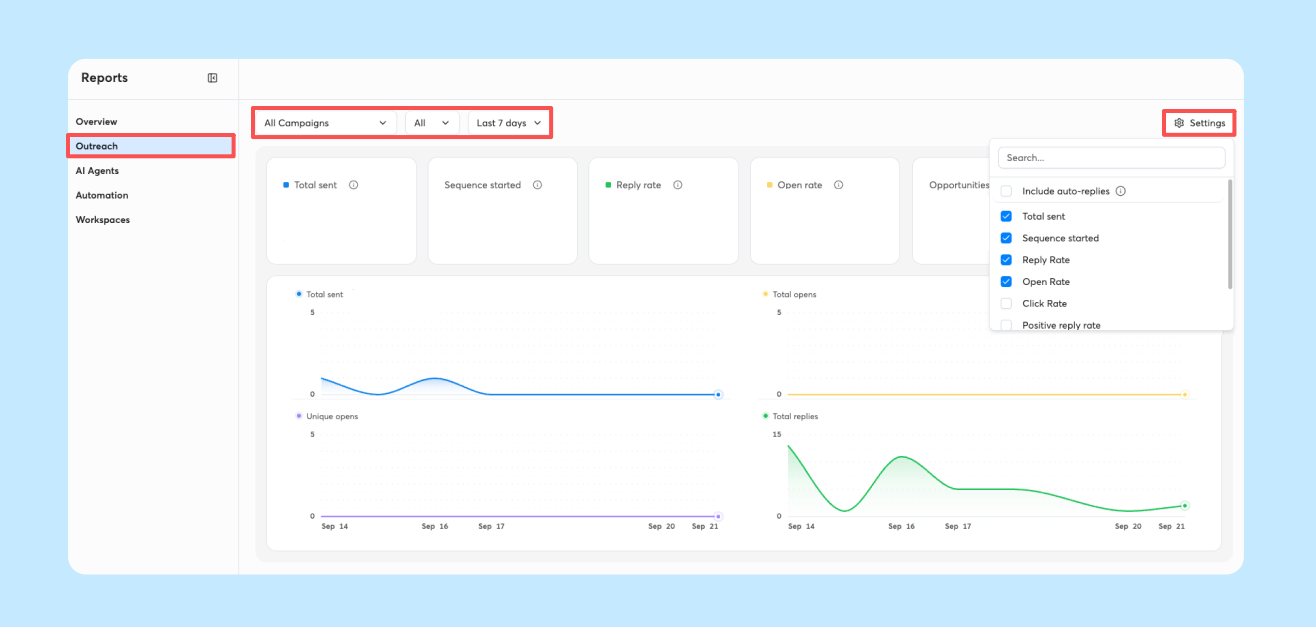
Instantly Reports example from official product documentation. Dashboard figures and interface elements are vendor illustrations, not DigiOffly campaign performance results.
💰 Instantly.ai Pricing Plans & Real ROI
| Plan | Advertised starting price / term | Published fit or allowance |
|---|---|---|
| Outreach Growth | $47/month on monthly billing | 1,000 uploaded contacts; 5,000 emails per month |
| Outreach Hypergrowth | $97/month on monthly billing | 25,000 uploaded contacts; 125,000 emails per month |
| Outreach Light Speed | $358/month on monthly billing | 100,000 uploaded contacts; 500,000 emails per month |
Instantly Outreach Growth Pricing: Contacts and Email Limits
At the time of this Instantly.ai pricing review, Outreach Growth is listed at $47 per month on monthly billing. The advertised operational figures are unlimited connected email accounts, unlimited warmup, 1,000 uploaded contacts and 5,000 monthly emails. Those allowances answer different questions. One thousand contacts restricts the size of a loaded prospect pool; five thousand sends limits messages including follow-ups. Even if you connect many inboxes, neither number becomes infinite. A freelancer contacting a handful of verified prospective partners might not get enough value from the subscription; a small agency that runs regular, narrow campaigns could. Add the recurring mailbox-provider cost and the time spent verifying data. Ask whether you can afford to pause a campaign when negative replies indicate poor fit, rather than trying to use every allowed email. Pricing can vary with billing term, region, tax and promotion, so confirm the actual checkout terms and do not confuse a yearly discounted equivalent with the month-to-month price.
Growth vs Hypergrowth: Which Instantly Plan Fits?
Hypergrowth is shown at $97 a month with monthly billing, alongside 25,000 uploaded contacts and 125,000 monthly emails on the public Outreach comparison. This is not merely a small step up in sends. It changes the scale of data that a team can accidentally mismanage. Before recommending it, I would ask for evidence that Growth’s contact or message allowance has constrained a successful, compliant campaign. If you are still rewriting the opening line every two days or have no process for fast reply triage, a bigger quota is premature. For a team serving several relevant verticals, Hypergrowth may provide convenient headroom, but it also demands clear segment ownership, unsubscribes across campaigns and a way to spot sender-specific trouble. Model two cases: your conservative month with one meaningful follow-up, and the busiest reasonable month with additional approved campaigns. Buy enough capacity for a measured workflow, not for an imagined contact list you have not verified.
Light Speed: Capacity and Higher Costs
The top self-serve Outreach option is branded Light Speed and listed at $358 per month on monthly billing in the current public comparison. It raises the published ceiling to 100,000 uploaded contacts and 500,000 emails monthly, and advertises its SISR infrastructure features. Those are infrastructure and capacity propositions, not evidence that a campaign will turn strangers into qualified meetings. For an agency managing many distinct businesses, account health and record separation become an operational and contractual concern. Who can see a client’s suppression data? How are replies assigned? What happens if the responsible rep is unavailable? Calculate monthly infrastructure, prospect sourcing, list verification and staff review alongside the software invoice. If you cannot identify a repeated, documented capacity problem in Hypergrowth, paying for Light Speed probably means optimizing for the wrong metric. Check current availability and the precise inclusions at checkout because bundled products and enterprise deals may have different terms.
Real Outreach Costs Beyond the Subscription
A realistic Instantly budget begins with at least five lines: outreach subscription, mailbox providers, domains and authentication, data verification and the hours spent answering replies. For example, if a founder adds eight commercial mailboxes, those accounts may each carry fees outside the outreach plan. Purchased prospect data can add its own recurring cost, and someone still must remove duplicates, outdated jobs and unsubscribed contacts. There is also the cost of human attention. A campaign that produces fifteen positive-sounding replies while the rep is away can waste the interest it generated. I would calculate cost per qualified conversation only after defining what qualifies: a relevant role, real need and permission to continue, not a tracking-pixel open. The denominator should include all these costs, not just $47 or $97. The calculation is illustrative; this review does not claim we ran a paid Instantly campaign or measured a conversion lift.
🎯 Who Should Use Instantly.ai?
Good for outbound teams managing several sending identities and repeatable campaign sequences. Less appropriate for businesses seeking an all-in-one relationship CRM or expecting automation to solve weak targeting.
Consider a two-person agency testing three industries with 400 validated prospects each. Their 1,200-person list exceeds the published Growth contact allowance even though their campaign volume may fit under 5,000 sends. The right response is not to buy more mailboxes. It is to separate experiments, remove bad records and model whether a higher tier produces enough incremental qualified conversations to pay for itself.
⚖️ Instantly.ai Alternatives: Smartlead, Lemlist & CRM Tools
Growth software comparisons lists Smartlead and Lemlist for alternative outbound models. For campaign planning read Notion and for marketing copy evaluation see Copy.ai.
Instantly vs Smartlead vs Lemlist: Outreach Workflow
Instantly vs Smartlead vs Lemlist should be compared by the work each platform owns. Instantly centers on coordinating outreach accounts, contact capacity, sequences and a unified response workflow. Smartlead is commonly evaluated for agencies with many sending accounts and client-specific routing needs; Lemlist is often shortlisted by teams that want more sales engagement and multichannel touchpoints. Those are reasons to trial a workflow, not declarations of a controlled winner. Map one campaign with the same contact records, approval rules and reply labels in each candidate. Check which tool creates unnecessary handoffs, which costs sit outside the headline price and whether the team can export its records. A team with an established CRM may prioritize simple delivery and reply capture; another may need native prospecting steps. Do not compare an entry Instantly plan with a premium competitor tier and call the price difference a saving. Match the actual task, quota and operational costs.
Agency Workspaces and Reply Ownership
When a consultancy manages separate client outreach programs, the hard part is not making a folder for each logo. The hard part is preventing contacts, approvals and reporting expectations from crossing boundaries. Imagine one client working with dental clinics and another selling booking services to the same market. The two teams might target the same people without realizing it. In Instantly, document who owns each campaign, how duplicate contacts are detected across authorized datasets and which supervisor reviews complaints. If the client uses a CRM, decide whether qualification notes belong there or in Unibox. Give the rep a clear service level for reviewing interested replies; do not let automation book a meeting that nobody has agreed to handle. I would run an offboarding rehearsal before accepting a larger account: can the client receive their authorized records, and can the agency revoke access without deleting information it must retain? Features matter only when they support these real client obligations.
How to Use Instantly.ai: A Four-Week Outreach Pilot
Week one should produce a list definition, approved message, data-handling decision and authenticated sender setup. Week two is a small controlled launch: verify bounce handling, stop rules and who responds in Unibox. During week three, examine qualified replies and objections rather than celebrating the total number of messages delivered. Have a sales rep read the conversations and identify which initial assumptions were wrong. In week four, make a plain-language decision: keep the plan, revise the audience, or stop outreach until the proposition improves. Four weeks is too short to treat performance as a universal deliverability benchmark. Different industries, recipient providers and contact quality create different outcomes. The useful result is whether the team can repeat a careful process and learn something about buyer needs. Track send count, unique reachable prospects, valid replies, meetings and explicit negative signals separately. An Instantly analytics chart is a prompt for questions, not evidence that the campaign was commercially successful.
When to Upgrade, Pause or Switch
My buying recommendation is deliberately conditional. If a small team already has reliable contact data, authenticated accounts and a person who can respond to interested prospects, Instantly may remove a genuine coordination bottleneck. If the team is still figuring out who its buyers are, it may only make bad assumptions scale faster. Upgrade when the published contact or monthly send quota repeatedly blocks useful, well-targeted work. Pause if the inboxes receive little qualified interest and your next step is another mass mailing without changing the offer. Compare alternatives if reply ownership, exports or client separation remain cumbersome after a realistic test. Finally, compare the cost of the software with the cost of the prospect research and sales follow-up that surrounds it. This is an editorial assessment based on vendor information and example workflows, not a claim that DigiOffly tested Instantly with thousands of real recipients.
📖 Closer Look: Six Questions About Instantly.ai
Why an unlimited-mailbox headline is not unlimited outreach
A team can connect numerous sender inboxes to Instantly and still run into a prospect storage limit before its campaign begins. These are separate types of capacity. One tracks the number of unique contacts held in the workspace, another counts messages sent during the billing period, and a third concerns the reputation and technical health of each sending identity. Follow-ups can consume multiple sends for one contact. An imported list of 1,200 contacts therefore does not become a 1,200-message campaign. The first pricing exercise is to map all three quantities before selecting a tier. Suppose a sales team tests three niches with four hundred verified prospects each. A lower plan that permits one thousand uploaded contacts creates an immediate constraint, even if the send allowance seems generous. The responsible answer is not to fragment consent or suppression records across unauthorized accounts. Instead, reduce the test set, sequence carefully, or upgrade when the larger pilot is justified. Every list also needs record-keeping for opt-outs and previous conversations. The economics depend on the cost of qualified discussions, not on an impressive count of connected mailboxes. A sending platform can organize operations but cannot establish that a particular recipient was legally or ethically appropriate to contact.
Deliverability begins before the automation dashboard
Cold email software cannot repair a fundamentally poor sender identity. Configure domain authentication, monitor hard bounces, and pay attention to complaints and policy notifications from mailbox providers. A new domain should not be pushed into large batches simply because a vendor offers warmup features. Warmup can be one component of sender preparation, but inbox placement changes with content, audience, authentication and recipient behavior. Any guarantee that a message will land in the primary inbox deserves skepticism. Treat each domain as an operational asset with a clear owner. Document who can change DNS records, who reviews authentication failures, and which person will pause a campaign when complaints increase. Avoid sending to scraped lists merely because addresses appear syntactically valid. Verification addresses one form of data quality; it does not create consent or a lawful basis for contacting a person. For Instantly, a useful readiness checklist includes validated recipients, reasonable send pace, relevant messaging, working unsubscribe instructions and a process for recognizing positive versus negative replies. When any element is missing, more sophisticated automation may magnify the problem.
A useful sequence is a conversation design, not a volume schedule
The common sales sequence begins with an introduction, a follow-up and a last attempt. But those steps should not be scheduled solely because software can send them. Define the legitimate reason for contacting a prospect and what evidence would justify following up. A message referencing an accurate business problem will often be more useful than a template that inserts a first name and a generic compliment. Test two concise approaches with a small list, using the same target criteria and transparent sender identity. Compare actual positive responses, not open rates that can be distorted by mail privacy systems. Most importantly, configure stop conditions. A negative response, unsubscribe, bounce or meaningful conversation should alter the future send path. Test whether a contact marked do-not-contact is suppressed across all relevant sequences and identities. If data also passes into a CRM, check whether the CRM state and Instantly state agree after a reply. Document responsibility for responding to people who express interest; an automated lead source still requires timely human follow-through. The buyer's goal is a relevant exchange, not a dashboard that turns every unanswered message into another scheduled touch.
What sales teams should measure after launch
Instantly-style campaign reports often make sending activity extremely visible: emails sent, opens, replies and campaign progress. The measurement problem is deciding which number indicates value. A reply might be an unsubscribe request, a request to contact somebody else or genuine purchase interest. Report these categories separately. A booked call is not a qualified opportunity unless the prospect fits the defined buyer profile, and a booked call that never occurs has different value from a completed discovery conversation. Join outreach data with CRM outcomes where legally appropriate and keep careful attribution. For an illustrative cost calculation, imagine $97 in software, $80 in mailbox expenses and $120 of data verification and operations during a month. If a campaign produces three qualified meetings, total direct and labor-related cost is $99 per meeting. That might be good or poor depending on deal value and conversion rates; the sample is mathematical, not a measured Instantly result. Compare this with the team using one ordinary mailbox and manual research. Pilot results should include negative-reply rates and time spent cleaning data. If scaling increases complaints or lowers relevance, volume growth does not represent improved marketing efficiency.
Instantly, Smartlead and Lemlist solve different shapes of work
An agency evaluating Instantly alongside Smartlead should examine client separation, mailing infrastructure, reply routing and how campaign state is managed when sender accounts change. Both may be evaluated for multi-inbox email operations, but differences in storage limits and optional services matter. Lemlist brings a different emphasis when reps combine email with LinkedIn or calling. For those teams, managing a conversation across channels can matter more than maximizing sending throughput. Comparing prices without identifying the channel model produces a misleading shortlist. Start with the actual sales motion. If one founder writes ten thoughtful messages per week, manual outreach may be preferable to subscribing to any of these platforms. If a team runs repeatable, lawful prospecting across thousands of records, specialized infrastructure may reduce operational errors. If each sale involves relationship-building across several channels, a multichannel workflow could have greater value than another email sender. Instantly is a tool for executing an already defined outbound process. Its value should be tested through customer relevance, reliable suppression and recorded opportunities, never through a promise of unlimited prospecting.
Segmentation is a relevance control, not a way around limits
When using Instantly for separate market tests, segment prospects by a genuine reason to speak with them. For example, a small software company might study independent design agencies, subscription retailers and remote support teams. The product proposition should be stated differently for each group only when their problems actually differ. The same generic sequence sent to all three audiences does not become targeted merely because the dashboard displays three campaign names. Create a written hypothesis for each group: what problem does it face, what evidence suggests the offer fits, and which response would count as useful interest? Keep the contact record authoritative across segmentation. If an individual appears in two lists, one opt-out must cover both campaigns and every authorized sending account. Test duplicates before import and use conservative messaging cadence. For each group, compare qualified conversations against the cost of research, verification, mailboxes and staff follow-up. A smaller group with meaningful fit can outperform a larger group of low-quality records, even if its send count looks unimpressive. Instantly may make the mechanics of follow-up easier, but it does not give the sender an exemption from privacy, platform or direct-marketing rules. The ethical and economic test is whether recipients reasonably benefit from the approach.
🧪 How Alex Wright Researched Instantly.ai
Alex Wright’s DigiOffly editorial assessment uses the official vendor pricing and product information, published feature descriptions and the workflow and cost considerations set out above. We distinguish those public facts from our own recommendations. We did not have a controlled end-to-end customer-account benchmark for this draft; any future hands-on findings must be added and labelled separately.
🏆 Final Verdict: Is Instantly.ai Worth It in 2026?
Buy Instantly for coordinated sending operations only after proving that your outreach message attracts relevant replies. Start with the smallest honest contact sample, record disqualified responses and account for external mailbox expenses. Adding automation before a team understands why prospects reply poorly merely makes the failure faster.

Frequently Asked Questions
How much is Instantly Outreach Growth?
The current public list displays $47 monthly for the Growth outreach tier; billing options and bundles can change.
Are unlimited inboxes the same as unlimited emails?
No. Growth has a 5,000-message monthly allowance despite advertising unlimited connected email accounts.
Does Instantly include leads in Outreach pricing?
The marketing site offers several product lines and credits. Confirm which lead data or enrichment is included in the selected subscription.
Will warmup guarantee delivery?
No service can guarantee inbox placement. Sender reputation, provider filtering and message relevance still matter.
Should small teams choose Hypergrowth immediately?
Only when verified contact volume and message allowance justify it; a narrow pilot usually reveals bottlenecks first.
🔍 Keep Going: From Outbound Prospecting to Better Conversations
Instantly can coordinate the sending, but a useful campaign still needs a clear message, an accountable reply owner and a realistic way to track work after the first positive response. These published DigiOffly reviews are grouped by the next job to complete.
The Instantly vs Smartlead comparison breaks down their real sending limits, contact-data costs and deliverability claims side by side.
1. Prepare useful outreach messages
- Writesonic review — Explore a draft-assistance workflow, then review tone, proof and accuracy before sending.
- Copy.ai review — Compare campaign-copy and short-form writing tools for tightly defined audiences.
- Jasper AI review — Examine brand-voice controls when multiple people prepare approved messages.
2. Organize replies and campaign work
- ClickUp review — Assign list checks, approvals and follow-up tasks to accountable people.
- Notion review — Keep research notes, customer segments and opt-out procedures documented.
- Canva review — Create supporting visuals for approved sales proposals rather than adding images to unsolicited emails.
3. Compare the broader software stack
- Growth & Marketing Software — Browse adjacent outbound and CRM tools without committing to a larger sending plan.
- SE Ranking review — Understand the separate SEO research and reporting workflow when prospecting and inbound search work together.
For our editorial approach to published features and illustrative scenarios, see how DigiOffly reviews software.