

Smartlead.ai — 2026 pricing and specifications: Pricing and plan terms checked against the vendor's public site on 10 October 2026. Figures are in US dollars where shown, and plans, limits, availability, taxes, billing periods and regional terms can change. Always verify on the official checkout page. Check the vendor’s latest plan terms.
A system can send half a million messages and still have nothing useful to say. Smartlead sells scale and delivery infrastructure, but the point where buyers get confused is much earlier: the base quota, stored contact count, verified prospect allowance and warmup quality are not interchangeable. A procurement team should model them separately, especially when several clients share an outbound operation.
In this Smartlead.ai review, Alex Wright examines where Smartlead.ai fits into a real team workflow, what published plan limits mean in practice, and when an alternative is the smarter purchase. This is a source-led editorial evaluation, not a claim that DigiOffly conducted a controlled live-account benchmark.
📊 Smartlead.ai Review Summary
| Question | DigiOffly editorial finding |
|---|---|
| Best fit | Outbound Infrastructure teams; suitability discussed below |
| Main buying criterion | Budget one representative outbound infrastructure workflow before upgrading |
| Current official plans | Base; Pro; Unlimited Smart; Unlimited Prime |
| Biggest caution | Check Base limits, subscription terms and integration requirements |
⚡ Quick Verdict: Should You Buy Smartlead.ai?
Smartlead is worth evaluating when campaign operations — multiple mailboxes, routing replies and managing large batches — are the actual bottleneck. If your team struggles to define its audience or book meetings from thoughtful messages, another sending dashboard is unlikely to fix the economics.
👍 What We Love
- ✅ Multiple Sending Accounts: Mailbox rotation can organize larger approved outreach workflows.
- ✅ Unified Reply Handling: Master Inbox lets a team triage replies without checking every sender separately.
- ✅ Campaign Automation: Sequences and follow-ups help enforce a documented sales process.
- ✅ Agency Capabilities: Higher tiers support larger contact volumes, more accounts and team operations.
👎 Where It Falls Short
- ❌ Limits Are Distinct: Stored contacts, verified addresses and monthly email sends are not interchangeable.
- ❌ Deliverability Requires Work: Warmup cannot compensate for poor lists, ignored opt-outs or inaccurate messaging.
- ❌ Agency Costs Accumulate: Sender provisioning, extra services and compliance controls need their own budget.
🏆 EDITORIAL VERDICT: BUILT FOR OUTREACH OPERATIONS

Best For: B2B sales operations and agencies that manage multiple sending accounts and need reliable reply routing.
🧠 What Is Smartlead.ai — and What Does It Actually Solve?
Smartlead focuses on running email outreach infrastructure and managing conversations across sender accounts. The subscription progression expands send volume, stored contacts, verified-address allowances and the level of sending infrastructure support. Agencies may value its account management structure, but that value depends on separating clients, handling opt-outs and understanding how optional services are billed. Its core strength is operational throughput rather than end-to-end relationship management.
🛠️ Smartlead.ai Features: The Details Behind the Headline
Mailbox rotation and warmup tiers
Smartlead rotates messages across connected accounts and offers different warmup pools by plan. Rotation helps distribute workloads; it cannot reverse damage caused by poor targeting or inaccurate address lists. Start with conservative send rates and monitor domain reputation.
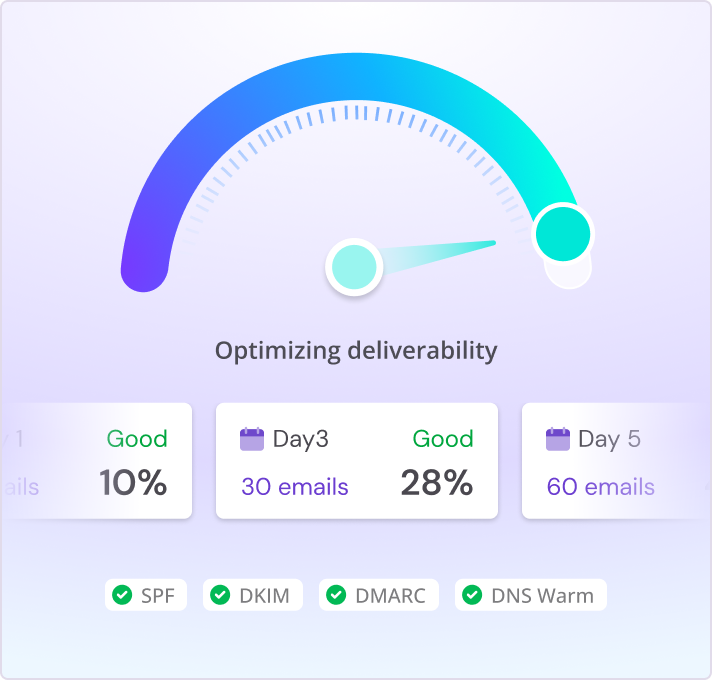
Product interface illustration from the official Smartlead website. This is a vendor asset, not a DigiOffly live-account screenshot or deliverability benchmark.
Master inbox and follow-up operations
Centralizing inbound replies matters because prospects should not receive another automated follow-up after saying no. Check how quickly suppression, replies and contact status propagate across campaigns and any linked CRM.
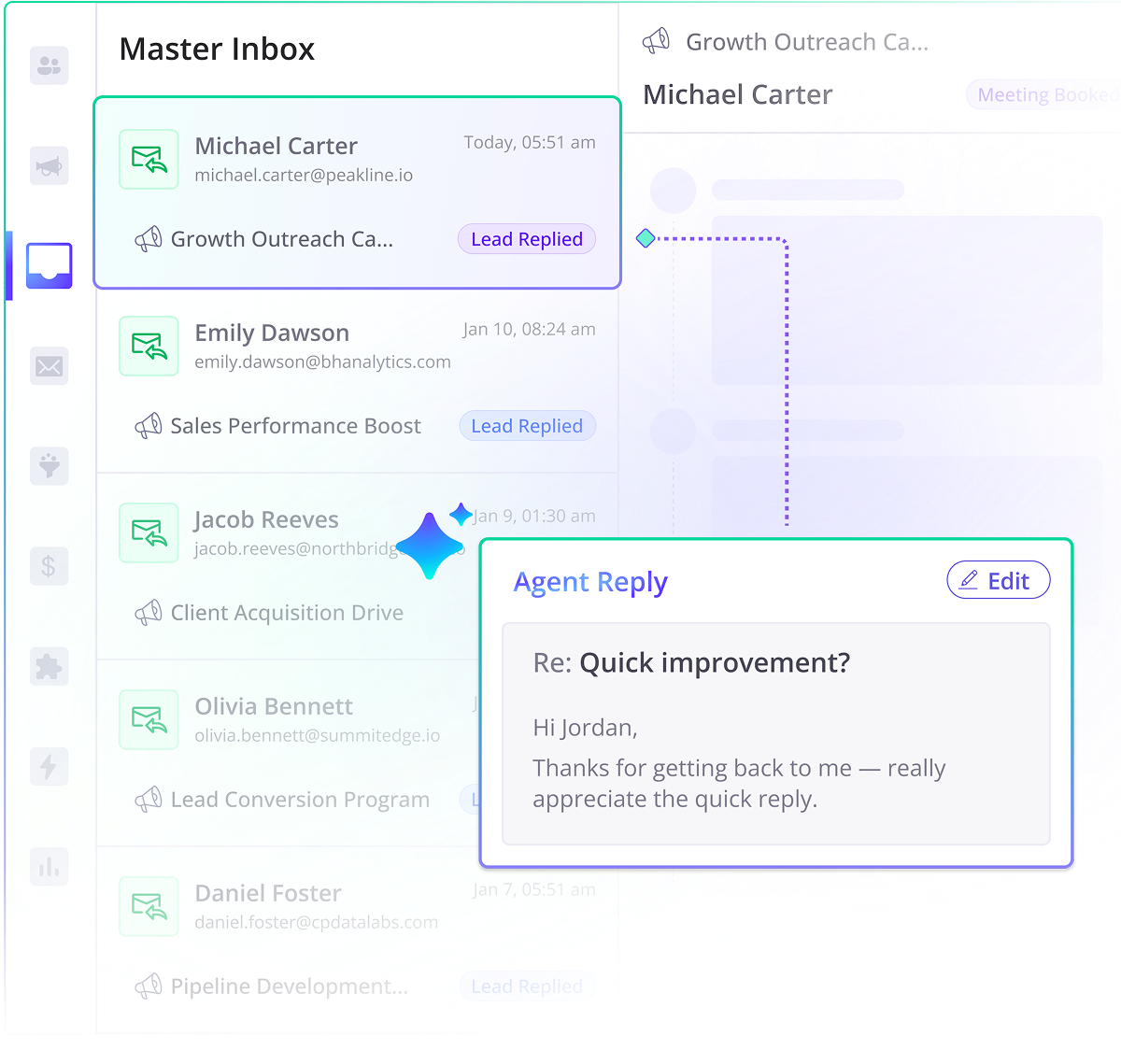
Product interface illustration from the official Smartlead website. This is a vendor asset, not a DigiOffly live-account screenshot or deliverability benchmark.
Prospect storage, verification and sends
Smartlead's published Base limit distinguishes 2,000 contacts and 6,000 sends. The site separately describes verified prospect allowances and add-ons; verify the itemized checkout before assuming verification is fully included.
Agency services and private infrastructure
Higher tiers introduce stronger sending infrastructure and workspaces. White-labeling, sender provisioning and deliverability diagnostics can add costs. An agency should calculate one transparent client-level margin instead of treating all workspace functionality as free.
🧭 How to Evaluate Smartlead.ai Before Paying
- Estimate monthly unique contacts separately from total messages and follow-ups.
- Compare Base and Pro limits against your real campaign calendar.
- Audit stop rules and unsubscribe handling for each client account.
- Trial one low-volume sequence and export reporting for independent review.
📨 Smartlead vs. Instantly: What Matters Before Scaling
A cold-email platform is an operations layer, not a shortcut around permission and relevance. Smartlead and Instantly both offer tools for managing campaigns across connected sender accounts.
Compare the number of unique prospects you can store, monthly message allowances, reply handling and agency features separately. An attractive sending cap is less useful if someone misses a genuine prospect response.
Pilot with synthetic contacts first, verify authentication and regional sending rules, then measure qualified replies and complaints rather than merely emails sent.
💰 Smartlead.ai Pricing in 2026: What You Really Pay
| Plan | Advertised starting price / term | Published fit or allowance |
|---|---|---|
| Base | $39/month | 2,000 stored contacts; 6,000 email sends monthly |
| Pro | $94/month | 30,000 contacts; 90,000 email sends monthly |
| Unlimited Smart | $174/month | Unlimited stored contacts; 150,000 sends monthly |
| Unlimited Prime | $379/month | 500,000 sends monthly plus higher-touch infrastructure |
🔬 The Procurement Question Most Teams Miss
A practical stress test is to disconnect one mailbox during a campaign and observe the system's response. Does it retry on the wrong sender, pause the contact or create duplicate follow-ups? Then change a prospect's status to 'do not contact' and see how quickly all sequences honor that instruction. This is not a performance claim about Smartlead; it is a test every multi-inbox buyer should run. High-volume agency operations also need client separation, exportable logs and staff permissions. Those controls may influence the choice between Pro, Smart and Prime more than a sending allowance alone.
⚠️ Hidden Costs and Practical Limits
Smartlead is infrastructure, not a compliance assessment. Review authentication records, opt-out handling, retention periods and the lawful basis for prospecting. The company itself distinguishes optional verification and specialized delivery services; do not hide these costs under a single 'all inclusive' statement.
Before switching vendors, audit the last campaign cycle: sends, verified contacts, bounce types, complaints, unique positive replies and time spent triaging inboxes. If the pain is shared-inbox operations, test that feature explicitly. If the pain is data quality, prioritize verification and segmentation.
🧮 A Realistic Buying Scenario
Take a small agency handling campaigns for four clients, each with 2,500 prospect records. Ten thousand records exceed Smartlead's Base storage even if the team sends slowly. Pro increases the allowance; the agency still needs to separate suppression lists and ownership by client. That process decision is more important than the headline that the plan allows unlimited sender accounts.
🎯 Who Should Use Smartlead.ai?
Best for operationally mature outbound teams or agencies that need scalable sender management. Not a fit for permissionless email blasting or companies shopping for a complete CRM and forecasting system.
⚖️ Smartlead.ai Alternatives and Trade-offs
Compare the outreach ecosystem in our Growth directory. Use ClickUp to track campaign operations and Notion for audited lists and playbooks.
🔐 Reliability, Privacy and Verification
🧪 How Alex Wright Researched This Smartlead.ai Review
Alex Wright’s DigiOffly editorial assessment uses the official vendor pricing and product information, published feature descriptions and the workflow and cost considerations set out above. We distinguish those public facts from our own recommendations. We did not have a controlled end-to-end customer-account benchmark for this draft; any future hands-on findings must be added and labelled separately.
🧭 The Real Buying Decision and Workflow
Start With the Reply That Nobody Owned
An agency can have ten perfectly authenticated domains and still lose a promising reply. Suppose a buyer responds to a campaign for Client A on Friday, while the account manager is handling Client B. By Monday, a scheduled follow-up has already gone out from another connected mailbox. That is not a deliverability problem; it is a broken handoff. For this Smartlead.ai review, I would first ask the team to draw the journey of a single reply: which campaign owns the contact, who sees the response, what stops the next scheduled email, and who records the outcome? Then ask whether Smartlead’s Master Inbox and sequence controls can support those rules without someone checking twenty separate accounts. If the existing workflow already closes the loop reliably, sending more messages is not a reason to buy another platform. Start with the operational failure the business can describe, not the claim that unlimited sender accounts will magically create demand.
A Smartlead Trial With Three Separate Clients
Take a fictional agency running outreach for three B2B clients. Each client has its own sending domain, exclusion list and owner for replies. Build a trial with synthetic contacts representing interested, uninterested, unsubscribed and bounced recipients, then create only the messages required to exercise the routing. No real prospects need to receive a trial campaign. Have one team member disconnect an account while another records how the campaign responds. Review whether a positive reply pauses the appropriate sequence, whether a block applies across relevant campaigns, and whether staff from one client can open records belonging to another. Next estimate ordinary volume from real historical reports: unique leads are not the same as messages, because one lead might receive several follow-ups. The platform’s Base tier lists 2,000 stored contacts and 6,000 monthly sends, so the pilot should calculate both counters. A successful demo needs to demonstrate reliable state changes, not just a large successful-send number.
Who Owns Sender Health, Replies and Opt-Outs?
The person setting up a Smartlead sequence is rarely the person who owns every consequence. A sales lead approves the offer and audience. An operations specialist maintains authentication and checks hard bounces. A client account manager decides whether a reply is qualified, and someone must update the CRM. Write those responsibilities beside the campaign before connecting more inboxes. For example, if a contact replies with a request to stop, the account manager needs a clear suppression procedure that the campaign operator cannot accidentally override. If a domain’s complaint rate rises, a named person must be able to pause sending without waiting for an administrator to return from holiday. Record where the final decision lives: Smartlead, the CRM or a client-controlled suppression registry. Duplicated responsibilities are as dangerous as missing ones. A shared inbox can make replies visible; it cannot resolve an approval process nobody has documented.
🔬 Feature-by-Feature Evaluation Without Guesswork
Mailbox Rotation, Email Warmup and Sender Safety
Smartlead’s mailbox rotation is useful when an authorized campaign genuinely needs multiple sender identities, but it needs a common source of truth for the contact. Picture a contact who appears twice after two spreadsheets are imported. The first copy replies, while the second still has an automated follow-up pending. Rotation alone does not tell the operator whether the copies represent one person. I would test import deduplication, campaign-level stops and the team’s suppression policy before increasing volume. The vendor says its plans include unlimited connected mailboxes, yet that does not mean unlimited safe sending: mailbox-provider restrictions, domain reputation and the plan’s total sends still apply. Warmup is included on all tiers, with Foundation, Growth and Premium pools depending on the plan. Its presence is not a guarantee that unwanted outreach reaches the primary inbox. The useful metric is qualified, permission-appropriate conversations per segment, alongside bounces and complaints.
Smartlead Master Inbox and Follow-Up Routing
A Master Inbox can save the team from checking individual sender accounts, but it also concentrates the risk of a missed assignment. Set up a sample reply that looks interested yet does not immediately request a meeting. Who recognizes it? Can the operator assign it to the right client manager without exposing Client A’s discussion to Client B’s team? Then simulate an opt-out and an out-of-office response. These should not trigger the same handling rule. During evaluation, note how long it takes to find the conversation history and whether a second employee can work out which message and sender produced the reply. A unified interface may look tidy while the ownership rules underneath remain inconsistent. I would prefer an inbox that lets a manager reliably stop inappropriate follow-ups over one that merely sorts every response into a new category. That is the practical distinction between reply management and an attractive dashboard.
Contact Storage vs Sends vs Verification Credits
Smartlead’s pricing table uses at least three different units that are easy to blur in a budget: stored contacts, monthly emails sent and verified-prospect email credits. On Base, the official pricing guide lists 2,000 stored contacts, 6,000 sends and 2,000 verification credits available through an add-on. Pro raises the first two caps to 30,000 and 90,000 and offers its verification allowance through an add-on. Unlimited Smart and Prime include larger verified-email allocations without that separate base charge. A sequence of four touches can consume four send units for a single contact, and a new CSV import can run into storage limits before monthly sends are exhausted. The vendor explains send counting in its trial-limit documentation. Build the estimate using a specific audience size, number of intended messages and verification work, not a rounded ‘cost per 100,000 emails.’ Verification reduces avoidable bounces; it does not establish that a person has consented to your offer.
Private Infrastructure and Client Workspace Limits
The phrase private infrastructure sounds like one feature, but agency procurement should ask three different questions. What sending infrastructure is actually included at the chosen tier? Which client-specific spaces cost extra? And who can see the resulting messages and reports? The Smartlead pricing page lists private infrastructure among Prime benefits, while client workspaces are add-ons on certain lower tiers. Its FAQ describes white-label client workspaces at $29 each per month on eligible plans, with three workspaces included in Prime. Those details matter to an agency managing several unrelated customers. Set up two synthetic clients and test whether an employee assigned to one can export another’s prospects or change its suppression rules. Review data processing and retention terms, particularly before putting personal data into any new platform. Extra infrastructure cannot fix an organizational decision about access, lawful contact or message quality. It may justify a subscription; it is not evidence that every campaign will land in an inbox.
💵 Plan Economics and Subscription Boundaries
Smartlead Base Pricing: $39 and 6,000 Monthly Sends
Smartlead Base is listed at $39 per month on monthly billing, with a lower annual-billing equivalent shown on the vendor’s pricing page. For a founder testing an approved offer, 2,000 stored prospects and 6,000 campaign emails may be plenty. The limits become more interesting when follow-ups are involved. Imagine 1,500 unique contacts with an initial message and two follow-ups: that could consume up to 4,500 sends, before retests or a second segment. The plan still needs room for new leads and for contacts kept for recordkeeping. Base uses the Foundation warmup pool and does not include everything larger teams expect from CRM access and client workspaces. Verification is a separate cost on this tier according to the vendor’s help center. I would begin with one audience, one lawful outreach scenario and an explicit stop rule. Paying more to gain volume before proving that the offer resonates only makes unsuccessful outreach more expensive.
Smartlead Pro Pricing: $94 and Agency Operations
Pro starts at the vendor’s advertised $94 per month on monthly billing, with 30,000 contact storage and 90,000 sends. On paper it looks like a dramatic expansion from Base. The meaningful reason to upgrade is more specific: a team consistently reaches its contact or message allowance while maintaining accurate lists, responsive inbox coverage and acceptable complaint levels. Pro offers a Growth warmup pool and CRM access, according to Smartlead’s documentation. Agency client workspaces and certain infrastructure features still require checking the add-on terms, so the price of the license is not necessarily the client-by-client total. Before moving several campaigns, ask whether the current constraint is sender volume, reply assignments or poor prospect targeting. Moving to Pro does not repair an inaccurate list or an offer aimed at people who cannot use it. Run a one-client pilot and compare genuinely qualified replies, not just the proportion of the new allowance consumed.
Unlimited Smart vs Unlimited Prime Pricing
Unlimited Smart and Unlimited Prime carry names that can obscure what remains limited. Smart currently lists $174 per month, unlimited contact storage and 150,000 monthly sends. Prime lists $379 per month, unlimited contact storage and 500,000 sends. Both have included verification allowances, which are not themselves unlimited; the official table lists 50,000 and 170,000 respectively. Prime also lists higher-touch services and three client workspaces. The step up is worth examining when an agency already manages a repeatable outbound process, knows which campaigns lead to qualified opportunities and needs a credible separation of multiple customer accounts. I would request a written total including any extra workspaces, mailboxes purchased through SmartSenders, optional placement testing and private-server costs. A half-million-send allowance is a capacity ceiling, not a performance forecast. Sending at that volume without attentive handling of replies, objections and opt-outs can create more problems than sales.
The Cost of Messy Data and Missed Suppression
The hidden cost I would put into a Smartlead budget is the time someone spends repairing campaign mistakes. An operator might import a file with inconsistent company names, while the copywriter has already built personalization around those fields. Another team member may keep a private opt-out spreadsheet that never reaches the sending platform. Neither issue appears in the subscription comparison. Set aside a review period before every new segment launches: inspect sample personalization, verify sending domains, check duplicates and confirm that suppression decisions are synchronized. Training should cover what happens when a recipient replies from a different address, an account is disabled or a client requests immediate removal of a record. Track the hours needed to correct those failures during the pilot. An extra administrative step that prevents repeated unwanted messages can be worth more than an automated function that shortens setup by a few minutes. Software ROI starts with work that actually disappears, not buttons that promise to automate it.
🔐 Risk, Data Quality, and Evidence
Client Data, Permissions and Sender Access
For an outbound agency, client data separation is not optional decoration. A campaign may contain names, business email addresses, company-specific buying signals and evidence of who asked not to be contacted. Those records can travel through lead-verification services, sending mailboxes, Smartlead, exports and a CRM. List each destination and identify who may access or delete a record before moving it. Test what happens when a contractor leaves halfway through a campaign: can their account be revoked without losing response history, and can a new manager continue the conversation without seeing unrelated clients? Keep suppression records available wherever a campaign could restart, subject to applicable retention and privacy rules. Ask the vendor for current processing and access-control documentation; do not mistake a product’s interface for a legal compliance certificate. Our editorial review is based on vendor information and operational analysis, not a security audit of Smartlead’s infrastructure.
Three Failure Cases to Rehearse Before Sending
A useful Smartlead rehearsal begins with a mistake. Prepare three fictional contacts: one who has opted out, one who answered positively and one whose address bounced. Put each contact into a controlled campaign with multiple synthetic sender accounts, then have a colleague simulate a reply arriving while the primary operator is away. The team should be able to show the exact event that stops subsequent messages, identify any duplicate record and assign a legitimate positive response to the correct manager. Try disconnecting one sender in the middle. Does the interface make an unresolved state obvious, or would staff discover it only after a duplicate follow-up? Record the evidence rather than assuming what the tool will do. This is an evaluation checklist, not a claim that DigiOffly performed these actions in a live paid account. If the organization cannot describe how to handle an opt-out before the test, fix the process before increasing the sending volume.
⚖️ Alternatives and Buyer Scenarios
Smartlead vs Instantly, Lemlist and Close CRM
The closest alternative to Smartlead for many teams is Instantly, not an all-purpose sales CRM. Both serve people managing cold-email campaigns across several sender accounts, and both require disciplined suppression and reply handling. I would compare their published plan limits, mailbox setup, verification costs and the steps needed to hand a qualified reply to a human. Lemlist becomes a different conversation when a sales team deliberately coordinates email with LinkedIn and calls. Close CRM belongs farther downstream if the problem is managing contact conversations, phone calls and deal progression after someone responds. These are adjacent workflows, not identical products fighting over one checklist. Test them with the same approved campaign scenario and the same definition of a qualified conversation. Beware comparisons based on how many messages a dashboard says it can send. A platform that makes it easier to stop a bad sequence may be better for the business than one that simply supports a bigger list.
How Agencies Should Roll Out Smartlead
Consider what happens when the agency’s best campaign operator takes a two-week holiday. Does the client account manager know which sender domains are active, where recent complaints were recorded and who can pause a sequence? If the answer depends on a personal spreadsheet, the account setup is not ready to scale. Document naming conventions for clients, campaigns and domains, then create a shared playbook for inbox assignments and suppression events. Grant permissions based on actual responsibilities; administrators should not be the default role for every contractor. Let a second employee operate one synthetic campaign using only that playbook. Ask them to locate the current sending quota, find a positive reply and explain what would stop the next follow-up. Their confusion is valuable feedback. Add another live client only when these basic operations survive a handoff. A new workspace should provide separation, not become another container of undocumented exceptions.
A Four-Week Smartlead.ai Trial Checklist
My preferred Smartlead trial has four checkpoints. During the first week, review the official plan terms and map the existing outreach process: how contacts are sourced, how consent or other lawful grounds are assessed, and what counts as a meaningful response. In week two, use synthetic records to rehearse deduplication, suppression, sender failure and reply assignment. In week three, let another employee repeat those scenarios without the original setup specialist helping them. Then examine the costs of the plan, any required verification add-ons, mailboxes and client workspaces. Week four is for a decision memo: did the tool make the approved workflow more reliable, and which limitations remain? Actual performance measures from the company’s existing lawful campaigns can provide context, but a four-week evaluation cannot prove universal deliverability or revenue uplift. A clear ‘not yet’ is a legitimate outcome if list quality and ownership are still unresolved.
When Is Smartlead.ai Worth Paying For?
I would put Smartlead on the shortlist for a sales operation that already understands its audience and needs a more organized way to manage several sender accounts, campaign schedules and incoming conversations. Its appeal grows when missed responses, duplicated follow-ups or fragmented sender management have become demonstrable costs. Before committing, choose between Base and Pro based on stored leads and send volume, then assess whether Smart or Prime adds genuinely required verification capacity, infrastructure or client separation. The Master Inbox deserves a realistic handoff test. So do suppression rules and the path from a reply to the CRM. None of this creates demand for a weak offer. If the company has barely tested whom it serves, a larger sending allowance may amplify uncertainty rather than resolve it. If it mostly needs a CRM, Close should be compared separately; if it wants a more compact email-sending workflow, examine Instantly. For me, the deciding question in this Smartlead.ai review is not how many campaigns the platform can launch, but how safely a real team can operate and stop them.
📖 A Closer Look at Smartlead.ai: Five Buyer Questions
Sender rotation helps operations only when state stays consistent
Smartlead is most interesting where one organization manages many sender accounts, but the presence of rotation raises a management question: which record tells the system that a particular person should not receive another message? If a lead replies in one mailbox, the team's suppression decision has to survive rerouting through others. Otherwise, a feature designed to keep work organized can produce the kind of repeated, unwanted contact that damages a company's reputation. This is especially consequential for agencies running separate campaigns for different customers. Build a test with fictional records and two connected test sender identities. Mark one record as unsubscribed, another as having replied and a third as a duplicate. Observe how each state changes future campaign steps, and inspect any shared inbox for inconsistencies. The purpose is not to trick the product: it is to confirm that the agency's operating rules remain intact when automation is busy. Keep client data separate, assign owners to global do-not-contact rules, and document what an account manager can override. Smartlead can be evaluated as infrastructure only when these controls are understandable. More connected accounts should never mean less accountability for the messages that leave them.
A contact quota is not a verification quota
Smartlead's published plans separate monthly sends from prospect storage, and they also describe address verification and optional infrastructure services. These are not interchangeable allowances. A team may have enough email sends but inadequate verified contacts; alternatively, it may hold many records that should not be messaged at all because the business relationship or legal basis is unclear. Plan capacity against clean eligible records rather than raw spreadsheet rows. Once records have been checked for accuracy, remove duplicates before using the tool's campaign counters. Take a hypothetical agency working with three B2B clients. The first has three thousand relevant contacts, the second four thousand and the third five thousand. The twelve thousand-row combined set may exceed an entry-level storage allowance. However, the correct response is not automatically to buy the largest plan. Determine how many records are actually active in the current period and how often contacts need to remain in the workspace. Test whether client workspaces and permissions keep both contact content and campaign statistics distinct. Ask how verification credits are debited, whether duplicates consume them, and what happens if a check fails. The true budget includes list hygiene and staff time as well as the vendor's advertised rate.
The operational value of the master inbox
A shared conversation dashboard is attractive because it can prevent interested prospects from being buried in separate mailboxes. The risk is that a unified inbox can obscure who owns the conversation or accidentally let staff from one client account see another client's correspondence. Test assignment rules and permissions before importing real prospect data. Create an example in which two team members try to act on the same reply. A trustworthy process should have one clear owner, a record of status changes and a straightforward way to halt automation while the human conversation develops. An agency manager should be able to identify the difference between a generic automated reply, an objection, a referral and a positive request for a meeting. Measuring all responses as equal inflates performance and can mislead renewal decisions. If Smartlead exports reply states to a CRM, examine whether the classification survives the transfer and whether the link points to the correct client record. Staff training is part of this reliability: a well-designed product cannot compensate for confusing internal definitions of qualified interest. Prefer actionable reporting with a small number of trustworthy categories over a dashboard with dozens of optimistic counters.
Deliverability maintenance is a recurring service, not a setup checkbox
For high-volume outbound, sender health needs weekly attention even after authentication and initial testing are finished. Review hard bounces, spam complaints, unusual declines in replies and provider messages about abuse or rate limits. A warmup pool or sender rotation feature may assist operations, but neither should be used as justification for pushing irrelevant messages to unwilling recipients. The agency should have pre-agreed conditions for pausing traffic and a person with the authority to do it. Keep the record in a durable client playbook so the rules do not disappear with a contractor. Cost the maintenance routine honestly. Verification, DNS administration, additional inboxes, reporting and compliance checks all use resources outside the headline Smartlead subscription. If an agency charges its customers for outreach management, the margin calculation should include that work. A cheaper software tier plus many manual repairs may cost more than a higher-priced service with the controls the team needs. Conversely, expensive sending capacity is wasteful when the customer has not established a credible message and target profile. Evaluate operational reliability by fewer mistakes and cleaner conversations, not by a record number of emails sent.
Where Smartlead fits compared with email and CRM products
Smartlead competes most directly with outbound platforms that manage campaigns and sender infrastructure. Instantly is an important alternative for teams comparing connected accounts, contact limits and campaign execution. Lemlist becomes more relevant when the team must also coordinate LinkedIn outreach and calling rather than treating email as the primary channel. A CRM such as Close or Pipedrive serves another responsibility: tracking longer-term conversations, forecasting qualified deals and preserving customer history. Software buyers should not compare these categories as though they are identical replacements. A practical procurement grid starts with the decision owner. The deliverability lead may prioritize account health and routing, the agency lead may need clean client separation, and sales management may care about the handoff to meetings and opportunities. Give each role one controlled task and compare the same task across alternatives. Model contact storage, sending volume, verification, staff seats and any add-ons separately. When a platform satisfies one role but leaves another dependent on brittle exports, include the integration cost. Smartlead may be the right execution layer without being the place to maintain the entire customer relationship. That distinction usually makes both budgeting and governance clearer.
Client isolation should survive exports, reporting and staff changes
An outreach agency must protect each customer's data and reporting context, not just give separate campaigns different titles. Before evaluating Smartlead at scale, design a sample organizational structure with distinct client ownership, sender domains and suppression policies. A staff member assigned to Client A should not accidentally see Client B's lead list or email conversations. Likewise, a client-facing export should not contain a pooled total that mixes unrelated campaigns. Check the exact plan's workspace and role capabilities instead of assuming every permission control is available at every price. Test what happens when an account manager leaves. Can administrators reassign campaigns without exposing personal credentials or losing response history? Is there a documented way to revoke access and preserve the customer's own records? Review the export format for contact status, opt-outs and conversation history, and ensure the team can reconcile it with the CRM. A system that makes sending easy but hides ownership changes may create an expensive exit problem. During procurement, involve an agency operations lead, not only the employee most excited about automation. The output to value is a compliant, traceable client workflow with accurate results. A high total email allowance has little value if the organization cannot safely manage the people and accounts behind it.
🏆 Final Verdict: Is Smartlead.ai Worth It in 2026?
For agencies already operating compliant outbound campaigns, Smartlead deserves a pilot centered on inbox routing and campaign governance. An early-stage founder should avoid paying for the higher tiers until customer targeting is proven. The published sending allowances are ceilings to plan around, not goals that a responsible campaign should rush to reach.

Frequently Asked Questions
Is Smartlead Base really $39 a month?
The official pricing page lists Base at $39 on monthly billing; confirm any verification or infrastructure add-ons.
How many messages can Smartlead Pro send?
The advertised Pro allowance is 90,000 sends a month, subject to current plan conditions and responsible pacing.
Does Smartlead charge per connected inbox?
It advertises unlimited connected email accounts, but sending volumes, storage and optional infrastructure remain limited or separately billed.
Is email verification included?
The pricing documentation separates verification and related add-ons; examine your selected tier’s precise allowance.
Is Smartlead safer than manual outreach?
Automation is not intrinsically compliant. Teams still need a lawful contact basis, relevant messages and working suppression lists.
🔍 Keep Going: From Outreach Lists to Real Conversations
After a prospect replies, the send count stops being the interesting metric. Compare the campaign tool, the quality of the approved message, and the system that owns the next action. These related reviews answer those three distinct questions instead of recommending more subscriptions by default.
For a side-by-side breakdown of billing, agency workspaces and sending infrastructure, see our Instantly vs Smartlead comparison.
1. Compare the outreach and CRM handoff
- Instantly.ai review — Compare mailbox coordination and send limits against Smartlead before switching tools.
- Close CRM review — Map positive replies to scheduled calls, deal records and a named sales owner.
- Growth & Marketing Software — Review the wider sales and marketing software category before adding tools.
2. Improve approved messages before launch
- Copy.ai review — Draft tailored opening messages, checking claims and consent before sending.
- Writesonic review — Compare supporting marketing-copy workflows before launching an approved sequence.
3. Give every response an accountable owner
- ClickUp review — Assign follow-up tasks, technical checks and delivery deadlines.
- Notion review — Maintain approved templates, client-specific suppression rules and test notes.
- Canva review — Create approved supporting diagrams and proposal assets when a lead asks for more detail.
For a separate inbound acquisition strategy alongside compliant outbound, read our SE Ranking review on SEO research, audits and reporting.
See DigiOffly’s software review methodology for the difference between vendor specifications, sourced editorial analysis and controlled hands-on testing.