

Pricing and product documentation checked on October 29, 2026. This Railway review uses published vendor material and publicly accessible screenshots, not an authenticated customer account. Features, service quotas and billing terms can change. See the official Railway pricing source before buying.
Railway streamlines deploying developer services, but resource-based billing, persistent state and service limits require more attention than the simplicity of the initial deploy button suggests. The Railway review tests the distance between an easy first deployment and a supportable application. Persistence, resource usage, environment isolation, observability and rollback are the practical concerns beneath the simple interface.
This Railway review follows a service from Git-connected deployment through restart, log inspection and recovery. A short setup experience is only part of the choice; persistent storage, resource use and rollback deserve equal attention.
Some DigiOffly links may earn a commission at no added cost to readers. Published vendor features and price terms are examined independently of those links.
📊 Railway Review Summary
Railway makes it straightforward to connect code to a deployed service, but keeping it running requires decisions about database persistence, environment variables, scaling and rollback. Its included usage credits are not the same as an unlimited monthly infrastructure plan.
💰 Railway plans at a glance
| Plan | Official entry price | What to verify |
|---|---|---|
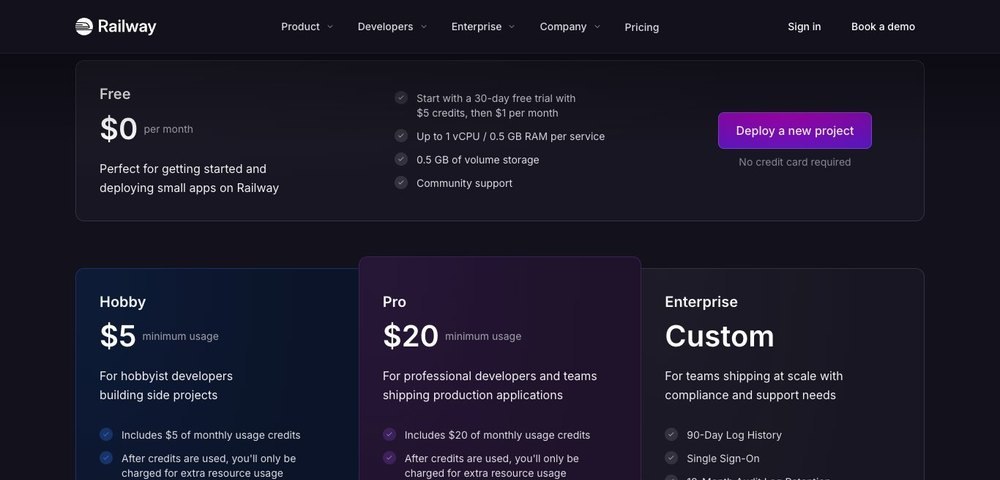
| Free | $0 | Free plan with $1 of monthly resource credit; the introductory Trial has separate terms |
| Hobby | $5 minimum usage | The $5 monthly subscription counts toward resources; above that, pay actual usage |
| Pro | $20 minimum usage | The $20 monthly subscription counts toward resources, with additional usage metered |
| Enterprise | Custom | Enterprise resources and compliance terms |
⚡ Verdict & Deployment Fit
A developer can launch a Railway service from a repository in minutes. The harder question is whether the same environment can handle secrets, persistent state and an unexpected restart without manual intervention.
From repository to running service
Railway can simplify deploying an app from source with managed infrastructure. The developer still decides how the service handles state, secrets and unhealthy deployments. Railway app hosting removes some initial setup work, but the application still needs backups and an accountable release owner.
Railway streamlines the initial transition from a source repository to a running cloud service by abstracting container build mechanics, provisioning networking, and automating TLS termination behind a minimal interface. However, this deployment convenience shifts architectural responsibility entirely onto the engineering team, who must explicitly configure how instances handle ephemeral filesystems, manage encrypted environment variables, and respond to failed health checks. A common implementation trade-off involves relying on default container restart policies without defining proper liveness probes, which can mask intermittent memory leaks or deadlocks. This approach is most useful for rapid prototyping, staging environments, and stateless microservices where operational overhead must remain minimal. For production, test a staging environment with separate credentials, an unhealthy deployment and a controlled increase in traffic.
Ideal workloads and boundaries
Personal projects, internal tools and suitable production services may benefit. Highly specialized networking or compliance requirements call for more investigation.
Personal projects, internal tooling suites, and moderately scaled production services benefit significantly from streamlined deployment workflows and rapid environment provisioning. Conversely, applications demanding highly specialized low-level networking configurations, localized hardware accelerators, or rigorous industry compliance certifications require deeper infrastructure investigation beyond standard managed offerings. A distributed database has placement and network requirements that a quick deployment demo does not demonstrate. Confirm regions and persistence first. These boundaries are especially useful when determining whether a project belongs on a flexible hobby tier, a team-oriented Pro setup with custom resource minimums, or a tailored Enterprise plan. Buyers must carefully verify that the platform’s networking boundaries, regional availability, and security isolation mechanisms align strictly with their internal governance mandates and architectural requirements before production rollout.
What simplicity hides
An easy successful deploy does not prove database resilience, recovery time, predictable egress cost or safe release practices.
Achieving an instantaneous successful deployment via a single click provides a false sense of security, as it conceals underlying risks related to database resilience, long-term recovery times, and unexpected egress bandwidth costs. An easy initial setup often masks inadequate backup automation, leaving stateful services vulnerable to silent data corruption or slow catastrophic recovery loops under high traffic loads. This lack of upfront visibility becomes critical when traffic surges drive up metered overage charges or when automated release practices push breaking schema migrations without proper staging verification. Such transparency gaps are most dangerous during unexpected regional outages or rapid scaling events where predictable infrastructure behavior is paramount. Technical evaluators should verify automated backup retention policies, test disaster recovery procedures, and audit egress pricing structures to prevent unpleasant financial and operational surprises down the line.
🚀 Build & Deploy Pipeline
A build that succeeds on one branch may ship the wrong configuration to production. Railway projects, environments and source integrations should be tested with a deliberate failed deploy and a gated release.
Connecting a Git repository
Source deployments should use the intended branch and a scoped connection. Confirm that a pull request cannot inadvertently deploy secrets to production. The Railway app GitHub connection should be restricted to the intended repository and deployment branch.
Connecting a remote Git repository to a cloud deployment pipeline requires strict branch scoping and least-privilege repository permissions to prevent unauthorized code execution and secret leakage. Problems arise when automated pull request previews inadvertently inherit production-grade environment variables, exposing sensitive API keys or database credentials to non-production build logs. Scoped connections and dedicated deployment branches are exceptionally useful when multiple developers collaborate on a single repository while maintaining strict separation between staging and production environments. Buyers must verify that webhooks, repository access tokens, and pull request triggers are configured to restrict automatic deployments from untrusted forks or unauthorized branches, thereby protecting the core pipeline from supply chain vulnerabilities and accidental secret exposure.
Build configuration and logs
Build failures and runtime failures need different responses. Record how environment configuration is reproduced after a fresh project creation. A Railway deploy Docker workflow should pin the build configuration and check that runtime secrets never appear in logs.
Distinguishing between build-time compilation errors and runtime execution failures is essential for maintaining a reliable deployment pipeline and minimizing service downtime. When a build fails due to missing system dependencies or incompatible runtime versions, developers must inspect isolated container build logs, whereas runtime crashes demand deep log aggregation and APM tracing. A common implementation tradeoff involves hardcoding configuration values directly into deployment scripts rather than relying on an externalized environment management strategy, making clean reproduction across fresh project recreations difficult. These structured logging and configuration practices are vital during incident triage and rapid disaster recovery scenarios. Engineering teams should verify how the platform exposes historical build logs, retains runtime crash traces, and facilitates reproducible environment bootstrapping when provisioning redundant staging or production clusters.
Rollbacks and deployment history
A rollback mechanism is useful only if schema changes and external dependencies remain compatible with the previous application version. A Railway deploy GitHub integration is convenient, but a code rollback may not reverse an incompatible database migration.
A platform-level rollback mechanism is only effective if the underlying database schema changes, API contracts, and external dependencies remain fully backward-compatible with the reverted application version. Reverting a broken deployment without accounting for destructive database migrations—such as dropped columns or modified tables—will inevitably trigger cascading runtime exceptions in the older code. A typical failure mode happens when teams treat rollbacks as a universal safety net, ignoring the complex interplay between stateless application code and persistent state layers. This feature is exceptionally useful for quickly reverting unintended UI regressions, logic bugs, or faulty configuration updates during active monitoring windows. Buyers must verify how quickly historical deployment artifacts can be restored, whether database snapshot integration is supported during rollbacks, and how migration versioning is managed across releases.
🗄️ Services, Storage & Networking
A container can be replaced while a persistent volume or managed database retains data. Teams should identify the actual recovery owner and avoid treating the convenience of an attached service as a backup plan.
Databases and persistence
Containers can be ephemeral; stateful workloads need volumes or managed external storage with backups. Define responsibility clearly. A Railway app Postgres setup needs a tested restore path and clear policies for persistent volume ownership.
Default container instances operate on ephemeral filesystems, meaning that any uncommitted local data is permanently lost whenever a container restarts, scales, or migrates across nodes. Stateful workloads such as relational databases and caching layers require persistent volumes or managed external storage backed by automated, routine backups to guarantee data integrity. A frequent architectural pitfall involves deploying stateful components onto ephemeral storage without configuring external volume mounts, resulting in catastrophic data loss during routine infrastructure updates. This structured approach to persistence is critical for production databases, user uploaded asset stores, and transaction ledgers where data durability is non-negotiable. Technical buyers must verify the reliability of attached storage volumes, check automated backup frequencies, and establish clear operational boundaries regarding who manages database maintenance and point-in-time recovery tasks.
Private connectivity and endpoints
Evaluate private service networking, public ingress, authentication at edge and outgoing traffic charges for the actual architecture. Railway web hosting can expose a public endpoint, while internal services should use private networking when possible.
Private networking and public ingress handling on Railway determine how services communicate internally versus how they expose public endpoints to the internet. Teams building microservices benefit from private service networking to route inter-service traffic securely without incurring public bandwidth overhead, whereas public ingress is essential for customer-facing web applications and APIs. Authentication at the edge should be configured using robust API gateways or middleware rather than relying solely on platform-level defaults. Outgoing traffic charges can accumulate rapidly if data-intensive payloads or large file transfers are routed inefficiently across external networks. A concrete failure mode involves unauthenticated internal endpoints leaking sensitive data due to misconfigured service discovery variables. Architectural usefulness shines when isolating backend databases from public exposure while keeping webhook receivers publicly reachable. Buyers should verify egress pricing tiers, custom domain SSL provisioning mechanics, and how private networking handles cross-service discovery under high throughput.
Multiple environments
Keep development, staging and production isolated. Service variables and external API credentials should not be copied indiscriminately.
Maintaining strict isolation across development, staging, and production environments prevents unwanted data pollution and unauthorized configuration leaks. Copying service variables and external API credentials indiscriminately across these tiers often leads to staging environments writing to production databases or test keys expiring prematurely. Teams benefit from multi-environment setups when testing breaking database migrations or feature flags prior to releasing them to end users. Problems arise when a developer hardcodes a production database connection string into a shared staging configuration file, causing accidental record corruption. Railway assists by segmenting environment variables per project deployment stage, though developers must manage variable hygiene. Buyers should verify how environment promotion handles secret rotation, whether environment-specific variables can be locked down with role-based access controls, and if audit logs track who modified production secrets.
Workflow roles compared
| Capability | What Railway contributes | What the team must own |
|---|---|---|
| Databases and persistence | Containers can be ephemeral; stateful workloads need volumes or managed external storage with backups. Define responsibility clearly. | Roles, test data, validation and escalation |
| Private connectivity and endpoints | Evaluate private service networking, public ingress, authentication at edge and outgoing traffic charges for the actual architecture. | Configuration review and failure handling |
| Multiple environments | Keep development, staging and production isolated. Service variables and external API credentials should not be copied indiscriminately. | Access, recovery and documentation |
📈 Reliability & Operations
Resource ceilings, health checks and log retention have different implications for development and production. A realistic pilot introduces a crashing worker and a missing dependency, then checks whether alerts are actionable.
Scaling replicas and limits
Free, Hobby and Pro have different resource ceilings and replica allowances. The application may still need health checks and backpressure controls. A Railway deploy NodeJS service still needs readiness checks and memory limits for traffic bursts.
Resource ceilings, replica allowances, and scaling thresholds vary significantly across Railway subscription tiers, impacting how applications handle traffic spikes. The Free, Hobby, and Pro plans enforce distinct limits on CPU, memory, and concurrent execution instances that dictate whether a service can autoscale smoothly. Even with platform-level scaling, applications often require robust health checks and backpressure controls to prevent cascading failures when downstream dependencies saturate. This feature proves useful when handling predictable traffic surges or isolating resource-heavy background worker jobs from core web traffic. One risk involves a memory leak exhausting a service container limit, causing repeated OOM kills and restart loops during peak traffic hours. Buyers should verify maximum replica counts per service, how horizontal autoscaling triggers are configured, and whether memory limits can be adjusted dynamically without triggering deployment downtime.
Logs and observability
Railway log history is bounded by plan. Sentry or Datadog may supply richer debugging when production incidents outlive the local retention window. A Railway deploy Django workflow should retain enough logs to diagnose delayed background task failures.
Observability and log history retention on Railway are bounded by the active subscription tier, meaning historical debugging data eventually rolls off. When production incidents outlive the local platform retention window, teams struggle to diagnose intermittent bugs without external telemetry providers like Sentry or Datadog. Richer debugging tools become especially useful when tracking asynchronous background job failures or transient network timeouts across distributed services. One risk involves a silent application crash occurring outside the active log buffer window, leaving engineers with no stack traces to determine root cause. Railway provides immediate stdout logging streams for live tailing, but long-term compliance and historical analysis require third-party aggregators. Buyers should verify exact log retention limits per plan, export capabilities to external log sinks, and whether metric dashboards offer granular CPU and memory utilization graphs.
Incidents and restore plans
Test a failing dependency, a crashed service and a bad migration. Decide whether the team can recover without a platform specialist present.
Disaster recovery preparedness requires proactively testing failing dependencies, crashed container instances, and botched database migrations before a real outage strikes. Deciding whether a development team can recover autonomously without a platform specialist present depends heavily on documented runbooks and automated backup verification. These restore plans are critical when a bad schema migration corrupts production data or an external API provider experiences a prolonged outage. One risk involves discovering during an incident that database snapshots were never scheduled or that restoration scripts fail due to unaddressed dependency orderings. Railway manages underlying infrastructure resilience, but application-level state recovery remains the team’s responsibility. Buyers should verify automated backup frequencies, point-in-time recovery windows, and whether database clones can be spun up quickly for staging disaster recovery drills.

💰 Plans & Billing
Free, Hobby and Pro have published usage allowances, but CPU, memory, storage and egress are metered. An idle service can consume resources even when user traffic is low; forecast those baseline costs separately.
Free allowance and trial nuance
Railway advertises a 30-day trial with credits, then a small Free allowance. Confirm current account eligibility and resource constraints.
Evaluating Railway requires understanding the transition from the initial trial phase to the entry-level Free tier allowance. The platform typically structures onboarding around a 30-day trial with credits, followed by a limited monthly credit allowance on the Free tier. This setup proves useful for validating basic proof-of-concept projects, small hobby scripts, or developer sandboxes without immediate financial commitment. A common friction point or failure mode occurs when a dormant project unexpectedly consumes trial credits due to persistent background tasks or attached storage volumes. Account eligibility rules and resource ceilings can also shift based on historical billing profiles or workspace ownership transfers. Buyers should verify current account eligibility criteria, exactly what happens to deployed services once monthly free credits expire, and how usage meters notify developers before hitting zero-balance cutoffs.
Hobby and Pro minimum usage
Hobby has a $5 monthly usage minimum with credits; Pro has a $20 usage minimum and corresponding credits. Resource use beyond them is charged separately. Railway free hosting allowances should be separated from the Hobby or Pro subscription’s metered resource use.
Subscription billing models on Hobby and Pro tiers rely on monthly usage minimums paired with corresponding credit allocations, rather than flat-rate fees. The Hobby tier incorporates a five-dollar minimum usage structure with included resources, while the Pro tier features a twenty-dollar minimum usage threshold and team-oriented collaboration features. Resource utilization exceeding these included baseline credits is billed separately as metered overage on the next invoice. This model benefits teams that want predictable baseline billing combined with elasticity for fluctuating workloads. A frequent budgeting failure mode involves abandoning test deployments that silently consume metered resources above the minimum credit threshold, leading to unexpected invoice spikes. Railway automates usage tracking, but engineers must monitor scaling limits. Buyers should verify exact overage pricing rates per gigabyte of RAM and CPU hour, how billing alerts are configured, and team seat pricing rules.
Compute and storage meters
CPU, memory, volumes and egress can add costs. An always-on service may consume credits even when it processes little user traffic. Railway app Docker workloads consume CPU and memory even when a deployment involves no new source commits.
Resource consumption on metered infrastructure directly impacts monthly expenditures because CPU, memory, persistent volumes, and outbound egress are billed continuously rather than packaged into a flat tier. An always-on service running on the platform will steadily consume credits even during low-traffic windows when it processes minimal user requests, turning idle background workers into unexpected cost drivers. For instance, a background cron job that sits dormant for hours but retains allocated memory will still accumulate resource charges throughout the billing cycle. This architecture is useful for persistent microservices or continuous listeners that require constant uptime without cold starts. Before committing production workloads, buyers should verify how resource utilization scales under sustained loads and audit whether idle services can be safely scaled to zero or transitioned to ephemeral execution models to prevent surprise overages on metered tiers.

⚖️ Alternatives & Integration
Supabase can supply PostgreSQL while Railway runs an application, and GitHub can gate deployment from a reviewed commit. The integration boundary is a credential and rollback decision, not only a convenient connect button.
Railway versus Firebase
Firebase packages app-oriented managed services, while Railway deploys general-purpose application workloads. Compare who operates the database and runtime.
Firebase packages app-oriented managed services with integrated client SDKs, whereas Railway deploys general-purpose application workloads directly from source repositories or containers. This fundamental difference shifts operational responsibilities: Firebase manages serverless backends and database infrastructure internally, while Railway grants direct control over the underlying runtime environment and execution lifecycle. Problems arise when developers treat a general-purpose PaaS like an opinionated mobile backend, leading to misconfigured networking or unhandled connection pooling when querying databases directly from client applications. This distinction becomes critical when your application requires custom reverse proxies, background daemons, or non-standard language runtimes that lack native client SDK support. Technical stakeholders must verify who maintains database patches, container security updates, and runtime scaling logic before deciding whether an app-centric platform or a general container host better fits their engineering constraints.
Railway with Supabase
Supabase can act as an external managed database. This can separate responsibilities but requires credential and network coordination.
Integrating Supabase as an external managed database alongside Railway separates database administration from application hosting, allowing teams to leverage specialized PostgreSQL tooling without managing the underlying database cluster themselves. However, splitting infrastructure across disparate providers introduces coordination challenges around secure environment variables, cross-region network latency, and connection limit exhaustion during traffic spikes. If application containers fail to pool database connections correctly, rapid container scaling can instantly saturate the external database’s connection pool, causing cascading timeouts across all deployed services. This setup is particularly useful when applications demand advanced PostgreSQL extensions, managed backups, or third-party authentication features that standard ephemeral volumes cannot reliably support. Engineering teams should verify secure cross-network communication pathways, inspect TLS configurations, and ensure proper connection pooling parameters are enforced across every independent service instance.
GitHub Actions or GitLab CI
A repository pipeline can test code before Railway deploys it. Avoid duplicated build triggers that make incident rollback unclear.
Integrating a repository pipeline like GitHub Actions or GitLab CI allows teams to run rigorous automated test suites, linting checks, and security scans before any code reaches production environments. A frequent failure mode arises when external CI platforms and the hosting environment both trigger automatic deployments simultaneously, creating race conditions where an untested build overwrites a validated artifact and obscures the true incident rollback path. This pre-deployment testing pattern is highly useful for regulated teams enforcing strict compliance checks, code reviews, and automated artifact signing prior to release. Architecture reviewers should verify that continuous integration tools handle build artifacts cleanly and that webhook deployment triggers are centralized through a single, predictable authority to ensure rollback procedures remain straightforward and fully auditable during critical system outages.
Alternatives and complements
| Software | Relationship to Railway | Key question |
|---|---|---|
| Supabase | Alternative or complementary tool | Which exact workflow changes? |
| Firebase | Alternative or complementary tool | Would this duplicate a paid function? |
| GitHub | Complementary part of stack | How are permissions and failures handed off? |
🧪 Production Pilot & Verdict
Start with a web process, background worker and a small amount of persistent state. Recreate the environment from documentation and practice rolling back a deployment whose database schema has changed.
Trial with a realistic workload
Deploy a representative worker and web service, track memory use, database access and restart behavior for several days.
Executing a structured trial with a representative worker and web service over several days reveals how an application handles memory leaks, database connection drops, and container restart behavior under realistic load conditions. Without a sustained multi-day pilot, transient memory bloat or gradual connection exhaustion often goes unnoticed until the service hits infrastructure resource limits in a live production environment. For instance, a background worker might steadily leak memory over forty-eight hours until the runtime crashes and triggers an abrupt container restart loop. This evaluation method is essential for uncovering hidden performance bottlenecks before scaling up resource allocations or migrating core revenue-generating systems. Technical evaluators must verify peak memory consumption metrics, inspect container logs for unhandled exceptions, and confirm that restart policies recover gracefully without corrupting active user sessions or persistent transaction logs.
Calculate consumption
Measure idle and busy compute, outbound bandwidth, persistent volumes and backups rather than assuming the advertised minimum is your final monthly bill.
Calculating true consumption requires measuring idle compute, peak busy processing, outbound bandwidth, persistent volume storage, and backup retention rather than relying on advertised minimum pricing tiers for monthly budgeting. Assuming a baseline plan minimum will cover total usage often leads to unexpected budget overruns when unexpected traffic spikes drive up egress and CPU costs. A common pitfall involves ignoring persistent volume growth, where unpruned log files or cached assets steadily expand disk utilization until the storage tier automatically incurs higher metered charges. This thorough calculation process is critical for teams operating on predictable budgets where unexpected infrastructure cost spikes threaten project sustainability. Financial decision-makers should verify historical telemetry data, model traffic growth projections against tiered resource costs, and establish automated billing alerts to catch consumption anomalies early.
Go/no-go for production
Choose Railway when its simplified operations outweigh metered uncertainty and required compliance, recovery and networking needs are satisfied.
Choosing Railway for production is justified when its streamlined developer workflows and rapid deployment capabilities outweigh the financial uncertainty of metered billing and your specific compliance, recovery, and networking requirements. Selecting this platform becomes risky if your application handles sensitive data subject to strict regulatory frameworks that demand custom enterprise compliance terms or isolated VPC architectures. For example, a fintech startup requiring guaranteed regional data residency and rigid audit trails might outgrow standard shared infrastructure configurations. This approach is highly useful for fast-moving product teams that need to ship features quickly without getting bogged down in complex Kubernetes cluster management. Technical leadership must verify that data backup routines, recovery time objectives, and security boundaries align with organizational risk tolerance before giving final approval for production deployment.
🏆 Final Verdict: Is Railway Worth It?
Railway suits teams prioritizing a small operational surface for app deployment. For a production workload, confidence depends on restoring data, handling a bad schema migration and tracing a failed release—not simply getting the first build online. Estimate real CPU, memory, networking and storage use before making it the default host.
For Railway, deploy an app with a small persistent dataset, introduce a broken dependency and rehearse rollback after a schema change. Track idle and peak resources against plan credits. This gives a meaningful basis for deciding whether simplified deployment offsets the ongoing billing and recovery responsibilities.

Frequently Asked Questions
What is Railway used for?
Railway supports connecting a git repository and related developer workflows. Railway streamlines deploying developer services, but resource-based billing, persistent state and service limits require more attention than the simplicity of the initial deploy button suggests. Compare its role in a complete software stack before choosing an annual plan.
Is there a Railway free plan?
Railway publishes the following plan starting points: Free $0, Hobby $5 minimum usage, Pro $20 minimum usage, Enterprise Custom. Free access and included services vary by workload; confirm the current official pricing page before relying on an allowance.
How much does Railway cost in 2026?
Railway pricing depends on the plan and service unit. Free $0, Hobby $5 minimum usage, Pro $20 minimum usage, Enterprise Custom. Additional usage, add-ons, seat count or infrastructure charges can change the total invoice. The vendor pricing page is linked in this review.
What are the key Railway features?
Railway focuses on databases and persistence, private connectivity and endpoints, multiple environments. Availability and limits depend on the active offering, and not every advertised add-on is included in a standard plan.
Who should consider Railway?
Railway streamlines deploying developer services, but resource-based billing, persistent state and service limits require more attention than the simplicity of the initial deploy button suggests. A buyer should validate role permissions, a realistic workload and who maintains the connection after the initial setup.
How should a team evaluate Railway security?
For Railway, audit workspace roles, deployment variables and database exposure. Run a staging service without production secrets, checking whether public networking or logs reveal unexpected information.
What are Railway alternatives?
Render and Fly.io are closer hosting alternatives; Firebase and Supabase also provide managed backend features. Compare deployment and database responsibilities rather than entry prices alone.
Does Railway integrate with other developer tools?
Railway can deploy from Git and run databases beside apps. Inspect build triggers, environment sharing, service networking and migrations when one application depends on several services.
What are the limitations of Railway?
Monthly usage credits do not necessarily cap compute, memory, volumes or networking costs. Model idle and peak use, persistent storage and failed deployments before estimating production spend.
How can a team migrate to Railway?
Recreate variables, database backups, custom domains and health checks in staging. Rehearse DNS cutover and rollback, and verify which volume snapshots and deployment records can move.
How was this Railway review researched?
DigiOffly checked public Railway pricing and product documentation on October 29, 2026. Screenshots show official publicly accessible pages. This article does not claim an authenticated company implementation or independently measured uptime.
EXPLORE NEXT ON DIGIOFFLY
🔍 Explore More on DigiOffly
Compare related developer platforms, estimate software costs and navigate DigiOffly guides before adding Railway to a production stack.
Explore related software
- Development & DevOps — Explore all eight developer software categories and reviews.
- Hosting & Websites — Review hosting and infrastructure choices.
- Automation & No-Code — Find integration and workflow alternatives.
- GitHub review — Repository management and code review
- Supabase review — Managed PostgreSQL and authentication
Compare your shortlist
- Software Directory — Browse reviewed tools by software category.
- Compare Software — Compare capabilities, billing and compatibility.
- AI Software Finder — Narrow options by your exact engineering workflow.
Plan costs and updates
- Software Cost Calculator — Estimate known license and usage costs.
- Best Value Advisor — Compare products against a practical requirement.
- Deal Alerts — Receive relevant software offers and updates.
- Vercel — Next.js deployment previews and commercial hosting costs
- Netlify — Git deploys, credit-based pricing and web functions