

Research updated October 30, 2026. This Workato review uses the vendor’s published product documentation, pricing descriptions and edition comparisons. The screenshots are public vendor pages, not a signed-in implementation. DigiOffly did not deploy a production recipe, move confidential company data or buy a Workato contract for this assessment. Pricing and eligibility must be checked against the specific workspace and region.
At 6:10 p.m. a contract is signed. The CRM already has the customer, but accounting has two near-identical records and the onboarding queue is empty. A rushed integration might create a third record, issue an invoice against the wrong billing entity and report success because each API responded. Sales and finance must agree on the customer ID. Contracts already processed need to be recognized, while ambiguous matches should be held for a person to review.
Workato sits between those applications and runs the handoff as a recipe. The revealing test happens when accounting accepts a customer but the CRM update fails. The recipe should not try to create the customer again. The team needs to see which steps completed, rerun only the failed portion where safe and keep ownership of the data mappings. Self-service Free and Pro editions make limited experiments possible; the enterprise offering adds a different set of governance and connectivity decisions.
Quick verdict: Workato is worth evaluating when automations have business ownership, sensitive connections, multiple downstream steps and operational support requirements. A small team can explore Workato Free and Pro, but should calculate credit use before relying on a live workflow. Enterprise buyers should demand a written edition, usage and add-on quote rather than an invented per-user price.
📊 Workato Review Summary
| Buying question | Practical answer |
|---|---|
| Primary category | Integration-platform-as-a-service, workflow orchestration, APIs and AI-enabled automation |
| Entry option | Workato Free: 50,000 one-time credits under documented self-service terms |
| Self-service paid | Workato Pro: credit packages, including $75/month for 2,500 credits |
| Enterprise editions | Standard, Business MCP, Enterprise MCP and Workato ONE; obtain quote |
| Billing unit | Credits accumulated across different capability meters |
| Builder | Low-code recipes with triggers, steps and connectors |
| Operations | Log review, lifecycle controls, access governance and exceptions depend on edition |
| Best fit | Multi-application business processes with accountable owners |
| Evidence | Official vendor documentation; no production tenant test |
🧭 Contents and Navigation
Jump to features, pricing, comparisons, practical scenarios, and official sources.
🧠 What Is Workato and Who Should Use It?
A Workato recipe could watch for a signed agreement, retrieve the contact’s CRM identifier, check accounting for an existing customer and then assign onboarding to a customer-success owner. The recipe is not the source of truth for the address, invoice or contract. Those records still belong to their respective systems, which must agree on how duplicates and updates are handled.
A startup with a simple form-to-spreadsheet need may not require this level of control. A mid-sized company syncing orders between an ecommerce store, inventory management, CRM and accounting system has more reasons to evaluate it. Workato is particularly relevant when an operation crosses several teams but no one team owns the full technical integration.
The product should not be mistaken for a database, sales CRM or help desk. It coordinates tasks among those systems. A Workato recipe that creates a support ticket still needs a ticketing application. A recipe that passes an invoice into accounting must respect the accounting ledger’s status and permission model. Buyers should budget for both Workato and the underlying apps.
💰 Workato Pricing 2026: Free, Pro and Enterprise Editions
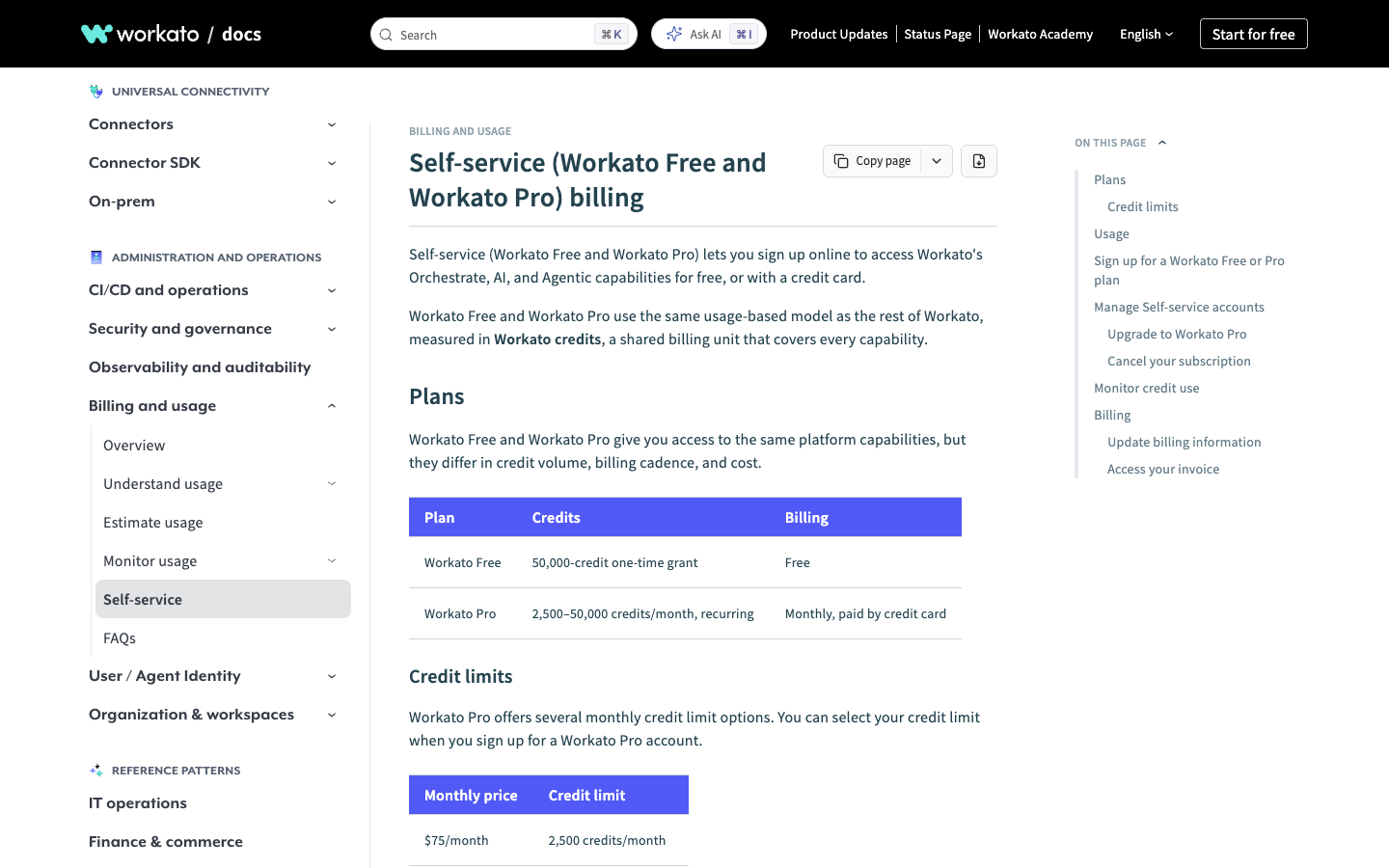
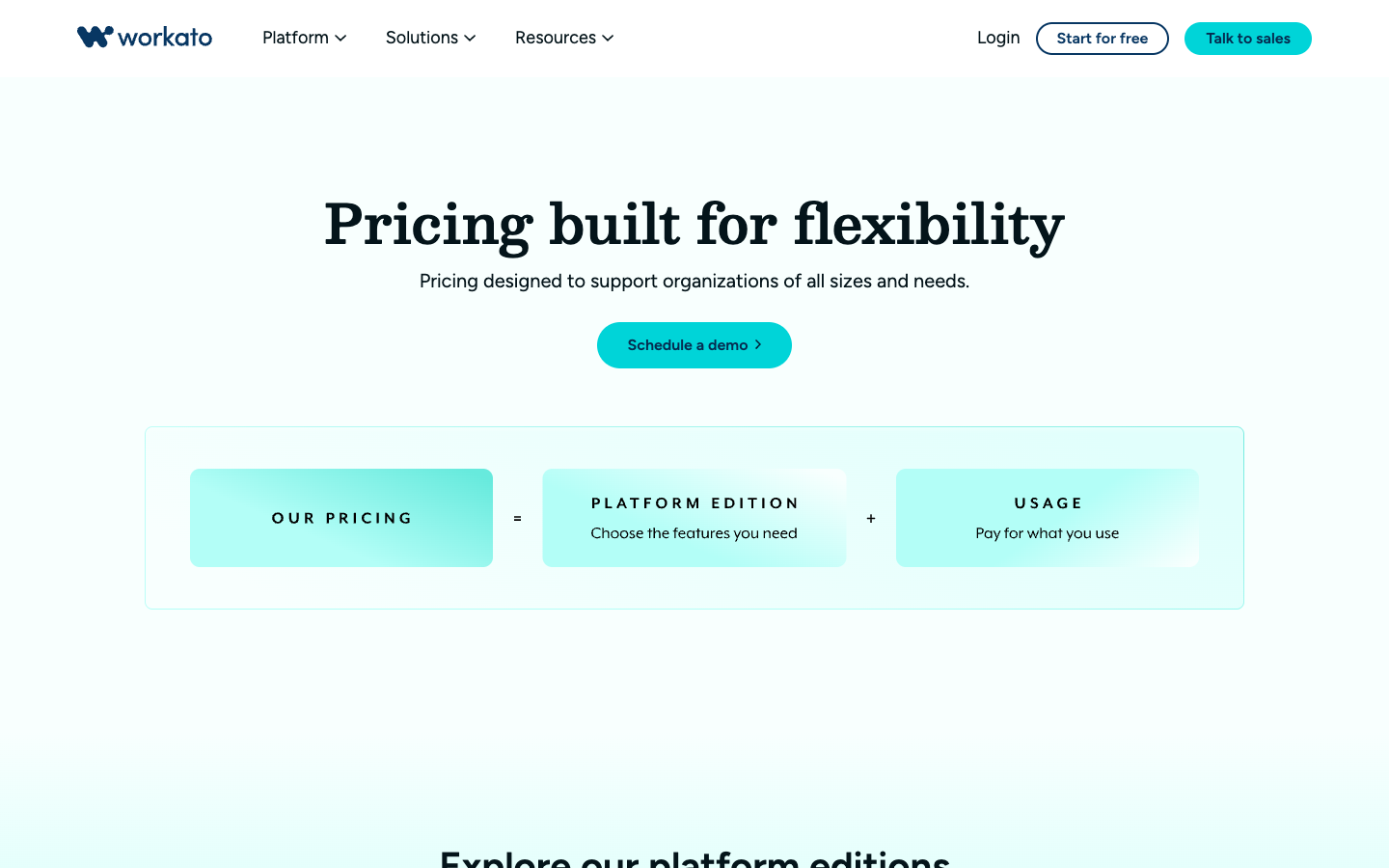
Workato now documents two self-service offerings and a separate set of enterprise editions. That matters because an older Workato review might claim that all pricing requires a call with sales. It is no longer a complete description. Workato Free provides a one-time 50,000-credit allowance; Workato Pro uses recurring monthly credit packages. The official self-service documentation lists multiple packages starting at $75 per month for 2,500 credits.
| Workato offering | Public price or billing | Limits and qualifications |
|---|---|---|
| Workato Free | $0 | 50,000 credits once, not 50,000 monthly |
| Workato Pro | $75/month | 2,500 recurring credits/month |
| Workato Pro | $100/month | 3,500 recurring credits/month |
| Workato Pro | $275/month | 10,000 recurring credits/month |
| Workato Pro | $780/month | 30,000 recurring credits/month |
| Workato Pro | $1,275/month | 50,000 recurring credits/month |
| Standard / Business MCP | Contract quote | Platform edition and applicable usage charges |
| Enterprise MCP / Workato ONE | Contract quote | Broader orchestration, security or agentic capabilities |
These are published examples, not a binding quote or recommendation to purchase a particular package. Self-service documentation explicitly states unused Workato Pro monthly credits do not roll over. Enterprise edition fees, credit allocations, optional add-ons, legacy contracts and purchasing commitments must be reviewed separately.
What counts as a Workato credit?
A recipe that runs 200 times is not automatically a 200-credit recipe. One execution could involve several connector steps, a document-processing task and an API request, each with its own metering rule. Cost the ordinary branch and the failed-payment or retry branch separately; their different steps may consume different Workato credits. The number of recipes shown in the workspace will not predict the monthly bill.
For a concrete model, imagine 4,000 new leads per month. Each lead might trigger a duplicate lookup, enrich the record, create a CRM item and send a notification. If the workflow retries failed calls, its total step consumption may be higher than a simple four-step estimate. Model actual successful runs, retries, branch paths, API calls and any document or AI work using Workato’s current credit schedule. Do not multiply actions by an assumed credit rate without verifying the exact capability.
Which Workato edition fits a larger company?
The public enterprise edition comparison covers Standard, Business MCP, Enterprise MCP and Workato ONE. Standard concentrates on core integrations and recipe lifecycle. Higher tiers expand capabilities such as API platform, on-premises access, data pipelines, document processing and agentic features. The published edition matrix can change as products evolve, so the company’s procurement worksheet should name the needed capabilities and obtain their availability in the proposed contract.
A business with internal SAP connections and strict identity controls may need a very different edition from a company syncing cloud SaaS products. Request pricing for the actual connection architecture and expected workload, including how many concurrent jobs are required. On-premises agents, governance add-ons and enhanced environments can matter more to cost than the nominal platform name.
🛠️ Workato Recipes: Triggers, Conditions and Data Mapping
Consider a sales handoff workflow. A contract status changes to signed, Workato receives an event, looks up the CRM customer, checks whether an accounting customer already exists and creates it only if necessary. A later step opens a customer-success onboarding ticket with the correct owner. This looks easy on a diagram, but there are at least three data-ownership decisions: which system defines customer identity, which system owns billing address changes, and which system gets the final onboarding status.
The critical implementation practice is to define the source of truth for each field. A sales representative may change a billing address in the CRM after an invoice is sent. Automatically pushing that edit into a closed accounting period would be inappropriate. A recipe should check invoice status and direct unauthorized changes to review, not overwrite financial history.
A good first test includes a valid new customer, a duplicate customer, an API timeout and a contract that is cancelled after an onboarding ticket was created. Record what the workflow actually did in each case. This is a proposed acceptance plan, not a real test completed by DigiOffly.
🔗 Workato Connectors and Integration Coverage
Workato advertises a broad ecosystem of connectors and integrations, but connector counts are a discovery aid, not a guarantee that each endpoint has every action a buyer needs. A CRM connector may support contacts and deals without exposing an organization-specific custom object. ERP operations may require elevated rights or additional licensing. Start with the fields, triggers and methods necessary for your use case.
The most consequential connection is often the least glamorous: a vendor’s update endpoint may not report deletions, a legacy database may require an on-premises agent, or a finance system may rate-limit bulk writes. Before choosing Workato for a multi-system process, request evidence that the required objects and update semantics are supported in the selected edition and region.
For a system that is not covered by a ready-made connector, API and custom-connector capabilities can extend coverage, subject to platform entitlement. That flexibility shifts responsibility to the implementation team. Authentication refresh, schema changes and rate-limit responses need tests just as much as a packaged connector would.
🔗 API Platform, On-Premises Agents and Hybrid Systems
The enterprise API platform can expose managed endpoints that let other applications invoke supported operations, but that also creates a production interface requiring authentication and versioning. A project should document which clients can call the API, how keys are rotated and what response is returned during a downstream outage. An endpoint returning success before accounting posts a record can mislead a caller into treating an incomplete transaction as finished.
Hybrid environments introduce a second boundary. If a warehouse runs an on-premises database, the team may need an on-premises agent to provide controlled connectivity. Verify supported network design, firewall rules, high availability and what happens if the agent is offline for a full business day. The existence of an agent feature in a pricing table does not establish that an organization’s firewall policy or regulator will approve it.
⚙️ Workflow Monitoring, Retries and Idempotency
Imagine the ERP accepts an order but the response times out on the way back to the recipe. An unguarded retry may send the order a second time. Before enabling retries, choose a durable business identifier and check whether the destination supports idempotent creation or a search for the already-accepted order. The monitoring screen should tell an operator what happened before the timeout, not merely display a red job status.
Operational dashboards and logs should answer which job failed, which input triggered it, what action already completed and whether retrying is safe. Sensitive customer data should not be copied indiscriminately into logs just to make debugging easier. The retention period and log access controls depend on platform edition and organization policies.
Establish a support owner for failures. If missing orders are first noticed at month-end, the integration has gone weeks without effective monitoring. Set alerts for meaningful thresholds such as a backlog of failed jobs, API authentication expiration or unusual credit consumption. Avoid alerting every transient retry when no human action is required.
🤖 AI Agents and Workato ONE
An AI agent can read a supplier email and extract an invoice number or classify a customer request. That helps only if the extracted fields are then checked against structured records. An LLM may confidently identify the wrong supplier when names are similar; the company still needs a deterministic match and an approval path for money movement. The agent’s ability to suggest an action must not silently become permission to execute it.
For a supplier invoice, it may be useful to extract vendor name, amount and purchase-order reference from a document. That does not authorize an AI agent to pay the supplier. Use a structured validation step, allowlist permitted actions, maintain human approval for material spending and record which document supported a decision. Governance and agent autonomy are separate design choices.
AI credits and document processing can also introduce new variable billing. Compare the workflow with a simpler rules-based alternative and estimate both failure handling and consumption. Paying for agentic features is justified only when the process genuinely needs interpretation rather than a basic field mapping.
🔐 Workato Security, Roles and Auditability
One integration account may read CRM contacts, update invoices and send internal messages. Giving every recipe editor unrestricted use of that identity creates a much larger failure radius than an ordinary form builder. Review permissions at each destination application, restrict who can change production recipes and confirm that disabled users cannot continue using saved connections.
Credentials should be rotated and access removed when employees leave. Review the service account privileges at each connected application, not only the role shown in Workato. If a connector account can update every customer record, a single faulty recipe can affect the whole database.
Compliance reviews should ask for data residency, encryption practices, logging and incident response evidence relevant to the intended workload. Vendor-level security claims do not automatically confirm that the customer configured its workspaces securely. Real compliance depends on business processes and applicable legal requirements.
⚖️ Workato vs Zapier, Make, n8n and Microsoft Power Automate
| Tool | Core advantage to assess | Main trade-off |
|---|---|---|
| Workato | Enterprise orchestration, integration governance and APIs | Usage and edition economics need detailed modelling |
| Zapier | Straightforward app-to-app workflows and quick starts | Task costs and advanced controls differ by plan |
| Make | Visual branching and granular workflow construction | Credits and operations need mapping |
| n8n | Developer flexibility and self-hosting options | More operational ownership when self-hosted |
| Microsoft Power Automate | Microsoft 365, Teams and SharePoint-centered workflows | Connector licensing and service identity complexity |
A small marketing team that wants an email after a form submission should start by comparing simpler products. An organization needing approvals, ERP and audit controls can reasonably accept a more involved platform selection. A convincing agent demonstration is not evidence that the product can safely handle a failed invoice sync or a revoked service account.
🔗 Migration From Legacy Integration Scripts
Replacing old scripts with Workato is not merely moving logic into a visual editor. The previous system may have retry records, scheduled jobs, data corrections and undocumented exceptions. Inventory each integration: owner, upstream source, downstream destination, frequency, error handling, credentials and criticality. A process that no one has documented is a particularly dangerous candidate for an immediate cutover.
During migration, prevent two systems from processing the same event independently. For an order feed, choose a freeze or handoff boundary, compare processed event IDs and keep a rollback route. Run the new recipe on non-destructive test data before switching production writes.
A service that has already reconciled yesterday’s invoices may need a different replay rule from a system that can safely reprocess event history. Decide that policy with finance and operations, not only the automation builder.
🏢 Workato Pros and Cons
| Strengths | Limitations to budget for |
|---|---|
| Broad integration and orchestration scope | More involved process design than simple one-trigger tools |
| Self-service Free and Pro make initial exploration possible | Credit conversion varies by capability and workload |
| Enterprise editions cover advanced governance | Enterprise pricing and add-ons require a tailored quote |
| API and hybrid connectivity options | Security and on-premises setup demand technical ownership |
| Agentic and AI options in higher-tier ecosystem | AI output needs validation and oversight |
🛠️ Practical Evaluation Plan and Overall Verdict
Begin with one integration whose business owner can state a clear success condition. For example: a signed contract must create exactly one billing record and one onboarding case within the agreed processing window. Document existing manual effort, exceptions, data access, daily volume and recovery requirements. Then model Workato credits and the underlying SaaS costs.
Run at least four controlled test cases: correct event, duplicate event, downstream outage and a revised source record. Inspect actual data in the destination systems, not just the workflow’s visual green status. Only after operations accepts the error handling should the business forecast savings or replace the manual process.
Workato is a serious option for interconnected business processes, not a default recommendation for every automation. The best choice depends on the complexity and importance of the work, support ownership, available engineering assistance and whether self-service credit economics or enterprise governance is the controlling factor.
🏢 Workato Recipe Ownership: Who Fixes the Workflow After Launch?
A finance automation may have been built by an integration consultant who no longer works with the company. The recipe still runs every night, but no employee knows why certain invoices are routed through a particular branch. Ownership is the first test of operational maturity. Each production workflow should have a business sponsor who can explain the outcome and a technical maintainer who can respond when an authentication token or API endpoint changes.
For a purchasing approval, the business sponsor defines how approvals work when a manager is absent; the technical owner implements delegation rules, access and monitoring. Neither one should make unilateral decisions that change monetary approval limits. Store a change record describing the trigger, permissions, data transformations and actions. A readable diagram is useful, but it cannot substitute for a runbook explaining what to do with a failed job.
💰 Estimating Workato Costs Before a Production Rollout
Suppose a support department processes 800 customer escalation events in an ordinary month. Each escalation may require a CRM lookup, a support-ticket update, a collaboration notification and an exception branch. Some cases will be closed early; others may enter multiple retry paths. A careful budget starts by counting each possible capability that Workato meters and obtaining the current Workato credit conversion schedule. Running 800 jobs is not the same as consuming 800 credits.
Then build a second scenario for the busiest month. Seasonal promotions or system migrations might double event volume. Include replays from a previous outage and administrative tests where the contract charges them. Compare the projected monthly credit balance with Workato Pro packages; if enterprise security or orchestration is mandatory, a self-service price is not an alternative to those entitlements. The meaningful number is effective cost per successfully completed business operation, with retries and support included.
🛠️ Handling Schema Changes Across Two Applications
A CRM vendor may rename a property, make a field mandatory or change its date format. A recipe that previously created valid records can begin failing even though no one edited Workato. That is why integration projects need a procedure for upstream changes and a non-production environment. Save representative payload examples and ensure the destination rejects invalid records visibly.
One scenario involves a customer record whose billing country uses a two-letter code in one application and a full country name in another. A mapping that works for the United States might fail on a less common destination. Maintain a canonical mapping table and reject unknown codes rather than silently defaulting to the wrong country. When a vendor releases an API upgrade, validate those mappings with synthetic records before deploying it to production.
🔐 Workato and Data Privacy Across Connected Apps
Connecting a CRM, HR platform and messaging service increases the number of places in which private information might appear. A recipe that alerts a manager about a new employee should not paste salary, date of birth and bank details into a general channel. Design the minimal payload for each destination and restrict logs containing sensitive values.
The data-protection review should map where information originates, where it is transformed and where copies are stored. If a user requests deletion of personal information, the business must know whether an automated copy resides in another connected application or long-lived job log. Workato’s platform features may support access and audit controls, but they do not make the customer’s policy decisions. Any international data-transfer obligations remain a separate legal assessment.
⚙️ When a Human Approval Belongs in the Recipe
Not every automated event should complete without human judgment. A purchase order above an agreed threshold may require a manager; a suspicious bank-detail change may require out-of-band supplier verification. That approval should create a durable record showing who reviewed it, when and under which policy, then resume the workflow without creating a duplicate request.
Beware of approval loops. If a manager forwards an alert to someone who lacks authority, the workflow may stall indefinitely. Decide how long an approval can remain pending and which escalation path is allowed. The failure state should be visible to the business team; a completed technical job is not proof that an exception was approved correctly. Workato can orchestrate an approval, but governance comes from the company’s rules.
🛠️ Recovery After a Partial System Outage
Imagine the CRM is available, but the accounting service returns errors for forty minutes. Workato can still ingest events, depending on connector and queue behavior. The danger is that staff manually enter records during the outage and then the automation retries identical work afterward. Define a stable transaction identifier that both the manual and automated paths share.
Once systems recover, reconcile accepted events against completed destination records. Report missing, duplicated and delayed items separately, and only replay those where idempotency is established. A narrow retry window might be safe for a status update but not for a financial payment. Testing this during a planned exercise reveals much more about platform suitability than a successful five-minute demo.
🏢 Workato’s Role in an Existing No-Code Stack
A company may already use Airtable for operations, Tally for intake, Slack for communication and a CRM for sales. Workato can coordinate some of those connections, but it need not replace the underlying tools. Before adding a paid orchestration subscription, identify which existing automations fail because they cannot express the required rules, permissions or audit history.
If the only problem is that Tally submissions should appear in a spreadsheet, a native integration may be enough. If the same submission must trigger credit checks, a contract review, a billing profile and a customer-success handoff with controlled failure recovery, Workato has a clearer role. Keeping the architecture simple is not a rejection of enterprise automation; it is a way to avoid paying for governance features that an uncomplicated workflow never uses.
📚 Official Sources
- Workato Free and Pro self-service billing
- Workato platform editions and enterprise pricing
- Workato usage model
- Workato integration and automation tools

Frequently Asked Questions
Is Workato free in 2026?
Workato documents a self-service Free offer with a one-time grant of 50,000 credits. It is not an unlimited monthly free allowance, and enterprise capability or account eligibility differs by edition.
How much does Workato Pro cost?
Published self-service options start at $75 monthly for 2,500 recurring credits; other packages include $100 for 3,500 and higher amounts. Verify live billing terms.
Does Workato publish enterprise prices?
The platform describes Standard, Business MCP, Enterprise MCP and Workato ONE editions, but a complete enterprise price depends on contracts, usage and selected add-ons.
What is a Workato recipe?
A recipe is an automated workflow linking triggers, data logic and actions across applications or services.
How are Workato credits calculated?
Different capabilities consume credits under their own metering rules. Workflows, API calls, rows, document processing and agents can use different units.
Does Workato Pro roll over unused credits?
Official self-service documentation states unused monthly Pro credits do not roll over.
Does Workato integrate with SAP or Salesforce?
Workato offers enterprise integration capabilities, but the exact supported connector objects, API methods and licence requirements must be verified for each deployment.
Is Workato better than Zapier?
Workato can make more sense for governed multi-system orchestration; Zapier may be easier for straightforward workflows. Actual requirements and fees should decide.
Can Workato connect on-premises systems?
The enterprise ecosystem includes on-premises connectivity, subject to agent availability, edition and network or security requirements.
Is Workato ONE an AI agent product?
Workato ONE adds agentic capabilities alongside integration and orchestration. Human approval and deterministic controls still matter for critical actions.
What should an enterprise buyer verify before purchase?
Confirm edition entitlements, expected credits, concurrency, security roles, connectors, log retention, add-ons and an agreed failure-recovery test.
EXPLORE NEXT ON DIGIOFFLY
🔍 Explore More on DigiOffly
Compare automation and no-code tools by actual workflow needs and documented usage limits.
Category and discovery
- Automation & No-Code — Compare capabilities and relevant alternatives
- Software Directory — Compare capabilities and relevant alternatives
- Software Stacks — Compare capabilities and relevant alternatives
Selection tools
- Compare Software — Compare capabilities and relevant alternatives
- AI Software Finder — Compare capabilities and relevant alternatives
- Software Cost Calculator — Compare capabilities and relevant alternatives
Related reviews
- Microsoft Power Automate — Compare capabilities and relevant alternatives
- n8n — Compare capabilities and relevant alternatives
- Zapier — Compare capabilities and relevant alternatives
- Make — Compare capabilities and relevant alternatives
- Baserow — Relational no-code databases and custom apps
Pricing and limits may change; verify current terms with the provider before purchase.