

Editorial note: This independent review analyzes official product documentation, published plan information and decision criteria. Vendor screenshots show public webpages. We do not claim to have completed a private-account hands-on test or guaranteed a particular price.
Instead, consider whether Miro fits your current system of record, staff permissions, procurement terms, administrative resources and ability to leave later. Features and packages change, sometimes within a year, so use the official pricing page as the final authority for your region before checkout.
📊 Miro Review 2026: Editorial Verdict
| Decision question | Editorial assessment |
|---|---|
| Core use case | A collaborative visual workspace for workshops, diagrams and discovery where the board is a shared thinking surface rather than a project system of record. |
| Team it suits | Design, product and consulting teams that frequently plan visually with people in different roles or locations. |
| Potential poor fit | Teams needing primarily accountable task execution with strict project dates and minimal workshop work. |
| Billing evidence | Vendor pricing — regional/tax/term details can vary |
| Suggested pilot | Two to four weeks, with sample tasks, real roles and exit criteria |
| Research status | Editorial assessment of public documentation; no private-account testing |
👍 What We Love
- ✅ Infinite collaborative canvas: A board combines notes, frames, connectors and diagrams so multiple people can see the same problem.
- ✅ Diagramming and technical shapes: More specialized diagrams and structured shapes may require Business and higher.
- ✅ Tables, timeline and prototyping: Structured visual artifacts bridge discovery and roadmap planning, but details should move into an authoritative delivery tool.
- ✅ Integrations with delivery tools: Connections to Jira, Asana or Linear help a workshop become executable work when two-way synchronization is configured.
👎 Where It Falls Short
- ❌ Free plan caps the number of editable boards.
- ❌ Member billing and guest roles can be misunderstood when inviting clients.
- ❌ Visual boards accumulate debt if facilitation ends without follow-up documentation.
✅ Miro: BUYER FIT AT A GLANCE
Best for: design, product and consulting teams that frequently plan visually with people in different roles or locations.
🧠 What Miro Actually Solves
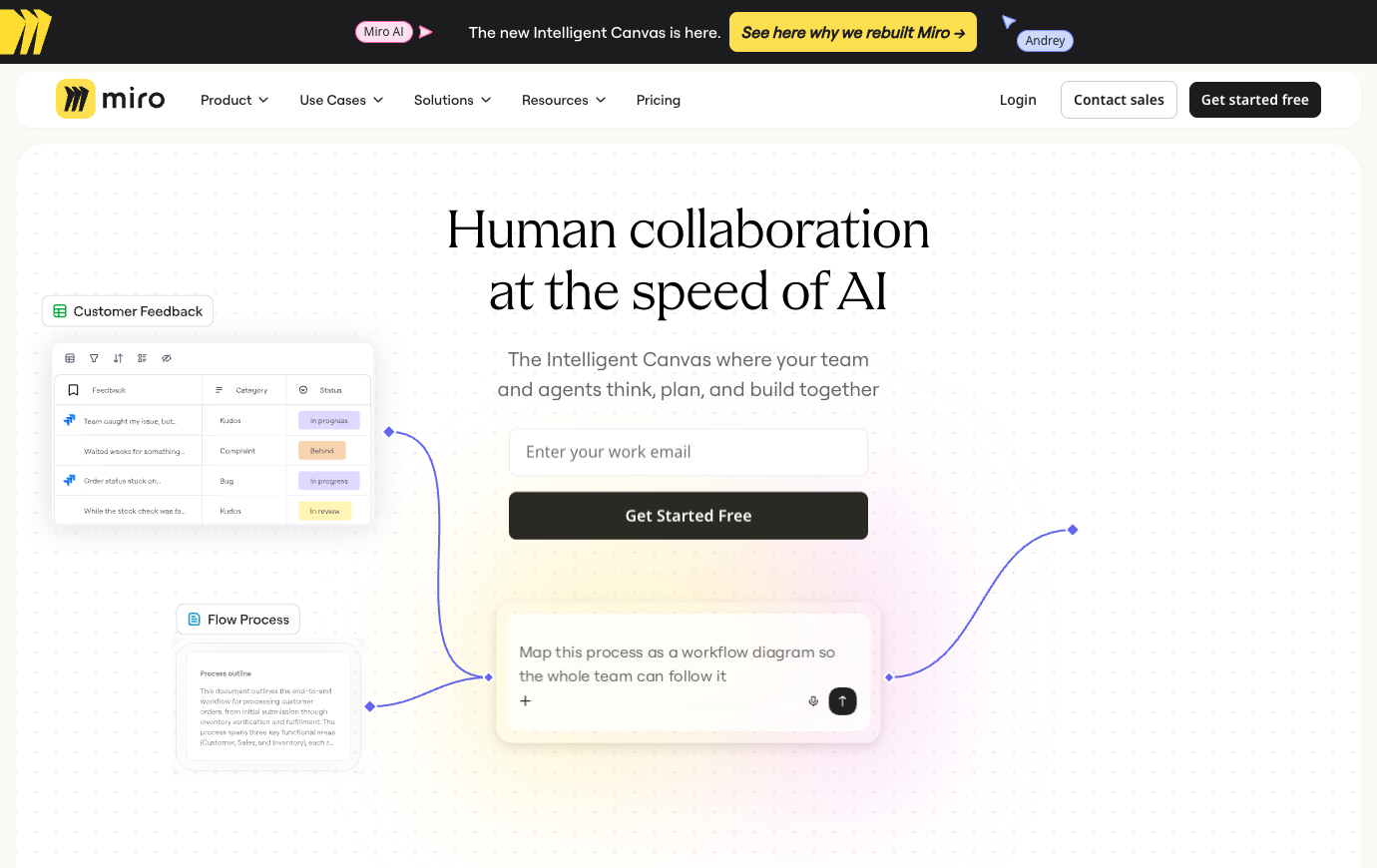
To evaluate Miro whiteboard collaboration for remote teams, assign a facilitator and a decision owner to a real workshop. For Miro workshop templates for product discovery, prepare frames for the question, evidence and intended outcome before inviting participants. The board adds value when its results reach the team backlog with ownership and a review date.
A remote product workshop may involve designers, engineers, operations and someone representing customers. Miro gives that group one canvas to compare observations, map flows and vote on competing approaches. However, the outcome is only useful when there is a named facilitator and a final decision record. At the end, assign three actions, link each to the issue tracker and archive the board where new participants can find it. Repeating a workshop from a blank canvas every month because nobody saved the rationale is not productive collaboration. The board is evidence of thinking, not an automatically maintained plan.
A Miro board is most useful before a team knows exactly what it needs to do. A workshop can put customer observations, competing ideas, assumptions and constraints on one canvas so people see relationships that a linear document would hide. That is not the same as keeping a definitive project backlog. After a session, somebody must convert the chosen actions into owned tickets or documents. Without that handoff, the team receives a beautiful screenshot rather than an executable decision. Miro should be evaluated on the quality of that transition as much as on the experience of placing notes and arrows.
🛠️ Miro Features: What Matters in Real Team Work
Test Miro diagramming for system architecture by tracing a dependency and recording who confirms its accuracy. With Miro guest permissions for clients, distinguish visitors, guests and paid members before inviting an outside workshop group. A link that can be opened should not automatically grant broad editing access.
Miro Free currently limits the number of editable boards, while Starter and Business add collaboration, private sharing and more structured options. The published reference lists three editable boards on Free, Starter around $8 per member per month billed yearly, and Business around $20. For a consultant with several clients, separate workspaces and guest roles may matter more than board count. Check whether a particular invitation creates a paid member, an eligible guest or a visitor. The pricing page notes that the Free tier lacks a true Guest role, so confusing collaboration labels can produce unexpected access and costs.
Infinite collaborative canvas
A board combines notes, frames, connectors and diagrams so multiple people can see the same problem. Ask the person leading the system architecture workshop to demonstrate the outcome using synthetic data. This is the practical distinction between Miro and Jira: Jira manages delivery issues while Miro supports the shared visual workshop. A different product may be the safer choice if this exact scenario is the team’s dominant work.
Templates and structured workshops
When assessing templates and structured workshops, check how the final record moves between colleagues. Reusable workshop templates can reduce facilitation setup, provided outputs are documented afterward. A useful proof is one consulting client kickoff example whose requester and approver disagree about the final state. Any unverified permission or plan restriction should appear in the procurement notes. A consultant needs to check who can reopen a client board after the project ends and whether it can be exported in a useful form.
Diagramming and technical shapes
Miro becomes easier to assess when the organization ties diagramming and technical shapes to a specific approval or handoff. Give an operator a scenario they did not configure beforehand. Test a client invitation as a guest or visitor, not by granting an unnecessary paid member role. Compare their actions to the documented process: For client discovery, ask each participant to locate the final decision on the board without requesting a recap from the facilitator. Free plan caps the number of editable boards. If the plan cannot support that requirement, record it as a limitation rather than adding a workaround nobody owns.
Private boards and permission roles
Free boards have restrictions; evaluate viewer, guest and member access before involving customers. Keep the first experiment small enough to reverse: Run one discovery workshop and check that the outcome is captured as assigned follow-up work outside the board. Look for one human owner and one recoverable final artifact. A chat message alone cannot serve as a durable record of a completed action.
Tables, timeline and prototyping
For Miro, a buyer should test tables, timelines and prototypes against one practical workshop scenario rather than a preference vote. Give every Miro frame a purpose and a facilitator; an unconstrained canvas can scatter participant attention. Use a real business scenario: Ask stakeholders to vote on three product problems, then export a decision log with each owner and due date.
AI workflows and credits
A team may encounter ai workflows and credits first during onboarding, not during a vendor comparison. Miro now includes AI workflows and agents with plan-level credits and MCP limits. Check both costs and data governance. Populate the pilot with realistic documents, permissions and handoffs. Try this realistic scenario: Before exporting the workshop, label its unresolved questions and identify where follow-up tasks will be tracked after the meeting. At review time, compare the resulting artifact with the previous process. Do not award Miro credit for basic good project hygiene that could be achieved with a simpler tool.
Integrations with delivery tools
Look at how integrations with delivery tools changes the next step in the workflow. Connections to Jira, Asana or Linear help a workshop become executable work when two-way synchronization is configured. Find out which step of service blueprint would have been invisible in the previous system. When a Miro integration shares board content with delivery tools, assess the named account, sharing link, retention rule and export path separately.
Miro becomes easier to assess when the organization ties integrations with delivery tools to a specific approval or handoff. If the team needs private boards or complex diagrams, inspect those entitlements rather than relying on a generic feature badge.
Exports and documentation
Exports and documentation deserve scrutiny because not every invited colleague has the same rights. High-resolution exports, board history and backups depend on edition; plan a durable handoff from workshop to repository. Set an owner for the artifact created during remote product discovery. An honest conclusion will depend on the exact user role and deployment, not a marketing claim about unlimited collaboration. Check whether the proposed plan supports private boards and detailed diagrams before sharing a client architecture map.
🧭 Four Practical Miro Workflows
Technical diagramming is a valuable Miro use case when different roles must agree on a system boundary. Draw a service, the database it writes to, external APIs and the failure path if one dependency disappears. The board helps reviewers discover missing assumptions, but technical accuracy still requires a subject-matter owner. Business plans have advertised more specialized shapes and structured visual formats; whether those matter depends on the team’s notation needs. For architecture work requiring versioned diagrams close to code, also compare text-based diagrams that can live in a repository.
Remote product discovery
A facilitator groups customer pain points into themes, votes and publishes decisions with owners in the issue tracker. The next participant should be able to identify the approved version, read the reason for the last change and act under their own account permissions. This is not evidence that Miro was privately benchmarked: it is a repeatable test design for a buyer. Visual boards accumulate debt if facilitation ends without follow-up documentation.
In the remote product discovery exercise, the test report for Miro should name the outgoing and incoming owner. Carry a chosen design decision into the owning issue system and record a link back to the visual evidence. AI credits and limits are independent of the board count.
System architecture workshop
Imagine a colleague arrives halfway through system architecture workshop and must finish without asking the original author. A technical team maps systems and data flows, flags risks and archives a reviewed diagram with changes. To keep the test fair, provide the same sample brief in competing software and time the point where the reviewer can understand ownership. Record not only what looked convenient but also the uncertainty that would block rollout.
Before declaring the system architecture workshop pilot successful in Miro, ask an unfamiliar colleague to inspect the final work. Also test whether permission settings survive a handoff to a different board owner.
Consulting client kickoff
Use consulting client kickoff as a way to test the actual collaboration boundary in Miro. Participants agree on goals and responsibilities using a shared board and preserve the artifact in the client workspace. Document what happens when the usual approver is absent, a guest loses access, or a deadline changes. Check both costs and data governance. Agree on measurable workshop outcomes before judging the interface. Verify diagramming tools and private controls against the actual subscription.
The consulting client kickoff scenario offers a chance to check information continuity, not merely the number of features available in Miro. Compare an AI grouping of workshop notes with the original observations before it becomes a project requirement. Check both costs and data governance.
Service blueprint
A useful service blueprint exercise needs an actual handoff, a late change and a clear owner for the final decision. Operations visualizes handoffs and failure points, assigns each improvement and tracks implementation elsewhere. Check whether the result can be exported and whether the workflow survives removal of the employee who initially created it. The final artifact belongs in the system the organization has declared authoritative, not in a second shadow list. Miro does not replace the definitive backlog or document repository without deliberate integration.
For a team using Miro in service blueprint, a planned interruption is more revealing than a smooth demonstration. Free plan caps the number of editable boards.
💰 Miro Pricing in 2026: Plans and Billing Caveats
A Miro Starter vs Business pricing comparison is meaningful only when private boards, advanced diagrams or guest controls are necessary. The Miro free three editable boards limit can affect consultants sooner than a small internal team. Miro Starter vs Business should be confirmed at checkout for the relevant billing region and member count.
Miro’s AI workflows and credit allowances add another buying question. A team might ask AI to group workshop notes, suggest categories or produce a rough prototype. That can speed ideation, but a plausible summary can erase minority opinions or collapse distinct requirements. Keep the original observations and mark which synthesis steps a human verified. The public plan grid describes differing credit allowances and MCP call limits by edition; do not imply an unlimited AI agent merely because its icon appears on the landing page. An organization using client information needs separate rules for what can be included in prompts.
| Edition / plan | Published reference price | Billing and eligibility notes |
|---|---|---|
| Free | $0 | up to three editable boards |
| Starter | $8 | USD/member/month billed yearly; unlimited private boards |
| Business | $20 | USD/member/month billed yearly; advanced guests, diagrams and workflows |
| Enterprise | Custom | contact sales; dedicated governance |
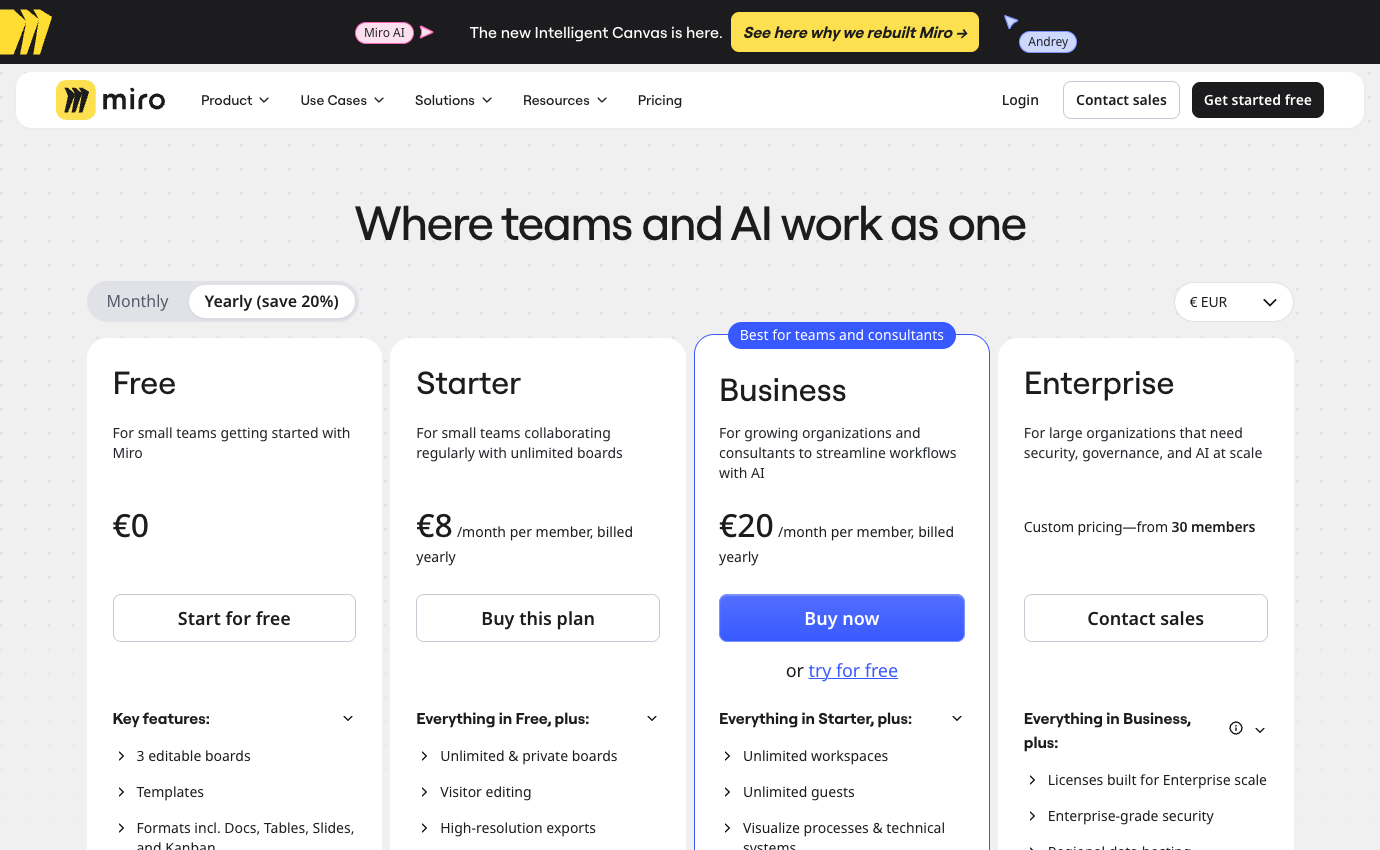
Always consult the official Miro pricing page for the country in which the account will be purchased. Some vendors personalize prices by geography or seat count. Where the public site shows a calculator instead of a fixed amount, we deliberately mark pricing as variable instead of inventing a precise figure. Discounts visible in a screenshot are not promises about your future contract.
🛡️ Security, Governance, Privacy and Exports
For Miro AI credits and privacy, establish which workshop notes may be processed and who checks the resulting summaries. A Miro board export and ownership test should retain the approved diagram and the rationale for decisions after the original facilitator leaves. Capture access history and remove temporary client permissions promptly.
Visual facilitation depends on participant behavior. A retrospective with twenty remote attendees requires a host to manage speaking turns, frames, voting and perhaps anonymous input. A blank infinite canvas can overwhelm people unfamiliar with the tool. Prepare named sections and an explicit outcome: three improvements with owners, not one hundred unprioritized notes. Use a facilitator, a timekeeper and a scribe responsible for publishing decisions into the team’s project system. Paying for Miro makes sense when your team runs these workshops often; for occasional sessions, a simpler whiteboard or slide deck may be enough.
⚠️ Limitations, Hidden Costs and Failure Modes
The costs of Miro do not stop at its published seat price. Free plan caps the number of editable boards. Check these buying risks against the actual edition and your own requirements.
1. Free-board restrictions for multiple clients
A free whiteboard can host an effective discovery meeting, but a few editable boards may become an obstacle for a consultancy running many client workshops. Archive a completed board and start another; decide how ownership and edit rights should work over time. License the collaboration pattern, not the number of colorful templates.
2. Visual workshops without decisions
An attractive workshop map is not a delivery plan. The person facilitating ideation must capture decisions, unresolved questions and a next-action owner before the session ends. Ask a colleague absent from the workshop to interpret the final frame; if the result requires a lengthy explanation, the board has not yet become useful documentation.
3. Guest access and board scope
External guests and visitors do not necessarily have the same rights as full members. Test a client’s access from a personal browser and confirm which unrelated boards and team member details remain hidden. Include the price and administrative effort of inviting recurring external collaborators in a budget discussion.
4. AI clustering and review of output
AI clustering and summary functions can save manual sorting, but they may group contradictory feedback together or invent a common theme. Keep raw notes and identify the person who approves any AI-generated conclusion. Check the exact credit rules and information-handling policy before sending confidential workshop material through automated processing.
5. Image export versus editable knowledge
Exporting an image of a board may preserve its appearance while losing the editable relationships between diagrams, comments and decisions. Decide which deliverables must survive the original project space and how people will locate them in six months. A static diagram is often enough for a presentation, but not always for ongoing systems design.
6. Overlap with FigJam and delivery systems
Miro can overlap with FigJam or other design collaboration tools, yet it does not automatically replace Jira, Asana or a task system. Map the transition from workshop decision to assignable implementation item. If diagrams are repeatedly copied manually into tickets, integration costs and ownership matter more than the price of another whiteboard seat.
⚖️ Miro vs Alternatives
Run a remote discovery workshop with two opposing stakeholder proposals rather than a blank board full of sticky-note templates. Keep both viewpoints visible, record why the group preferred one approach and create implementation tasks outside the board. A week later, ask a teammate who missed the workshop to trace each action back to the decision. If the answer lives only in the facilitator’s memory, the whiteboard captured a meeting, not reusable knowledge. Export needs and client access rules then determine whether the free tier is sufficient.
Compare Miro vs FigJam visual collaboration when shared ideation and interface design dominate the workflow. A Miro integration with Jira issues should produce trackable execution tasks while keeping workshop material as supporting evidence. Miro alternatives are not always substitutes for Asana or Linear: a visual planning canvas and a delivery system have different responsibilities.
Compare Miro with project tools as complementary layers rather than strict substitutes. Asana and Jira record accountable execution, Linear tracks software delivery, and Miro helps teams converge on a visual model. The dangerous overlap appears when one team starts treating a Miro card, Jira issue and Slack message as three separate commitments. Pick one execution source and link back to the workshop evidence. In a two-week pilot, assess whether people can find the final architecture diagram and the resulting owned tasks a week later. If both are reliable, the visual layer is contributing more than decoration.
| Product | Where it may be preferable | Buying question |
|---|---|---|
| Miro | The documented core workflow evaluated in this review | Does it measurably reduce your biggest current bottleneck? |
| Jira | Issue tracking and sprint delivery are Jira’s strengths; it is not a substitute for live visual facilitation. | Would this replace an existing paid seat or add another system? |
| Linear | A focused execution workspace for software teams. | Would this replace an existing paid seat or add another system? |
| Asana | A structured cross-functional project management system. | Would this replace an existing paid seat or add another system? |
🧪 A Responsible Thirty-Day Evaluation Plan
For an agency working with clients, permission and billing questions deserve early attention. Miro Free’s editable-board limit may be tolerable internally yet awkward when every client expects a separate private board. Paid plans allow other collaboration roles, but member, guest and visitor are not synonyms. Use a test client identity to confirm who can enter, comment, edit and export a board. If participants produce diagrams or AI-assisted summaries, decide where the reviewed version is preserved. AI credits and per-plan MCP limits should be counted if the agency expects agents to manipulate boards at scale. Do not sell a client project around capabilities that a short trial has not demonstrated.
Days 1–3 — baseline and requirements
Start the Miro evaluation with a baseline of five sample remote product discovery requests. Assign someone to record current completion time, missing information and repeat questions. The baseline matters because a successful pilot must improve an observed handoff, not just create a cleaner workspace.
Days 4–7 — permissions and procurement
Price the actual Starter and Business plans for your country and planned license count. For Miro, check external access separately. Confirm cancellation, data export and the authorization required for any paid AI usage before inviting more employees.
Week 2 — real but controlled tasks
Run a controlled system architecture workshop scenario in Miro: A technical team maps systems and data flows, flags risks and archives a reviewed diagram with changes. Create one realistic problem, one correction and one handoff under a non-admin account. A screenshot is not proof of success; ask another person to reconstruct the final decision without private explanations.
Week 3 — integrations and handoff
Use a safe integration case involving private boards and permission roles. In Miro, confirm what happens when two edits conflict, a notification fails, or a collaborator leaves. Document which system holds the authoritative version instead of copying the same status into multiple tools.
Week 4 — decision and exit test
Compare your Miro trial with the previous workshop process and Jira. Decide whether the team needs a canvas to reach agreement or a tracker to deliver agreed work. Ask the requester and operator to identify what genuinely improved, then export the sample materials, record the subscription terms and decide whether a limited rollout is warranted.

Frequently Asked Questions
What is Miro best used for?
The strongest use case is a collaborative visual workspace for workshops, diagrams and discovery where the board is a shared thinking surface rather than a project system of record. Consider it when the team is struggling with that specific outcome, then verify whether existing software already provides enough of the same functionality.
Does Miro offer a free plan?
The current published starting tier is Free ($0). Free versions may limit collaborators, history, functionality or number of workspaces. Check the official feature table for the exact restrictions in your region.
What is the cheapest paid Miro plan?
The first listed paid reference is Starter at $8 per the current vendor page, with these caveats: USD/member/month billed yearly; unlimited private boards. Confirm regional tax, seat count and renewal before payment.
Can I pay monthly rather than annually for Miro?
Term options vary. The published information notes USD/member/month billed yearly; unlimited private boards. Do not confuse an annual-commitment monthly equivalent with a month-to-month subscription. Inspect the actual checkout.
Is Miro suitable for a remote team?
It may be a good fit for design, product and consulting teams that frequently plan visually with people in different roles or locations. A remote trial should validate access from approved devices, external participants, time-zone handoffs, notifications and the location of durable decisions.
What feature should I evaluate first in Miro?
Start with infinite collaborative canvas. A board combines notes, frames, connectors and diagrams so multiple people can see the same problem. A useful trial also includes permission and offboarding checks.
What is a common limitation of Miro?
Free plan caps the number of editable boards. Treat this as a purchase risk to verify, not as a claim of firsthand failure. The exact impact depends on your team size and chosen edition.
How does Miro compare with Jira?
Jira is for managing delivery tasks, while Miro is designed around collaborative visual planning. Select a representative workflow and evaluate both candidates with the same participant roles, retention expectations and costs.
Can external collaborators work with Miro?
Access policies depend on the selected tier and whether a person is a member, guest or viewer. Test invitation scope, deletion of access and whether external people consume billable seats.
Are AI features included with Miro?
Availability and usage limits are plan-specific. Review integrations with delivery tools; do not assume an unlimited allowance from a marketing label. Check credit or request limits and security policies.
What should we verify before buying Miro?
Confirm official pricing, account roles, data export, required integrations, license minimums, renewals and the real outcome of a small pilot. A written owner should sign off on the decision.
🎯 Final Verdict: Who Should Choose Miro?
Miro works especially well for design, product and consulting teams that plan visually across different roles and locations. It is less suitable for teams focused on dated task execution with little need for visual workshops. Its most convincing benefit would be a documented improvement in the work that currently causes missed handoffs, duplicate effort or avoidable switching.
Use a limited pilot, insist on a written cost estimate and compare one credible alternative. The current vendor plan page should settle any price ambiguity. The objective is not to own the broadest possible software stack; it is to build a workflow where responsibility, documentation and communication are easy to find.
Our methodology: This review is written from public vendor documentation and transparent illustrative decision scenarios. The 2026 price references and both product screenshots were inspected on October 26, 2026. We did not log into a paid account or conduct private first-hand benchmark tests, and nothing here constitutes a guaranteed quote or security certification.
EXPLORE NEXT ON DIGIOFFLY
Build a Smarter Team Software Stack
Use focused reviews and our comparison tools to separate essential collaboration subscriptions from duplicated functionality.
Plan & organize
- Notion review — Compare docs, wikis and linked project databases.
- ClickUp review — Consider tasks, views and team execution.
- Airtable review — Explore connected records and shared workflows.
- Softr review — Build a client-facing portal on structured data.
- Compare workflow automation and no-code tools — See when you need a dedicated workflow builder instead of another task board.
Communicate & decide
- Loom review — Record asynchronous walkthroughs for teammates.
- Otter.ai review — Evaluate meeting transcripts and follow-ups.
- Grammarly review — Improve collaborative writing and editing.
- Microsoft Copilot review — Review productivity AI and licensing limits.
- Explore creator and streaming software — Connect Loom-style async walkthroughs with recording and editing workflows.
- Browse AI & Tech reviews — Evaluate AI writing, transcription and Microsoft Copilot alternatives.
Compare your software stack
- Software Directory — Discover our full software catalog.
- Compare Software — Check tools side by side by actual use case.
- Software Cost Calculator — Estimate monthly versus annual commitments.
- Best Value Advisor — Identify potential overlap before another purchase.
- Explore Growth software — Connect project delivery with CRM, outreach and marketing workflows.
- Productivity & Collaboration reviews — Compare the complete team software shortlist.
- Asana review — Turn workshop decisions into assigned tasks and due dates.
- Zoom review — Compare visual workshop planning with the meeting platform that hosts it.