

Choose banking, accounting, payroll, spending and international payment tools for a US startup, with practical budgets at each stage.
By Alex Wright, DigiOffly · Pricing and offer terms checked 13 November 2026 · Source-led buying guide.
Quick answer: A lean financial software stack for US startups can start with Mercury for business banking and either Xero or QuickBooks Online for accounting. Add Gusto when the company has employees, Ramp or Brex when spending needs dedicated controls, and Wise Business when international payment routes justify a separate service. The best financial software stack is not the one with the most subscriptions. It is the one that keeps a reliable general ledger, makes payroll and bills predictable, and gives founders a clear picture of cash runway. Start with the smallest system that meets your actual obligations, then add controls as complexity increases.
Editorial disclosure: We reviewed official US pricing and product documentation on November 13, 2026. This guide uses hypothetical businesses and original budget calculations. We have not opened accounts, processed payroll, moved money or tested live transactions for these examples. Prices exclude applicable taxes, payment fees, payroll wages, employer taxes, benefits, bookkeeping labor and other professional services unless specifically stated. Eligibility, fees and offers depend on the company and provider. This is software selection guidance, not tax, legal or investment advice.
The best financial software stack for US startups at a glance
The table is a starting menu, not a recommendation to buy everything. Choose one primary accounting system and identify which tool owns each process before connecting accounts.
| Layer | First option | Alternative | Buying decision |
|---|---|---|---|
| Business banking | Mercury basic account, $0 monthly | A suitable direct bank account | Eligibility, cash access, payment routes and resilience |
| Accounting | Xero Early $27/month | QuickBooks Online Simple Start $38/month | Transaction volume, accountant preference, reporting |
| Payroll | Gusto Simple $49 + $6/person/month | Another appropriate US payroll provider | States, employee classification, benefits, tax filings |
| Spend management | Ramp Free, $0 subscription | Brex Essentials, $0 subscription | Card eligibility, approval rules, receipt collection |
| International payments | Wise Business | Mercury international wires | Destination currency, final recipient amount, reconciliation |
| Reporting | Accounting reports plus a cash forecast | Dedicated planning software when justified | Consistent runway and reliable month-end close |
The accounting and payroll prices are regular US list prices, not introductory discounts. Mercury, Ramp and Brex have no mandatory subscription fee on the indicated entry plans; that does not mean every financial transaction or service is free. Check current offers at Mercury, Xero, QuickBooks, Gusto, Ramp, Brex and Wise.
Good finance tools for startups keep three records consistent: cash actually held, obligations that have not yet been paid, and the accounting entries explaining what happened. A bank balance alone cannot tell a founder how much revenue has been earned or which invoices are overdue. A general ledger cannot prove that a payment was authorized unless the approval record is retained somewhere. Start with those distinctions.
Design the finance system before selecting subscriptions
Think about the flow of money rather than the software logos. A customer payment enters the operating account. A payment processor might deduct fees before depositing a net payout. The accounting system records revenue and fees correctly, the founder checks available cash, and the person responsible for closing the books reconciles the deposit against its source. If this process works, the company can explain why its cash balance changed.
For expenses, the process moves in the opposite direction. Someone requests a purchase, an authorized person approves it, a card or payment account funds it, and a receipt or invoice becomes part of the accounting evidence. The workflow should distinguish a request from an actual commitment and a commitment from a settled payment. That distinction prevents a dashboard from treating an unpaid bill as if cash has already left.
A common early-stage mistake is buying multiple products because each promises a complete financial platform. Mercury, Ramp and Brex all offer financial operations features. Xero and QuickBooks can support bills and invoices. Gusto connects payroll with other finance processes. Their overlap may help a team use fewer products, but only if it deliberately chooses which one controls a particular job.
Before signing up, write a one-page ownership map. Name the person who owns the ledger, approves payments, updates payroll, manages user access and checks the cash forecast. One founder may initially hold several responsibilities. Record them separately anyway. When another employee joins, that map becomes the starting point for transferring access and responsibility without giving away control of the entire system.
A finance software stack should also have a source of truth for the legal entity. If there are two subsidiaries, do not combine their transactions merely because the same person owns both. Set up separate records and ask the accountant how intercompany transfers and shared costs should be treated. The complexity of the entity structure may change the required accounting plan long before the number of employees becomes large.
Layer 1: business banking and cash management
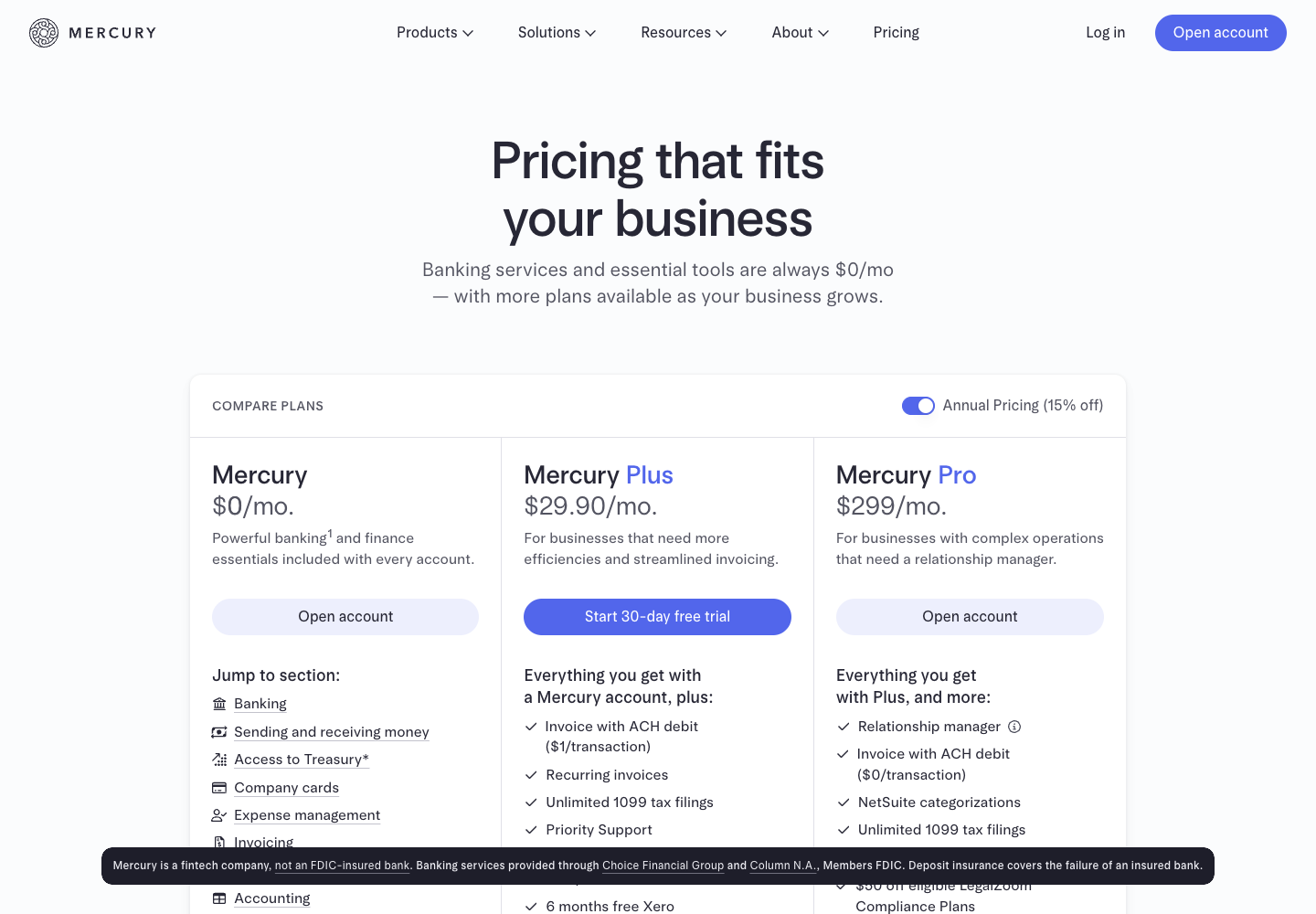
Mercury business banking is a strong candidate for a US startup that wants an operating account, online payments and finance tools in a single interface. Its basic business account has no required monthly subscription fee. Standard ACH and domestic wires are listed as free, and its basic service can support payments, invoices and accounting connections. See our Mercury review.
Mercury is a financial technology company, not itself an FDIC-insured bank. When reviewing Mercury FDIC insurance, distinguish the partner-bank deposit arrangement from investment products. Its current business disclosures identify Choice Financial Group and Column N.A. as partner banks. Eligible deposits may receive coverage through the banks and their sweep networks, subject to applicable conditions. That is different from promising that every product balance is insured or that the same insurance applies to securities held in an investment account. Read Mercury's business disclosures before deciding where to hold operating reserves.
Check Mercury business account requirements before relying on approval. Mercury’s application guidance calls for US formation and registration, existing or planned US operations, formation documents, an EIN document and identity information for relevant owners or controllers. Non-US founders may qualify, but eligibility is not automatic, and supported residences, business activity and address rules matter. Check your actual circumstances before making this provider the only route to paying employees.
For a company with a newly funded account, create a clear cash policy. Decide which balance is available for everyday spending and which amount is reserved for upcoming payroll, tax obligations or other commitments. A separate account or a ledger designation can help, depending on the setup. The important part is that the founder does not mistake an earmarked amount for money that can safely be spent on a new project.
A second consideration is operational continuity. A temporary account review, payment delay or missing authorization can affect a company even when it has enough money on paper. Establish a backup payment route appropriate to your risk and business needs. Store account statements securely and know who can authorize urgent payments if the usual administrator is unavailable.
Use our Mercury vs Wise Business comparison when foreign currency payments are material. An account with no subscription fee is not necessarily the lowest-cost option for every transfer. The currency, destination and payment method determine whether another service is worth adding.
Layer 2: choose one accounting system
Xero and QuickBooks Online both give a small company a place to record financial activity and produce reports. The right choice often depends less on a feature count than on the accountant who will use it, the type of business and how many transactions need to be processed each month. Read our Xero review and QuickBooks Online review for individual product coverage.
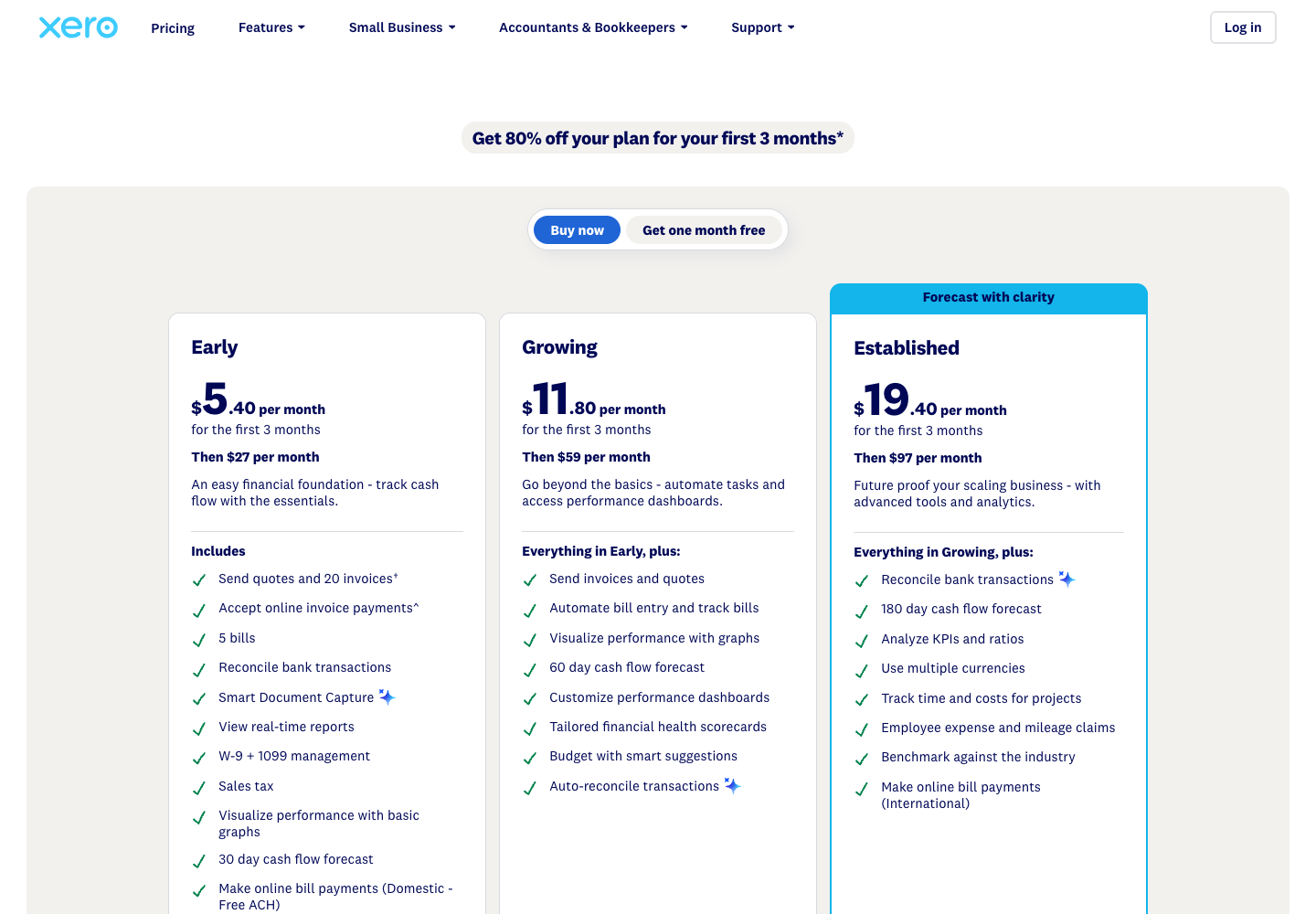
Xero US pricing lists Early at $27 per month, Growing at $59, and Established at $97. Early has limits of 20 invoices and five bills; transactions initiated through some partner apps may count toward those limits. The Xero Growing plan is a more natural option when the company regularly exceeds the entry-level limits. The Xero Established plan adds capabilities including multicurrency accounting and project-related tools.
QuickBooks Online starts at $38 per month in the US on Simple Start. The higher regular monthly rates are $85 on Essentials, $140 on Plus and $340 on Advanced. Choose a tier according to the actual users, features and reporting needs. Do not buy a higher plan just because a company raised capital, and do not assume the lowest plan supports every accountant’s preferred workflow.
| Accounting need | Candidate plan | Regular monthly cost | Upgrade signal |
|---|---|---|---|
| Very low-volume startup | Xero Early | $27 | Approaching invoice or bill limits |
| Basic bookkeeping in QuickBooks | QuickBooks Simple Start | $38 | Additional users or features needed |
| Growing transaction volume | Xero Growing | $59 | Multicurrency or advanced reporting required |
| More QuickBooks collaboration | QuickBooks Essentials | $85 | Inventory, projects or other Plus features |
| Multicurrency accounting | Xero Established | $97 | More complex entity or consolidation needs |
| QuickBooks inventory/project needs | QuickBooks Plus | $140 | Advanced reporting, permissions or scale |
A founder should test a representative month before settling on a plan. Import or manually enter a small set of non-sensitive sample transactions: an invoice, a payment, a software expense, a card refund, an unpaid bill and a transfer between accounts. Ask the bookkeeper to explain each entry and reconcile the ending balance. If an integration creates duplicate transactions, correct the connection or mapping before importing the entire history.
For a subscription business, payment processing is a particularly useful test. Imagine a customer pays $100 and the processor deducts an illustrative $3 fee before depositing $97. The correct accounting treatment depends on the underlying business and accounting policy, but simply importing $97 as revenue may obscure gross sales and payment fees. Use the processor statement and the ledger together so the accountant can identify both amounts.
Keep invoice numbering, chart of accounts and customer identifiers consistent. A company that creates invoices in two different systems can accidentally recognize the same sale twice. Choose where invoices originate, which integrations are allowed to create accounting records, and how corrections are handled. A bank feed is a source of information, not a reason to abandon transaction review.
The best accounting software for startups should make month-end close repeatable. A clean close involves reconciling bank and card statements, matching payroll records, investigating outstanding items and reviewing revenue and expenses. It also requires the appropriate accounting policies, which are not determined by the software itself. Work with a qualified professional on the company’s reporting and filing obligations.
Layer 3: payroll software when the company hires
Gusto provides startup payroll software and related HR services. Its Simple plan is listed at $49 per month plus $6 per person and is described for basic single-state payroll. Gusto Plus pricing is $80 plus $12 per person and supports more complex needs including multi-state payroll. Premium is $180 plus $22 per person. See our Gusto review for more context.
The software fee is not the payroll budget. A payroll run may require gross compensation, employer taxes, benefit contributions, reimbursements and other amounts in addition to the provider’s fee. A founder who compares only the $49 base price misses the much larger cash obligation.
| Payroll example | Base fee | Person fees | Monthly software subtotal |
|---|---|---|---|
| Simple, 1 person | $49 | $6 | $55 |
| Simple, 5 people | $49 | $30 | $79 |
| Plus, 10 people | $80 | $120 | $200 |
| Premium, 20 people | $180 | $440 | $620 |
These are illustrative headcounts at the listed rates, not payroll quotations. Eligibility, additional benefits and services may change the bill. For a company with remote employees, verify the states in which the employees actually work and the required registration and payroll support. Do not assume a single-state plan remains appropriate simply because the company was formed in Delaware.
A first hire is a useful moment to introduce a payroll approval checklist. Confirm the employee’s details, compensation authorization, start date, payment account and applicable withholding information. Review the payroll preview before submitting it. Establish a schedule for funding payroll and checking that the bank debit and payroll reports match the accounting records.
The distinction between contractors and employees cannot be solved by choosing a cheaper subscription. Worker classification depends on the facts and applicable rules. If a founder plans to pay overseas contractors or employees, review the legal arrangement, tax implications and payment route with appropriate advisers before treating those people as ordinary US payroll participants.
As the company grows, ownership of payroll access matters. A payroll administrator may need to prepare a run without being the person who finally releases it. Confirm the provider supports the permission model you need. Remove access promptly when a payroll owner leaves and preserve necessary records according to your policy.
Layer 4: expense management and corporate cards
Ramp and Brex are candidates when a startup needs to control spending across several people or departments. Their entry subscriptions are advertised at $0, and both offer card and expense-management capabilities. Our Ramp review and Brex review cover their broader features.
Ramp Free includes spending and receipt controls, bill payment and accounting integrations. Ramp Plus is listed at $15 per user per month plus a platform fee based on team size; the vendor advertises a reduction for annual billing. Brex Essentials is advertised at $0 per user per month and Premium at $12 per user per month. Check whether any additional services, fees or eligibility rules affect the selected account.
Ramp corporate card requirements for US applicants include a qualifying registered entity, US operations and physical address requirements, and at least $25,000 in cash in a linked US business bank account. The entry price is therefore not a guarantee that a cash-constrained company can open an account. Confirm eligibility with Ramp's application guidance. Brex also has its own approval criteria; verify them rather than assuming a free subscription is an approved credit line.
The simplest design for a young company is to avoid two competing expense systems. If Mercury’s existing card and expense features meet the needs of a founder and one employee, another platform may be unnecessary. If the team needs delegated purchase requests, receipt collection and policy enforcement, a dedicated spend tool can become valuable.
Consider a five-person company with recurring cloud, software and travel expenses. Give each recurring vendor a clearly identified payment method, assign a budget owner and decide which spending requires approval. A new card should have an operational reason, not merely an attractive reward. A recurring vendor charge can continue long after the person who set it up leaves.
Reconcile the expense platform with the ledger. When a corporate card transaction appears in the spend tool and then the accounting feed, the accounting system should recognize the underlying expense once. If reimbursement is involved, record its status and match the actual settlement. A duplicate expense can distort gross margins and make a runway report look worse than reality.
As purchasing becomes more complex, distinguish approval of the purchase from release of the payment. A manager might approve a vendor’s work, while finance verifies the invoice and bank details. For sensitive changes to a beneficiary, use a trusted independent verification channel. Do not treat an email requesting new payment instructions as sufficient authorization.
Layer 5: international payments without unnecessary subscriptions

Wise Business can complement a US operating account when the company pays vendors or receives funds in multiple currencies. Wise Business account pricing includes a $31 setup fee for receiving account details and a variable transfer or conversion fee starting at 0.23%. The actual rate depends on the route, currencies and transaction details. Holding supported currency balances is advertised without a recurring holding fee, but other charges can apply. See our Wise Business review.
For Mercury international wire fees, the provider advertises a 1% currency exchange fee for non-USD international wires. Standard USD international wires are listed without a sender fee, while optional premium processing or downstream bank charges may affect total cost. Do not compare those headline rates without defining the actual payment.
Suppose a company needs to convert $10,000 for a vendor. Under a simplified 1% model, the conversion fee would be $100. If an alternative route offered a hypothetical all-in quote of $60, the difference would be $40. The $60 is an example, not a Wise quote. Obtain the actual final recipient amount, exchange rate and delivery estimate for the same destination before choosing a route. A starting rate of 0.23% cannot establish the cost of every payment.
Beyond Wise Business transfer fees, one additional account creates another reconciliation task. Record the transfer from the operating account into the currency balance, then match the outgoing vendor payment and the conversion charges. Keep documentation of the exchange rate and payment date for the accountant. Avoid treating every movement between company-owned accounts as an expense.
For a startup with one occasional international payment, the existing bank route may be sufficient. For a company collecting foreign currency revenue or paying suppliers every month, a dedicated payment service can be worth comparing. The decision should use a sample of recurring routes, not a single favorable example from a marketing page.
Three financial stacks and their monthly costs
Here are three illustrative US startup software stacks. The totals use regular list prices and assume the selected free plans are available and sufficient. They do not include transaction fees, wages, benefits, outside accountants, payment processing, taxes or additional subscriptions. The payroll examples assume all counted people are eligible for the indicated Gusto plan.
| Company profile | Banking | Accounting | Payroll | Spend and payments | Recurring software subtotal |
|---|---|---|---|---|---|
| Pre-hire founder, low volume | Mercury $0 | Xero Early $27 | None | Existing account tools | $27 |
| Five employees, single state | Mercury $0 | QuickBooks Simple Start $38 | Gusto Simple $79 | Ramp Free if eligible | $117 |
| Ten employees, multi-state and international | Mercury $0 | Xero Established $97 | Gusto Plus $200 | Ramp Free + Wise Business | $297 |
The first stack costs $324 on a twelve-month run-rate basis. The second costs $1,404, and the third costs $3,564 before the one-time Wise setup fee and usage charges. These calculations assume the team size and plan remain constant for twelve months. A real startup may hire gradually or upgrade partway through the year, so the actual first-year spend can differ.
The five-person stack uses QuickBooks Simple Start as a deliberately lean assumption. If the company requires Essentials at $85 instead, the recurring subtotal becomes $164, or $1,968 annualized. That is a $47 monthly change. Make the plan decision with the accountant before buying; paying for a tier that omits a required capability can create more administrative cost than it saves.
The third stack chooses Xero Established for multicurrency accounting and Gusto Plus for multi-state payroll. It does not imply that every company with ten employees needs either of those plans. If international payments are infrequent and the accounting policy does not require that functionality, a lower accounting tier could be enough. If the employees all work in one state and the company meets Simple requirements, payroll costs can also differ.
Now imagine that the ten-person company considers a paid spend plan. Ramp Plus at the listed $15 per user would add $150 per month for ten billable users, before the platform fee. The subtotal would be at least $447 before other costs. Brex Premium at the listed $12 per user would add $120 if ten users are billable and the company selects that instead of Ramp. The hypothetical subtotal would be $417. These are alternatives, not charges to add together. Confirm the actual number of paid users and platform terms.
Keep a separate column for one-time and variable costs. The $31 Wise setup fee belongs in the first-year cash budget rather than a monthly subscription row. A $100 currency fee belongs in the month a relevant transaction occurs. Startup bookkeeping costs, such as an accountant’s quarterly invoice, belong in the cash forecast even if it is not software.
Use the Software Cost Calculator for recurring subscription planning and Software Stacks for related tools. The Software Finder can help shortlist candidates, but verify account eligibility and current prices before making a financial commitment.
Promotions and startup perks: budget for renewal
Xero’s US pricing page currently advertises 80% off the first three months for eligible new customers, after which the regular plan price applies. The Early plan therefore displays $5.40 for each of the first three months and $27 thereafter. Under those exact terms, the first-year base subscription would total $259.20 rather than $324. The difference is $64.80. Taxes and extra charges are excluded, and eligibility and offer availability can change.
QuickBooks’ US subscription page shows a 50% introductory reduction for three months. At the listed Simple Start regular price of $38, the modeled first year would be $399: three months at $19 and nine at $38. That is $57 below the regular $456 twelve-month total. The discount is not an ongoing $19 subscription. Check the actual purchase terms.
Do not compare the Xero promotion with the QuickBooks promotion without considering the required plan. If the company exceeds Xero Early’s invoice or bill limits, the advertised entry price may not describe a usable solution. If it needs additional QuickBooks features, the Simple Start offer may not be the relevant purchase either.
Mercury offers startup perks and optional advanced plans, but a perk should not be counted as cash savings until the business qualifies and would otherwise buy the product. Check whether a partner offer applies to new accounts, a specific plan or a limited redemption window. Record the regular renewal amount in your finance model.
Our Deals Hub is a separate starting point for verified offers. This guide does not claim an exclusive DigiOffly discount or guarantee that a promotion remains available. Buy the workflow the business needs, not the promotion with the largest percentage.
Set up a reliable month-end close
A workable startup financial software stack does not end at the first successful bank connection. Establish a monthly routine that produces reliable balances and shows how spending relates to the approved budget.
First, collect statements for every bank, card and payment account. Reconcile closing balances to the accounting system and identify any transfers still in transit. A missing statement or unsettled payment should be recorded as an item to investigate rather than forced into a category to make the numbers balance.
Second, review outstanding invoices and bills. A company with substantial unpaid receivables may report revenue but have little cash available for wages. An unpaid bill affects the cash forecast even if the bank balance has not changed. Ask the accountant to confirm the correct accounting treatment for the business.
Third, compare payroll reports with cash movements and the ledger. Verify that payroll liabilities, reimbursements and any employer-funded costs are recorded consistently. If an employee changes states or compensation, investigate the effect on future payroll rather than assuming the previous month is an accurate forecast.
Fourth, review recurring subscriptions. Match each subscription to an owner and a business purpose. A product may still be necessary even when usage is low, but a duplicate tool with no owner deserves investigation. Compare the cancellation terms and data export options before removing a financial system.
Finally, prepare a short cash forecast. Begin with the verified available cash balance, add expected receipts and subtract expected payments in the appropriate periods. Separate commitments from uncertain estimates. If a fundraising round is not yet closed, do not treat the expected proceeds as available cash.
A useful runway example is a startup with $120,000 in available operating cash and a hypothetical $15,000 monthly net cash burn. A simple constant-burn estimate is eight months. If monthly burn increases to $20,000, the estimate falls to six months. Neither figure predicts the future; the actual forecast must account for timing, irregular payments, restricted cash and changes in revenue or spending.
The founder should review the forecast alongside the ledger, not instead of it. The accounting system explains recorded activity; the cash forecast helps plan upcoming obligations. An accounting report that looks healthy does not guarantee that enough cash will arrive before payroll.
Security, permissions and growth triggers
Financial software connects systems that can move real money. Start with individual accounts, multi-factor authentication and access limited to the job. Avoid sharing a single administrator password. Store recovery methods securely and decide who can recover access if the founder is unavailable.
Separate roles as the team grows. A person who prepares an invoice payment should not automatically be able to approve and release every payment. Verify new vendor payment details through a known independent channel. Review access when an employee or contractor leaves and retain appropriate records.
For integrations, start with a test connection where available. Check which system can read or write transactions, how to revoke access and whether an integration can create or modify records. A one-way bank feed is different from a connection that can initiate payments. Review any AI-assisted financial workflow with particular care: generated categorization or summaries should not become authority to move funds.
Upgrade the stack when a specific constraint appears. More invoices may justify a new accounting tier. A second state may change payroll requirements. A new department may need spending limits. International revenue may require multicurrency accounting. A second entity may need professional advice and separate reporting. Do not upgrade just because a software vendor labels a plan as suitable for a growing business.
Final verdict: choose the simplest finance stack that works
For a newly formed US startup with low transaction volume, Mercury and Xero Early can provide a lean operating foundation if the company qualifies and the accounting limits fit. QuickBooks Online is a sensible alternative when the accountant prefers that ecosystem. Add Gusto when there is a genuine payroll requirement, a spend platform when the company needs controls beyond existing tools, and Wise Business when the actual international routes justify it.
A growing startup should budget for more than the software fee. Payment charges, accounting work, payroll obligations and operational controls matter more than a small difference in subscription cost. The best financial software stack for US startups is the one that can explain every material transaction, support the company’s obligations and grow without unnecessary duplication.

Frequently Asked Questions
1. What financial software should a US startup buy first?
Start with a suitable business account and one accounting system. Add payroll, spend management and international payment tools when the company has a specific need for them.
2. Is Mercury a bank?
Mercury is a fintech company that provides banking services through partner banks. Deposit insurance depends on applicable conditions and the specific account or sweep arrangement.
3. How much does a lean startup finance stack cost?
The illustrative Mercury plus Xero Early stack costs $27 per month in base subscriptions at regular US list prices. Payment fees, taxes, professional services and other costs are excluded.
4. Should I choose Xero or QuickBooks Online?
Choose based on your accountant’s workflow, transaction limits, reporting, integrations and plan requirements. Compare a representative month of transactions rather than deciding on an introductory price.
5. Can Gusto handle a company with employees in multiple states?
Gusto lists multi-state payroll on Plus. Confirm the required state registrations, employee locations and plan details with your payroll provider and advisers.
6. Is Ramp Free available to every new startup?
No. Ramp has US entity, address, operations and cash requirements, including a published $25,000 cash threshold for US applicants. Approval and terms depend on the application.
7. Do I need both Ramp and Brex?
Usually not for the same spending workflow. Choose the tool that meets the company’s control and integration needs, and avoid duplicate expense records or subscription costs.
8. Does Wise Business replace a US bank account?
Not necessarily. Wise can complement an operating account with international payment and currency services. Verify account features, safeguards, eligibility and the actual payment routes you need.
9. Are payroll wages included in software subscription costs?
No. The Gusto examples calculate the provider’s base and per-person fees only. Wages, employer taxes, benefits and applicable extras are separate.
10. Can I use one ledger for multiple legal entities?
Do not assume that is appropriate. Separate entities generally require separate records and appropriate treatment of intercompany activity. Consult your accountant about the correct structure.
11. How often should a startup review its finance software?
Review costs and usage regularly, particularly after hiring, entering new states or countries, adding entities or experiencing new approval requirements. A monthly close provides useful evidence for deciding whether to upgrade.
How DigiOffly researched this guide
We used official US vendor pricing and documentation and constructed illustrative costs for defined business profiles. We distinguished subscription fees from payment fees and operating obligations, and did not claim real account approval or live transaction testing. Pricing and promotional terms were checked November 13, 2026 and may change.
- Mercury pricing
- Mercury business banking
- Mercury business disclosures
- Xero US pricing
- QuickBooks Online US subscription plans
- Gusto pricing
- Ramp pricing
- Ramp US application requirements
- Brex pricing
- Wise Business US pricing
What to read next
Explore the tools and price your complete finance stack before choosing a subscription.
Explore the products in depth
- Mercury review — US business banking.
- Xero review — Accounting plans and reporting.
- QuickBooks Online review — Accounting and billing.
- Gusto review — Payroll and HR.
Turn the research into a practical workflow
- Ramp review — Spend controls.
- Brex review — Corporate expenses.
- Wise Business review — International payments.
- Mercury vs Wise Business — Compare payment routes.
Compare related software before subscribing
- Financial Software — Finance software reviews.
- Software Stacks — Build a practical stack.
- Software Finder — Choose tools for your process.
- Software Cost Calculator — Model recurring costs.