

Framer pricing and feature information checked October 16, 2026. Its current pricing structure offers Free, Basic and Pro website plans, plus custom Enterprise services. The public annual-billing equivalents are $10 per month for Basic and $30 per month for Pro, excluding applicable tax, editor seats and add-ons. Always confirm the selected billing period in checkout. Official Framer pricing · Help center.
Building a distinctive website no longer requires writing every interaction from scratch. But there is a difference between making an impressive first impression and operating a website that stays useful after a year of product launches, marketing experiments, translations and staff changes. A design tool can make the first part delightful while leaving real questions about content and ownership.
Framer specializes in visual website creation. Its canvas-driven approach, design-oriented components, effects and publishing service appeal to freelancers, startups and marketing teams looking to create engaging brand experiences. Its integrated CMS and evolving AI tools also make it relevant beyond a one-page portfolio.
This Framer review 2026 considers what that creative workflow costs, which restrictions are most likely to matter as the site grows, how CMS and localization work, and where a designer-oriented hosted platform differs from Webflow, Wix and Squarespace. Our analysis is based on publicly documented features and prices rather than an imaginary paid account or fabricated benchmark data.
📊 Framer Review Summary
Framer is a hosted design and website publishing platform with a visual editor, templates, motion design features, CMS Collections and managed infrastructure. It works well as a starting point for attractive marketing pages and portfolios, particularly when teams want to iterate on visual details without manually maintaining a separate server.
The biggest decision isn’t simply whether its pages look better than those of another builder. Framer’s free plan is suitable for experiments, while Basic and Pro introduce different page, collection and bandwidth capacities. Pro also includes staging and branching capabilities useful when a business needs to review major changes before production.
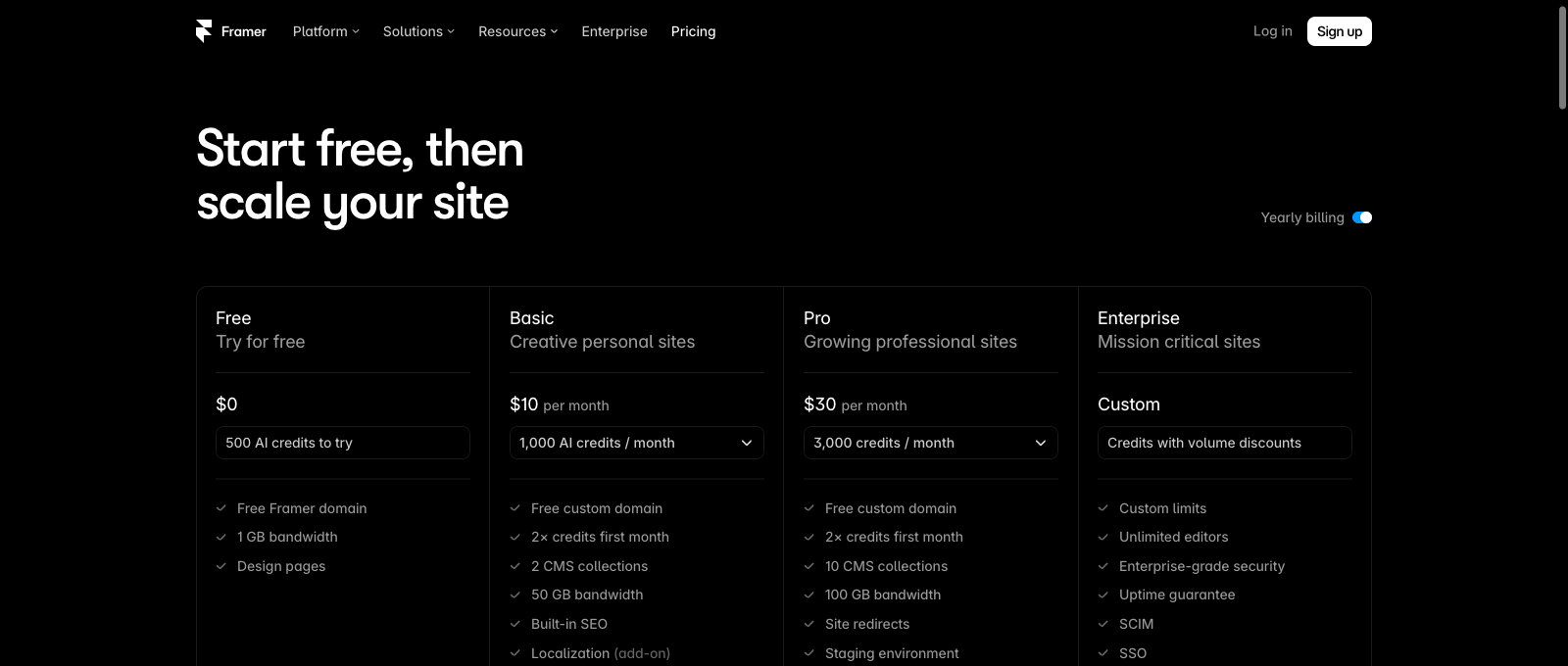
In October 2026, the official site lists Basic at $10 per month and Pro at $30 per month when billed yearly. Basic includes up to 30 regular site pages, two CMS Collections, 1,000 CMS items and 50 GB monthly bandwidth. Pro includes 150 regular pages, ten Collections, 2,500 CMS items and 100 GB bandwidth before eligible add-ons. These are separate dimensions; a site can reach one limit before another.
Our editorial verdict is positive for creative websites where the design workflow matters. The principal warning is vendor dependence: Framer’s own documentation says it does not provide a functioning HTML export for self-hosting. If moving a finished website between infrastructure providers is essential, compare alternatives before investing in dozens of custom pages.
⚡ Quick Verdict: Is Framer Worth It in 2026?
Framer is worth considering for marketing pages, design portfolios and visually distinctive sites that do not need full control over their server infrastructure. The integrated canvas, publishing experience and components can help skilled designers update landing pages without maintaining a large WordPress plugin stack.
Basic makes sense for relatively compact sites with modest CMS needs. Pro is more appropriate for teams managing a larger publishing workload or needing branching, staging and more generous resources. Enterprise targets organizations requiring custom limits, stronger access controls and contractual assurances.
The platform is less persuasive for a business requiring specialized ecommerce operations, extensive back-end logic or an easy exit to independent hosting. Some needs can be met with integrations, but the fact that a site looks sophisticated should never be taken as proof that every business process is included.
Rather than declaring an overall speed winner, we focus on capabilities a buyer can verify: editing model, paid feature boundaries, usage allowances, migration options and recurring fees. We haven’t conducted matching performance tests on paid Framer and competitor sites.
🏆 Framer Pros and Cons
Framer’s strongest points are direct visual composition, responsive design tools, an attractive template ecosystem and modern CMS functionality. Designers can build components, create reusable sections and publish without manually configuring traditional hosting.
The negatives relate to operational fit. Advanced team workflows and multiple locales cost more, limits apply to CMS and bandwidth, and the platform is not meant to export fully working standalone HTML sites. A complex project may require integration work or a different architecture even if its public-facing pages could be designed beautifully in Framer.
👍 What We Love
- ✅ Visual creativity: Responsive layout, components and motion help create distinctive brand pages.
- ✅ Managed publishing: Hosting and site optimization are bundled into the platform.
- ✅ Structured CMS: Collections and reusable content layouts support blogs and customer stories.
- ✅ Staging on Pro: Branching and preview workflows assist with safer production releases.
👎 Where It Falls Short
- ❌ No standalone HTML export: Framer does not let customers self-host an exported working site.
- ❌ Resource limits: CMS items, Collections, bandwidth and page capacity vary by plan.
- ❌ Additional charges: Team editors, translation locales and optional analysis tools can increase cost.
🏆 EDITORIAL VERDICT: STRONG FOR DESIGN-LED PORTFOLIOS
Best for: visual marketing sites, portfolios, small startups and designers working with reusable components.
🧠 What Is Framer Website Builder?
Framer is a website design, content and publishing environment. Designers work visually, building layouts, typography, components and motion rather than treating every page as a plain text document with a few configurable templates. Publishing connects the site to Framer’s managed hosting system.
For a creative studio, that can be attractive because the visual expression of a brand is the main product. For a startup, it may make landing-page experiments easier to manage. A consultant or local business may appreciate launching with an appealing template instead of commissioning a bespoke front-end from day one.
However, Framer is not interchangeable with a self-managed WordPress installation. WordPress sites can generally be moved using conventional files and database exports with appropriate compatibility work. Framer’s published application depends on its own platform infrastructure and doesn’t offer an equivalent ready-to-host HTML bundle.
Understanding that trade-off early can save a migration headache later. If a founder expects to rebuild the brand site every year, flexibility within one builder may be enough. If an organization mandates ownership of deployable source and server operations, a different system may be a requirement rather than a preference.
🖥️ Framer Editor and Design Workflow
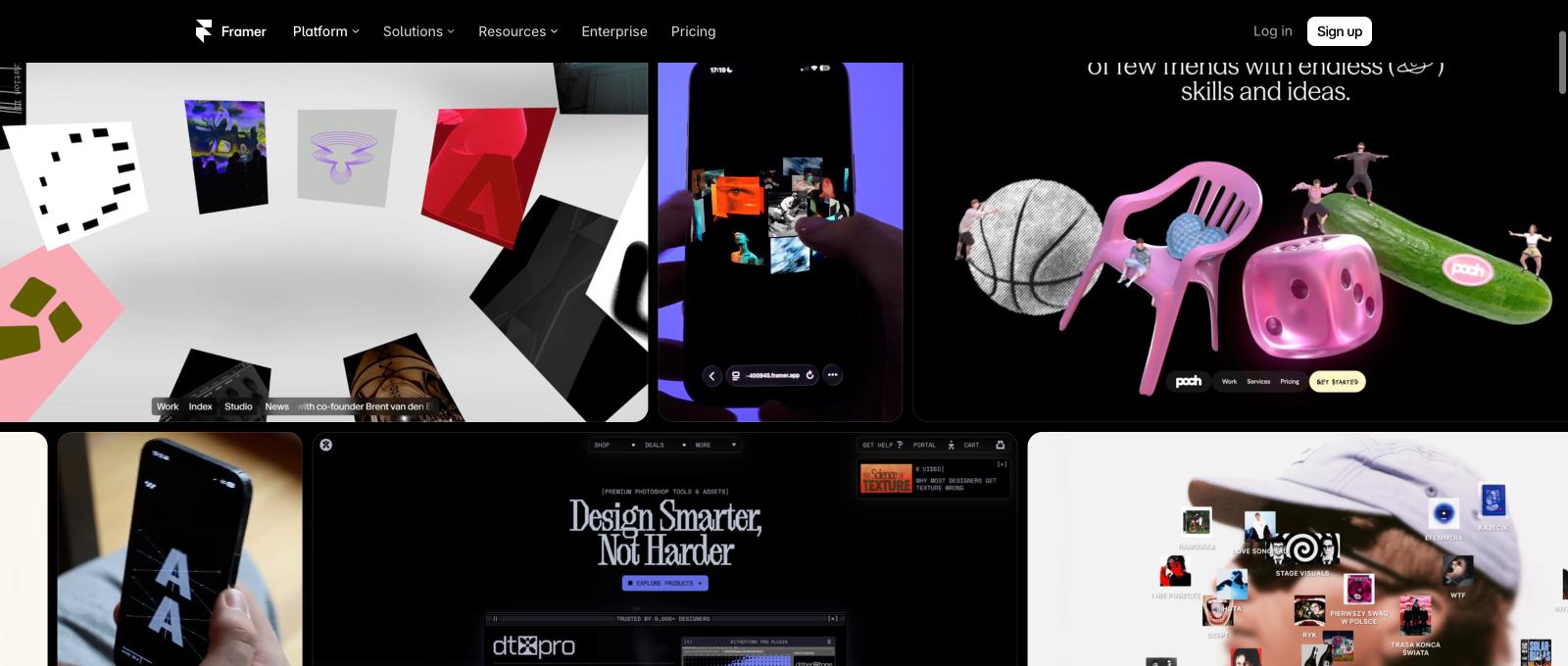
Framer’s visual workflow is particularly well suited to polished landing pages, interactive brand sites and portfolios. Designers arrange layout objects on a canvas, refine typography and spacing, and apply responsive behavior with controls intended for visual work. Templates can offer strong starting points, though the quality of a final site depends on actual content and design decisions.
The ability to create components matters as much as the appearance of an animation. If twenty pages share a call-to-action block, changing one reusable element is safer than manually rebuilding it everywhere. Teams should agree on a small design system, standard buttons, shared spacing and a process for reviewing updates before publication.
Motion is another part of the attraction. Animated headings, transitions, scrolling effects and distinctive visual layouts can help a creative business stand apart. The caution is accessibility. Movement that becomes hard to follow on mobile or ignores reduced-motion preferences can work against visitors; not every possible effect should make it into the final version.
Our screenshot illustrates Framer’s public design showcase, not a private account we operated. We haven’t timed how quickly a real agency completed a project or claimed production performance based on a vendor marketing page.
When Templates Help and When They Don’t
A professional template is most valuable when its content structure already resembles the intended site. A photographer needs organized projects, a startup needs understandable product sections, and a consultant needs clear proof of expertise and a working inquiry process.
Replacing placeholder headings with real text often reveals design weaknesses. Longer descriptions can break carefully staged hero elements, multi-language versions change line length, and actual product screenshots rarely crop exactly like demonstration images. Test those cases before choosing a template as the foundation for dozens of pages.
A good first experiment is to recreate one real landing page with a mobile menu, a form, a repeated feature card and a CMS-driven case study. That demonstrates whether the editing workflow fits the people who will maintain it rather than the person enjoying the setup tutorial.
🛠️ Framer Features That Matter After Launch
🗂️ Framer CMS Collections and Content Operations
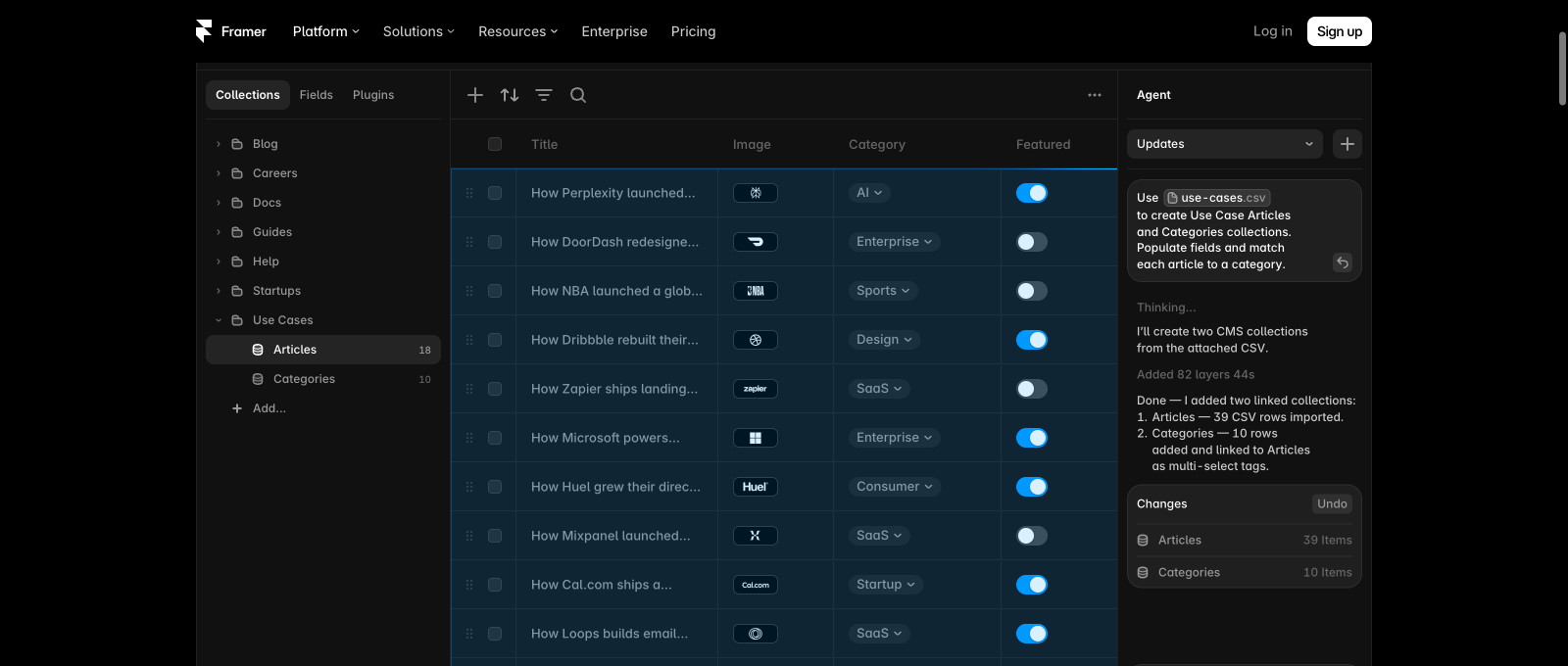
The Framer CMS helps a marketing team manage repeated content types without building every page from scratch. Collections can hold case studies, articles, people, testimonials, product announcements or other records that share a field structure. Designers create templates linked to those records, while content editors manage the information that flows into the layouts.
This is a different workflow from individually designing every blog entry. A company with fifty customer stories needs consistent titles, industries, customer photos, summaries and related links. Modeling those fields once makes ongoing publishing more predictable and improves the chance that an archive stays organized.
The paid plan limits must be counted correctly. Basic lists two Collections and 1,000 items, while Pro lists ten Collections and 2,500 items at the initial tier. Framer’s 2026 pricing table also describes Pro usage add-ons: more Collections, additional CMS items and higher bandwidth allowances can be purchased within published ceilings. A site with a huge directory must budget this growth before importing thousands of records.
The free plan deserves careful reading. The provider’s FAQ discusses a generous design and CMS experimentation environment, but the free published site has its own restrictions, including a Framer domain and limited bandwidth. Some limits are intended for project experimentation rather than production publishing. Don’t treat every free-design allowance as a guarantee that a large public site can stay on Free indefinitely.
Framer’s AI Agents can help create or populate collections from structured instructions and CSV files. The official help center says to review imported fields, especially dates, options, references and images. That warning is important: plausible placeholder content is not suitable for a real company biography, a customer result or a product claim without editorial verification.
🧪 Staging, Branching and Safer Releases
Basic publication can be enough for a simple portfolio where the site owner previews a handful of edits. A growing business has a different need: it must test changes without accidentally putting them in front of customers before approval.
Framer’s current Pro subscription includes a staging environment and branching with previews. Its September 2026 documentation explains that editors can publish to staging, review changes and then deploy the latest version to production. That is more valuable than a marketing promise about effortless publishing because it describes a specific approval workflow.
A disciplined team still needs a checklist. After updating a design, verify the contact form, page navigation, analytics code, accessibility and all translated versions. A successful publish action doesn’t prove that a complex integration or third-party payment link still works.
When people collaborate, establish who may edit, who may publish and who approves final copy. Framer provides viewer access and paid editor roles under its current pricing structure. Shared administrator credentials are a poor substitute for actual permissions.
🌍 Localization: Languages, Regions and the Real Bill
Framer supports localization for translated websites, including CMS content and canvas-level copy. Its current help center describes manual translation, AI-assisted translation, region selections and a preview method for checking a page in a selected locale.
The published pricing page charges $20 per additional locale for its standard localization add-on, within the stated supported tier limits. AI translation also uses credits, and those credits may be shared across a Workspace. The final expense therefore depends not only on how many languages are available but on how many you need and how much translation activity the team performs.
This is relevant to international brands because automatic translation can fail on product names, legal disclaimers or cultural phrasing. A new locale should get its own editorial review, localized calls to action and appropriate search metadata. Pay particular attention to longer strings that wrap differently in a compact mobile navigation.
The available help documentation covers a large set of language and regional variants. But language availability is not proof that all translated content will be accurate. Use a native or qualified editor for high-stakes copy, especially anything describing payment terms or customer rights.
🔎 Framer SEO, Metadata and Redirects
Framer includes tools for page titles, meta descriptions, indexing controls, automatically generated sitemaps and redirects. It also describes search-oriented settings for CMS pages and integration with Google Analytics. These are useful foundations when a design-led business wants its site to be discoverable.
The biggest SEO risk often comes during a migration. A redesigned site may look beautiful yet break an established set of URLs. Framer’s redirect tools support individual paths and wildcard rules, so the owner should prepare a complete URL map before switching the domain. That is particularly important for articles and directories receiving organic traffic.
Do not confuse having the right technical switches with having useful search content. A short marketing page needs clear information about its services, location where relevant, and meaningful proof of expertise. CMS articles need original research or concrete examples rather than dozens of AI-generated variations on the same theme.
The vendor also offers analytics and tracked links or form submissions. Tracking an interaction helps teams understand which page elements users engage with, but it does not automatically establish that a lead became a paying customer. A serious marketing operation should connect its website measurement with its own conversion and sales records.
🤖 Framer Agents and AI-Assisted Production
The 2026 Framer platform includes an expanding collection of Agents and AI features. The pricing page lists AI credit allowances rather than unlimited free AI actions. Basic includes 1,000 monthly credits and Pro includes 3,000, with more credits available through paid options.
A useful application is preparing a CMS schema or mapping spreadsheet columns to collection fields. Agents can also help produce a first page concept. They are less suitable for publishing unsupported factual claims, invented customer testimonials or sensitive legal copy without human checking.
The provider’s own Agent documentation warns that unspecified information can become plausible placeholder text. That is an essential editorial distinction. In a commercial software review, placeholders should never be presented as real testing, verified customer sentiment or a tested quote.
When calculating the subscription, include who will use Agent features and whether shared Workspace credits are sufficient. The value of AI automation depends on saved production time and the quality of review, not simply the presence of a prompt field in the interface.
🧑🤝🧑 Collaboration and Editor Seat Costs
Framer’s current public pricing lists the Workspace owner and viewers as free, but additional editors cost $20 per month per seat under its standard paid plan schedule. Content editors are listed separately at $10 per month per seat. The right mix depends on whether someone needs to change layout, edit CMS content or only review a page.
That separation can be beneficial. A content editor doesn’t necessarily need the power to alter an entire design system. A reviewer may only need to comment on a planned change. Proper permission assignment lowers the chance that a non-design task unintentionally disrupts a layout.
It also means that a studio operating many sites should not budget solely from the $10 Basic or $30 Pro figure. Count the active sites, the necessary editor roles and any localization or advanced-hosting services. Calculate the cost of an ordinary month and a busy production month with multiple contractors.
Keep account ownership clear when building for a client. Decide who controls the site subscription, domain registration, billing and production publishing rights. That administrative work is less glamorous than canvas design, but it can prevent disputes at project handoff.
🛡️ Hosting, Security and Reliability
Framer supplies managed hosting and site delivery. Its public pricing table describes global delivery locations, bandwidth allocations and more advanced hosting options on higher tiers. This is convenient for owners who do not want to maintain server updates or configure a separate content delivery network.
Managed infrastructure does not mean a business can stop monitoring its website. Domain renewals, analytics configuration, account credentials and payment integrations still belong to the owner. A broken contact link on an otherwise perfectly hosted page can cost just as much as a short infrastructure outage.
The platform’s documentation lists further optimization functions such as image resizing, font handling and server-side rendering. These are legitimate components of its managed delivery system, but they aren’t an independent speed comparison. A site with heavy animations and large media can still become unpleasant on modest devices.
A buyer with contractual uptime requirements should review the Enterprise terms separately. Premium service promises and custom agreements should not be assumed to apply to every Basic subscription.
🔄 Framer Site Export: The Limitation You Should Know
A particularly important Framer limitation is often omitted from comparison posts: its current documentation explicitly says you cannot export an entire finished Framer website as a working static HTML package and simply self-host it elsewhere. The published pages rely on the provider’s hosting and optimization system.
Framer does let designers export individual visual assets as PNG or JPG images under its documented design-asset process. That is not equivalent to exporting a production site with routing, CMS content, forms and functional components. The domain name may be portable, but the complete design and application aren’t automatically transferable to another server.
For a small portfolio, rebuilding elsewhere might be tolerable. For a business with many custom landing pages, translations, connected forms and a content collection, the costs could be considerably higher. Before starting a long-term project, keep original copy, photography, product data and documentation accessible outside the builder.
This is a genuine difference from Webflow, where certain paid Workspaces allow static HTML/CSS/JS export, although Webflow CMS and ecommerce also remain nonportable through that method. Neither approach should be called complete ownership of deployable application source. Organizations requiring that level of control should consider a self-hosted CMS or custom frontend.
⚠️ Framer Does Not Provide a Self-Hosted HTML Export
Framer publishes through managed hosting; its official support documentation says you cannot export a complete working website as a standalone HTML bundle.
You can export some individual visual assets, but CMS records, forms, page routing and a live application are not delivered as an independently deployable static site.
In October 2026 the annual-billed Basic and Pro prices are $10/month and $30/month before tax. Additional editors, locales and optional marketing services cost extra.
| Plan factor | Free | Basic | Pro | Enterprise |
|---|---|---|---|---|
| Public annual-billed monthly price | $0 | $10 | $30 | Custom |
| Regular page allowance | Trial publishing | 30 pages | 150 pages | Custom |
| CMS Collections | Restricted free publishing | 2 | 10; expandable | Custom |
| CMS item allowance | Free experimentation | 1,000 | 2,500; expandable | Custom |
| Bandwidth figure | 1 GB | 50 GB | 100 GB | Custom |
| Custom domain | No | Yes | Yes | Yes |
| Staging and branches | Not included | Not included | Included | Custom |
| Monthly AI credits | 500 introductory credits | 1,000 | 3,000 | Negotiated |
💰 Framer Pricing 2026: Free vs Basic vs Pro
The Framer pricing page checked on October 16, 2026 displays Free at $0, Basic at $10/month and Pro at $30/month as annual-billing monthly equivalents. The first two paid tiers are the sensible comparison for many freelancers, designers and marketing teams; Enterprise has individually negotiated terms and custom limits.
The distinction between plans goes beyond whether a custom domain is connected. Basic includes 30 regular site pages, two Collections, 1,000 CMS items and 50 GB of monthly bandwidth. Pro expands those baseline allowances to 150 site pages, ten Collections, 2,500 CMS items and 100 GB monthly bandwidth. The Pro tier also includes staging and branching with previews, features that matter during team-based launches.
A basic site owner who needs one branded domain and a few portfolio pages may be comfortable with Basic. A marketing company operating a substantial resource library needs to evaluate the Collection and item counts. A video-heavy landing page can face bandwidth needs that differ dramatically from those of a text-focused publication.
The current pricing also allows Pro usage extensions. Its published add-on table includes 100 additional pages for $20 per month, ten additional Collections for $40, 10,000 more CMS items for $20 and another 100 GB of bandwidth for $40, subject to maximums. These examples explain the billing model rather than guarantee that every configuration is eligible for every add-on.
The free tier is best treated as an environment for learning, drafting and experimentation. It uses a Framer-provided domain and has stricter publishing allowances, including a 1 GB bandwidth figure on the plan overview. A domain for a professional business website requires a suitable paid subscription.
Additional Costs: Editors, Languages and Experiments
The site subscription is only the starting point of the operating budget. Current standard rates list $20 per extra editor and $10 per content editor per month. If a team uses four paid design editors, that is a separate recurring line item from its site plan.
Localization is another potential charge, publicly listed at $20 per additional locale under the standard add-on, with plan-specific limits. Pro also offers experimentation through the Convert product, with pricing beginning at $50 for 500,000 events in the current published schedule. Organizations exploring advanced routing or deployment options should separately consider the Advanced Hosting add-on at its current listed starting price.
An illustrative personal project can be as simple as Basic billed annually, or $120 before tax across twelve months. A Pro project on the same schedule is $360 before extras. But a team adding two design editors, two content editors and multiple languages will have a substantially different yearly bill.
These are dated public examples. The website uses different billing options and may display other prices based on location, tax or later product changes. Record the checkout total before purchasing.
🎯 Who Should Choose Framer?
Independent designer or creative studio: Framer is particularly attractive for visually distinctive portfolios and client showcases. Test it with real project imagery, navigation and mobile behavior, not just a polished template demonstration.
Startup launching marketing pages: A small product team can use Framer for a fast-moving brand site with experiments, campaign pages and CMS-driven updates. Pro may become useful when staged releases and branching matter.
Marketing team maintaining a content library: CMS Collections and reusable components can support consistency across articles, client stories and product updates. Estimate item counts, contributor seats and localization needs before committing.
Local business with simple needs: Framer can produce a strong design, but a simpler builder may involve less learning for an owner who only changes hours and contact details. Choose by maintenance workflow, not by animations alone.
Organization requiring independent code deployment: Framer is probably not the best fit when fully portable HTML output or self-hosted application infrastructure is required. Its public support documentation confirms those exports are not provided.
⚖️ Framer vs Webflow, Wix, Squarespace and WordPress
The closest conceptual alternative to Framer is Webflow, a designer-focused hosted platform with responsive styling, components and structured CMS Collections. Webflow offers a different publishing and pricing model, including a Site-versus-Workspace distinction. Its paid code-export option differs from Framer’s lack of a self-hostable HTML export, although neither makes complex hosted application features automatically portable.
Our Webflow review explains its 2026 Basic and Premium subscriptions, CMS and Workspace allowances. For a marketing team comparing the two, an actual test of one realistic CMS template, landing page and publication workflow will be more revealing than marketing galleries.
Wix and Squarespace are worth considering when the owner prefers a more packaged website-building experience with integrated business functions. The cost of booking, ecommerce, payments and applications may matter more to a local business than the level of control available over animation details.
Self-hosted WordPress serves a different audience. It generally gives owners access to standard content files and a database but requires a chosen hosting environment and maintenance strategy. Our SiteGround review and Kinsta review explore two of those hosting approaches.
The decision shouldn’t be reduced to which builder makes the best screenshots. Compare how many people must edit the website, which content types will grow, the real subscription including add-ons, and what would happen if the organization decides to move away.
| Practical question | Framer | Webflow | Wix / Squarespace | Self-hosted WordPress |
|---|---|---|---|---|
| Typical buyer | Design-led portfolios and landing pages | Visual CMS and agency websites | Service businesses and stores | Owner needing independent hosting |
| Design workflow | Canvas with reusable components | Responsive Designer and CMS | Templates and visual editing | Themes, blocks or page builders |
| Budget diligence | Seats, locales, CMS, bandwidth | Site and Workspace subscriptions | Plan and optional apps | Hosting, maintenance and plugins |
| Portability | No functional standalone HTML export | Static export under eligible paid Workspace only | Proprietary layouts require rebuilding | Files and database can be migrated |
🧪 How We Evaluated Framer
This review uses first-party Framer prices and help-center documentation checked October 16, 2026. We examined plan limits, CMS, AI credits, team seats, localization, staging, publishing, site export, redirects and analytics controls. References to vendor capabilities are not independent test results.
The screenshots in this article are captured from publicly accessible Framer product pages and show the current product presentation rather than a paid account operated by our team. We haven’t purchased a Framer plan, conducted systematic uptime monitoring, benchmarked it against Webflow under identical load or tested paid support response time.
Our conclusions focus on practical buying questions: what the plans allow, what the add-ons cost, who can maintain the site and whether content and designs are portable. We distinguish these documented features from performance claims that would require a real test environment.
🏆 Final Verdict: Is Framer Worth It in 2026?
Framer deserves a place on the shortlist for teams that want an expressive visual website and managed publishing without maintaining traditional hosting. Its canvas, components, CMS and evolving AI tools can help design-oriented teams produce consistent, engaging marketing experiences.
Begin with Free to determine whether the editing approach fits your team. Consider Basic for a compact branded website and Pro when the CMS workload, staging or collaboration needs justify the higher cost. Keep a separate budget for editors, localization and optional experimentation.
The largest strategic caveat is ownership of the deployable site: Framer doesn’t provide a standalone HTML export. Keep copies of your original content and important assets outside the platform, and consider Webflow or self-hosted alternatives if the ability to move code is a contractual requirement.
Framer’s value isn’t a promise that no other builder can make an appealing page. It lies in how well its creative workflow matches the site your organization needs to update and maintain after launch.

Frequently Asked Questions
Is Framer free to use in 2026?
Framer offers a Free plan for designing and trying its tools. Connecting a branded domain or expanding public-site resources requires a suitable paid subscription.
How much does Framer cost per month?
The October 2026 yearly-billed public US equivalents are $10 for Basic and $30 for Pro. Enterprise is custom priced. Taxes, editors and add-ons may cost extra.
What is the difference between Framer Basic and Pro?
Basic suits smaller sites with 30 regular pages and two CMS Collections; Pro expands to 150 pages and ten Collections, with more bandwidth, staging and branching features.
Does Framer support CMS blogs and collections?
Yes. Framer offers structured CMS Collections for articles, projects and other repeating content, with item and collection limits determined by the selected plan.
Can I export Framer as HTML and self-host it?
No. Framer’s own help center states that functioning published websites cannot be exported as self-hostable HTML packages. Individual visual assets can be exported separately.
Does Framer provide a staging website?
Staging environments and branching with previews are included in the current Pro plan under its documented publication workflow.
Can Framer create a multilingual website?
Yes. Framer has localization tools, including manual and AI-assisted translation. Additional languages and AI usage may incur extra fees.
Is Framer good for SEO?
Framer includes metadata, indexing, sitemap and redirect tools. Search rankings still depend on content quality, competition and technical implementation; the platform cannot guarantee positions.
Does Framer charge for extra editors?
Its current public pricing lists additional design editors at $20 per month and content editors at $10 per month, with free viewer roles available.
Should I use Framer or Webflow?
Framer is attractive for visual marketing sites; Webflow offers a different designer, CMS and Site/Workspace model and supports limited static code export on certain paid Workspaces. Test the same real workflow in both.
Is Framer suitable for a large multilingual website?
Framer can publish design-led websites, but evaluate localization cost, CMS limits, editing permissions, publishing workflow and migration needs before scaling.
DIGIOFFLY / VERIFIED DEAL ALERTS
Get notified about Framer promotions
Interested in this product? Subscribe to optional email alerts for verified vendor promotions. Choose instant notifications or a weekly digest; no unconfirmed discounts, and unsubscribe anytime.
Notify me about Framer deals →EXPLORE NEXT ON DIGIOFFLY
🔍 Explore More on DigiOffly
After this Framer review 2026, evaluate the wider software stack for design production, analytics and website operations:
Explore website options
Need more control? Review the Webflow pricing and CMS guide or our hosting and website-building directory.
- Browse the Website Platform Hub — Find builders and hosting services organized around real publishing needs.
Plan subscriptions and costs
- Estimate the Total Subscription — Price CMS allowances, paid collaborators and marketing subscriptions together.
- Choose Supporting Software — Explore related design, analytics and publishing products for your project.
Tools for your next step
- Explore Product Comparisons — Investigate alternatives before selecting a long-term creation platform.
- Build the Audience — Research SEO reporting and customer acquisition tools for the new website.
- Vercel — Next.js deployment previews and commercial hosting costs
- Netlify — Git deploys, credit-based pricing and web functions