

Editorial fact check: October 24, 2026. Pricing below uses US-dollar annual-billing reference rates published in Retool’s US-facing pricing materials; EU visitors may be shown €9/€5 Team and €46/€14 Business instead. Public-document research only: no production account, paid test or independent performance benchmark is claimed.
A warehouse supervisor needs a screen that shows delayed orders, inventory exceptions and the next action. The underlying data exists in an SQL database, but the people who can fix an order should not have direct database access. Asking the engineering team for a bespoke admin interface might be reasonable. Asking them to maintain ten versions of the same CRUD dashboard is less appealing.
Retool exists in that gap. It provides application components, queries and workflows so technical teams can build tools for people who actually run operations. It is not simply another “drag and drop” consumer website builder. The useful questions are how securely it accesses production data, who counts as a builder, and whether the audit and external-user features require a more expensive tier.
This Retool review 2026 examines internal tools, workflows, mobile applications, AI credits, governance and the difference between builder and internal-user seats. We use an order-exception dashboard as a hypothetical evaluation, not a claim that DigiOffly deployed Retool in a real business.
📊 Review Summary

| Criterion | Finding |
|---|---|
| Product | Internal applications, workflows, native mobile tools and AI-assisted features |
| Free | Up to five users; 500 workflow runs/month and 250 AI credits |
| Team annual-rate US reference | $10 per builder plus $5 per internal user/month |
| Business annual-rate US reference | $50 per builder plus $15 per internal user/month |
| Enterprise | Custom contract for advanced access control and deployment |
| Usage allowances | 5,000 workflow runs/month on Team; AI credit pools vary |
| Best buyer | Technically staffed organization with database/API-driven operations |
| Primary risk | Builder seat definition, role security, expensive governance, metered usage |
| Testing status | Documented capabilities and price research, not production benchmarks |
🎯 Best-Fit Teams and Wrong-Fit Scenarios
Engineering-enabled operations. When developers already understand the company’s APIs, a reusable Retool dashboard can reduce the need to build every internal form and table from scratch. Someone must still design safe queries and establish who can modify business-critical records.
Support, logistics and finance teams. A Retool application can display the record that explains an exception and expose a controlled action, such as reassignment or approval. Its value is highest when the user can complete a real job without needing full access to the underlying database.
Developers building administrative products. Retool supports web and native mobile applications, queries, workflows and reusable modules. Those are helpful when several teams need related screens, but permission policy and release control should precede widespread use.
When it may be wrong. A business with no developer or integration owner may find Retool harder to maintain than a simpler data-backed portal. A founder building a heavily customized public marketplace may prefer Bubble. Retool shines when it can sit responsibly on top of an existing technical stack.
💰 Pricing Plans in 2026
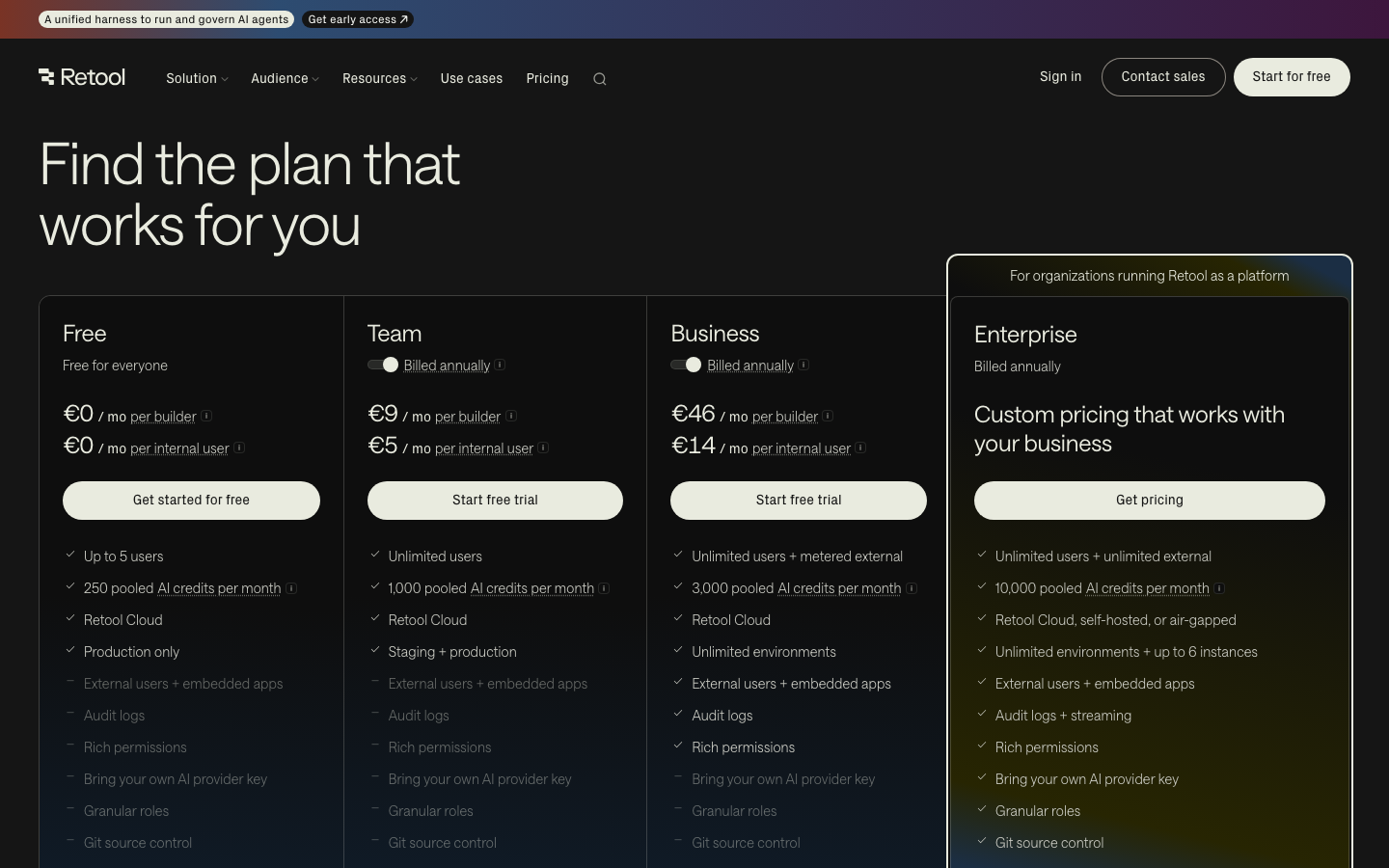
The central Retool pricing 2026 distinction is between a builder and an internal user. Under Retool’s pricing definition, someone who creates or edits an app or workflow within the relevant billing cycle may count as a builder. An employee using a published tool without building has a lower seat price.
Retool’s US annual-billing reference is $10 per builder and $5 per internal user monthly on Team. Business increases that to $50 and $15 respectively. Its live page may redirect European visitors to prices in euros: €9 and €5 for Team; €46 and €14 for Business. Currency is not a direct conversion guarantee; contract, taxes and checkout country govern your bill.
The Free tier lists five users, 500 monthly workflow runs, 5 GB data storage and 250 pooled AI credits. Team shows 5,000 workflow runs and 1,000 pooled AI credits; Business shows 3,000 AI credits, audit logging, more powerful permissions and external portal capabilities. These are plan allowances, not promises of unlimited automated activity.
| Plan | US annual-rate builder | US annual-rate internal user | Differentiating limit |
|---|---|---|---|
| Free | $0 | $0 | Up to 5 users; 500 workflow runs; 250 AI credits |
| Team | $10/month | $5/month | 5,000 workflow runs; staging and releases |
| Business | $50/month | $15/month | Auditing, rich permissions, external apps and portals |
| Enterprise | Custom | Custom | SSO, source control, dedicated deployment options |
A Retool builder vs internal user classification can change the budget even if the nominal headcount does not. Ask whether drafting or editing a workflow changes someone’s billing status in that cycle; do not rely solely on a human job title such as “analyst.” Retool’s official EU price card: Retool pricing and US-facing reference: Retool price card shown in USD. Verify checkout locale.
🧮 Illustrative Annual Cost Examples
The following examples use the annual-rate US reference for one company workspace. Builders and internal users are distinct counts, and each illustration assumes all listed seats remain enabled for twelve months. Extra AI credit packs, workflows, agent time, external users and infrastructure are excluded.
| Scenario | Reference calculation | Year-one price |
|---|---|---|
| Team: 1 builder + 5 internal users | ($10 + 5 × $5) × 12 | $420 |
| Team: 2 builders + 20 internal users | (2 × $10 + 20 × $5) × 12 | $1,440 |
| Business: 1 builder + 5 internal users | ($50 + 5 × $15) × 12 | $1,500 |
| Business: 2 builders + 20 internal users | (2 × $50 + 20 × $15) × 12 | $4,800 |
| Free: 3 people total | $0 within Free limits | $0 |
Why is this important? A five-person operations team with one actual builder should not be priced as five builders without good reason. Conversely, a “viewer” who edits applications frequently may no longer be billed as an internal-only user. The cost comparison must include a monthly audit of build permissions and actions.
For Retool external user pricing, Business can support portals, but Retool defines separate external-user and embedded-app terms. The EU plan has usage bands, starting with a free 0–50 range and per-user fees thereafter; do not apply internal-user prices to customers outside the company. Dedicated self-hosting can require an Enterprise arrangement.
🧩 Features and Real-World Buying Criteria
Visual components with technical control. Retool offers ready-made tables, inputs, charts and buttons. A developer connects the components to queries and controlled events. The goal should be a short, understandable operator workflow, not the most complicated possible screen.
Database and API connectivity. Retool applications often sit in front of SQL databases, REST APIs or SaaS backends. Prefer purpose-built views or backend endpoints that expose only the needed fields. An internal UI is not a reason to grant broad write permission to an entire production database.
Queries and state changes. A dashboard may read order records and trigger a safe action that changes status. The important distinction is reading data and authorizing a write. Validate inputs server-side, use parameterized queries, and retain audit details where the plan supports them. A dangerous “Run SQL” button is not a user-friendly feature.
Workflows. Retool Workflows supports jobs and automated processes, with execution allocations differing by plan. Use explicit retry rules and idempotent actions, so a repeated webhook does not place a duplicate order or send the same invoice twice.
Native mobile and reuse. A team can build mobile experiences and share modules across applications, with feature limits varying by tier. For a warehouse manager, a phone app may matter more than a desktop dashboard, but offline behavior and permissions need separate tests.
🛠️ Workflow to Test Before Paying

The following Retool internal tools example models an order-exception app. Use a dedicated test database and invented orders. The purpose is to find hidden permission and failure problems before handling any customer record.
- Create a read-only query that returns twenty fake delayed orders with unique IDs, assignment and timestamps.
- Show them in a sortable table with filters for status, assignee and age; verify that the results match a known SQL reference.
- Add a detail pane with the complete exception history; conceal unrelated customer or financial fields.
- Give supervisors an explicit approve/reassign action, implemented with a least-privilege backend endpoint.
- Disable duplicate button submissions and require confirmation before a high-impact status change.
- Test with a viewer account, an authorized supervisor, an expired API token and a deliberately invalid record ID.
- Inspect query errors, workflow retries, mobile layout and audit logs at the plan level actually under evaluation.
This is a recommended evaluation exercise rather than a claim about a tested Retool tenant. A good internal application is boring in the best way: an operator understands the state, takes one safe action and can explain the result. Record whether a feature requires Business or Enterprise before finalizing a team’s app architecture.
🤖 AI, Integrations and Usage Limits
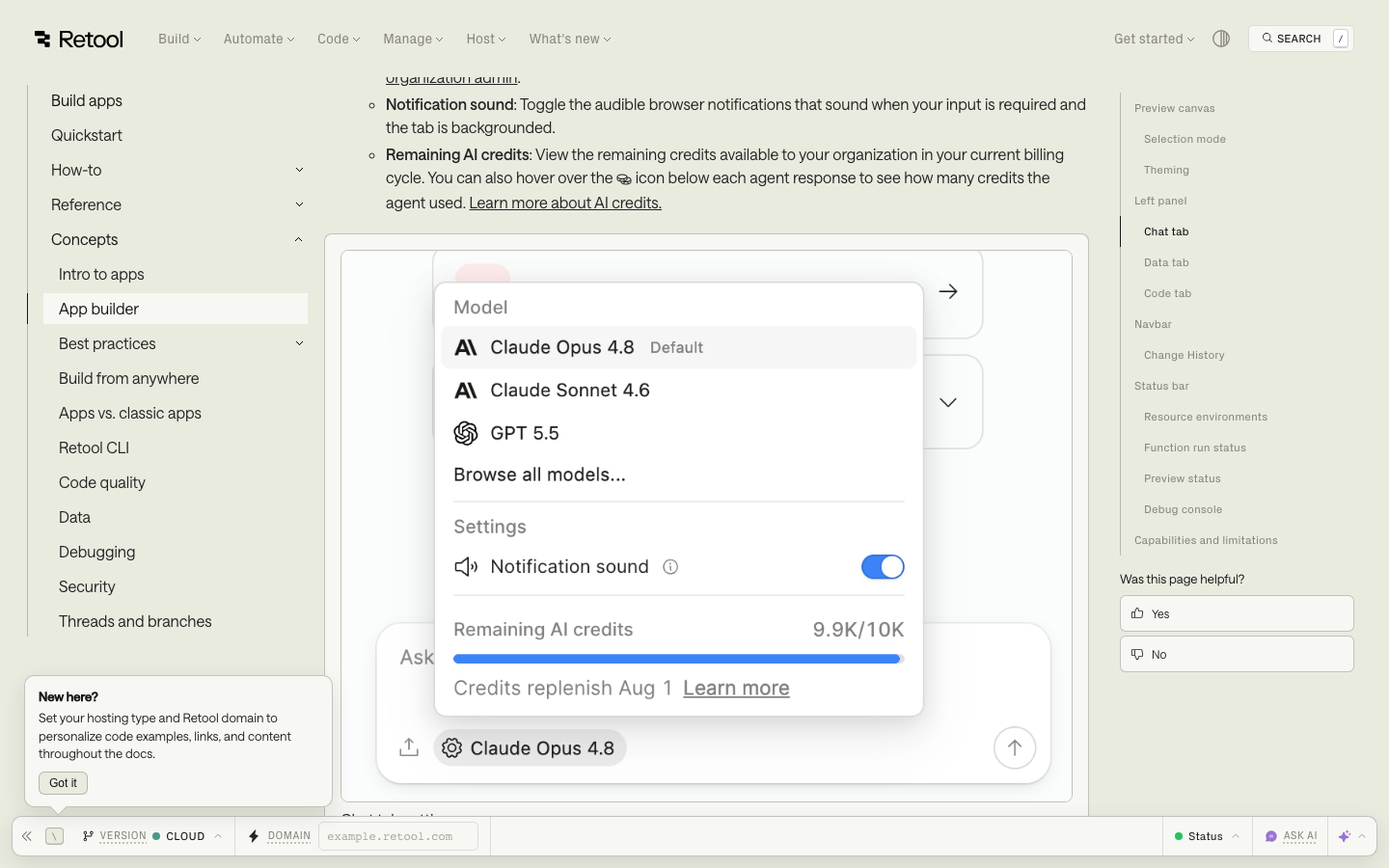
Retool’s plan comparison includes monthly pooled Retool AI credits: 250 on Free, 1,000 on Team and 3,000 on Business in the current public card. The credits support eligible AI building and AI actions, while agent services may have separate terms. Unused credits do not necessarily roll over, so a buyer should distinguish prepaid allowance from automatic additional charges.
AI can help draft queries or summarize an exception, but AI-generated SQL deserves the same security review as SQL written by a person. Separate query-writing rights from production execution, and test every generated query in a sandbox before using it.
External model APIs, credentials and data policies may differ by tier. A customer support agent that can modify orders should not be given unrestricted production write permission. The review criterion is whether a human can inspect and reverse consequential changes.
🔐 Permissions, Data Governance and Reliability

An internal tool often has privileged access to systems of record. That makes Retool role based permissions a central buying criterion. Business advertises audit logging and rich permissions; Enterprise adds features such as SAML/OpenID Connect SSO, source control and advanced platform administration. A procurement review should map the real requirement to the exact plan feature.
Grant every resource the narrowest usable read/write scopes. A front-end table that filters by account does not replace database row-level security or backend authorization. Test with a user who should not see another team’s customer records and attempt direct API or query access.
For Retool self-hosted pricing, a dedicated deployment is not just another cloud toggle. Retool’s docs distinguish Retool-managed and self-managed deployments, with self-managed production using Kubernetes and Helm. Infrastructure ownership brings patching, backups, secrets and on-call work. Treat an Enterprise/self-host requirement as an architectural and budget decision, not merely a license checkbox.
⚠️ Trade-Offs and Operational Risks
Retool builder user pricing. Billing classification may follow editing activity, not an employee’s formal designation. Train app consumers not to modify production apps casually if their role should remain internal-user only.
Governance paywall. A pilot may work on Free or Team but need Business for audit records, advanced permissions or external portals. Include the future compliance scenario in the first budget.
Secrets and privileged queries. The danger of a simple internal tool is that an apparently harmless input can update real systems. Use least-privilege access, validation and tested rollback paths.
Metered AI and workflow usage. Account-level allowances make a usage model necessary for larger deployments. Product demos typically do not simulate a quarter’s volume.
Implementation skill. Retool can reduce front-end boilerplate but does not eliminate engineering judgment around database schemas, backend access or operational monitoring.
⚖️ Alternatives Compared
Editorial comparison: Retool is closer to an internal application engineering environment than to a spreadsheet-to-app shortcut. Compare it against Glide, Bubble and Softr using the same authenticated workflow and data sources; the distinction is technical ownership and permissions, not visual polish.
| Platform | Best use case | Data handling approach | Cost basis | Primary concern |
|---|---|---|---|---|
| Retool | Internal SQL/API operations and admin | Connected resources and queries | Builders, internal users, runs | Engineering and governance |
| GlideOS | Team forms, checklists and trackers | Shared business data and AI building | Apps, members, credits | Less custom query logic |
| Bubble | Custom customer-facing app | Own app data and workflows | Subscription plus workload | Privacy and scalability design |
| Softr | Portal over structured data | Templates and integrated sources | User and feature tiers | Advanced behavior constraints |
Buyer decision matrix
| Decision point | Retool | GlideOS | Bubble | Softr |
|---|---|---|---|---|
| Production SQL dashboard | Core use case | Tier-dependent integration | External API possible | Connected source fit |
| Consumer SaaS product | Possible, not usual first pick | Simpler internal tools | Strong custom fit | Portal-first fit |
| Permission model | Resource and role design | Team/project permissions | Privacy-rule design | Portal permissions |
| Who maintains it | Developer or technical admin | Business team with agent | App builder / agency | Business operations owner |
| What can increase bill | Builders, usage, external users | Credits, published apps | Workload units | Seats and features |
Retool vs Glide
Retool is worth the technical overhead when staff need controlled actions against production APIs and databases. GlideOS is more approachable for a team replacing spreadsheets with field-service or inventory apps. Give both products identical records, a read-only worker and an authorized supervisor; compare security and total admin work before pricing.
Retool vs Bubble
A database-backed internal operations console naturally favors Retool. A custom booking marketplace or public multi-role product may favor Bubble's app-oriented data and visual workflow model. Budget for Retool user classifications on one side and Bubble workload units on the other. Neither product removes authorization testing.
Retool vs Softr
Softr can deliver a recognizable customer portal without the engineering depth of Retool. If the job demands complex SQL queries, resource permissions or bespoke operations workflows, Retool may justify its higher implementation effort. If you only need a private directory and simple form, a lighter portal builder might suffice.
For the simpler end of this decision, explore the published Softr review and Airtable review. Compare this with our Glide review for nontechnical operations teams, or the Bubble review for customer-facing applications.
🧱 Retool Architecture: A UI Is Not Your Source of Truth
A business may already have carefully maintained order data in PostgreSQL, customer records in a CRM, and fulfillment status in a logistics API. Rebuilding those systems inside an internal tool is rarely the best use of developer time. Retool’s appeal is that a developer can place the right interface in front of existing systems. But this architecture also raises an important question: which service is authoritative when two screens disagree?
For an order-exception dashboard, define exactly where each displayed value comes from. Order status might live in the order database; payment status might come from the payment provider; shipment events might be retrieved from a carrier service. A table that joins those records is useful as an overview, not necessarily as a new master copy. If a user changes an order state, send the operation to a controlled backend endpoint that validates the transition. Avoid letting a UI component write to multiple systems without a transaction or recovery plan.
The safest Retool internal tool design uses narrowly scoped database queries, parameterized inputs and distinct read and write actions. Reading fifty delayed orders might be permitted to a warehouse lead. Changing payment bank details should not be. A field that is hidden in the interface is not proof that a connected database credential lacks permission to access it. Restrict the underlying service account as well as the visible component.
Query composition and business logic
A basic Retool table can retrieve records and show filters quickly. The more difficult step is ensuring a change cannot violate business rules. Suppose an order can be in Pending, Packed, Shipped or Cancelled state. The workflow should reject a transition from Cancelled to Shipped unless an authorized recovery procedure exists. A developer may express that policy in a service API, database procedure or carefully controlled workflow; placing it only in an editable client component is fragile.
Use a simple test matrix. A supervisor can reassign an order, a viewer cannot; a finance role can inspect approved refund status but not alter shipping addresses; a support representative can add a note without deleting history. Record expected query results and expected denial messages. The trial should prove that the correct employees can act on orders and everyone else is blocked.
💸 Builder Seats, Internal Users and Role-Based Costs
Retool pricing depends on whether an account builds applications or only uses them. A builder edits or creates application or workflow logic, while an internal user generally consumes the published tool. Some staff may switch between activities during the month. A procurement manager should define the number of actual builders and review billing rules for any user who modifies applications, rather than relying on job titles.
Imagine a company with three engineers, fifteen operations employees and five managers. If all three engineers need to edit tools, they may be builders. The other twenty employees may be internal users if they only operate deployed interfaces. If a manager begins developing workflows, that person may need a builder entitlement. This example explains why the same overall headcount can produce different monthly costs.
The Retool Team plan may cover a useful pilot, but audit logging, richer permissions and embedded or external portal capabilities sit in higher tiers. A company that needs documented approvals in a regulated process should not select a lower tier solely because the prototype fits within its user limit. First list the controls the business requires; then determine which plan exposes them.
External users change the licensing model
An external portal used by suppliers or customers is not the same thing as an internal application used by employees. The Retool Business plan supports external applications and portal arrangements, with different user pricing and eligibility rules. A projected audience of 500 external suppliers cannot simply be entered in a spreadsheet as 500 discounted internal seats. Obtain the current pricing policy for the deployment mode and expected active-user pattern.
It may be cheaper to expose only a narrow task through an existing customer platform rather than build a full Retool portal. Conversely, an external supplier workflow may justify the higher tier when it replaces a fragile email approval system. Estimate the security review, identity lifecycle and support requirements along with the license fees.
🔐 Security Review: Database Credentials, Permissions and Auditing
An internal dashboard can accidentally become one of the most privileged systems in the organization. If a resource connection uses credentials with broad database access, every app wired to that resource deserves scrutiny. A secure evaluation creates a dedicated service account with the minimum tables, views or API scopes required by the particular workflow. It does not paste a production administrator password into a quick demo.
Review both application-level permissions and backend authorization. Retool can provide controls over who sees and edits an app, but a poorly scoped SQL resource remains dangerous. Test an account that is allowed to read an order but not change it. Verify that clicking a hidden or disabled action is not the only barrier: the backend should independently reject an unauthorized write.
Retool audit logging is more important for consequential actions than for cosmetic interface changes. A useful log connects a user identity, record ID, timestamp, requested action and outcome, while avoiding unnecessary exposure of sensitive details. Decide how an incident investigator would answer “Who changed this order’s shipping destination?” If the current plan cannot deliver the required evidence, include that limitation in the purchasing decision.
Secrets, environments and release separation
Use separate development, staging and production connections where the plan and architecture allow them. A sample query developed against fictitious records should not accidentally update live customers because a copied app still points to a production database. Name environments clearly and require an explicit test before promotion. Restrict who can change resource credentials or publish a new application version.
Rotation needs a runbook. When an API token expires or is revoked, a maintainer should know which tools depend on it and how to restore them without exposing credentials to all editors. For a Retool self-hosted deployment, extend the checklist to host patching, TLS, backups, secrets management and rollback of the platform installation itself.
🔄 Workflows, Retries and Reliable Background Jobs
Retool Workflows is relevant for scheduled tasks and automated processes that are adjacent to an operational dashboard. A workflow may poll for delayed orders, enrich a record from another service and create a task for a team member. A successful demonstration proves little unless the workflow has predictable behavior when systems respond slowly or unexpectedly.
Set a stable identifier for each logical operation. If the carrier API times out after accepting a shipment update, repeating the operation should not produce another shipment. A retry routine must recognize a previously completed event. When an external system does not support idempotency keys, maintain a reconciliation record or a controlled human review process.
Do not design alerts that fire continuously without an owner. A useful failure notice includes what failed, the affected record, a safe next action and a link to the relevant log. Set a review cadence for repeated exceptions and for workflows that quietly stop running. For a critical job, define when failure requires immediate escalation and when it can wait until business hours.
Running at higher volume
The Free and Team plan comparisons include monthly Retool workflow runs. The number of end users does not alone predict run consumption. A dashboard may trigger one workflow on demand, while another application starts a workflow every minute for monitoring. Model the expected frequency of scheduled executions, user-initiated jobs and automatic retries separately.
An illustrative example: a scheduled job every fifteen minutes creates 96 runs per day before extra retries. Over a 30-day month that is 2,880 runs. A 5,000-run Team allowance might accommodate it, but adding other scheduled jobs and retry traffic can change the result. These figures describe hypothetical scheduling arithmetic, not a measured Retool account. They show why workflows should be inventoried as separately as seats.
📱 Mobile, Offline Access and External Operations
An internal tool used on a desktop is not necessarily usable by a warehouse operator holding a phone. Before selecting a Retool mobile approach, identify which actions can be completed with one hand, whether barcode scanning or camera input is necessary, and what happens when connectivity drops. Dense administrative tables rarely translate into good mobile field experiences without redesign.
Offline behavior requires particular scrutiny. Retool’s plan comparison distinguishes mobile offline capabilities by edition, with Business advertising features beyond lower tiers. If a field worker must capture data in an area without reception, test the exact operating mode and synchronization behavior. Otherwise the app may appear functional during office testing but fail in a loading bay or remote site.
Mobile users also have permission constraints. A supervisor may approve a stock adjustment from a desktop, while a floor worker may only flag an exception. Check that the mobile layout does not accidentally expose an administrative action because it reuses a component with broader permissions.
🤖 AI Assistants, Query Generation and Human Approval
An AI assistant can draft a SQL query, but the builder still has to review its joins, filters and privileges. In an internal tool, incorrect code can expose data or change records. Run generated SQL against a controlled test database; inspect joins, filters, row limits and parameter handling. A query that works in preview still needs permission, filter and write checks before production.
Retool’s public plan comparison lists pooled AI credit allowances. Credits should be forecast separately from user and workflow costs. One analyst experimenting with AI summaries may generate a different usage profile from a system that automatically summarizes every new support case. Measure the actual debit for representative operations before granting broad use.
For tools that recommend refunds, order cancellations or customer communications, preserve a human approval boundary. The AI assistant may summarize evidence and propose an action; an authorized employee should review the source records before a consequential change occurs. A guardrail is meaningful only if the backend enforces the permissions even when the frontend displays a confident suggestion.
✅ Acceptance Test and Exit Planning for Retool Buyers
Build one complete operations scenario for your trial. Use a synthetic database containing fifty orders, twenty customers and several intentionally inconsistent statuses. Give a builder permission to create the app, a supervisor permission to change selected orders, and an internal viewer read-only access. Test a missing order, duplicate update, expired API credential and failed downstream service.
Next, document ownership. Keep query definitions, resource scopes, workflow dependencies, deployment settings and a copy of the fictional test dataset. The goal is not to create a large paper trail. It is to make the tool maintainable when the original developer moves to another project. A second engineer should be able to reproduce an issue with the same inputs.
Finally, ask how the company would migrate away if its requirements changed. Can the business logic be moved into an ordinary service? Are critical workflows already implemented as reusable APIs? Where are logs and attachments stored? A Retool application should simplify access to an existing system, not become the only undocumented representation of an essential business process.
Retool’s strongest economic argument is the engineering time saved by reusing components while keeping important data in governed systems. Prove that advantage with one representative application and a genuine permission test. Only after the design works should the organization scale the number of builders, consumers and deployed tools.
✅ What We Love / Where It Falls Short
✅ What We Love
- Speeds up creation of database-driven internal UIs
- Separates builders from lower-cost app consumers
- Supports workflows, web apps and mobile experiences
- Business tier introduces valuable governance features
- Can connect to an existing technical stack
⚠️ Where It Falls Short
- Needs technical ownership to deploy safely
- Builder classifications can change monthly spend
- Rich audit and permission functions cost more
- External users and hosted deployment need separate analysis
- AI credits and workflow runs introduce usage limits
🧪 Research Methodology and What Was Not Tested
We inspected Retool’s public pricing pages and current product documentation through October 24, 2026. We distinguished US annual-rate references from the euro prices presented on an EU-localized official page, and checked the Free/Team/Business feature differences. The figures are not obtained from a private sales quote.
We have not installed a self-hosted Retool instance, created a production dashboard or conducted measured latency and security tests. The proposed order-exception exercise would produce evidence for a future hands-on assessment; until then, the verdict is conditional on documented features and real operational requirements.

Frequently Asked Questions
What is Retool used for?
Building internal applications, dashboards, workflows and mobile tools connected to existing databases and APIs.
Is Retool free?
A Free tier exists with up to five users and published limits on workflow runs, storage and AI credits.
How much does Retool Team cost?
The US annual-rate reference is $10 per builder and $5 per internal user each month. EU pricing can differ.
How much does Retool Business cost?
The US annual-rate reference is $50 per builder and $15 per internal user each month, excluding additional usage.
Who counts as a Retool builder?
A user who creates or edits apps or workflows in the billing period may be billed as a builder rather than an internal app consumer.
Does Retool have workflow limits?
Yes. Current public comparisons list 500 monthly runs on Free and 5,000 on Team; check additional usage terms.
Does Retool support external portals?
Business includes external apps and portals, with a separate external-user pricing approach.
Can Retool be self-hosted?
Retool documents managed and self-managed deployments, subject to plan eligibility and infrastructure requirements.
Does Retool include AI credits?
Yes. Public plan cards show pooled monthly AI credit allowances that vary by tier and may not roll over.
Is Retool better than Glide?
Retool often suits technical teams joining databases/APIs; Glide may be easier for straightforward structured-data business apps.
What should an IT buyer test first?
Test read-only queries, an approved write action, role isolation, query errors, audit requirements and builder-seat classification.
🏁 Final Verdict
Retool offers a productive middle ground for companies that have real operational data and technical people capable of connecting it safely. Developers can build useful tools without recreating ordinary table and form interfaces from first principles.
Its commercial model rewards careful separation of builders from app consumers. Before committing, price the expected seat mix and then inspect the tier required for auditing, permissions and external access. If the tool will be self-hosted, include infrastructure and on-call responsibility. The lowest published Team figure is not the whole cost of a business-critical internal platform.
📚 Official Sources
- Retool current pricing – EU localization
- Retool public USD pricing representation
- Retool product documentation
- Retool self-hosted deployment guide
- Retool self-managed deployment details
Five dated screenshots of official public vendor pages are included above with their sources. This draft makes no claim to include private-account screenshots or paid product test results.
EXPLORE NEXT ON DIGIOFFLY
Explore Software That Fits Your Workflow
Use the guides below to compare Retool with existing solutions, calculate subscription costs and build a reliable stack.
Automation & No-Code
- Explore all automation reviews
- Softr builder review
- Airtable database review
- Make review
- Development & DevOps — Explore reviews of code, APIs, app backends and deployments
- Supabase — PostgreSQL, authentication and app backends
- Firebase — Firestore and Google-backed app services
Compare objectively
More tools & savings
- Software Directory
- n8n review
- Zapier review
- Software deals
- Baserow — Relational no-code databases and custom apps
Independent editorial recommendations; verify eligibility and current vendor pricing before purchasing.