

Research updated: October 24, 2026. Prices below are public US-dollar examples, not a personalized quote. WP Engine’s current Essential offer starts at $28/month billed annually ($336 upfront) for a first-year one-site configuration; introductory offers, taxes, extra sites and add-ons may change the checkout total. The vendor’s separately published March 2026 price schedule lists $35/month for the Startup subscription at renewal. Confirm your account-specific renewal price before paying. Sources: WP Engine plans, WP Engine renewal pricing notice.
Most WordPress sites work fine until a plugin update, redesign or client handoff exposes a weak release process. A new checkout plugin requires a PHP update. A landing page is edited during a campaign. An agency wants to deliver a finished client site without giving away its own hosting account. In those moments, a hosting control panel matters more than a shiny uptime slogan.
That is the question behind this WP Engine review 2026: does a specialized managed environment earn its premium, or are you paying for conveniences that a less expensive WordPress host already provides? Rather than repeat promotional speed claims, we examine WP Engine hosting plans, the staging workflow, backup controls, measured resource allowances, the billing structure and a realistic migration checklist. We reviewed official documentation and public pricing; we did not purchase a subscription or conduct independent load tests.
📊 WP Engine Review Summary
WP Engine is a managed hosting provider focused on WordPress. It handles important platform-level operations—such as core and PHP management, CDN delivery and daily backups—while leaving editorial decisions, plugin selection and application behavior to the website owner. Its value is clearest when a team frequently changes a revenue-producing WordPress property.
The real trade-off is between a more structured workflow and a significantly larger hosting bill than entry-level shared plans. WP Engine pricing uses site, visit, bandwidth and storage allowances; none should be mistaken for unlimited production capacity. Our assessment favors its agency-friendly environments and recovery workflow, while warning buyers to budget renewals, premium security features and traffic overages separately.
Bottom line: WP Engine managed WordPress hosting is worth shortlisting for a business where staging, client handoff and restoration matter. It is difficult to justify for a small static blog whose main requirement is the lowest long-term cost.
⚡ Quick Verdict: Is WP Engine Worth It in 2026?
Yes for teams whose WordPress changes are frequent and consequential; usually not for budget-first hobby sites. The most persuasive feature is not a promise that every page will load fastest on WP Engine. It is having production, staging and development environments designed around WordPress changes, alongside backups and support from people who work primarily with that ecosystem.
WP Engine hosting becomes attractive when the cost of a bad deployment exceeds the difference in the monthly bill. A WooCommerce store, membership site or agency portfolio can benefit from testing new code before the public sees it. A personal blog that gets edited twice a month may not capture that value. The premium must solve a real operational problem.
🏆 WP Engine Pros and Cons
👍 What We Love
- ✅ WordPress-focused management, including WordPress and PHP updates
- ✅ Production, staging and development environments for careful releases
- ✅ Daily and on-demand backups with a documented recovery workflow
- ✅ Global CDN, SSL and server-side caching are part of the platform
👎 Where It Falls Short
- ❌ Premium cost versus low-end WordPress hosting
- ❌ Visits, storage and bandwidth are finite by plan
- ❌ Some advanced security, optimization and plugin-automation options cost extra
🏆 EDITORIAL VERDICT: RECOMMENDED FOR WORDPRESS TEAMS
Best for: teams that publish and deploy WordPress changes frequently and need staged releases, documented backups and managed operations.
The advantages are capabilities established in WP Engine documentation. They are not claims based on a fictitious support conversation or a synthetic speed benchmark.
🧠 What Is WP Engine?
WP Engine is a managed WordPress hosting platform, not a generic virtual private server and not a drag-and-drop website builder. You still use the familiar WordPress editor, themes, plugins and database. The host supplies a WordPress-oriented environment around them. That distinction matters to teams deciding whether they need a managed CMS operation or unrestricted server administration.
For a publisher, the practical benefit is that routine hosting tasks are consolidated: an SSL certificate, backups, environmental controls, user access, deployment and traffic information can be managed without building all those systems from scratch. For a developer, it means accepting platform conventions in exchange for less maintenance of the underlying hosting stack.
An important boundary: managed hosting does not mean WP Engine can certify every third-party plugin or guarantee that custom checkout code never fails. Security, privacy, accessibility, marketing integrations and database changes remain shared responsibilities.
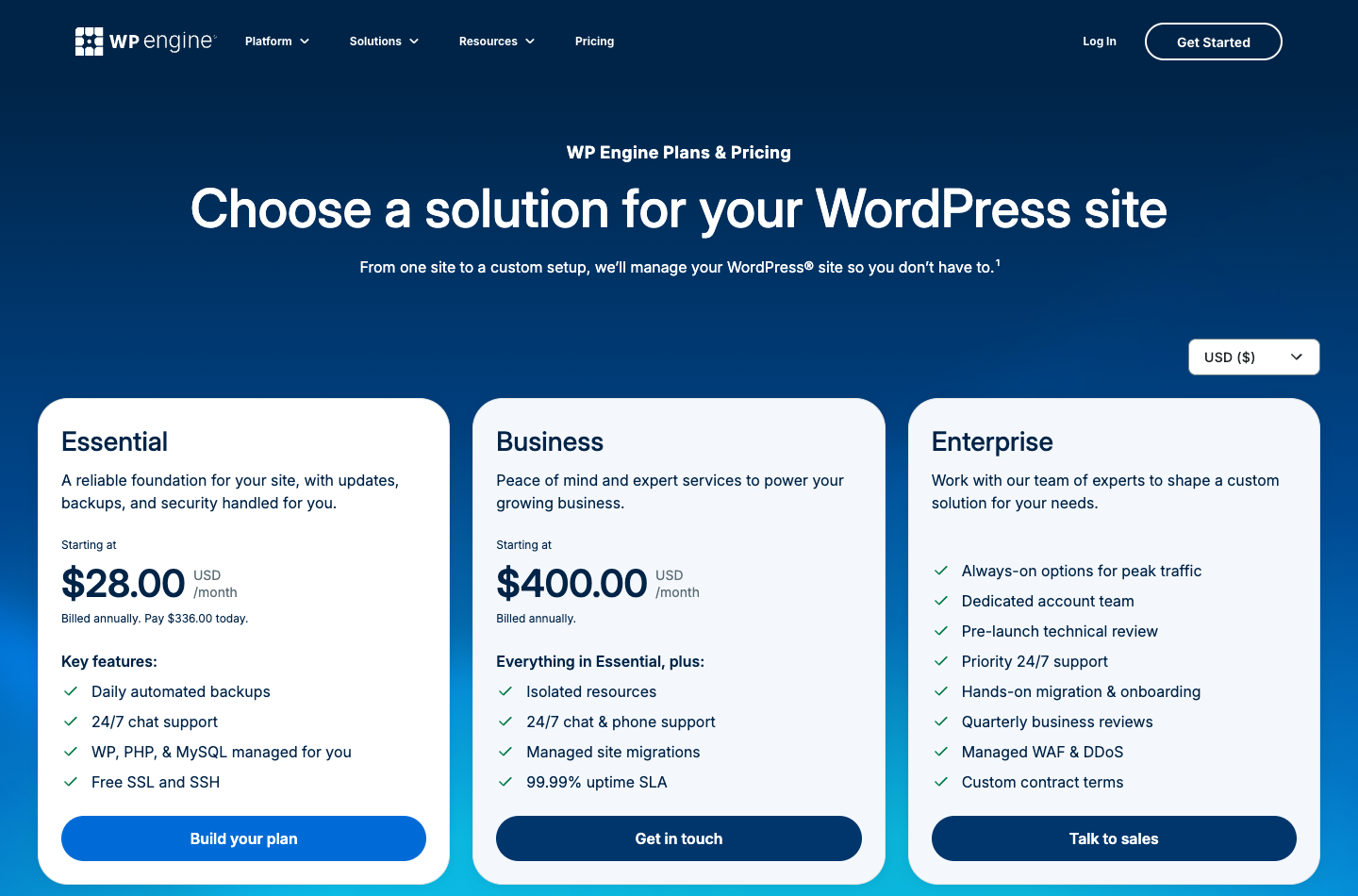
Capture of the official public pricing page. Source: https://wpengine.com/plans/. Not a screenshot of a paid DigiOffly test account.
🖥️ WP Engine User Portal and Staging Workflow
WP Engine staging environments are worth using for every significant release, not only for redesigns. Run an actual login, form and checkout test before promoting an update. WP Engine automatic backups provide another recovery path, but teams should understand what a database restore would overwrite. For WP Engine hosting for agencies, document which account owns the production site and who can approve a restoration.
The WP Engine environment model is unusually central to the purchase decision. The official documentation describes up to three separate WordPress environments per site: Production for live traffic, Staging for testing and Development for active work. A staging copy is useful when a change affects database structure, checkout templates, redirects or a new theme. It gives a team room to break something privately rather than in public.
Consider a small store preparing a holiday promotion. The developer clones the live website to staging, updates the payment extension, checks the cart on mobile, verifies transactional emails and reviews logs. Only then does the team decide how to deploy. This is the workflow you are purchasing; it is not the same as clicking an update button directly on the live store.
WP Engine staging is not a magical rehearsal for every production behavior. Scheduled jobs, external payment gateways, email delivery and live order traffic can behave differently from a cloned site. If orders arrive while a staging copy is being modified, restoring or pushing an old database can overwrite real customer activity. WP Engine’s staging tools should be combined with a selective deployment plan and a fresh backup.
WP Engine also documents sandbox and transferable website workflows that are relevant to freelancers. Before committing, confirm how a finished project changes ownership, what the receiving client’s plan costs and which team permissions remain after transfer.
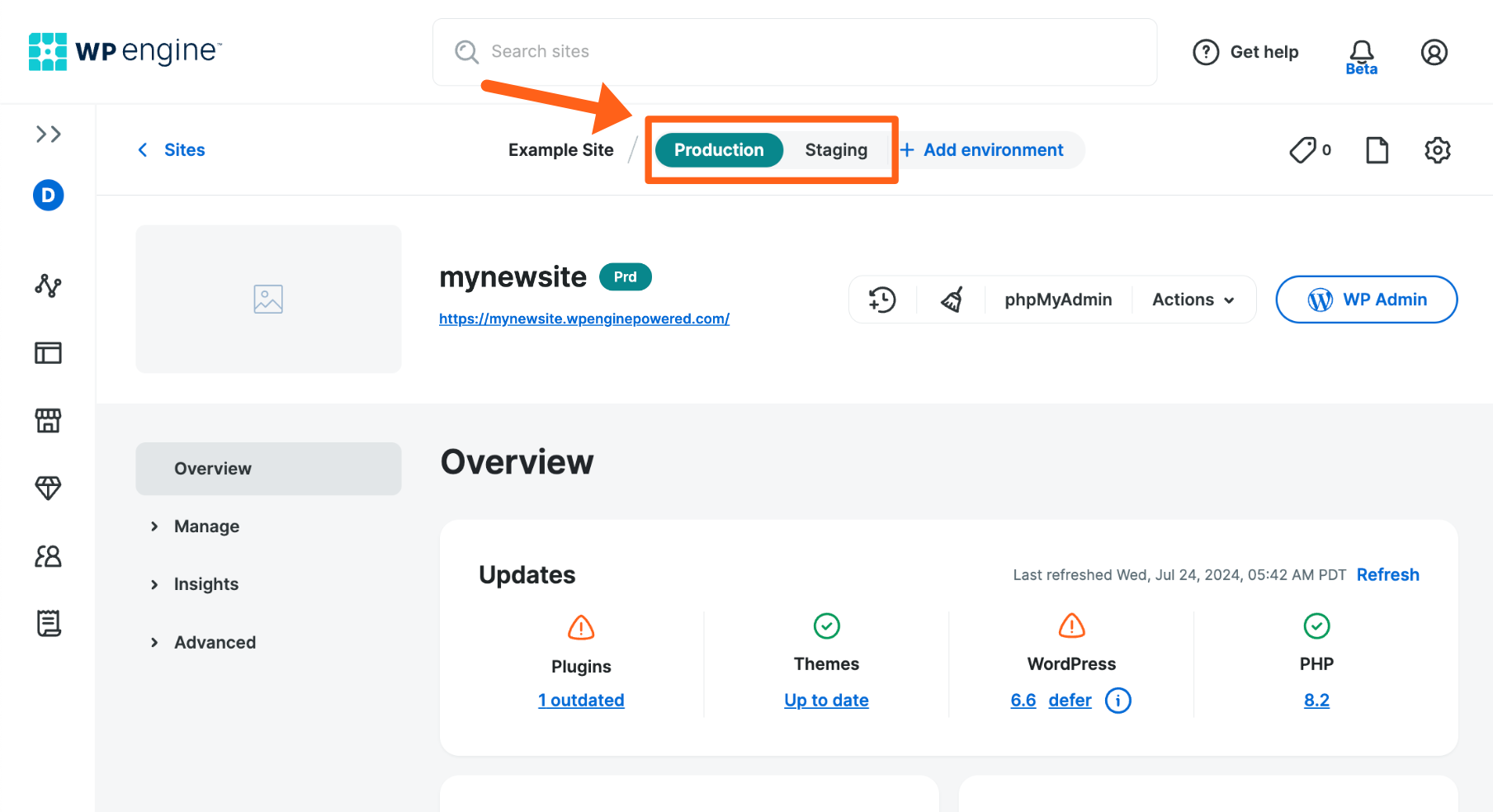
Official vendor documentation screenshot. Source: https://wpengine.com/support/environments/. Not a screenshot of a paid DigiOffly test account.
🔧 WP Engine Features That Actually Matter
Backups and recovery
WP Engine backup options include daily backups as part of the managed offering, and WP Engine documents on-demand backups as well. This is valuable before a theme swap or plugin rollout. Yet a backup is useful only if you know how to restore it. Verify retention, whether media and the database are included, restoration scope and the ability to keep an independent off-host copy. A production recovery plan also needs domain and DNS access.
EverCache, CDN and caching exceptions
WP Engine EverCache is the provider’s WordPress-oriented caching technology, and the platform also advertises a global CDN. Both can reduce work on repeated requests and distribute static assets nearer to visitors. Neither turns personalized carts or logged-in experiences into ordinary cacheable pages. For WooCommerce, memberships and subscription applications, test uncached operations separately. A homepage marketing screenshot is not evidence that your checkout is fast.
Security and updates
WP Engine manages platform patching and provides SSL, threat defense and security-oriented tooling. The current plans also display paid options for additional web application firewall protection and automated plugin updates with visual testing. Do not infer that every paid add-on is included in the entry price. Review roles, least-privilege accounts, two-factor authentication and plugin maintenance responsibilities before launch.
Agency and developer operations
SSH access, GitHub Actions deployment possibilities and transferable sites can simplify collaboration. A design agency handling a dozen small websites may get more value from standardized environments than from small differences in storage. Still, staging copies, add-on sites and premium tooling can change the economics. Count live billable properties, not just the number of projects in a spreadsheet.
🧭 WP Engine Workflow Test: A Safe WordPress Release
Imagine that a publisher needs to update its checkout, replace a theme component and change the caching configuration in the same week. A bad update costs more than downtime: the team must trace the change while visitors encounter broken features. A sensible WP Engine workflow starts with a named production checkpoint, a documented staging environment and a written list of high-risk pages. Your team should agree who approves the release, who can restore a backup and what constitutes a failed deployment. Those controls are not glamorous, but they let a content business make frequent changes without treating its public site as the test environment.
Before moving a new plugin to production, compare a small test matrix: homepage, search, a long editorial page, contact forms, member login and any payment or subscription journey. Test both anonymous browsing and logged-in sessions because a cached page can look fine to one person and fail for another. If the site serves visitors in several regions, verify the CDN and regional redirects as well. WP Engine’s production, staging and development environments make this separation possible, but the organization still needs its own release checklist. A one-click copy should never be mistaken for proof that all customer-facing integrations survived.
A rollback plan also needs boundaries. Restoring database content after customers have placed orders can erase legitimate changes made since the checkpoint. For WooCommerce, membership sites and editorial platforms with active comments, rehearse whether files can be reverted independently from the database. Record plugin versions and export any volatile order data before a risky change. WP Engine documents backups and restoration, but your operational policy must decide what data you are willing to roll back. The more dynamic the site, the more important a maintenance window and an explicit recovery owner become.
🛡️ Security Responsibilities: What Managed WordPress Does Not Remove
Managed WordPress hosting narrows part of the operational workload; it does not transfer every security decision to the host. The site owner still decides which third-party themes to install, who gets administrator privileges and where form submissions are stored. A strong setup uses individual accounts rather than shared credentials, multi-factor authentication where supported and a quarterly review of access granted to contractors. Editors rarely need to install plugins, while developers should not hold permanent access to billing systems. This distinction becomes important when a company grows beyond a single technically minded founder.
Think about a marketing stack connected to WordPress: analytics, forms, email delivery, affiliate links and payment processing. A managed host may keep core infrastructure maintained while a vulnerable integration remains exposed. Review each plugin’s maintenance history and permissions; remove abandoned software instead of leaving it disabled indefinitely. Check whether webhooks contain customer information and whether error logs preserve sensitive parameters. A plugin risk scan is one useful signal, not an independent compliance certificate. WP Engine’s security and update offerings are valuable precisely when combined with responsible site configuration and a clear inventory of extensions.
Backups should be tested as recovery tools, not viewed as a decorative dashboard badge. Ask how far back restore points are available, who can download them and whether an independent off-platform copy is appropriate for critical assets. Test restoration against a staging environment before an emergency. A company with regulatory or contractual retention needs must map its own obligations to the host’s backup schedule. There is a difference between a host keeping short-term checkpoints and a business preserving legally important customer records. Treat those as separate requirements during procurement.
⚡ Caching, Dynamic Pages and Performance Interpretation
WP Engine advertises EverCache and a global CDN, both potentially useful for content-heavy WordPress properties. However, caching only helps when visitors can safely receive a shared representation of a page. Personalized account pages, shopping carts, member dashboards and some location-sensitive experiences require careful cache exclusion. A website can look extremely fast in a public landing-page test while its logged-in dashboard remains slow because every view runs uncached PHP and database queries. That is why a single home-page speed score is an insufficient basis for selecting hosting.
Build a performance baseline before migrating. Record the median and slower-end loading experience of several representative pages, not only the hero landing page. Distinguish initial server response, image loading, script execution and Core Web Vitals; these measurements identify different bottlenecks. Test with similar traffic and the same theme and plugin versions. Otherwise the supposed effect of a host change may actually come from a newly installed optimization plugin or different image sizes. DigiOffly has not performed a controlled WP Engine benchmark, so this review assesses the documented tools and decision framework rather than claiming a specific speed advantage.
For a business site, performance also includes operational consistency. Can an editor publish a large image library without generating unnecessary variants? Can the team invalidate a cache after a price update? Are backups and staging operations predictable when the database grows? Look at error logs around scheduled jobs, external API requests and payment callbacks. If a host’s managed conventions require special treatment of cron jobs or cache headers, document those needs before launch. Most performance problems are interaction effects between application code, configuration and real traffic, not a simple contest of marketing speed claims.
⚙️ How to Migrate WordPress to WP Engine Safely
A WP Engine WordPress migration needs a complete inventory of DNS records, redirects and third-party integrations. During the rehearsal, test WP Engine CDN and caching behavior on both public content and logged-in pages. Treat WP Engine staging and backups as complementary safeguards: staging catches predictable issues, while backups support recovery after a problem reaches production.
1. Audit the existing application. A WP Engine site migration starts with recording the active plugins, PHP compatibility, database size, custom cron tasks, redirects, DNS records and payment integrations. A migration that moves posts but forgets a webhook is incomplete.
2. Preserve an independent backup. Export files, uploads and the database before changing nameservers or using the official migration plugin. Export mail separately if the previous host handles mailboxes; a WordPress hosting migration does not automatically move email service.
3. Create the destination and test privately. Use the supported migration workflow, inspect permalink structure and forms, then test sign-ins and carts. If a site relies on external APIs, compare their callback URLs between the test and live environments.
4. Plan DNS cutover and rollback. Lower TTL ahead of time where appropriate, schedule the switch, keep the old hosting account available and watch real transactions after the move. Take another backup of new production traffic before any subsequent rollback.
💵 WP Engine Pricing 2026: Essential, Business and Enterprise
The WP Engine Essential plan is a natural starting point for a single-site quote, but its introductory rate should never be projected across several client sites without checking allowances. WP Engine Business hosting targets different operational requirements. When comparing WP Engine hosting alternatives, make separate columns for renewal costs, support access, traffic policies and the staff hours required to maintain the stack.
| Offer / capacity | Public pricing context | Key buying consideration |
|---|---|---|
| Essential entry / one site | From $28/mo, billed annually ($336 upfront) as an advertised first-year offer | 25,000 visits, 10 GB storage for the entry configuration; verify current checkout |
| Essential larger configurations | Site count and allowances increase with selection | Compare three, ten or thirty sites before choosing a tier |
| Business | Contact sales; current page positions isolated resources here | Higher operational requirements and stated 99.99% uptime SLA |
| Enterprise | Custom quote | Dedicated account and advanced support arrangements |
WP Engine previously described named Startup, Professional, Growth and Scale packages. The 2026 storefront increasingly groups options under Essential, Business and Enterprise, while legacy or renewal schedules can still reference the older plan names. Do not assume a promotional Essential figure is the evergreen renewal price of a legacy Startup subscription. The vendor’s March 2026 notice lists Startup at $35/month and Professional at $65/month for affected subscription renewals. These figures are different contexts, not prices to add together.
The current pricing page notes that first-year coupons apply to eligible new Essential customers, not renewals. Taxes and overages may apply. Ask support or inspect the cart for extra sites, automated plugin management, security upgrades and site optimization. The best WP Engine plan is the least expensive one that accommodates real traffic and the workflows your team uses.
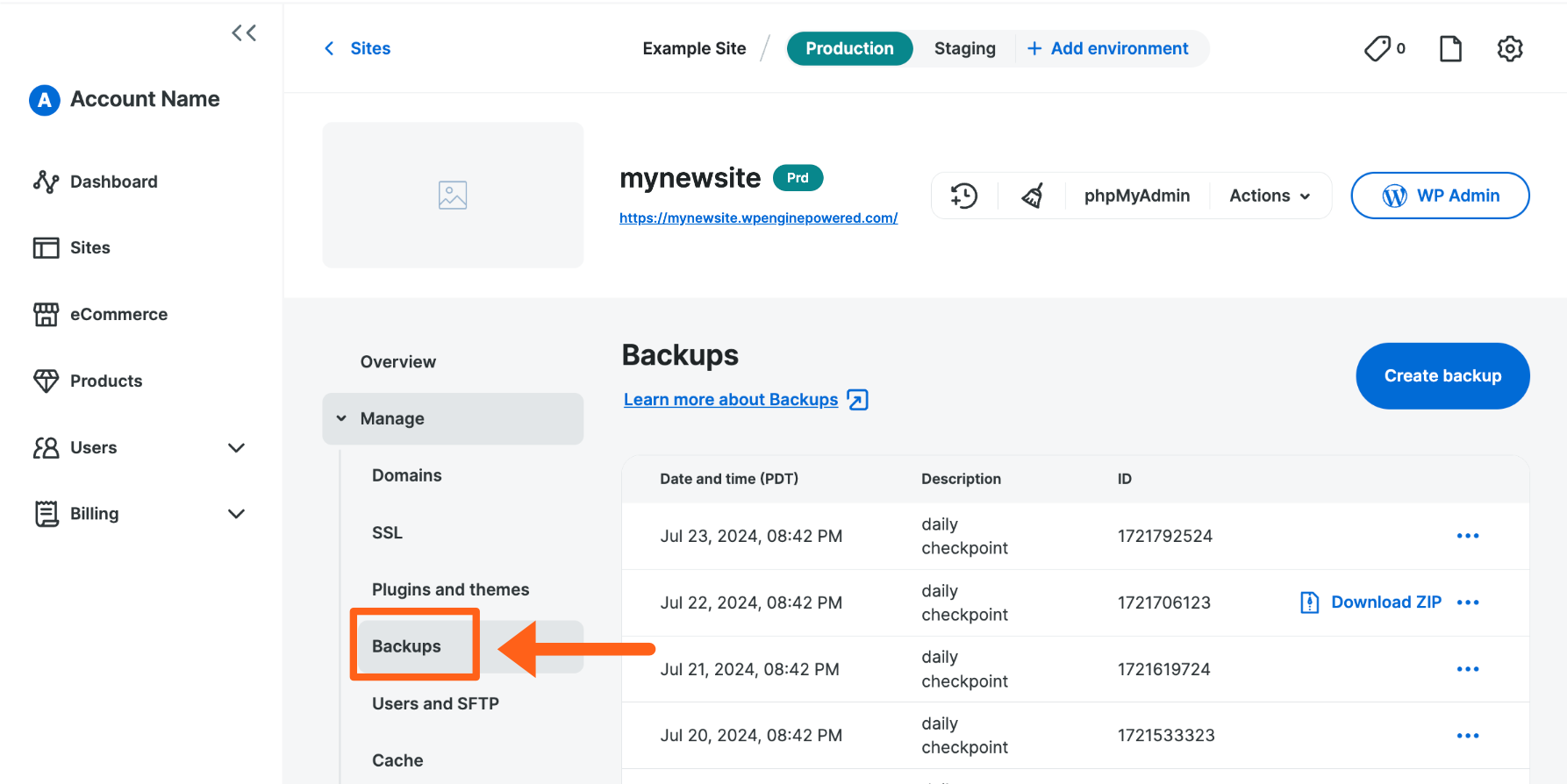
Official vendor documentation screenshot. Source: https://wpengine.com/support/restore/. Not a screenshot of a paid DigiOffly test account.
🔍 The Two-Year Hosting Cost Test
Suppose a new buyer receives the displayed one-site Essential annual offer of $336 for year one. If, hypothetically, the second-year renewal for the chosen configuration were $35/month, the second-year cost would be $420 and the two-year subtotal $756 before taxes, add-ons or overages. This is a budgeting illustration, not a promise that this checkout configuration will renew at exactly $35. Always use the actual renewal shown for your account.
Now compare a $10/month competitor. The correct question is not simply why WP Engine costs more. Calculate the support hours, risk of broken releases and recovery time that the managed workflow could save. A six-person agency may justify the premium with one avoided production incident; a hobby blog often cannot.
🎯 Who Should Use WP Engine?
A growing publisher: A managed WordPress environment can suit an editorial site with regular updates, sponsorship landing pages and an expanding plugin stack. The team should validate actual bandwidth, media size and staging frequency.
An agency: WP Engine’s transferable sites and multiple environments create a credible reason to pay for the workflow, especially when projects pass between designers and clients. Confirm permissions and site-count economics first.
A WooCommerce operator: Staging, backups and platform management are relevant, but live transaction traffic, database growth and payment extensions require deeper checks. Arrange a load test using realistic logged-in and uncached activity.
A price-sensitive beginner: Consider Bluehost, Hostinger or WordPress.com before accepting a premium recurring commitment. You can always migrate a successful site later, with proper backups.
A custom-application developer: DigitalOcean or another cloud provider will often be a better fit if root access, Docker and non-WordPress runtimes are essential.
⚖️ WP Engine Alternatives Compared
The most useful WP Engine vs Kinsta comparison is about the work your team repeats every week: staging, incident response and release approvals. WP Engine vs SiteGround makes sense when a business is balancing managed operations against a lower full-year hosting bill. Neither comparison can be settled fairly with a single homepage speed score.
| Alternative | Better reason to consider it | Main trade-off |
|---|---|---|
| Kinsta | Another specialist managed WordPress workflow | Different allowances and billing model |
| SiteGround | Small-team site management and accessible plans | Renewal rate and shared-resource trade-offs |
| Cloudways | Flexible managed cloud provider selection | More infrastructure decisions |
| Hostinger | Lower introductory entry point | Long terms, renewals and plan limits |
| DigitalOcean | Server-level control for custom applications | You manage much more of the system |
No honest reviewer can declare a universal speed winner from promotional homepages. The correct WP Engine versus Kinsta comparison requires identical site content, a matching traffic profile, cache-state measurements and the full two-year cost.
💰 Budgeting WP Engine Beyond the Headline Hosting Plan
The first invoice is only one piece of the cost model. A business that needs several environments, additional sites, automated plugin updates, advanced security or a premium support arrangement may face a materially different total than the price displayed for one introductory Essential configuration. Build a twelve-month and a twenty-four-month worksheet with the quantity of live sites, storage allocation, traffic assumptions, any relevant overage policy, selected add-ons and expected renewal price. Include domain registration, transactional email delivery and third-party backup or monitoring services where applicable. Compare annual cash outlay with the actual billing date rather than treating a monthly equivalent as a monthly charge.
Suppose a team operates a brochure website today but intends to add a customer portal and a store next year. The cheapest plan at launch may not be the lowest-cost operating model once logged-in activity, checkout complexity and peak campaign traffic arrive. Get written answers about capacity limits, allowed site environments and whether new workloads require a different hosting family. It is better to identify a likely tier change before signing a contract than to discover the need during a sales campaign. WP Engine’s Essential, Business and Enterprise positioning reflects different operating requirements, not just larger versions of the same website.
Include the migration effort in your comparison with Kinsta, SiteGround or Hostinger. A cheaper host can be more expensive in practice if a developer spends multiple days rebuilding deployment pipelines or resolving email DNS records. Conversely, a small static blog may gain little from a premium operating environment and can use simpler hosting with a well-documented backup process. Treat staff time, release risk and support requirements as line items. If the team cannot name a concrete benefit it will use every month, the premium may be unjustified even if the product looks impressive.
👥 Agency Operations and Client Handoffs
Agencies should examine how ownership changes when a site moves from construction to the client’s production account. WP Engine’s transferable-site workflow can be helpful, but a successful handoff needs more than transfer permission. Define who owns the domain, billing account, repository, design assets and third-party licenses. List the people who retain access after launch, the renewal contacts and the escalation process for outages. A transfer made without that record can leave an agency paying for a client’s services or a client unable to reach the engineer who configured critical integrations.
When building multiple client websites, standardize checks rather than assuming every WordPress installation behaves alike. A minimal acceptance sheet can capture PHP and plugin versions, scheduled backups, staging access, analytics continuity, form delivery and payment tests. Add a note describing any unusual caching exclusions. For every account, identify whether the host or the agency manages domain DNS and email authentication. Small details become expensive when support tickets are handed between contractors. The right managed host should support the agency’s routine, not create a second hidden management layer.
A useful procurement test is to ask a prospective account manager to demonstrate the path from a new project to a completed handoff. Where does a developer create the environment? How can a client preview the work before domain cutover? What happens to access after the transfer, and can the receiving owner immediately download a backup? The answers often distinguish an agency-friendly offering from a product optimized only for individual site owners. The strongest recommendation is the host that fits the real governance structure of the team.
📋 Final WP Engine Purchase Checklist
Before committing to WP Engine, request a written quote for your actual number of sites, traffic range and storage needs. Confirm whether pricing is introductory, the renewal schedule, any applicable taxes and the cost of services described as optional. Check what level of support is available at the chosen tier and whether your team requires telephone support or a contractual availability commitment. Record which plugins or workflows might conflict with platform rules. This is more reliable than assuming that every feature mentioned on a marketing page belongs to the entry plan.
Run a limited migration rehearsal before changing authoritative DNS. Prepare an inventory of redirects, analytics tags, contact forms, mail transport, scheduled jobs and dynamic pages. Export a full backup from the previous provider and keep the old environment intact while testing. Review cache behavior, SSL, robots directives and search-engine canonical settings after the move. A migration that improves hosting but accidentally blocks indexing can cost far more than the subscription itself. Document the final cutover and its rollback owner.
WP Engine deserves a shortlist when the site is financially important, the editorial team changes it often and managed operations free developers to work on customer-facing features. It is harder to justify for a single low-traffic project where a basic host already performs reliably. Make the purchase decision on operational maturity, total cost and risk reduction. A strong managed WordPress platform is not a guarantee of good site architecture; it is an environment in which a disciplined team can run that architecture with fewer recurring infrastructure chores.
🧪 How We Evaluated WP Engine
This is a documentation-based DigiOffly editorial review. We examined the provider’s official product and plan pages, March 2026 renewal schedule, environment guidance and PHP-management documentation. The review separates documented features from editorial judgments. We have not created a paid WP Engine account, tested customer-support response time, measured uptime or benchmarked load time. The screenshot slots above are not evidence of tests or account access; they must be filled with genuine source captures before publication.
A future controlled test would deploy identical WordPress versions, plugins and content, include logged-in journeys, log TTFB distributions, measure database behavior under load and validate backup restoration. Until then, our verdict concerns the operational feature set and published economics.
🏆 Final Verdict: Is WP Engine the Right Host?
WP Engine makes its strongest case when WordPress is part of a business process rather than simply a place to publish occasional articles. Its managed environments, backups and WordPress-centric support model can make change management less risky. That is meaningful value, but not a justification for every bill.
Before buying, write down your site’s peak visits, monthly asset transfer, storage growth, backup recovery expectations and year-two budget. Compare WP Engine pricing with Kinsta and SiteGround using those same criteria. Choose managed hosting for reduced operational work, not because a promotional page implies it removes all responsibility.
➡️ View official WP Engine hosting plans

Frequently Asked Questions
Is WP Engine good for WordPress in 2026?
Yes, for teams that value managed WordPress operations, staging and backup workflows. Value depends on your traffic and budget; we have not run an independent performance benchmark.
How much does WP Engine cost?
The official site showed an Essential annual introductory offer starting at $28/month equivalent, $336 upfront, on October 24, 2026. Your final quote depends on capacity, tax and extras.
Does WP Engine have a renewal price increase?
Promotional first-year pricing is not guaranteed at renewal. WP Engine’s March 2026 notice lists Startup at $35/month for covered renewals; check your actual subscription terms.
Does WP Engine include staging?
Yes. The documented environment model provides Production, Staging and Development environments for site workflows.
Can I host several WordPress sites on WP Engine?
Yes, depending on the selected capacity and billable site limits. Verify the current site counts and any additional-site costs.
Does WP Engine include email hosting?
Do not assume full mailbox hosting is included. Budget a separate business-email provider and plan DNS/MX continuity during a move.
Can I run WooCommerce on WP Engine?
Yes, WordPress e-commerce is a common use case, but test uncached checkout operations, extensions and transactional backups before choosing a plan.
Is WP Engine faster than Kinsta?
We cannot establish that without comparable independent tests. Their cache configurations, network paths and workload limits differ.
What is EverCache?
EverCache is WP Engine’s WordPress-oriented caching system. It can reduce work for cacheable pages but does not replace optimization of uncached and personalized requests.
Can I migrate an existing site?
WP Engine provides an automated migration plugin and documented processes. Back up files, database and email routing before migration and test the destination privately.
Who should avoid WP Engine?
A budget-limited blog or a developer who needs unrestricted server administration may get better value from a different hosting model.
🔔 DigiOffly Deal Alerts
Interested in WP Engine promotions? Use DigiOffly Deal Alerts to follow verified offers rather than assuming a coupon will remain available.
EXPLORE NEXT ON DIGIOFFLY
🔍 Explore More on DigiOffly
Compare website and hosting options, model the full cost, and keep exploring the tools that support your next project.
Explore website options
- Kinsta managed WordPress review
- SiteGround WordPress hosting review
- Hosting & Websites offers
- Development & DevOps — Explore reviews of code, APIs, app backends and deployments
- Railway — Deploy apps and manage running services
Plan costs and workflows
Keep researching
- Compare software
- Software Directory
- Software Deals
- DreamHost — WordPress shared hosting, DreamPress and renewal-price comparison