

Research checked October 24, 2026. DigitalOcean’s official Basic Droplet pricing lists 512 MiB / 1 vCPU / 10 GiB at $4/month, 1 GiB / 1 vCPU / 25 GiB at $6/month, and 2 GiB / 1 vCPU / 50 GiB at $12/month. The $4 VM is below the current minimum for DigitalOcean’s WordPress 1-Click image, which requires at least 1 GiB RAM and 25 GiB storage. More demanding production WordPress projects are recommended to use at least 2 GiB RAM and 50 GiB storage. Backups, managed databases and object storage can add separate charges; prices exclude tax and vary by configuration.
A custom web application can outgrow the assumptions of a basic WordPress hosting plan. An application needs background workers. A small company runs an API alongside its marketing site. A developer wants to automate deployments without surrendering system access. Suddenly a shared WordPress plan is the wrong comparison, even if it looks cheaper than a cloud server.
This DigitalOcean review 2026 examines the platform from that perspective. DigitalOcean is not simply a WordPress hosting company; it offers cloud virtual machines, application deployment, managed databases, storage and other developer infrastructure. We’ll explain Droplet sizing, real operating costs, backups, WordPress deployment, App Platform and the responsibility you accept when choosing an unmanaged server. We reviewed current official materials; we did not run paid benchmarks or deploy a production environment for this article.
📊 DigitalOcean Review Summary
DigitalOcean provides infrastructure products that let developers and small teams run applications with substantial control over the environment. Its Droplets are virtual servers; App Platform is a more managed way to deploy applications; Managed Databases and Spaces object storage serve different parts of an application architecture.
The apparent affordability of DigitalOcean Droplets is genuine at the resource level, but it should not be confused with the full cost of an operated website. A $6/month VM does not automatically include the application maintenance, backup policy, security operations and response coverage expected from managed WordPress hosting. On the other hand, DigitalOcean can support services that a specialized WordPress plan cannot host at all.
Bottom line: DigitalOcean is a strong candidate for developers who want explicit infrastructure choices. For someone who only needs a WordPress blog with minimal maintenance, the easier option is often a managed WordPress provider or Cloudways.
⚡ Quick Verdict: Is DigitalOcean Worth It in 2026?
Yes if you are comfortable owning the deployment and operational process; less so if you want someone else to manage it. DigitalOcean’s control-panel interface, well-defined VM sizes, API and project structure make it approachable for a cloud platform. The responsibility boundary still matters more than the design of the dashboard.
We particularly like the clarity of the underlying resource catalog: you can select RAM, vCPU, disk and transfer, and estimate infrastructure costs independently. But no server is maintenance-free. If your team cannot patch the operating system, secure SSH, monitor disk growth or restore a broken database, the cheapest VM can become the most expensive option during an incident.
🏆 DigitalOcean Pros and Cons
👍 What We Love
- ✅ Transparent VM sizes and posted monthly caps
- ✅ Droplets support general-purpose application runtimes
- ✅ One-click WordPress image simplifies initial installation
- ✅ App Platform offers a separate managed deployment path
👎 Where It Falls Short
- ❌ Root-level control brings patching and security responsibility
- ❌ Backups and managed services cost extra
- ❌ One-click does not mean fully managed WordPress hosting
🏆 EDITORIAL VERDICT: RECOMMENDED FOR HANDS-ON DEVELOPERS
Best for: developers and operations-capable teams that value virtual-machine flexibility, clear resource choices and cloud deployment tools.
We are evaluating the service model and public prices, not awarding an invented uptime or latency trophy.
🧠 What Is DigitalOcean?
DigitalOcean cloud infrastructure covers virtual machines, databases, storage and managed deployment. DigitalOcean is a cloud infrastructure provider. A Droplet is a virtual machine you can use for Linux applications, WordPress, APIs, scheduled jobs or many other workloads. It gives the owner more server control than a packaged shared-hosting subscription, but the owner must choose and maintain the software stack.
Think of the difference this way: a managed WordPress host is a prepared workshop with many tools maintained for you. A DigitalOcean Droplet is a workspace with much greater freedom but more responsibility for setting it up and keeping it safe. App Platform offers a third model: deploy an application from a repository or container and let the platform handle more of the underlying runtime.
DigitalOcean’s product catalog also includes managed databases and object storage. Those should not be described as automatically included with the $4 entry VM. Infrastructure buyers must decide which pieces they genuinely need.
Capture of the official public pricing page. Source: https://www.digitalocean.com/pricing/droplets. Not a screenshot of a paid DigiOffly test account.
🖥️ DigitalOcean Dashboard and Developer Workflow
A typical DigitalOcean workflow starts by creating a project and provisioning a Droplet. You pick a region, image, plan and SSH authentication method. Once the VM exists, you can deploy an application and configure networking and monitoring. Official guidance recommends SSH keys rather than relying solely on a password.
For a small team, explicit projects and repeatable server templates matter. A development server, production server and test environment can be tracked separately. The DigitalOcean API and command-line tooling allow standardized provisioning, but automation is not a substitute for a backup and security plan. Incorrect automation can replicate a mistake across several servers just as efficiently as it deploys a fix.
The interface includes monitoring options, resource detail and backup selections. Those surfaces help diagnose operational questions—whether CPU, RAM, disk or traffic are becoming bottlenecks. The dashboard should be judged for what it exposes and permits, not as evidence that a particular WordPress theme will load in an arbitrary number of milliseconds.
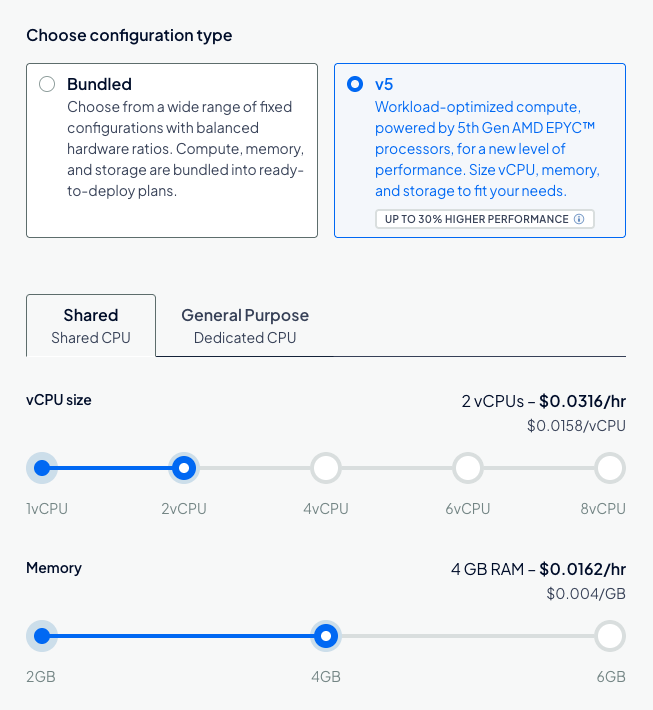
Official vendor documentation screenshot. Source: https://docs.digitalocean.com/products/droplets/how-to/create/. Not a screenshot of a paid DigiOffly test account.
🔧 DigitalOcean Cloud Infrastructure: Key Features Explained
DigitalOcean App Platform pricing is relevant when developers prefer a managed deployment workflow instead of configuring a virtual machine directly. DigitalOcean managed databases can keep the database layer separate from application servers. DigitalOcean Spaces object storage provides a different service for assets and uploads. Price all three resources separately rather than assuming the cheapest advertised Droplet contains a complete production architecture.
Basic and premium Droplets
The DigitalOcean Basic Droplet catalog provides shared-CPU virtual machines in several sizes. A low-traffic worker may need very little memory, but a database-backed production application requires headroom for the operating system, server processes, database and traffic bursts. Choosing a server solely because it is advertised at $4/month is a poor sizing strategy. Monitor memory use and establish a scale-up path before critical traffic arrives.
DigitalOcean 1-Click WordPress Installation
DigitalOcean offers a marketplace image that configures WordPress and its required components. The current 1-Click WordPress documentation describes an Ubuntu-based stack, setup wizard, HTTPS provisioning and common security components. The documented minimum is 1 GiB RAM and 25 GiB disk, with 2+ vCPUs, 2+ GiB RAM and 50+ GiB storage recommended for production.
This makes the headline $4/month Droplet a misleading basis for WordPress comparisons: that size does not meet the current image minimum. The $6/1 GiB option meets the minimum but offers little headroom, while the $12/2 GiB option is a more relevant starting point for a modest deployment—though it has one vCPU, short of the production documentation’s 2+ core recommendation. A 2 vCPU / 2 GiB Basic Droplet is listed at $18/month, making it a closer match to all three recommended resource dimensions.
One-click setup does not transfer responsibility for the OS, WordPress updates, plugins, mail, backups and incident response to a dedicated WordPress operations team. If that is what you need, compare Cloudways or a specialist managed host.
App Platform
DigitalOcean App Platform offers a separate managed route to deploy applications. Its public pricing page lists a free tier for static sites and paid applications starting at $5/month. The free tier supports static-site deployments with limitations; it is not a free replacement for a persistent database-backed production service. Paid compute, attached databases, outbound traffic and other add-ons should be budgeted separately.
App Platform can make sense for a small API or web app when the team wants repository-based deployment but does not want to patch the underlying server. It is still necessary to understand its application lifecycle, environment variables, scaling and persistent data boundaries before placing customer workloads there.
Managed Databases
DigitalOcean’s Managed Database pricing currently shows a basic single-node configuration from $15.15/month for a 1 GiB class in the public configurator. The real benefit is not that this database is cheaper than running MySQL on the same VM; it is separating responsibilities and enabling managed features. Availability, backup retention, high availability and capacity depend on the selected product and configuration.
Spaces object storage
Spaces pricing currently starts at $5/month, including 250 GiB storage and 1 TiB outbound transfer, with additional usage billed separately. Spaces can store media, exports or files outside an application’s VM. It is not a substitute for a full relational-database backup, and putting a copy in the same cloud account does not automatically solve account-level disaster recovery.
Automated Droplet backups
DigitalOcean automated backups are optional paid services. The official DigitalOcean backup pricing lists standard weekly backup coverage at 20% of the Droplet price, and daily backups at 30%, with distinct retention periods. More frequent schedules and usage-based pricing also exist. Backups are billed separately; they should be part of the initial budget, not an optional afterthought when a server fails.
🏗️ DigitalOcean Architecture Choices: VM, App Platform or Managed Service?
DigitalOcean presents several infrastructure models under one brand, but their management boundaries are different. A Droplet is a virtual machine for which you choose the operating system and take responsibility for application deployment, updates and much of the security configuration. App Platform handles more of the deployment infrastructure for supported applications and can build from connected source repositories. Managed databases outsource parts of database maintenance. These choices should be made before looking at the smallest price on the pricing page, because operational responsibility affects both staffing and risk.
A developer building a small Python API might choose App Platform to simplify releases and scaling, while another team may prefer a Droplet when custom server packages or unusual background tasks are essential. A WordPress publisher can use a marketplace image on a Droplet, but that does not turn the result into fully managed WordPress hosting. The owner still needs a plan for updates, storage, backup, firewall rules and monitoring. Evaluate whether that control is valuable to the business or merely an additional task no one has time to maintain.
A practical architecture diagram should identify the web app, database, uploads, external email, DNS and backup destinations. Record which components are inside the same server and which are billed separately. If images live on the Droplet filesystem, replacing the server may require a deliberate migration step; object storage changes the model. If the database is local, it may share resource contention with web traffic. Before deployment, write down recovery steps for the failure of each component rather than assuming that cloud hosting automatically means high availability.
🔒 Linux Hardening and Access Management for Small Teams
Self-managed infrastructure becomes manageable when its first-day configuration is repeatable. Use SSH keys rather than relying on a shared password, restrict administrative access and define who can create or delete production resources. Keep the operating system and application dependencies maintained. Use network firewalls to expose only required services, and avoid making a database port publicly accessible without a specific need. For a business run by more than one person, document how access is revoked when an employee or contractor leaves.
Automatic security updates help reduce neglected patches, but they do not replace planned maintenance. Package upgrades can affect application dependencies or database compatibility; critical services should have a tested restore path. Observe logs and alerts, and periodically check whether an old test server is still running. If deployment uses environment variables, handle credentials through appropriate secret-management features rather than placing API keys in a repository. Screenshots of a cloud console are not evidence that an application’s security has been configured correctly.
For a WordPress Droplet, hardening includes PHP updates, plugin audits, TLS renewal and protection of login endpoints. An unmanaged VM may be less expensive on paper than a managed WordPress plan, but the business must assign someone to these chores. The true comparison is between the complete service levels. If nobody can respond to a 2 a.m. outage, the apparent savings may be poor value even when monthly resource pricing is predictable.
⚙️ How to Deploy WordPress or an Application Safely
A DigitalOcean Linux server offers direct configuration control, which means the customer must also maintain system packages and services. DigitalOcean SSH access should use individual keys and carefully restricted privileges. Test that you can restore the database and assets on an isolated instance. A powered-off CPU Droplet continues to incur charges while its reserved resources exist; destroying it ends that Droplet’s billing.
1. Define the workload. Write down whether you are launching WordPress, a static frontend, a background worker or a database-backed app. Choose between Droplets and App Platform based on operational control rather than a headline monthly price.
2. Size realistically. For the current WordPress 1-Click image, do not pick the $4 512 MiB tier. Check the documented minimum and recommended memory, core and disk requirements, plus expected plugin load.
3. Secure initial access. Use SSH keys, restrict unnecessary inbound traffic, set up a firewall and document who administers the server. Keep secrets out of deployment scripts and source repositories. Apply OS and application updates as part of an explicit schedule.
4. Plan persistence and backups. Determine where the database, uploaded media, logs and user-generated content live. Configure backups and perform a restoration rehearsal to a separate environment; a green “backup enabled” indicator is not a recovery test.
5. Configure observability. Enable monitoring, alerts and log retention, then verify that high disk consumption, memory pressure and failing application responses will be noticed. A weekend outage should not require a customer email to become visible.
6. Prepare deployment and rollback. Keep versioned configuration, database migration procedures and a documented rollback path. Never assume an old snapshot can safely overwrite newer payment or user records.
💵 DigitalOcean Pricing 2026: Droplets and Add-Ons
DigitalOcean per-second billing applies to bundled CPU Droplets and several other documented configurations, subject to the provider’s minimum charge and plan rules. DigitalOcean shared CPU Droplets can work for applications that tolerate variable CPU performance. DigitalOcean Droplet backups are a separate cost choice: check the backup cadence and actual recovery procedure, not just the backup percentage.
| Product or size | Public base price | What the figure actually buys |
|---|---|---|
| Basic Droplet: 512 MiB / 1 vCPU / 10 GiB | $4/mo | Very small VM; below current WordPress 1-Click minimum |
| Basic Droplet: 1 GiB / 1 vCPU / 25 GiB | $6/mo | Meets 1-Click minimum, limited headroom |
| Basic Droplet: 2 GiB / 1 vCPU / 50 GiB | $12/mo | More memory, but one CPU core |
| Basic Droplet: 2 GiB / 2 vCPU / 60 GiB | $18/mo | Meets current 1-Click recommended CPU/RAM/storage thresholds |
| App Platform static tier | $0/mo | Static sites, subject to free-tier limits |
| App Platform paid tier | From $5/mo | Managed app deployment; component-dependent pricing |
| Managed Database | From $15.15/mo | Separate managed database configuration |
| Spaces object storage | From $5/mo | 250 GiB storage and 1 TiB transfer in base plan |
| Droplet backups, weekly / daily | 20% / 30% of VM price | Separate protection and retention schedule |
Droplets changed to per-second billing effective January 1, 2026, with a 60-second or $0.01 minimum; the displayed monthly amounts act as usage caps for the relevant configuration. Short-lived test environments benefit from granular billing, but powering off a Droplet does not stop its compute charges. DigitalOcean documentation explains that resources can remain reserved while powered off; destroying an unneeded resource is how compute charges end. Check volume, snapshot, IP and backup charges separately before assuming the account bill is zero.
Illustrative cost model: small WordPress project
Start with the $18/month 2 vCPU / 2 GiB VM. Add daily percentage-based backups at 30% ($5.40). That produces an illustrative $23.40/month infrastructure subtotal, before tax, domains, email, outbound overages, optional storage and the value of administrative work. If instead a team chose a $12 VM plus daily backups and an additional $15.15 managed database and $5 Spaces plan, the subtotal would be $35.75/month. These are examples assembled from public prices, not bundles DigitalOcean promises to supply for those totals.
A self-managed VM can be financially attractive when technical ownership already exists. If you need to hire someone to handle updates, monitoring and recovery, that labor belongs in the comparison with managed WordPress hosting.
Capture of the official public pricing page. Source: https://www.digitalocean.com/pricing/app-platform. Not a screenshot of a paid DigiOffly test account.
🔍 Resource Limits, Transfer and Operational Costs
DigitalOcean assigns data-transfer allowances to Droplet sizes. Transfer beyond a team’s pooled allowance can create charges, and separate services have distinct metering. A media-heavy application should calculate actual bandwidth rather than assume the base VM includes infinite traffic.
Disk management is another overlooked cost. A server with 25 GiB storage may appear spacious on day one, but databases, uploaded media, temporary backups, logs and software updates grow. Monitor filesystem utilization and decide what belongs in object storage or a separate volume.
Finally, consider staff time. A cheap VM that requires ten hours of emergency maintenance is expensive by any realistic business metric. DigitalOcean offers tools, not a blanket managed-service promise. A team should determine exactly who receives alerts, applies patches and restores service.
🎯 Who Should Use DigitalOcean?
Developers and technical startups: Droplets and App Platform let teams choose between detailed server control and a managed deployment flow. APIs and automation support repeatable infrastructure.
SaaS prototypes: A small app can begin on modest compute and grow, but the architecture should separate persistent data and establish a backup plan before real users depend on it.
WordPress developers: The 1-Click image is useful when you want to administer the stack. For nontechnical owners who only need WordPress publishing, a managed provider is often easier.
Agencies with infrastructure staff: Multiple projects and custom services may benefit from a standardized cloud environment, but billing and administration should be centralized to prevent forgotten resources.
A small creator without technical support: WordPress.com, SiteGround or Cloudways may be safer buys because the visible VM price does not include operational coverage.
⚖️ DigitalOcean Alternatives Compared
DigitalOcean vs AWS is partly about operational scale and the number of managed services the team needs, not simply an hourly virtual-machine price. Among DigitalOcean hosting alternatives, managed WordPress providers may cost more because they handle application maintenance in addition to infrastructure. Determine who will manage security updates and incident response before making a cost comparison.
| Alternative | Better fit when | Main difference |
|---|---|---|
| Cloudways | You want managed cloud hosting for WordPress | More administration handled by provider, different bill |
| WP Engine | WordPress staging and specialist platform management matter | Narrower WordPress-focused hosting product |
| Kinsta | Premium WordPress operations are the priority | Usage allowance and managed-service model |
| Hostinger | Beginner-friendly hosting with an entry offer | Different capacity, access and long-term contract economics |
| Webflow | A visual web publishing platform is more important than server control | Hosted builder, not your general-purpose VM |
DigitalOcean vs Cloudways is particularly important because the broader company offers both models. Renting a raw Droplet means accepting its operating responsibilities; Cloudways packages managed hosting conveniences around cloud infrastructure. Those are not interchangeable subscriptions even when underlying cloud capacity overlaps.
📊 Capacity Planning: CPU, RAM, Storage and Traffic
Choosing a Droplet by its advertised CPU count alone can be misleading. A small virtual machine may serve a cached static-like website adequately but struggle with WordPress administrative operations, image processing or a burst of uncached requests. Track peak memory, swap activity, database size and storage growth during representative use. A server that is consistently memory-constrained should not be described as fast merely because it has a low monthly charge. Do not confuse a generous transfer allowance with unlimited processing capacity.
Set a baseline before upgrading. Measure response times for representative endpoints, database query behavior and the rate of unsuccessful requests. Separate short-term spikes from sustained pressure. When an issue comes from a slow plugin or missing database index, a larger server may delay the problem without resolving it. Conversely, an application with genuine memory pressure may benefit immediately from the next RAM tier. Capacity decisions are much more defensible when tied to monitored symptoms rather than arbitrary visitor-count estimates.
Managed databases and Spaces object storage can improve separation of responsibilities, but they create additional monthly line items. List each resource in a spreadsheet and model traffic, backups, transfer overages and storage retention together. Cloud pricing is granular, so the cheapest individual component is rarely the only component a production app requires. Set spending alerts and remove development resources promptly. A terminated VM and a stopped VM should not be treated as the same financial state when understanding bills.
🧯 Backup, Disaster Recovery and Resilience
DigitalOcean documents percentage-based backup options and usage-based alternatives, along with separately charged snapshots. These services answer related but different questions: routine recovery, point-in-time infrastructure copies and longer-term retention. Decide how much data loss is acceptable for each workload and how quickly service must return after failure. A portfolio site might tolerate restoring yesterday’s files; an order-processing application may require more frequent database protection. Let the recovery objective drive the backup schedule rather than selecting the lowest-priced option automatically.
Test a restore into an isolated environment. Confirm that application files, databases, secrets, uploads and DNS settings are present or can be rebuilt. Some backups may not preserve every external dependency, so recovery instructions should identify services outside the Droplet. A successful backup creation notification is not proof that the application can boot from it. Record the person authorized to initiate recovery and the expected cost of keeping an emergency replacement server available.
Resilience also involves avoiding accidental destruction. Use descriptive resource names, tags and separate projects for production versus experimentation. Review account-level permissions and enable the account security features currently supported by the provider. If an automated workflow can delete resources, scope its credentials to the smallest useful set. None of these practices guarantees zero downtime, but they reduce preventable incidents that cloud providers cannot solve on behalf of customers.
✅ DigitalOcean Procurement Checklist and Fit
Start with a workload diagram and a minimum viable bill of materials. For a production WordPress site, write down the required CPU and memory, database choice, file storage, backup policy, email delivery and monitoring. For an application, add build and deployment requirements and any managed-service costs. Confirm the smallest VM meeting your software image’s stated minimums; the existence of a $4 Droplet does not mean it is an appropriate WordPress 1-Click production configuration. Compare the documented monthly caps against expected usage and inspect bandwidth and backup policies.
Run a small reversible deployment before migrating customers. Create an instance, configure safe access, deploy test content and verify a restore. Record the exact steps as infrastructure documentation. Then compare the time spent against a managed alternative such as Cloudways, Kinsta or WP Engine, depending on the workload. Cloud hosting is a strong match for teams with clear operational ownership; it becomes a risk when the application is business-critical and nobody maintains the underlying system.
DigitalOcean is compelling for developers who value straightforward virtual machines, accessible deployment services and a broad set of infrastructure primitives. Its value is less obvious for someone expecting a host to manage WordPress updates, plugins and day-to-day support automatically. Choose it for flexibility you will actively use, not because an isolated entry price looks lower than managed hosting. A documented, recoverable system is more valuable than an inexpensive server nobody understands.
🧪 How We Evaluated DigitalOcean
This DigiOffly review is a documentary assessment of DigitalOcean’s current official Droplet price table, App Platform plans, Managed Database and Spaces pricing, backup policies and the marketplace WordPress 1-Click system requirements. We calculated an illustrative combined bill instead of equating a standalone VM with managed WordPress hosting.
We did not deploy servers, benchmark network latency, inspect a customer’s private dashboard or conduct a support experiment. The screenshot slots must be replaced with authentic official captures. No invented speed or uptime result is included. A meaningful later benchmark would repeat the same workloads across comparable CPU, memory, cache and database configurations.
🏆 Final Verdict: Is DigitalOcean a Good Choice?
DigitalOcean is compelling when control, flexibility and clear infrastructure components are more important than a turnkey WordPress experience. The service has affordable VM entry points, a strong developer focus and multiple ways to assemble an application stack.
But the right DigitalOcean plan includes more than a VM. Choose a realistic size, budget backups and data storage, understand transfer metering and establish who handles security and recovery. If your only goal is to publish articles, you may prefer someone else to maintain the server. If your goal is to build and operate software, DigitalOcean deserves serious consideration.
➡️ View official DigitalOcean Droplet pricing

Frequently Asked Questions
What is DigitalOcean used for?
DigitalOcean supplies cloud infrastructure for websites, APIs, applications, databases and other workloads, primarily through products such as Droplets, App Platform and Managed Databases.
How much does a DigitalOcean Droplet cost in 2026?
Public Basic pricing starts at $4/month for a 512 MiB VM, with larger options including $6 for 1 GiB and $12 for 2 GiB / 1 vCPU.
Can I host WordPress on a $4 DigitalOcean Droplet?
The current DigitalOcean WordPress 1-Click image requires at least 1 GiB RAM and 25 GiB storage, so the $4 512 MiB / 10 GiB size does not qualify.
What size is recommended for DigitalOcean WordPress hosting?
The official 1-Click docs recommend at least 2 CPU cores, 2 GiB RAM and 50 GiB storage for production. The published 2 vCPU / 2 GiB / 60 GiB Basic tier is $18/month.
Is DigitalOcean managed WordPress hosting?
A plain Droplet is primarily self-managed. For more managed WordPress operations, compare Cloudways or a specialist hosting provider.
Does DigitalOcean include automatic backups free?
No. Automated Droplet backups are separately priced. Standard weekly backups are listed at 20% and daily backups at 30% of the VM cost.
Does DigitalOcean charge for powered-off Droplets?
Powered-off Droplets generally remain billable while resources are allocated. Destroy an unused server to end its compute billing and separately inspect associated resources.
What is DigitalOcean App Platform?
It is a managed application deployment service with a free static-site tier and paid components starting at $5/month, subject to product limits.
How much is DigitalOcean Managed Database?
The public configurator includes a basic 1 GiB class starting at approximately $15.15/month, with higher prices for larger nodes and additional services.
What is DigitalOcean Spaces pricing?
The public Standard object-storage plan starts at $5/month and includes 250 GiB storage and 1 TiB outbound transfer, with additional usage fees.
Is DigitalOcean better than AWS or Cloudways?
That depends on workload, team skill and pricing. Compare equivalent resources, managed-service responsibilities, support and total operating costs—not only entry prices.
🔔 DigiOffly Deal Alerts
Follow DigiOffly Deal Alerts for verified vendor promotions; a one-time credit should never be confused with the normal ongoing cloud bill.
EXPLORE NEXT ON DIGIOFFLY
🔍 Explore More on DigiOffly
Compare website and hosting options, model the full cost, and keep exploring the tools that support your next project.
Explore hosting models
- Cloudways managed cloud review
- Kinsta WordPress hosting review
- Hosting & Websites offers
- Development & DevOps — Explore reviews of code, APIs, app backends and deployments
- Railway — Deploy apps and manage running services
Model your infrastructure spend
Keep researching
- Compare software
- Software Directory
- Software Deals
- Vercel — Next.js deployment previews and commercial hosting costs
- Netlify — Git deploys, credit-based pricing and web functions
- DreamHost — WordPress shared hosting, DreamPress and renewal-price comparison