

Editorial note: This independent review analyzes official product documentation, published plan information and decision criteria. Vendor screenshots show public webpages. We do not claim to have completed a private-account hands-on test or guaranteed a particular price.
Instead, consider whether Slack fits your current system of record, staff permissions, procurement terms, administrative resources and ability to leave later. Features and packages change, sometimes within a year, so use the official pricing page as the final authority for your region before checkout.
📊 Slack Review 2026: Editorial Verdict
| Decision question | Editorial assessment |
|---|---|
| Core use case | Channel-based asynchronous team communication that is valuable when decisions can be found later rather than buried in private inboxes. |
| Team it suits | Distributed teams with frequent cross-functional questions, integrations and a need for searchable work conversations. |
| Potential poor fit | Teams hoping that a chat timeline by itself replaces project ownership, durable documentation or a customer help desk. |
| Billing evidence | Vendor pricing — regional/tax/term details can vary |
| Suggested pilot | Two to four weeks, with sample tasks, real roles and exit criteria |
| Research status | Editorial assessment of public documentation; no private-account testing |
👍 What We Love
- ✅ Public and private channels: A useful channel taxonomy makes topics visible and reduces DM silos.
- ✅ Threads and huddles: Threads keep context attached to an announcement; huddles provide lighter voice coordination.
- ✅ Slack Connect: Working with external organizations is useful, but the boundary between internal and external channels requires governance.
- ✅ Administration and identity: SSO, provisioning, data exports and support levels vary by tier.
👎 Where It Falls Short
- ❌ Channels can become an informal unstructured task tracker with no accountable owner.
- ❌ Free history and app limits make long-term retrieval a subscription consideration.
- ❌ External channels create data-sharing and confidentiality considerations.
✅ Slack: BUYER FIT AT A GLANCE
Best for: distributed teams with frequent cross-functional questions, integrations and a need for searchable work conversations.
🧠 What Slack Actually Solves
When evaluating Slack free message history limits, retention should be discussed before procurement, not after the first important decision disappears from search. Test Slack thread search for teams by asking a colleague returning from leave to locate the original reason for a release or customer escalation. The chat history should point to a durable ticket or knowledge article rather than being the only source of truth.
Imagine a customer-success department receiving urgent messages from sales, support and engineering. A Slack channel can make an escalation visible to all three, but only if the group agrees on one accountable owner and one linked support ticket. Without that agreement, messages travel faster while the customer waits just as long. Give the channel a naming convention, decide what severity warrants a notification, and set the time when the incident record must be updated. Ask a teammate returning from leave to find the decision without prompting. If they need private messages from three people, the collaboration design failed regardless of how quickly the channel loaded.
Slack’s value is not that it replaces email with a faster stream. It is that the right channel can expose questions and decisions to colleagues who would otherwise be excluded from a private thread. This requires rules, not just a workspace invitation. Design channels around durable subjects such as customer escalations, release coordination and company announcements. A channel called ‘misc’ becomes a sink for unanswered work; a private channel for every small decision recreates the email silo. An effective pilot asks whether someone joining after a week can reconstruct why a decision was made without calling the author.
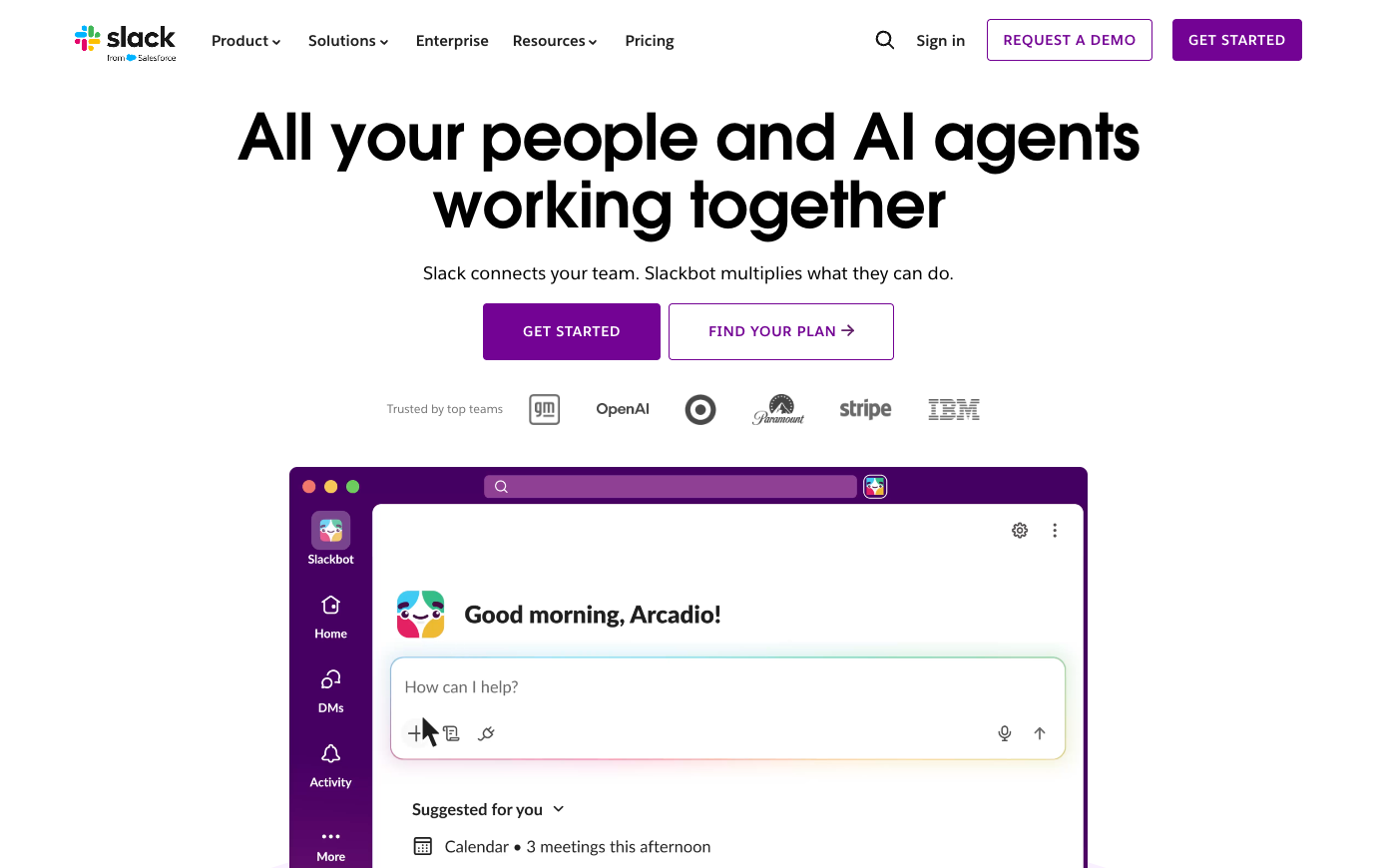
🛠️ Slack Features: What Matters in Real Team Work
Use a partner sandbox when testing Slack Connect external guest permissions; a shared channel should not reveal employee-only projects or internal financial updates. Slack notification overload management starts with a simple rule: urgent incidents trigger alerts, while routine updates go into a daily digest. More messages do not inherently produce clearer teamwork.
The Free plan’s ninety-day searchable message window changes the economics of using Slack as an institutional record. A team can communicate successfully during a short trial, then discover that older context is outside the retention window. The correct choice depends on the value of historic discussions and whether decisions are deliberately copied into a wiki, ticket or customer record. Slack Pro’s published United States reference is $7.25 per active user per month on annual billing, or $8.75 monthly; the Business+ page describes $15 annually or $18 monthly. Temporary promotional badges should not be presented as permanent pricing.
Public and private channels
A useful channel taxonomy makes topics visible and reduces DM silos. Sensitive projects require explicit membership policies. Ask the employee responsible for customer escalation to demonstrate the outcome with synthetic data. That observation matters when comparing Slack with Microsoft 365: A company already licensing Microsoft Teams should check whether separate Slack channels solve a communication gap or merely add another paid seat. A different product may be the safer choice if this exact scenario is the team’s dominant work.
The practical question for public and private channels is who fixes an access mistake when it happens. Use a real business scenario: To evaluate channel privacy, invite an outside contractor into one release discussion and verify that the person cannot read unrelated customer issues.
Search and message history
When assessing search and message history, check how the final record moves between colleagues. The Free history window is limited to 90 days. Paid retention policy and compliance-export controls need review before treating chat as an archive. A useful proof is one weekly asynchronous status example whose requester and approver disagree about the final state. Any unverified permission or plan restriction should appear in the procurement notes. AI features and compliance exports are tier-sensitive.
Threads and huddles
Include the person who will manage Slack after launch when reviewing threads, huddles and support handoffs. Give an operator a scenario they did not configure beforehand. Watch whether a bot posts genuinely actionable alerts or recreates the same message in several public channels. Compare their actions to the documented process: Every team owner posts a short outcome, blocker and next step rather than running an open-ended status meeting. When nobody owns a decision, a channel can become an unreliable informal task list. If the plan cannot support that requirement, record it as a limitation rather than adding a workaround nobody owns.
Integrations and workflow actions
Connected apps can post alerts and convert messages to tasks. Unmanaged bots can overwhelm channels and leak sensitive data. Keep the first experiment small enough to reverse: For integrations, confirm that a deployment alert links back to the approved issue and release record instead of copying a vague status into chat. Look for one human owner and one recoverable final artifact. If the task exists only as a chat message, the team still lacks a traceable completion record.
Slack Connect
Working with external organizations is useful, but the boundary between internal and external channels requires governance.
AI search and summarization
A team may encounter ai search and summarization first during onboarding, not during a vendor comparison. AI-powered summaries are tier-dependent and content access follows permissions and product rules. Verify exactly which plan contains your intended feature. Populate the pilot with realistic documents, permissions and handoffs. Try this realistic scenario: Each weekly update should identify the decision, accountable owner and link to the underlying work item. At review time, compare the resulting artifact with the previous process. Do not award Slack credit for basic good project hygiene that could be achieved with a simpler tool.
Administration and identity
Look at how administration and identity changes the next step in the workflow. SSO, provisioning, data exports and support levels vary by tier. An audit of user lifecycle is more valuable than a polished demo. Find out which step of external agency collaboration would have been invisible in the previous system. An agency enters a tightly controlled collaboration channel while customer files remain in the proper document repository. When Slack administration includes external partners, examine the named account, sharing link, retention rule and export path separately.
A second look at administration and identity should involve the person who will administer Slack after the original champion leaves. Identify which administrators can permit summaries of sensitive channels and who checks the resulting access boundaries.
Active-user billing
Active-user billing deserves scrutiny because not every invited colleague has the same rights. Slack references active users in published paid pricing. Validate the actual billing treatment for deactivated staff and guests. Set an owner for the artifact created during release coordination. An honest conclusion will depend on the exact user role and deployment, not a marketing claim about unlimited collaboration. Only employees who genuinely need AI search or regulated exports should drive the additional license requirement.
🧭 Four Practical Slack Workflows
Threads and huddles solve different interruptions. Threads keep replies adjacent to an originating message, while huddles provide lightweight audio or video when typed clarification is inefficient. A team should decide when a problem deserves a scheduled meeting, a thread, a ticket or a document. If a complex production incident is managed entirely through a huddle, future colleagues may never see the reasoning. Require a brief record of the decision in the authoritative issue tracker. Slack reduces friction when it carries context to the right destination, not when it becomes the only destination.
Release coordination
Engineering posts a release note in a project channel, QA threads defects and the owner links the approved release record to Jira or Linear. The next participant should be able to identify the approved version, read the reason for the last change and act under their own account permissions. This is not evidence that Slack was privately benchmarked: it is a repeatable test design for a buyer. External channels create data-sharing and confidentiality considerations.
In the release coordination exercise, the test report for Slack should name the outgoing and incoming owner. Use a deliberately narrow Slack Connect invitation and verify an outside participant sees no internal-only channel. Uncontrolled notifications produce distraction rather than useful responsiveness.
Customer escalation
Imagine a colleague arrives halfway through customer escalation and must finish without asking the original author. Support posts a sanitized customer issue into a designated channel, assigns an owner and sends the final resolution back to the help-desk ticket. To keep the test fair, provide the same sample brief in competing software and time the point where the reviewer can understand ownership. Record not only what looked convenient but also the uncertainty that would block rollout. Uncontrolled notifications produce distraction rather than useful responsiveness.
Before declaring the customer escalation pilot successful in Slack, ask an unfamiliar colleague to inspect the final work. Before using summaries for customer escalation, review whether the relevant private conversations are included in the AI feature.
Weekly asynchronous status
Use weekly asynchronous status as a way to test the actual collaboration boundary in Slack. Each weekly update should identify the decision, accountable owner and link to the underlying work item. Document what happens when the usual approver is absent, a guest loses access, or a deadline changes. Verify exactly which plan contains your intended feature. A success condition should be specified before someone chooses their favorite interface. The weekly status recap should link to approved work items, not expose private customer threads to a wider team.
A weekly asynchronous update should prove that the next colleague can find the decision and its owner without chasing messages. Test a simple channel recap against the original thread; a generated summary is useful only when the underlying source stays traceable. Verify exactly which plan contains your intended feature. Paid chat can overlap with an already licensed Microsoft Teams environment.
External agency collaboration
For a team using Slack in external agency collaboration, a planned interruption is more revealing than a smooth demonstration. Retain a link to the owning ticket or document, so the latest Slack reply cannot silently become the only account of a customer decision.
💰 Slack Pricing in 2026: Plans and Billing Caveats
For Slack Pro annual billing cost, compare the full annual obligation with month-to-month terms and the number of genuinely active users. The phrase Slack Business Plus AI features also requires scrutiny: the official paid tier is branded Business+, and features are not identical across editions. A Slack Pro vs Business Plus comparison should focus on the actual administrative or AI capabilities the team will use.
Slack Connect introduces genuine external collaboration value, but a partner’s presence in a channel is also a security boundary. A supplier may need to hear about delivery dates without seeing internal budgeting or other customers. Test an invitation with a sandbox organization, confirm the channel’s permitted data and decide which integrations can post into it. An automation that copies the whole text of internal tickets into an external collaboration channel is not a harmless convenience. Set an owner for channel membership reviews and a closure rule for completed engagements.
| Edition / plan | Published reference price | Billing and eligibility notes |
|---|---|---|
| Free | $0 | 90-day searchable history; limited app integrations |
| Pro | See regional checkout | annual and monthly prices differ; vendor displays locale-dependent currency |
| Business+ | $15 | USD per active user/month billed annually on official US plan page; $18 monthly |
| Enterprise | Custom | contact sales |
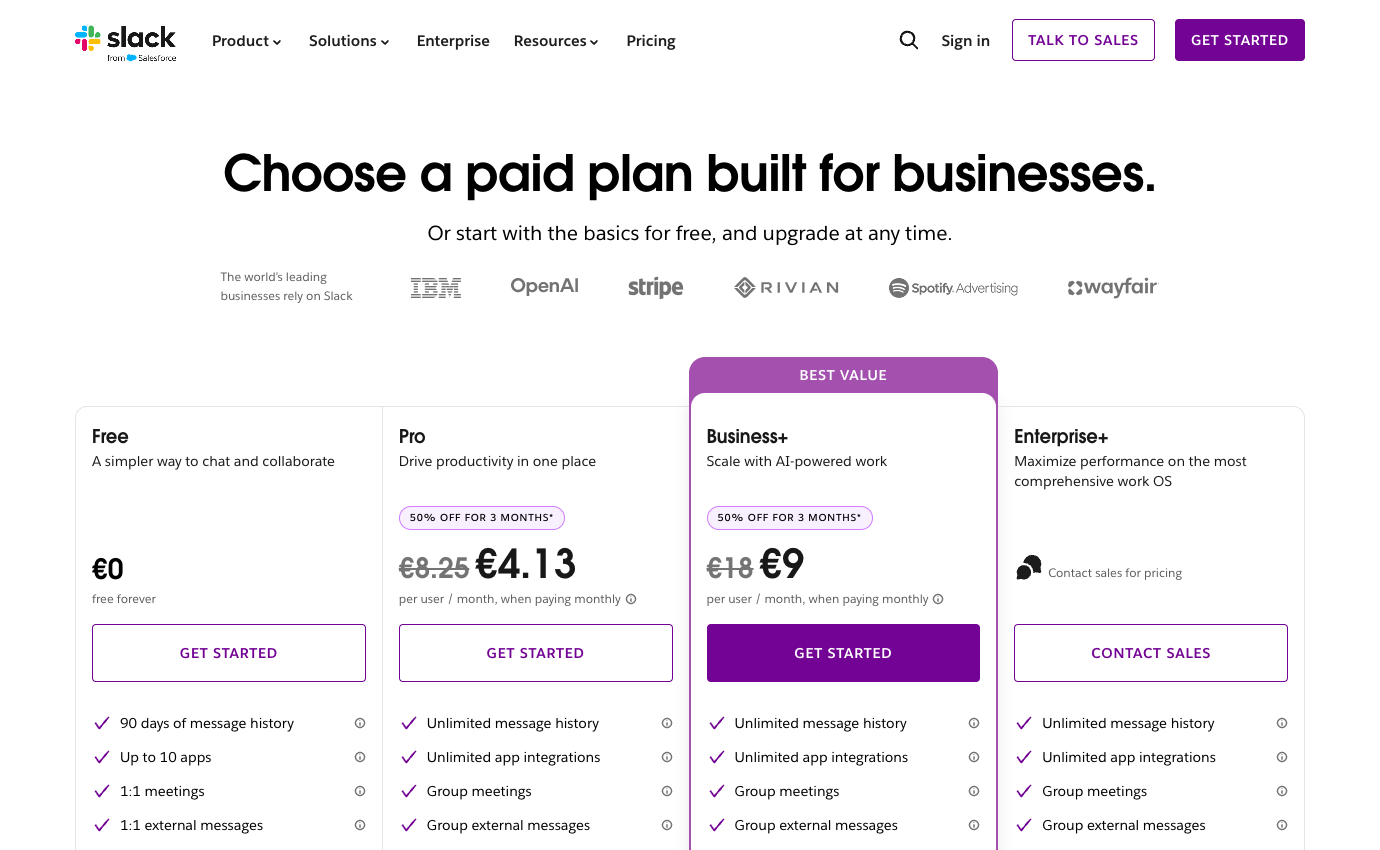
Always consult the official Slack pricing page for the country in which the account will be purchased. Some vendors personalize prices by geography or seat count. Where the public site shows a calculator instead of a fixed amount, we deliberately mark pricing as variable instead of inventing a precise figure. Discounts visible in a screenshot are not promises about your future contract.
🛡️ Security, Governance, Privacy and Exports
Ask who controls Slack data retention for compliance before important customer records move into private channels. A deliberate Slack offboarding shared channels procedure must account for guests, bots and partners whose access should end with a contract. Export policies and permissions matter more than a convenient search demo if conversations are part of the organization’s required records.
Integrations can make a Slack workspace feel indispensable. They also create alert fatigue if CRM, monitoring, development and project tools all post every state change. Begin with one alert that requires action, one reporting digest and one escalation route. Measure how often those posts lead to a meaningful response instead of channel muting. When the team adopts Slack lists or canvases, decide whether they hold short-lived conversation context or replace a paid project system. Two copies of a task are rarely twice as useful. The same scrutiny applies to Slackbot and AI summaries: check plan eligibility, human verification and the visibility of source material.
⚠️ Limitations, Hidden Costs and Failure Modes
A Slack budget should include administration time as well as seats. Chat discussions should link to an accountable issue or project record. Check these buying risks against the actual edition and your own requirements.
1. Chat becoming an unowned task queue
Slack conversations can look like tasks even when nobody owns the outcome. In a release channel, a message saying ‘I’ll look into it’ is not an accepted defect ticket. Require one owner and a linked issue for work that survives the conversation; otherwise a fast-moving thread quietly becomes a second, unmaintained backlog.
2. Message history and decisions that disappear
The free message-history window makes Slack easy to trial but unsuitable as an indefinite archive of unresolved decisions. Decide where engineering approvals, customer escalations and compliance records will live after older messages become harder to retrieve. A paid tier may improve history access, but it does not fix the absence of a decision log.
3. Slack Connect and outside partners
Slack Connect makes communication with partners smoother and data boundaries more complicated. Create a test channel with a contractor account, inspect whether internal files or user details leak through invitations and connected apps, then remove the partner. The external channel should not be the only place where project approvals are recorded.
4. Notification noise and bot overload
Notifications can become their own workload. If every GitHub update, CRM change and deployment alert reaches a broad channel, urgent messages compete with noise. Categorize alerts by action required and send informational events to a digest. Ask the on-call employee to identify the last significant incident without scrolling through a day’s worth of bot messages.
5. AI and compliance controls by tier
Do not assume the presence of an ‘AI’ badge buys every search, summarization or compliance capability. Check the actual plan and administrative controls, especially when an AI summary could expose text a user should not see. If export and retention policies are mandatory, involve the information-governance owner before rolling paid seats across the company.
6. Duplicate spending alongside Microsoft Teams
Slack can be a productivity gain for a distributed team and unnecessary duplication in an organization already using Microsoft Teams. Price the overlap and test one handoff in both environments, including guest access and files. Measure how easily employees find the final task, not how enjoyable the chat interface feels during a demonstration.
⚖️ Slack vs Alternatives
A support team receives an angry customer email, mentions it in a Slack channel and agrees to prioritize a fix. Two weeks later, a new support agent must establish whether the issue shipped and what the customer was promised. Searching chat may reveal discussion but no formal closure. Connect the channel to a durable issue and customer record, then ask the replacement agent to find the outcome without help. This distinguishes Slack’s value as a communication layer from the work of tracking obligations; the best chat history is not a substitute for an accountable process.
Compare Slack vs Microsoft Teams pricing using subscriptions already paid for through Microsoft 365, not two isolated sticker prices. For Slack workflow automation limits, calculate which alerts or ticket transitions actually save an employee a step. Slack alternatives only deserve another license if they materially improve ownership, handoffs or discoverability rather than duplicating a familiar chat window.
A strong Slack trial includes a real asynchronous handoff across two time zones. The outgoing colleague posts a decision, links the relevant ticket and identifies a blocker; the incoming colleague continues without an impromptu meeting. Audit whether the incident details can be found through search and whether a guest sees too much. Compare the result with the organization’s existing Teams or Google Chat arrangement. Slack is worth paying for when channel governance makes collaboration measurably clearer. If all conversation still resolves privately and tasks remain unowned, switching platforms is unlikely to fix the problem.
| Product | Where it may be preferable | Buying question |
|---|---|---|
| Slack | The documented core workflow evaluated in this review | Does it measurably reduce your biggest current bottleneck? |
| Microsoft 365 | Teams may already be covered by your company’s office subscription, alongside identity and file administration. | Would this replace an existing paid seat or add another system? |
| Zoom | Video-first conversations are better when synchronous facilitation is central. | Would this replace an existing paid seat or add another system? |
| ClickUp | A task-oriented hub tracks commitments more clearly than chat alone. | Would this replace an existing paid seat or add another system? |
🧪 A Responsible Thirty-Day Evaluation Plan
In this department, paying for full history may be worthwhile because a decision from last quarter can explain a customer dispute. But historical search should not become a substitute for a governed CRM or ticket system. A concise summary in the ticket is easier to preserve than an entire conversation, and it reduces the harm of disappearing free-plan messages. Limit Slack Connect channels to relevant outside partners, review who can invite them, and decide which integrations may publish information across the boundary. Make the cost of Slack compete against Teams already included in a Microsoft bundle rather than treating chat as a standalone inevitable purchase.
Days 1–3 — baseline and requirements
Start the Slack evaluation with a baseline of five sample release coordination requests. Assign someone to record current completion time, missing information and repeat questions. The baseline matters because a successful pilot must improve an observed handoff, not just create a cleaner workspace.
Days 4–7 — permissions and procurement
Price the actual Pro and Business+ plans for your country and planned license count. For Slack, check external access separately. Confirm cancellation, data export and the authorization required for any paid AI usage before inviting more employees.
Week 2 — real but controlled tasks
Run a controlled customer escalation scenario in Slack: Support posts a sanitized customer issue into a designated channel, assigns an owner and sends the final resolution back to the help-desk ticket. Create one realistic problem, one correction and one handoff under a non-admin account. A screenshot is not proof of success; ask another person to reconstruct the final decision without private explanations.
Week 3 — integrations and handoff
Use a safe integration case involving integrations and workflow actions. In Slack, confirm what happens when two edits conflict, a notification fails, or a collaborator leaves. Document which system holds the authoritative version instead of copying the same status into multiple tools.
Week 4 — decision and exit test
Compare your Slack trial to the old process and to Microsoft 365. For the exit decision, compare how a returning support agent retrieves old customer decisions in both tools and include retention costs. Ask the requester and operator to identify what genuinely improved, then export the sample materials, record the subscription terms and decide whether a limited rollout is warranted.

Frequently Asked Questions
What is Slack best used for?
The strongest use case is channel-based asynchronous team communication that is valuable when decisions can be found later rather than buried in private inboxes. Consider it when the team is struggling with that specific outcome, then verify whether existing software already provides enough of the same functionality.
Does Slack offer a free plan?
The current published starting tier is Free ($0). Free versions may limit collaborators, history, functionality or number of workspaces. Check the official feature table for the exact restrictions in your region.
What is the cheapest paid Slack plan?
The first listed paid reference is Pro at See regional checkout per the current vendor page, with these caveats: annual and monthly prices differ; vendor displays locale-dependent currency. Confirm regional tax, seat count and renewal before payment.
Can I pay monthly rather than annually for Slack?
Term options vary. The published information notes annual and monthly prices differ; vendor displays locale-dependent currency. Do not confuse an annual-commitment monthly equivalent with a month-to-month subscription. Inspect the actual checkout.
Is Slack suitable for a remote team?
It may be a good fit for distributed teams with frequent cross-functional questions, integrations and a need for searchable work conversations. A remote trial should validate access from approved devices, external participants, time-zone handoffs, notifications and the location of durable decisions.
What feature should I evaluate first in Slack?
Start with public and private channels. A useful channel taxonomy makes topics visible and reduces DM silos. Sensitive projects require explicit membership policies. A useful trial also includes permission and offboarding checks.
What is a common limitation of Slack?
Slack works best when conversations point to a separate record of task ownership and completion. Treat this as a purchase risk to verify, not as a claim of firsthand failure. The exact impact depends on your team size and chosen edition.
How does Slack compare with Microsoft 365?
Compare what your existing Teams license includes before paying separately for another workplace messenger. Select a representative workflow and evaluate both candidates with the same participant roles, retention expectations and costs.
Can external collaborators work with Slack?
Access policies depend on the selected tier and whether a person is a member, guest or viewer. Test invitation scope, deletion of access and whether external people consume billable seats.
Are AI features included with Slack?
Availability and usage limits are plan-specific. Review administration and identity; do not assume an unlimited allowance from a marketing label. Check credit or request limits and security policies.
What should we verify before buying Slack?
Confirm official pricing, account roles, data export, required integrations, license minimums, renewals and the real outcome of a small pilot. A written owner should sign off on the decision.
🎯 Final Verdict: Who Should Choose Slack?
Slack is best suited to distributed teams handling frequent cross-functional questions, connected tools and searchable work conversations. It is a poor fit for teams expecting chat history alone to replace project ownership, durable documentation or a customer help desk. Its most convincing benefit would be a documented improvement in the work that currently causes missed handoffs, duplicate effort or avoidable switching.
Use a limited pilot, insist on a written cost estimate and compare one credible alternative. The current vendor plan page should settle any price ambiguity. The objective is not to own the broadest possible software stack; it is to build a workflow where responsibility, documentation and communication are easy to find.
Our methodology: This review is written from public vendor documentation and transparent illustrative decision scenarios. The 2026 price references and both product screenshots were inspected on October 26, 2026. We did not log into a paid account or conduct private first-hand benchmark tests, and nothing here constitutes a guaranteed quote or security certification.
EXPLORE NEXT ON DIGIOFFLY
Build a Smarter Team Software Stack
Use focused reviews and our comparison tools to separate essential collaboration subscriptions from duplicated functionality.
Plan & organize
- Notion review — Compare docs, wikis and linked project databases.
- ClickUp review — Consider tasks, views and team execution.
- Airtable review — Explore connected records and shared workflows.
- Softr review — Build a client-facing portal on structured data.
- Compare workflow automation and no-code tools — See when you need a dedicated workflow builder instead of another task board.
- Zendesk review — Consider external ticketing alongside internal collaboration.
Communicate & decide
- Loom review — Record asynchronous walkthroughs for teammates.
- Otter.ai review — Evaluate meeting transcripts and follow-ups.
- Grammarly review — Improve collaborative writing and editing.
- Microsoft Copilot review — Review productivity AI and licensing limits.
- Explore creator and streaming software — Connect Loom-style async walkthroughs with recording and editing workflows.
- Browse AI & Tech reviews — Evaluate AI writing, transcription and Microsoft Copilot alternatives.
Compare your software stack
- Software Directory — Discover our full software catalog.
- Compare Software — Check tools side by side by actual use case.
- Software Cost Calculator — Estimate monthly versus annual commitments.
- Best Value Advisor — Identify potential overlap before another purchase.
- Explore Growth software — Connect project delivery with CRM, outreach and marketing workflows.
- Productivity & Collaboration reviews — Compare the complete team software shortlist.
- Zoom review — Separate live video calls from asynchronous channel discussions.
- Microsoft 365 review — See whether Teams already covers your internal messaging needs.