

Editorial note: This independent review analyzes official product documentation, published plan information and decision criteria. Vendor screenshots show public webpages. We do not claim to have completed a private-account hands-on test or guaranteed a particular price.
Instead, consider whether monday.com fits your current system of record, staff permissions, procurement terms, administrative resources and ability to leave later. Features and packages change, sometimes within a year, so use the official pricing page as the final authority for your region before checkout.
📊 monday.com Review 2026: Editorial Verdict
| Decision question | Editorial assessment |
|---|---|
| Core use case | Highly configurable board-centric work management for operations teams that need custom statuses, automations and dashboards. |
| Team it suits | Teams comfortable designing their own workflow structure instead of following a prescriptive project system. |
| Potential poor fit | Organizations expecting a completely configured process with no board administration. |
| Billing evidence | Vendor pricing — regional/tax/term details can vary |
| Suggested pilot | Two to four weeks, with sample tasks, real roles and exit criteria |
| Research status | Editorial assessment of public documentation; no private-account testing |
👍 What We Love
- ✅ Boards, items and columns: Boards can model projects, clients or operating processes.
- ✅ Timeline, Gantt and calendar views: The view mix differs by tier.
- ✅ Automations and integrations: Actions can move work and notify owners.
- ✅ Multiple monday product families: Work Management, Dev, CRM and Service show different prices/features; do not mix their checkout pages.
👎 Where It Falls Short
- ❌ Per-seat headline prices may not equal your payable invoice after seat-bundle rounding.
- ❌ Free plan has a two-seat ceiling and limited boards.
- ❌ Automation/integration actions differ sharply by tier.
✅ monday.com: BUYER FIT AT A GLANCE
Best for: teams comfortable designing their own workflow structure instead of following a prescriptive project system.
🧠 What monday.com Actually Solves
Use monday.com work management for operations to model a supplier intake flow with clear approval authority. A monday.com board status automation should not mark a supplier approved before the required check has occurred. The operational value lies in traceability when a document is missing or an employee is away, not simply the number of configurable columns.
An operations business could model supplier onboarding with a monday Work Management board: new vendor, document review, finance verification, contract approved and active. That appears straightforward until a vendor resubmits a document or an approver becomes unavailable. Define which step creates a new item, which status represents legally accepted work, and who may edit the contract record. Test the process with an intentionally incomplete submission and one escalation. A board can make each stage visible, but only an explicit control prevents a user from marking a supplier active before required review. That distinction should shape the first pilot more than colors or template choices.
monday.com sells several products under one company brand. Work Management, Dev, CRM and Service are not synonyms, and their pricing screens should not be blended. The Work Management reference page shows Free for up to two seats, Basic at about $9 per seat per month on annual billing and Pro at about $19; Standard is commonly shown at $12. But the site also displays AI credit packs, temporary discounts and a team-size selector. The correct number for a budget is the checkout total for the specific product family, country and seat bundle. Quote that amount rather than treating a marketing badge as a perpetual discount.

🛠️ monday.com Features: What Matters in Real Team Work
When testing monday.com custom board dashboards, define what each status and date column means before aggregating records. A monday.com forms and approval workflow trial needs at least one incomplete submission and one request that changes after approval. This shows whether the flexibility reduces manual follow-up or simply moves it into a larger spreadsheet-like interface.
A monday board is a configurable database presented as a work surface. Columns can represent dates, status, contacts, priority and formulas; groups can represent teams or phases. The flexibility is useful when work does not follow a generic project template. It also creates a design responsibility: two departments may call the same field ‘priority’ and mean different things, making dashboards misleading. Choose one shared naming convention and restrict who may alter critical board structure. Then build a sample request flow around a real operation, such as supplier onboarding or campaign approvals, before making the board a permanent system of record.
Boards, items and columns
Treat boards, items and columns as an operational decision in monday.com, rather than a checkbox. Boards can model projects, clients or operating processes. Choose a primary owner for each field to prevent duplicate data. Ask the person responsible for the marketing calendar to test it with synthetic data. That observation matters when comparing monday.com with Asana: A more standardized approach to task dependencies for coordinated delivery. A different product may be the safer choice if this exact scenario is the team’s dominant work.
Forms and intake
For the monday.com buyer, the question behind forms and intake is how the record travels between people. Requesters can submit structured information that becomes work items, avoiding repeated copy-and-paste steps. Test a project portfolio dashboard with a case where the requester and approver disagree on whether the work is complete. Any unverified permission or plan restriction should appear in the procurement notes. Annual promotional discounts should not be treated as permanent pricing.
Timeline, Gantt and calendar views
Consider timeline, gantt and calendar views before signing a monday.com agreement. The view mix differs by tier. Confirm it against what stakeholders actually use weekly. Before claiming an improvement, ask the next project owner to follow a supplier handoff without explanations from the original manager. External contractors receive permission only to the necessary board and attachments. Record which edition was used, whether the external participant could see unrelated work, and whether a departing colleague could leave without losing the underlying content.
When evaluating monday.com, test timeline, Gantt and calendar views against a real project deadline rather than voting on which looks best. Give an operator a scenario they did not configure beforehand.
Dashboards and workload
A useful deployment assigns a named owner to dashboards and workload estimates. Dashboards become useful once teams agree on statuses and update cadence, not simply because colorful widgets exist. Keep the first experiment small enough to reverse: For the dashboard test, submit an overdue supplier request and check whether its owner and missing approval are obvious to another department. Look for one human owner and one recoverable final artifact. A chat message alone cannot serve as a durable record of a completed action.
Automations and integrations
monday.com becomes easier to assess when the organization ties automations and integrations to a specific approval or handoff. Name the exact monday product family before selecting any tier; Work Management, CRM and Dev do not have identical billing. Use a real business scenario: For automations, submit an incomplete application and verify that it creates an exception rather than marking the supplier approved.
Guests and permissions
A team may encounter guests and permissions first during onboarding, not during a vendor comparison. External partners can collaborate but board scope and guest accounting deserve a pre-purchase test. Populate the pilot with realistic documents, permissions and handoffs. Try this realistic scenario: An operations lead summarizes risks across active work but insists on maintained status and budget fields. At review time, compare the resulting artifact with the previous process. Do not award monday.com credit for basic good project hygiene that could be achieved with a simpler tool.
Multiple monday product families
Compare monday.com product families based on the workflows your team must actually run. Work Management, Dev, CRM and Service show different prices/features; do not mix their checkout pages. Find out which step of supplier project collaboration would have been invisible in the previous system. When work moves between different monday.com products, assess the named account, sharing link, retention rule and export path separately.
For monday.com, a buyer should turn multiple monday product families into a practical test scenario, not a preference vote. Give an operator a scenario they did not configure beforehand. Check the renewal invoice separately from the initial promotion.
AI credits and features
AI credits and features deserve scrutiny because not every invited colleague has the same rights. Product pages describe tiered AI allowances and promotional discounts; confirm base currency, region and renewals. Set an owner for the artifact created during production request queue. An honest conclusion will depend on the exact user role and deployment, not a marketing claim about unlimited collaboration.
🧭 Four Practical monday.com Workflows
The difference between a visual board and a genuinely reliable operational process is usually the exception path. Suppose an external request arrives without a contact name or deadline. Which team member receives it? If a supplier resubmits an item, will the new record replace the original or create a duplicate? If the owner is absent, can someone else see the blocker? monday.com forms and automations may help, but they must reflect business rules, not merely move colorful labels. Test one valid request, one incomplete request and one correction before claiming the workflow has been automated.
Production request queue
A useful pilot for the production request queue should test how the team handles an unexpected priority change. A team creates a request form, triages new items and advances approvals through a status column before dispatch. The next participant should be able to identify the approved version, read the reason for the last change and act under their own account permissions. This is not evidence that monday.com was privately benchmarked: it is a repeatable test design for a buyer. Automation/integration actions differ sharply by tier.
In the production request queue exercise, the test report for monday.com should name the outgoing and incoming owner. Use a board with only the columns the process needs, then let a second teammate interpret it without coaching.
Marketing calendar
Imagine a colleague arrives halfway through marketing calendar and must finish without asking the original author. Owners track deadlines, creative reviews and channel plans from a board plus a calendar view. To keep the test fair, provide the same sample brief in competing software and time the point where the reviewer can understand ownership. Record not only what looked convenient but also the uncertainty that would block rollout. The Work Management page also contains CRM, Dev and Service pricing; product family selection matters.
Before declaring the marketing calendar pilot successful in monday.com, ask an unfamiliar colleague to inspect the final work. In the marketing calendar, determine which approval notifications are useful and which merely send repeated alerts to every viewer. Paid plan limits require measuring likely monthly action volume.
Project portfolio dashboard
Use the project portfolio dashboard to test how teams share and maintain project information. An operations lead summarizes risks across active work but insists on maintained status and budget fields. Document what happens when the usual approver is absent, a guest loses access, or a deadline changes. A success condition should be specified before someone chooses their favorite interface.
The project portfolio dashboard scenario offers a chance to check information continuity, not merely the number of features available in monday.com. Change a board column definition and inspect whether cross-board reports still mean what management thinks they mean. Heavy customization creates governance overhead and board sprawl.
Supplier project collaboration
For a team using monday.com in supplier project collaboration, a planned interruption is more revealing than a smooth demonstration. A minimum seat bundle can raise the invoice above a simple seat-price calculation.
💰 monday.com Pricing in 2026: Plans and Billing Caveats
A key question about monday.com seat bundle pricing is the total amount charged at the selected team size and country. Compare monday Standard vs Pro automation limits against the number of actions expected each month; Work Management is not priced identically to monday Dev or CRM. monday.com pricing should be checked against the live checkout rather than a promotional headline.
Dashboards are particularly prone to premature praise. A dashboard showing numbers across boards can be compelling in a demonstration, while the source fields in ordinary daily use may be incomplete. Establish the definitions of ‘blocked,’ ‘done’ and ‘overdue’ across each contributing board. Ask the person reporting status to explain how a project could be marked complete incorrectly. If nobody can answer, the organization is buying a visualization layer before it has trustworthy data. This issue affects monday.com because its configuration flexibility is both a differentiator and a maintenance cost.
| Edition / plan | Published reference price | Billing and eligibility notes |
|---|---|---|
| Free | $0 | up to two seats; three boards |
| Basic | $9 | USD/seat/month billed annually on Work Management; seat bundles and locale pricing apply |
| Standard | $12 | USD/seat/month billed annually; Work Management |
| Pro | $19 | USD/seat/month billed annually; Work Management |
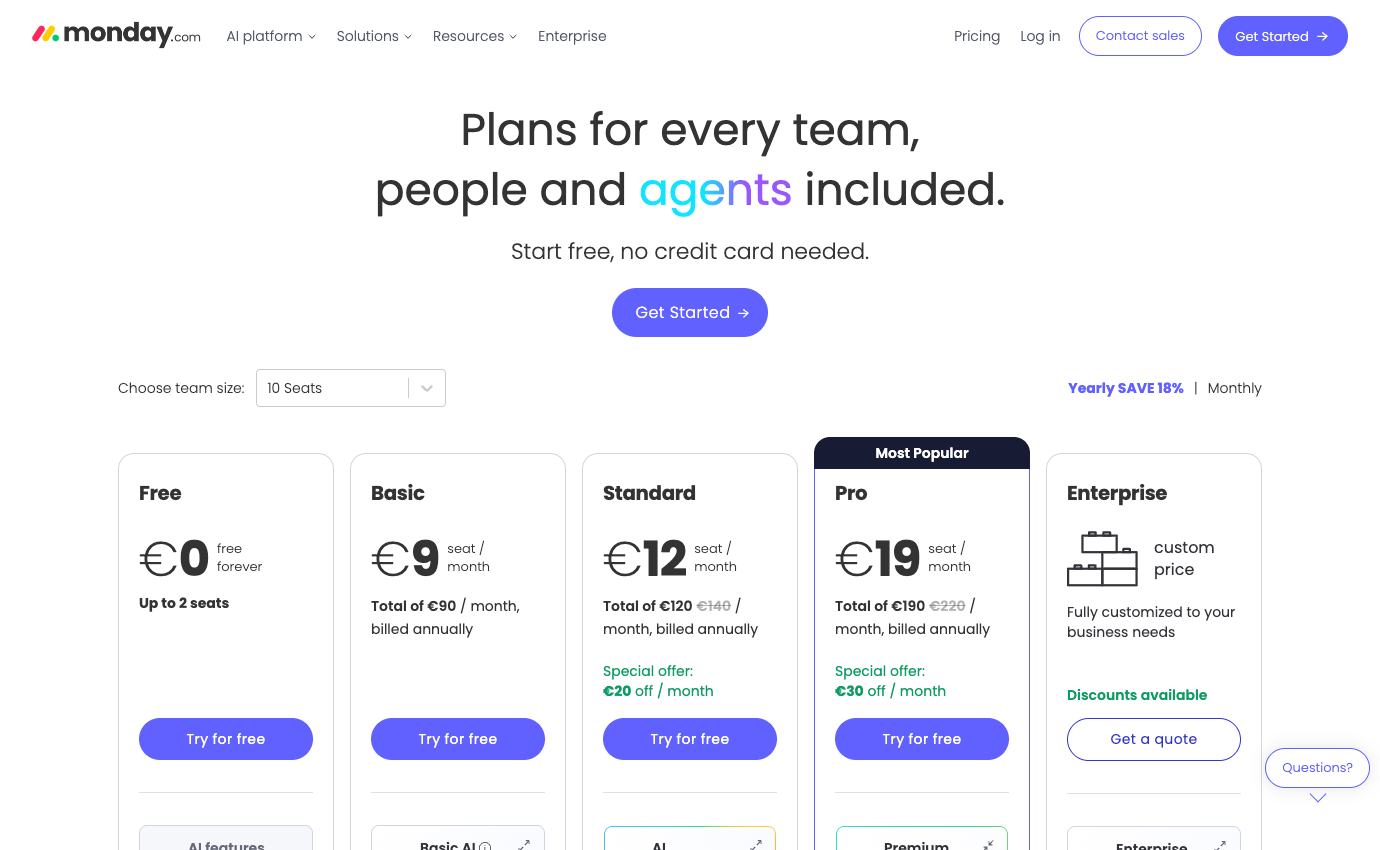
Always consult the official monday.com pricing page for the country in which the account will be purchased. Some vendors personalize prices by geography or seat count. Where the public site shows a calculator instead of a fixed amount, we deliberately mark pricing as variable instead of inventing a precise figure. Discounts visible in a screenshot are not promises about your future contract.
🛡️ Security, Governance, Privacy and Exports
For monday.com guest access permissions, test a contractor who must not see unrelated clients. Add a monday.com data export and offboarding exercise to ensure that deleted access does not erase approvals or attachments. This matters in highly customized boards because the meaning of every column must remain understandable after an administrator leaves.
AI changes the economics of monday Work Management beyond subscription seats. Credits, agents, AI columns and connected actions can add a usage dimension to recurring plans. A workflow that classifies one hundred requests each month has a different profile from one that processes thousands of documents. The official pricing page has offered credit packs and promotional deductions; neither should be generalized into a fixed future invoice. Keep a log of anticipated actions and ask which employee may enable automations with recurring costs. Establish a monthly ceiling and an alert well before deploying any agent that modifies production records.
⚠️ Limitations, Hidden Costs and Failure Modes
The costs of monday.com go beyond the advertised per-seat rate. Budget for the actual billable seat bundle and the automation tier. Check these buying risks against the actual edition and your own requirements.
1. Seat-bundle rounding and real invoices
A per-person promotional figure is not always the invoice for a small team. Review how monday.com groups seats, how billing cycles affect the quoted amount, and whether the selected package is Work Management rather than CRM or Dev. Check the total for the exact number of active users; tiny rounding effects matter when only a few people will use a board.
2. Free boards versus production needs
The free plan can demonstrate the board model without reflecting a real production deployment. Check the member and board restrictions against the intended project volume. If two colleagues use it for a week, resist translating their comfort with drag-and-drop into a conclusion about contractor access, reporting or automation at scale.
3. Forecasting automation-action usage
Automation counts should be forecast from actual work. A purchase-order queue generating several status notifications per item can consume more actions than a sample marketing board. Estimate monthly triggers and failure handling before buying a tier primarily for automations; build a deliberate failed-action case into the pilot.
4. Separate Work Management and CRM SKUs
Work Management, CRM, Dev and Service are separate product families, not merely views of one purchase. A team can select the wrong landing-page calculator and underestimate the actual operating cost. Record the SKU, included capacities and integrations for each required workflow before comparing it with Asana or another project tracker.
5. Promotions, renewals and AI credits
A launch promotion is not a renewal price. Save the vendor checkout terms, invoice currency and renewal schedule before committing to annual billing. If a substantial portion of the value comes from AI allowances, price the necessary credits independently and make the owner of metered actions explicit.
6. Custom-board sprawl and unclear statuses
Highly customized boards create a vocabulary that new employees may not understand. If ‘Ready’, ‘Approved’ and ‘In production’ mean different things to each department, dashboard totals become misleading. Limit custom statuses, document field ownership and have a colleague who did not build the board complete an unfamiliar request.
⚖️ monday.com vs Alternatives
Take a supplier onboarding process where a missing tax form must prevent approval. Build an intake board and let a colleague submit a deliberately incomplete application. The board should expose the missing evidence, route the request for review and prevent the next team from treating ‘In Progress’ as ‘Approved’. Then ask a separate department to recreate the process with a second supplier. The exercise measures whether flexible statuses and automations reflect a reliable business control or just recreate another spreadsheet with more notifications.
A monday.com vs Asana project tracking trial should run the same supplier or campaign handoff in both products. Check monday.com AI credits and billing before automating classification at scale, and write down who is allowed to trigger metered work. monday.com work management makes sense when the benefit of custom operations outweighs the cost of maintaining those customizations.
For a practical purchase decision, compare monday.com against Asana and Trello using the same set of requests. monday may win when configurable operational columns and dashboards match existing processes, Asana when standardized dependencies matter, and Trello when a light visual board is enough. Score each product on the time needed to set up, change a workflow, recover from mistakes and cleanly remove an external collaborator. The deciding point is not how many templates appear on the welcome screen. Instead, consider whether a small internal owner group can keep the chosen setup dependable without continual specialist intervention.
| Product | Where it may be preferable | Buying question |
|---|---|---|
| monday.com | The documented core workflow evaluated in this review | Does it measurably reduce your biggest current bottleneck? |
| Asana | A more standardized approach to task dependencies for coordinated delivery. | Would this replace an existing paid seat or add another system? |
| Trello | Simpler boards may suffice without paid dashboards. | Would this replace an existing paid seat or add another system? |
| ClickUp | Broad document, task and reporting surface for teams willing to configure. | Would this replace an existing paid seat or add another system? |
🧪 A Responsible Thirty-Day Evaluation Plan
The same business may open monday’s pricing selector for ten seats and see credits, promotional deductions and other monday products presented nearby. A buyer should preserve the full checkout quote, not add the headline price for Work Management to a CRM feature table. Count board editors, guests and viewers separately, then price the necessary integration actions with a buffer for seasonal workload. An AI-assisted request classifier can save triage time, but only if a human can identify and correct mistakes and if management approves the credit ceiling. Compared with Asana’s task model or Trello’s simple cards, monday’s customization is most defensible where an operations process really differs from the generic project template.
Days 1–3 — baseline and requirements
Start the monday.com evaluation with a baseline of five sample production request queue requests. Assign someone to record current completion time, missing information and repeat questions. The baseline matters because a successful pilot must improve an observed handoff, not just create a cleaner workspace.
Days 4–7 — permissions and procurement
Price the actual Basic and Standard plans for your country and planned license count. For monday.com, check external access separately. Before expanding the pilot, document who maintains each rule and how many paid automation actions it consumes. Confirm cancellation, data export and the authorization required for any paid AI usage before inviting more employees.
Week 2 — real but controlled tasks
Run a controlled marketing calendar scenario in monday.com: Owners track deadlines, creative reviews and channel plans from a board plus a calendar view. Create one realistic problem, one correction and one handoff under a non-admin account. A screenshot is not proof of success; ask another person to reconstruct the final decision without private explanations.
Week 3 — integrations and handoff
Use a safe integration case involving dashboards and workload. In monday.com, confirm what happens when two edits conflict, a notification fails, or a collaborator leaves. Document which system holds the authoritative version instead of copying the same status into multiple tools.
Week 4 — decision and exit test
Compare your monday.com trial to the old process and to Asana. A more standardized approach to task dependencies for coordinated delivery. Ask the requester and operator to identify what genuinely improved, then export the sample materials, record the subscription terms and decide whether a limited rollout is warranted.

Frequently Asked Questions
What is monday.com best used for?
The strongest use case is highly configurable board-centric work management for operations teams that need custom statuses, automations and dashboards. Consider it when the team is struggling with that specific outcome, then verify whether existing software already provides enough of the same functionality.
Does monday.com offer a free plan?
The current published starting tier is Free ($0). Free versions may limit collaborators, history, functionality or number of workspaces. Check the official feature table for the exact restrictions in your region.
What is the cheapest paid monday.com plan?
The first listed paid reference is Basic at $9 per the current vendor page, with these caveats: USD/seat/month billed annually on Work Management; seat bundles and locale pricing apply. Confirm regional tax, seat count and renewal before payment.
Can I pay monthly rather than annually for monday.com?
Term options vary. The published information notes USD/seat/month billed annually on Work Management; seat bundles and locale pricing apply. Do not confuse an annual-commitment monthly equivalent with a month-to-month subscription. Inspect the actual checkout.
Is monday.com suitable for a remote team?
It may be a good fit for teams comfortable designing their own workflow structure instead of following a prescriptive project system. A remote trial should validate access from approved devices, external participants, time-zone handoffs, notifications and the location of durable decisions.
What feature should I evaluate first in monday.com?
Start with boards, items and columns. Boards can model projects, clients or operating processes. Choose a primary owner for each field to prevent duplicate data. A useful trial also includes permission and offboarding checks.
What is a common limitation of monday.com?
Check how the vendor rounds billable seats before multiplying a per-seat rate by your headcount. Treat this as a purchase risk to verify, not as a claim of firsthand failure. The exact impact depends on your team size and chosen edition.
How does monday.com compare with Asana?
A more standardized approach to task dependencies for coordinated delivery. Select a representative workflow and evaluate both candidates with the same participant roles, retention expectations and costs.
Can external collaborators work with monday.com?
Access policies depend on the selected tier and whether a person is a member, guest or viewer. Test invitation scope, deletion of access and whether external people consume billable seats.
Are AI features included with monday.com?
Availability and usage limits are plan-specific. Review multiple monday product families; do not assume an unlimited allowance from a marketing label. Check credit or request limits and security policies.
What should we verify before buying monday.com?
Confirm official pricing, account roles, data export, required integrations, license minimums, renewals and the real outcome of a small pilot. A written owner should sign off on the decision.
🎯 Final Verdict: Who Should Choose monday.com?
Use a limited pilot, insist on a written cost estimate and compare one credible alternative. The current vendor plan page should settle any price ambiguity. The objective is not to own the broadest possible software stack; it is to build a workflow where responsibility, documentation and communication are easy to find.
Our methodology: This review is written from public vendor documentation and transparent illustrative decision scenarios. The 2026 price references and both product screenshots were inspected on October 26, 2026. We did not log into a paid account or conduct private first-hand benchmark tests, and nothing here constitutes a guaranteed quote or security certification.
EXPLORE NEXT ON DIGIOFFLY
Build a Smarter Team Software Stack
Use focused reviews and our comparison tools to separate essential collaboration subscriptions from duplicated functionality.
Plan & organize
- Notion review — Compare docs, wikis and linked project databases.
- ClickUp review — Consider tasks, views and team execution.
- Airtable review — Explore connected records and shared workflows.
- Softr review — Build a client-facing portal on structured data.
- Compare workflow automation and no-code tools — See when you need a dedicated workflow builder instead of another task board.
Communicate & decide
- Loom review — Record asynchronous walkthroughs for teammates.
- Otter.ai review — Evaluate meeting transcripts and follow-ups.
- Grammarly review — Improve collaborative writing and editing.
- Microsoft Copilot review — Review productivity AI and licensing limits.
- Explore creator and streaming software — Connect Loom-style async walkthroughs with recording and editing workflows.
- Browse AI & Tech reviews — Evaluate AI writing, transcription and Microsoft Copilot alternatives.
Compare your software stack
- Software Directory — Discover our full software catalog.
- Compare Software — Check tools side by side by actual use case.
- Software Cost Calculator — Estimate monthly versus annual commitments.
- Best Value Advisor — Identify potential overlap before another purchase.
- Explore Growth software — Connect project delivery with CRM, outreach and marketing workflows.
- Productivity & Collaboration reviews — Compare the complete team software shortlist.
- Asana review — Compare cross-team accountability and approvals with flexible work boards.
- Trello review — Check whether simple cards can replace a more complex operations board.
- Baserow — Relational no-code databases and custom apps