

AI & BUSINESS / DIGIOFFLY
Best AI Tools for Small Business 2026
Six tools, four real jobs and a budget you can verify.
How to choose AI tools for small business
The best AI tools for small business are the tools that complete a recurring job without creating a second job for the owner. A new business does not need six AI subscriptions simply because six services can write a paragraph. Start with the work: answer customer questions, prepare a campaign, summarize an approved meeting or automate a repetitive handoff. This guide compares six credible options by that work, their real entry costs and the limits that matter before buying. It is a source-led buying guide, not a ranked benchmark of model intelligence.
AI tools for small business: price and task comparison
| Software | Best fit | Entry plan and limits |
|---|---|---|
| ChatGPT | General-purpose assistant and file-based work | Free (limited); Plus $20/month |
| Claude | Document-heavy writing and review | Free (usage limits); Pro $20/month or $200/year prepaid |
| Canva | Template-led branded design | Free; Pro $18/month or $144/year |
| Adobe Express | Quick creative assets and Adobe handoffs | Free; Premium $9.99/month |
| Make | Automation with optional AI steps | Free: 1,000 credits/month; Core: $12/month for 10,000 credits |
| Otter.ai | Meeting transcripts and follow-up | Basic Free: 300 transcription minutes/month |
Six AI tools for small business worth evaluating
ChatGPT
General-purpose assistant and file-based workFree (limited); Plus $20/month
Use a general assistant for drafting a proposal from approved notes, reviewing a spreadsheet or preparing a customer-response template. ChatGPT Free includes limited access to file uploads and other advanced tools; quotas and availability differ by feature. Plus has expanded access. A solo owner can begin with Free and decide whether Plus solves a recurring usage or capability constraint.
Watch for: Free and paid plans have different usage limits and access to tools. Consumer subscriptions are not API subscriptions or equivalent to organization-level controls. Check account data settings before including business information.
Proposed pilot: Give it a sanitized product brief and ask for a short email, a list of unanswered questions and a fact-check table. Require citations for external claims and compare the final draft with the approved source.
Claude
Document-heavy writing and reviewFree (usage limits); Pro $20/month or $200/year prepaid
Claude is a candidate for a team member who spends time reviewing briefs, drafting long documents or extracting structured follow-up items. Claude offers an ongoing Free tier with usage limits, not unlimited prompts; its individual Pro subscription has monthly and annual options. Compare it with ChatGPT using the exact same work; two overlapping assistants are not automatically a better stack.
Watch for: Usage caps vary with the model, conversation and files. An individual Pro subscription is not a team administration package. The model can still omit context, invent references or misunderstand an instruction.
Proposed pilot: Provide a non-sensitive five-page sample policy and request a concise summary, questions requiring a human decision and a table of the source passages. Check each extracted item manually.
Canva
Template-led branded designFree; Pro $18/month or $144/year
Canva is useful when a business turns its existing ideas into repeated social graphics, presentations and customer-facing materials. A solo creator can explore Free, then consider Pro for more assets, brand kits and AI-assisted editing. A team should evaluate Business and the real seat requirement rather than sharing an individual license.
Watch for: AI use depends on the plan and feature. Extra usage can cost more. Existing assets, brand restrictions and export requirements may matter more than the number of templates.
Proposed pilot: Make one approved square graphic, a story resize and an editable variation. Inspect line breaks and product accuracy; verify who can modify the master template.
Adobe Express
Quick creative assets and Adobe handoffsFree; Premium $9.99/month
Adobe Express is an alternative to Canva for social graphics, short videos, lightweight documents and Adobe-related workflows. Premium is a monthly individual plan with 250 generative credits and 100 GB storage. Teams offers organization controls but uses an annual commitment and a minimum of two licenses.
Watch for: Do not compare a promotional Teams figure to a flexible individual monthly rate. Linked professional Adobe applications may need their own membership. Stock and generative asset terms still apply.
Proposed pilot: Repeat the same Canva test with identical assets and formats. Compare edits, exports, rights and access, then choose one primary design editor.
Make
Automation with optional AI stepsFree: 1,000 credits/month; Core: $12/month for 10,000 credits
Make is useful when the owner needs a repeatable data handoff: capture a form, look up a record and prepare an internal message. Its visual scenarios can connect approved applications and insert AI where useful. Core also has a documented $108 annual prepayment for the 10,000-credit monthly allocation.
Watch for: Credits are not finished workflows. AI calls and external providers may add usage costs. Error recovery and duplicated writes need deliberate design. Never let a trial automation send irreversible customer messages without review.
Proposed pilot: Use synthetic records for one workflow with a missing field, duplicate and failed write. Count actual credits, confirm output and require human approval for customer-facing changes.
Otter.ai
Meeting transcripts and follow-upBasic Free: 300 transcription minutes/month
Otter is worth evaluating when the main bottleneck is turning meetings into notes and action items. The public Basic comparison lists 300 monthly transcription minutes, a 30-minute conversation limit and three lifetime audio/video file imports. This can be sufficient for a small pilot, not unlimited meeting recording.
Watch for: Consent, language support, retention and account policy matter. Transcripts can mishear names, numbers or decisions. A meeting bot should not join confidential conversations without appropriate authorization.
Proposed pilot: With participant permission, record a short non-sensitive meeting. Compare the transcript and action list against your notes, then correct names, deadlines and decisions.
Best AI Tools for Small Business: a lean starting stack
Pick one primary assistant, one design editor only if visual production is a real job, and an automation or transcription tool only after identifying a repeated task. For a solo owner, ChatGPT Plus at $20 and Adobe Express Premium at $9.99 would total $29.99 monthly before tax. Substituting Canva Pro at $18 would make that $38. These are illustrative choices, not a requirement to subscribe to both design tools.
For a business that already pays for an AI-capable workspace or Creative Cloud package, first inspect included access. A separate license may duplicate an entitlement. If a free tool handles occasional work, leave it free; a paid account should unlock a feature or usage level you actually need.
Best AI Tools for Small Business: three practical workflows
Marketing: use the assistant to organize an approved product brief, then create the final graphic in one design editor. A person verifies claims and rights before scheduling. The success metric is the number of approved assets, not the number of AI drafts.
Operations: capture a form submission, validate the email and write a draft record. Use Make only after testing duplicate handling and the exact destination action. An AI-generated summary must not silently change an authoritative customer field.
Meetings: with permission, capture a short discussion, extract decisions and tasks, and ask participants to confirm them. Put the final action list into the existing project-management system. Do not pay for a second knowledge base just to store the same transcript.
How to evaluate affordable AI tools for small business
Use a two-week pilot with a specific input and acceptance checklist. Record the subscription amount, number of paid seats, units consumed, time spent correcting results and any external API charge. Measure the cost per approved outcome. A free tool that needs extensive correction may cost more in staff time than a modest paid one.
Separate account billing from API usage. ChatGPT Plus and a developer API are different purchases; Make credits and model-provider charges can also coexist. Record prepaid annual cash separately from recurring monthly payments, and do not multiply a per-seat amount by contractors who do not need paid access.
The best AI tools for small business should fit the company’s data rules. Use sanitized records in a pilot, confirm what the provider stores and uses, and set a human approval boundary for publishing, payments and sensitive decisions.
Best AI Tools for Small Business: selection methodology
We selected tools with an existing documented task fit, official plan information and useful alternatives, not affiliate payouts. This is a shortlist by work type, not a claim that the six applications outrank every other product. Vendor facts were checked November 14, 2026. We did not run a standardized paid-account benchmark; the proposed tests are repeatable evaluation examples.
The final decision is to select the smallest stack that completes the actual work. A shop with no meeting load may skip Otter, while a consultant may prioritize transcription over a design subscription. Review the actual work and cost after a month before increasing the budget.
Choose AI tools for small business by role, not by license count
A shop owner who writes occasional emails does not need the same stack as a designer who produces daily assets. Start with one text assistant and an existing source of truth for approved facts. Add a visual tool only when it removes a repeated design step. AI tools for small business can save staff time without replacing the person who checks prices, permissions and publication.
Budgeting AI tools for small business: track cash and usage
Set a monthly software ceiling and record each tool in the calculator. A solo assistant and design editor are separate from the cost of an automated workflow. Before increasing a subscription, measure usage for two weeks. Ask whether the existing license already includes the feature, and whether the next plan buys a capability or merely a higher cap.
A practical privacy checklist for AI tools for small business
Use non-sensitive sample material to test an assistant, design template or automation. Record who can access the workspace, what input gets sent to a model provider, whether staff can export or delete content, and who approves messages. Do not treat an individual consumer plan as an organization-wide data-control agreement.
When AI tools for small business are not the right upgrade
If the recurring problem is unclear ownership, outdated product information or a broken handoff, fix that process first. Adding another assistant will not repair an inconsistent source of truth. Choose a tool whose output can be checked and maintained by another person.
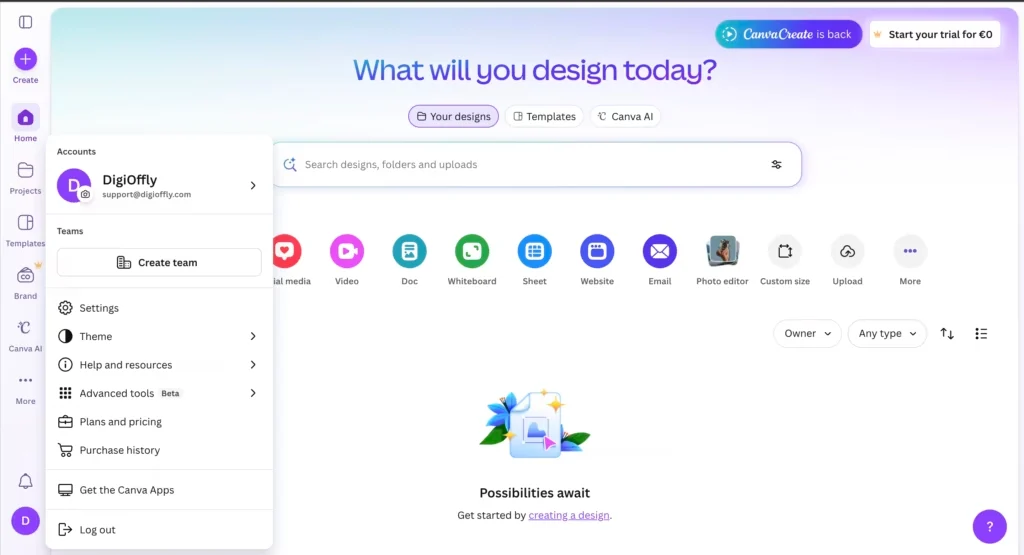
AI tools for small business: an interface example
AI tools for small business: frequently asked questions
What are the best AI tools for small business in 2026?
Start with a general assistant such as ChatGPT or Claude, then add one design tool such as Canva or Adobe Express only if needed. Consider Make or Otter for a demonstrated automation or meeting workload.
Which AI tools for small business fit a low budget?
Use continuing free plans to complete a real deliverable first. Pay for the smallest plan that removes a specific limit, and count the full stack cost.
Can I use free AI tools for small business?
Yes for many low-risk tasks, but check usage, licensing, account terms and data controls. Free is not the same as a free trial or a business administration plan.
Should I subscribe to both ChatGPT and Claude?
Not by default. Test the same representative work, then keep the tool that meets your requirements. A second subscription needs a distinct purpose.
How much does a simple AI stack cost?
For one person, ChatGPT Plus and Adobe Express Premium would be $29.99/month at the US public references. ChatGPT Plus and Canva Pro would be $38/month. Taxes and extras are excluded.
Can AI tools for small business replace a marketing team?
It can assist with drafting and asset creation, but people still need to verify facts, rights, brand consistency and approval.
Are AI tools for small business safe for client data?
It depends on the account, provider terms, data type and business policy. Use non-sensitive test data and verify permissions, retention and model-training settings.
Can Make automate customer emails?
Supported connectors can automate workflows, but use synthetic data first and add approvals, duplicate handling and an owner for customer-facing sends.
Does an AI subscription include API usage?
Not necessarily. ChatGPT Plus and API usage are separate; other products have their own billing rules and limits.
How should I measure a pilot of AI tools for small business?
Cost per approved output, corrections, real usage, access failures and whether another person can maintain the workflow.
Where can I compare the complete software budget?
Use DigiOffly Software Finder to shortlist products and the Cost Calculator to model documented prices and billing terms.
Pricing note: US public references checked 14 November 2026. Taxes, region, account eligibility and plan changes may affect the actual price. All pilots are proposed evaluation tasks, not measured paid-account tests.
Continue researching on DigiOffly
Software Finder · Cost Calculator · Compare Software · Best Software
EXPLORE NEXT ON DIGIOFFLY
Explore More on DigiOffly
Compare AI tools for small business with the full reviews and budget tools.