

Pricing checked October 24, 2026. Bluehost’s US WordPress hosting pricing page advertises Starter from $3.99/month, Business from $6.99/month, and eCommerce Essentials from $14.99/month when purchasing a 36-month term. That means approximate initial commitments of $143.64, $251.64 and $539.64 respectively, before taxes or extra purchases. These are promotional monthly equivalents, not pay-as-you-go monthly prices. Bluehost lists separate renewal schedules for one-year, three-year and monthly contracts. Confirm renewal in the checkout or Account Manager Renewal Center; some product-page summaries and detailed renewal tables display different figures.
A cheap introductory hosting rate may hide a substantial prepaid commitment and a higher renewal bill. Years later, the renewal notice arrives—and suddenly the feature list you skimmed during signup looks a lot more important than the initial discount.
That gap between promotional and renewal pricing is central to this Bluehost review 2026. Bluehost hosting can be a practical entry point for a new WordPress website, but deciding whether it is good value takes more than comparing a $3.99 headline with a competitor’s first-year offer. We examine the new Bluehost WordPress hosting plans, storage and traffic estimates, backup and staging tools, eCommerce options, renewal costs, and alternatives you can evaluate without a sales pitch.
📊 Bluehost Review Summary
Bluehost hosting plans include managed WordPress-friendly hosting with a website setup workflow, WordPress update tools, SSL, CDN integration, backups and assistance features. The public 2026 WordPress-hosting page emphasizes Starter, Business and eCommerce Essentials rather than relying solely on older Basic and Choice Plus labels commonly found in legacy reviews.
Starter targets introductory sites, Bluehost Business provides a larger allocation and broader support, and Bluehost eCommerce Essentials bundles selling-related tools. A newcomer may find the combination approachable. The key disadvantage is contract math: the lowest published introductory monthly equivalent typically requires paying for three years before launch, and Bluehost renewal rates are higher, so Bluehost renewal pricing deserves a separate comparison.
Bottom line: Bluehost is worth considering for a WordPress beginner who understands the full upfront commitment and renewal terms. It is not automatically the cheapest three- or five-year solution, and the longest contract is not always the safest choice for a new project.
⚡ Quick Verdict: Is Bluehost Worth It in 2026?
Potentially yes—provided the buyer compares the entire term and resists buying capacity they do not need. A new publication or service website may benefit from Bluehost’s hosting, one-click WordPress tooling and common website protections. A growing store needs closer scrutiny of database demands and real checkout traffic.
Bluehost pricing 2026 only becomes meaningful when renewal rules, support and operational features enter the comparison. Bluehost WordPress hosting is best evaluated as a packaged service. You are buying a plan, a billing commitment, a control-panel experience and access to support. You are not buying a guaranteed fixed speed result. The vendor’s visit estimates and uptime service statements are useful planning inputs, but do not replace tests on the exact site you intend to run.
🏆 Bluehost Pros and Cons
👍 What We Love
- ✅ Accessible WordPress setup path with managed update features
- ✅ SSL, CDN and common site-protection features advertised
- ✅ Staging, caching, SSH and WP-CLI appear in the current plan comparison
- ✅ Business tier offers greater storage and phone support
👎 Where It Falls Short
- ❌ Lowest promotional prices require a lengthy prepaid term
- ❌ Renewal price depends on contract length and may increase materially
- ❌ “Ideal for” visitor estimates are not performance guarantees
🏆 EDITORIAL VERDICT: SOLID FOR BUDGET-CONSCIOUS WORDPRESS STARTERS
Best for: small WordPress sites comfortable with a prepaid introductory hosting term and a clear plan for renewals.
We give credit for documented functionality, not for hosting “reviews” that invented an account, support call or latency benchmark.
🧠 What Is Bluehost?
Bluehost is a hosting provider offering WordPress-specific plans alongside other infrastructure and website services. For the product reviewed here, the subscriber receives a hosted environment for a WordPress installation with a management interface and common site tools. This is distinct from renting an unmanaged cloud VM: the user need not install an entire Linux stack just to publish a blog.
That convenience is helpful at launch. A solo business owner can connect a domain, choose a theme, set up a site and concentrate on content. The trade-off is that you operate inside a plan with defined storage, resource and support terms. If you need root access or deploy non-WordPress services, a cloud server may be a better starting point.
Also distinguish Bluehost WordPress hosting from a proprietary site-builder product or other Bluehost plans. A marketing page may present bundles for different audiences. Before checkout, confirm that your cart contains the exact WordPress plan and term discussed in the review.
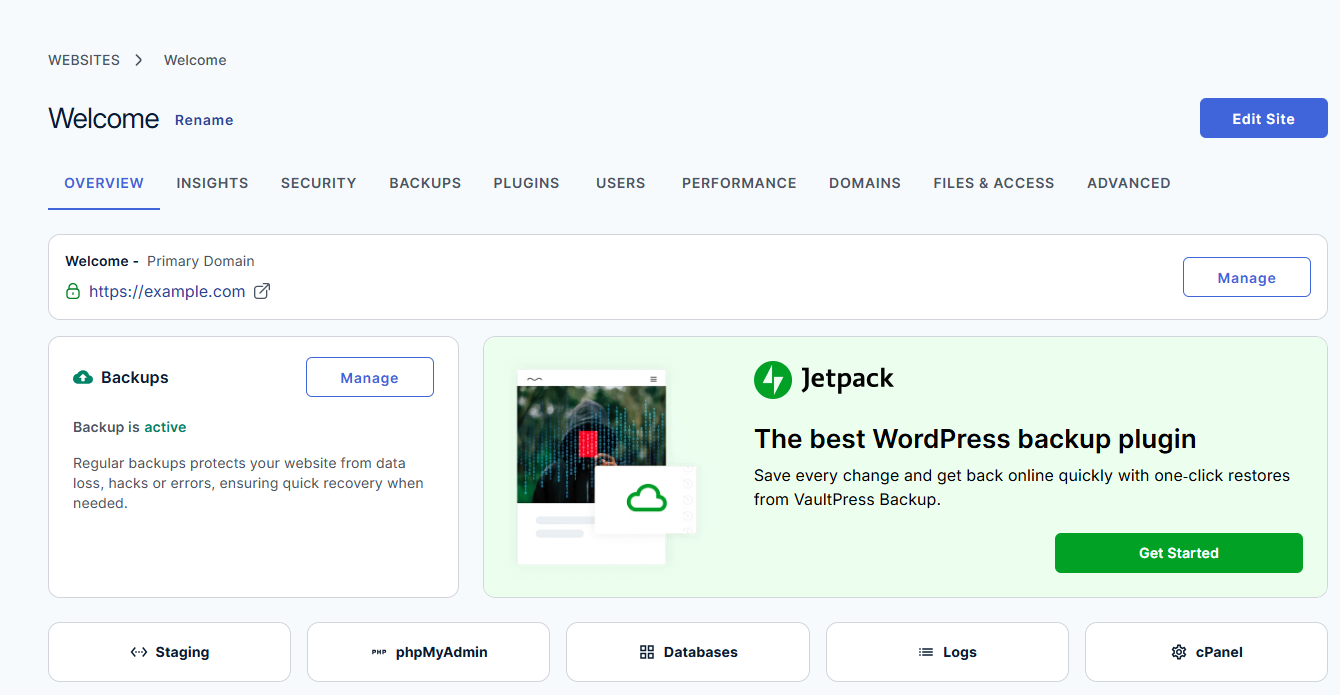
Official vendor documentation screenshot. Source: https://www.bluehost.com/help/article/am-websites-overiew-tab. Not a screenshot of a paid DigiOffly test account.
🖥️ Bluehost Control Panel and Getting Started
The best part of an entry-level hosting workflow is that you can perform simple tasks without searching for command-line instructions. WordPress installation, a domain connection, SSL and site-management functions are intended to sit within a guided environment. The current comparison also advertises advanced access such as SSH and WP-CLI, which will matter more after the initial launch.
Imagine a local services company beginning with a five-page website. Its owner wants to publish service descriptions, add a booking plugin and handle a contact form. Bluehost may deliver enough infrastructure to make the site accessible. But the owner still needs to configure form email, backups, spam protection, updates and consent preferences. “Managed” reduces some platform chores; it does not take over the business.
Bluehost WordPress staging is listed across the current hosting comparison. That is useful when changing themes or updating extensions. Treat it as a test environment rather than an automatic deployment guarantee. A staging version can miss real email conditions, live payment callbacks or scheduled tasks. Take a recovery point before pushing changes.

Official vendor documentation screenshot. Source: https://www.bluehost.com/help/article/website-builder-publish. Not a screenshot of a paid DigiOffly test account.
🔧 Bluehost Features That Deserve a Closer Look
Evaluate Bluehost security features by reading what is actually included at your chosen tier: basic scanning, backup frequency and remediation help are not interchangeable services. The host can protect parts of its infrastructure, but WordPress user permissions, plugin selection and external forms remain the owner’s responsibility. Keep a current access list and an independent copy of essential records.
WordPress updates and website security
Bluehost website security begins with advertised managed WordPress updates and a collection of SSL, DDoS, firewall and malware-related features. These reduce setup friction, but the exact protection level can vary across plans. The simplified pricing cards and detailed feature tables do not always present every security entitlement identically. Before selecting a package, check the actual order summary and written product terms for malware cleanup, scanning, backup frequency and recovery rights.
Storage and visitor guidance
At the time of review, the Starter card listed 10 websites, 10 GB NVMe storage and an “ideal for 40K visits/month” estimate. Business listed 50 websites, 50 GB and 200K estimated monthly visits, while eCommerce Essentials showed 100 websites, 100 GB and 400K estimated visits. These figures are marketing guidance, not a guarantee that every WordPress theme and plugin stack will handle those visitors equally.
What matters is the workload beneath the visit count. A mostly cached brochure page behaves very differently from a store generating personalized carts, membership checks or complex search queries. Monitor resource consumption, disk usage and database activity rather than using a visitor estimate as the sole capacity criterion.
Backups and staging
Bluehost weekly backups are advertised in the current plan matrix. Weekly snapshots may be adequate for a rarely changing portfolio but are a weak sole recovery strategy for a busy shop with daily orders. If new orders arrive hourly, losing nearly a week of records is unacceptable. Verify whether more frequent independent backups are available, what can be restored, and whether they carry an extra fee.
Commerce and payments
The eCommerce Essentials tier presents a WooCommerce-oriented bundle, including product subscriptions, memberships, paid courses and other commerce tools. Those features can be useful, but they should be selected because the store needs them. A shop selling ten physical products may do fine on a simpler WordPress plan with WooCommerce; a subscription service may need a more complex architecture and reliable transaction backup policy.
Support boundaries
The Starter plan currently lists chat support but not phone support, whereas Business and eCommerce Essentials include phone support in the published comparison. Think about who would troubleshoot a failed payment page at 11 p.m. and what the host promises to help with. A hosting support agent is not automatically the developer of every WordPress plugin installed on the account.
🧮 Bluehost Renewal Math: The Three-Year View
Bluehost’s inexpensive headline is attractive because many customers compare it with a month-to-month software subscription. The offer can be fundamentally different: a low monthly equivalent may require paying for a multi-year contract at once. On the pricing page reviewed in October 2026, a Starter example showed $3.99 per month for a 36-month term and a $9.99 monthly renewal reference. That is not a promise that every cart, region or term will carry the same price. Read the checkout line items and renewal notice before relying on those figures.
A simple budgeting exercise illustrates the difference. Multiplying $3.99 by 36 gives $143.64 for the initial three-year hosting term, before tax and add-ons. Multiplying a $9.99 monthly renewal equivalent by twelve gives $119.88 for a subsequent year at that illustrative rate. The first figure is a prepaid commitment, not a $3.99 monthly subscription that can be cancelled without consequence. Compare alternative terms with the same total time horizon. Also include privacy services, email, domains and any third-party backup or security products not included in the selected plan.
Small businesses should separate a promotional discount from an ongoing operating advantage. If the website earns revenue, the cheapest upfront hosting may be a reasonable experiment; if budgets are tight, a three-year prepayment could reduce cash available for content, design or marketing. Calculate the total paid today and the likely renewal date, then set a reminder well before it arrives. The more useful question is whether Bluehost’s everyday management workflow justifies the full contract price once the temporary offer ends.
🖥️ Bluehost Portal: A Realistic Owner’s Weekly Routine
An owner logging into Bluehost typically needs answers to ordinary operational questions: Is SSL active? Are backups current? Which WordPress version is installed? Can an upcoming redesign be tested safely? The provider’s official Websites overview shows controls for several of those tasks. That is a sensible way to organize a hosting portal, but the existence of a menu does not prove that a particular feature is included without restriction. Confirm whether the chosen account has automated backups, staging and the support channels that appear in the marketing screenshots.
Consider a typical week for a service business. On Monday, an editor publishes a new article; on Wednesday, someone updates a booking plugin; on Friday, a freelancer adds a tracking script. Each change should be documented and reversible. In Bluehost, decide which work belongs in WordPress admin and which belongs in the hosting portal. Keep domain settings, DNS, payment profiles and production site administration limited to appropriate staff. A clear permissions policy matters even for a two-person team: the person writing the blog does not necessarily need the ability to delete a production database.
Create a short operating guide instead of relying on memory. Include the link to the site’s WordPress login, the Bluehost account owner, the last tested backup and the procedure for checking forms after an update. Record where to find support and the site’s PHP configuration. When an issue happens outside business hours, the guide should help another authorized person gather information without improvising. Hosting convenience is not just a collection of buttons; it is a repeatable routine that still works when the original developer is unavailable.
🔐 Security, Backups and the Shared-Responsibility Model
Bluehost can provide essential hosting safeguards, but the site owner remains responsible for plugin selection, user access and data handling. A site with dozens of outdated extensions is exposed even if its host advertises malware scanning. Keep WordPress core, themes and extensions maintained, use strong unique credentials and remove inactive tools that are no longer needed. If a site uses payment processing, avoid storing sensitive card information in custom WordPress forms. Instead, rely on supported payment workflows and confirm the implications for privacy and data retention.
Backups deserve particular attention because plan pages sometimes bundle a basic feature while presenting more extensive protection as an upgrade. Ask exactly what is backed up: files, database, email, DNS records or only certain components. Check frequency, retention and whether self-service restores are available. A backup that can only restore an entire account may be inconvenient if you simply need to recover one deleted article. Test restoration on a non-public copy and keep independent exports for information the business cannot afford to lose.
Even a technically successful restore can create a business problem. Orders, contact submissions and form messages generated after a backup may disappear if the full database is reverted. For stores and appointment sites, maintain a record of transactions and consider how you would reconcile changes following an incident. Document a rollback window before significant plugin changes. The existence of automated backups does not replace that planning; it makes a considered recovery process possible.
⚙️ How to Set Up or Migrate WordPress to Bluehost
A Bluehost WordPress migration should preserve redirects, email DNS records, analytics and the original content database until acceptance testing is complete. The Bluehost free domain first year promotion, when included in a particular offer, does not mean future domain renewals will also be free. Verify the domain registrant and expiry date separately from the hosting term.
1. Choose the product and term. Select the appropriate WordPress-hosting family, then change between monthly, one-year and three-year billing where available. Record the full invoice and renewal terms before considering paid extras.
2. Audit the old website. Export the WordPress database, media library and application files. Make a separate copy of mailboxes and DNS records if an old hosting provider also handles business email.
3. Use the migration workflow. Bluehost migration options include a free site migration tool. Test the resulting copy through a temporary or preview address, then verify plugins, images, redirects, login pages and contact forms. WooCommerce stores should also test checkout, refunds and transactional email.
4. Prepare the switch. Coordinate DNS and SSL changes, keep the old hosting account active and take a new backup before moving customer traffic. After the switch, watch error logs and confirm that forms or order webhooks reach their destination.
5. Document renewal. Add a calendar reminder several weeks ahead of the next hosting and domain renewals. Keep the current bill, domain ownership details and migration backup in a location independent of the hosting account.
💵 Bluehost WordPress Pricing 2026: Starter, Business, eCommerce Essentials
A Bluehost Starter plan may suit a simple publishing site, while the Bluehost Business plan needs to be assessed against its specific storage, resource and support allowances. An offer such as Bluehost pricing 36 months describes a prepaid contract equivalent, not necessarily a flexible monthly bill. Compare the exact payment shown at checkout with the renewal total before deciding whether an introductory discount is valuable.
| WordPress plan | Promoted 36-month monthly equivalent | Initial 36-month subtotal | Current published 12-month renewal monthly equivalent |
|---|---|---|---|
| Starter | $3.99 | $143.64 | $11.99 |
| Business | $6.99 | $251.64 | $16.99 |
| eCommerce Essentials | $14.99 | $539.64 | $18.99 |
The initial figures above multiply the visible promotional monthly equivalents by 36 months; actual invoices may contain taxes, domain costs or separately selected add-ons. Renewal figures are from the current WordPress hosting renewal table for a 12-month renewal, not a promise of what a three-year renewal will cost. For example, the same official page lists Starter at $15.99/month on a monthly renewal or $9.99/month when renewing for 36 months.
There is also a practical verification issue: Bluehost’s current Business marketing card says it “renews at $13.99/month,” while its detailed managed WordPress renewal table shows $14.99/month for the 36-month Business option. This discrepancy is a reason to check your exact product and contractual renewal amount in the cart or Renewal Center, not to publish either as a universal certainty. Reference: current pricing and renewal matrix.
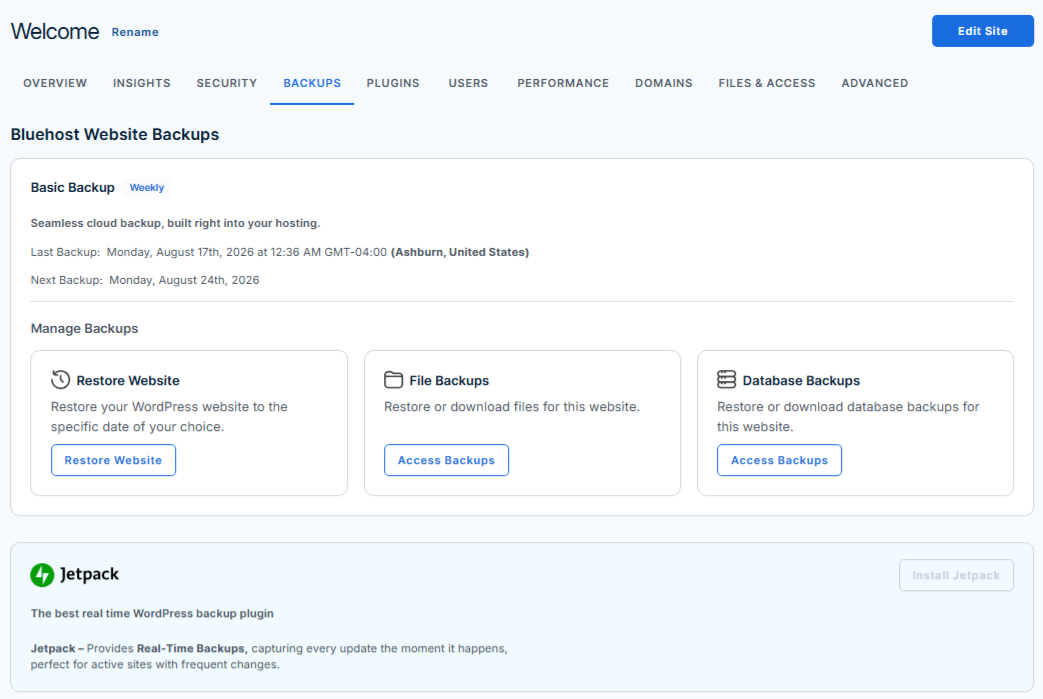
Official vendor documentation screenshot. Source: https://www.bluehost.com/help/article/am-websites-backups-tab. Not a screenshot of a paid DigiOffly test account.
🔍 What Will Bluehost Really Cost Over Three Years?
The small monthly equivalent makes Bluehost pricing look easy to compare, but prepayment changes the buyer’s risk. Paying $143.64 upfront for Starter may be reasonable for a committed three-year project. For a business idea that might change direction in six months, a shorter and more flexible plan can be worth a higher monthly rate.
Suppose a site owner buys the promotional 36-month Business plan at the advertised $6.99 equivalent. The initial base hosting subtotal is $251.64. The budget still needs a business mailbox, any paid template, domain renewal after year one, premium plugins and potentially stronger backup retention. These are illustrative categories, not charges we found added to every Bluehost cart.
Compare equivalent durations. Do not put a three-year Bluehost discount next to one month of a competing managed host and declare Bluehost the universal winner. Normalize contract periods, support level, backup frequency, staging, storage and the likely cost of exiting before the term ends.
🎯 Who Should Use Bluehost?
First WordPress site: A blog or portfolio with stable requirements may fit Starter, especially when the owner values guided setup. Storage, traffic expectations and renewal terms still deserve attention.
Small business running several websites: Business can make sense if several properties truly need hosting and the team values phone support. Calculate the cost per active site rather than treating a high maximum site count as something you must fill.
WooCommerce entrepreneur: Review eCommerce Essentials for the bundled tooling, but validate caching behavior, backups and order recovery. Checkout reliability is a workload issue, not merely a plan name.
Agency or professional publisher: Compare Bluehost with SiteGround, WP Engine and Kinsta. The cheapest prepaid plan might not offer the operational recovery controls your contracts demand.
Developer needing unrestricted configuration: Consider DigitalOcean when you need a custom deployment stack, at the cost of managing patches, backups and security yourself.
⚖️ Bluehost Alternatives: Which Hosting Model Fits?
Bluehost vs Hostinger is a better comparison when it uses the same contract length and renewal assumptions. Bluehost for small business may make sense if owners want a familiar WordPress-oriented account and accessible support. Compare Bluehost hosting alternatives by the operational tasks they remove, not merely the price in the first advertising panel.
| Alternative | Best reason to evaluate | Main diligence point |
|---|---|---|
| Hostinger | Another accessible WordPress hosting option | Compare contract length, limits and renewal prices |
| SiteGround | Site-management workflow and staging | Higher ongoing costs on some plans |
| Cloudways | Managed cloud infrastructure options | Separate hosting resource model |
| Kinsta | WordPress-specialist operations | Premium pricing and usage caps |
| Wix | All-in-one visual site building | Different editor and portability model |
There is no trustworthy universal answer to “Bluehost vs SiteGround speed” without identical site builds and repeatable tests. Bluehost may be entirely adequate for a modest cached blog, while a high-traffic store requires load testing and a more careful hosting budget.
🚚 Moving an Existing WordPress Site Without Traffic Loss
Migration starts with an inventory, not with a DNS change. Export site files and database, collect the current DNS zone and identify every external integration. The obvious content pages are only part of the project. Contact forms may depend on SMTP settings; customer messages may route through a third-party mailbox; marketing attribution may rely on carefully configured redirects. Preserve the old hosting account until you can verify each critical function on the new environment.
Build a pre-launch test list covering homepage and several deep URLs, robots directives, canonical tags, category archives, image paths and checkout or membership flows where relevant. If the site serves users in multiple languages, inspect language-switching URLs and translated canonical relationships. Test from a phone as well as a desktop. A site can render perfectly to the person who migrated it while returning broken images or insecure content warnings to real visitors. Keep a change log so a failure can be traced to a specific step.
After switching DNS, monitor traffic and error reports rather than declaring success when the homepage loads. Verify SSL, transactional email and search-engine accessibility. Use redirects for any changed permalinks; avoid creating chains or sending unrelated old articles to the homepage. Note that domain transfer and website migration are independent operations and can happen on different schedules. A planned overlap period usually costs less than an emergency caused by cancelling the old provider too early.
⚖️ Choosing Bluehost Versus a Different Hosting Model
Bluehost makes the most sense when WordPress-oriented setup and a familiar hosting account are priorities. Compare that with Hostinger when renewal economics and value features matter, with SiteGround when a team uses staged publishing workflows, and with WP Engine or Kinsta when dedicated managed WordPress operations justify a higher budget. DigitalOcean serves a different buyer: someone ready to manage a cloud server or use platform services. These are not four interchangeable plans at different prices. They distribute maintenance responsibilities differently.
Run the same evaluation against each candidate. Can you stage changes, download backups and restore a site without waiting for support? Is there a clear policy for resources, traffic and abuse controls? What does the second-year or fourth-year bill look like after discounts expire? Does the support model match the team’s needs? Instead of asking which host is universally fastest, load the same application stack and representative content on test environments with comparable caching and CDN settings. Otherwise measured differences are easy to misinterpret.
A marketing website, a small store and a custom app may need three different answers. For a brochure site with occasional updates, Bluehost’s packaged model can be sensible. An agency handling frequent deployments might prefer stronger staging and developer workflows. A bespoke backend requiring root access is better evaluated as cloud infrastructure. Start with the application’s demands and the people available to maintain it; the familiar logo or discount should be the final tie-breaker, not the first filter.
✅ Bluehost Purchase and Maintenance Checklist
Before placing an order, confirm the exact plan name, term length, payment total, renewal rate and cancellation conditions visible in the cart. Check whether the included domain is only free for the first registration year. Ask about backup inclusion, staging, security scans, SSL and whether phone support varies by tier. If a feature is presented as free, determine whether it expires after an introductory period. Save the final contract details for the person responsible for business subscriptions.
For a new website, create a minimal production launch checklist: enforce HTTPS, disable public indexing only during construction, configure a backup, connect a domain, verify mail deliverability and publish an accessible privacy policy. Add only the plugins needed for the first version. Record the last known-good backup and a rollback plan for updates. Do not install overlapping performance plugins simply because each advertises an optimization benefit. Conflicting caches can be harder to troubleshoot than a small unoptimized site.
Bluehost can be a reasonable starting point for owners who want a packaged WordPress experience rather than a self-managed server. The strongest reason to choose it is that the selected features and support fit the business for the full prepaid and renewal period. If the appeal vanishes when the discount ends, reassess the choice. Your hosting bill is only one expense in running a dependable website; maintenance, migration effort and continuity are equally real costs.
🧪 How We Evaluated Bluehost
Our research used Bluehost’s public 2026 WordPress-hosting page, its current renewal table and official support material describing managed hosting. We calculated the actual cash commitment for the advertised three-year terms and compared it with the published contract-length-based renewal schedules. We explicitly called out inconsistent Business renewal figures instead of silently choosing whichever was more attractive.
We have not purchased a Bluehost plan, run paid-account tests, measured uptime or contacted support. Screenshot placeholders must be replaced with genuine official-page captures before public release. No invented speed, uptime or support-performance ranking is included.
🏆 Final Verdict: Should You Choose Bluehost in 2026?
Bluehost remains a reasonable candidate for someone who wants WordPress hosting with guided setup and an accessible initial invoice. The current WordPress offering advertises useful capabilities such as staging, updates, backups, SSL, CDN and more support on higher tiers.
But this Bluehost review 2026 ends where a good purchasing decision begins: with the real contract. Check the total due today, renewal pricing for your actual term, the backup restore policy and anything required to run your application safely. If the three-year obligation fits your plans, Bluehost can be worth testing. If flexibility or advanced incident recovery matters more, shortlist competitors before committing.
➡️ Compare official Bluehost WordPress plans

Frequently Asked Questions
Is Bluehost good for WordPress in 2026?
It can be suitable for a beginner or small business looking for a packaged hosting setup. The right plan depends on workload, renewal budget and recovery needs.
How much does Bluehost Starter cost?
The October 24 public offer showed $3.99/month equivalent with a 36-month commitment, or about $143.64 upfront before taxes and extras.
Does Bluehost renew at the introductory price?
Usually the promotional new-customer price should not be assumed to continue. Renewal rates vary by plan and contract term; check the actual Renewal Center.
What are Bluehost Starter, Business and eCommerce Essentials?
They are the current advertised WordPress hosting tiers, with increasing website/storage allowances, support and e-commerce bundles.
Does Bluehost include a free domain?
Qualifying plans advertise a domain for the first year. You should separately verify domain renewal and privacy pricing.
Does Bluehost have WordPress staging?
Yes. The current WordPress plan comparison lists staging across the three highlighted plans, but test the push workflow before relying on it.
Are Bluehost backups daily?
The current plan comparison advertises weekly backups. Verify the backup schedule and optional services for your specific subscription.
Can Bluehost host WooCommerce?
Yes, but a store should test checkout, resource usage and recovery procedures. eCommerce Essentials bundles additional commerce-related tools.
How many websites can Bluehost Starter host?
The current highlighted Starter plan advertises up to 10 websites, subject to the account’s capacity and resource constraints.
Is Bluehost faster than Hostinger?
We have not conducted matched benchmarks; vendor claims alone do not establish a winner across WordPress workloads.
Can I migrate from Bluehost later?
WordPress sites are generally migratable through files, database and configuration work. Preserve domain control and backups, and test redirects, forms and email before cancelling.
🔔 DigiOffly Deal Alerts
Track verified Bluehost offers through DigiOffly Deal Alerts. Check contract duration and renewal before acting on a promotion.
EXPLORE NEXT ON DIGIOFFLY
🔍 Explore More on DigiOffly
Compare website and hosting options, model the full cost, and keep exploring the tools that support your next project.
Explore website options
Calculate hosting costs
Keep researching
- Compare software
- Software Directory
- Software Deals
- DreamHost — WordPress shared hosting, DreamPress and renewal-price comparison
- Namecheap — domain registration, Stellar cPanel hosting and 2026 renewals