

Research updated: October 24, 2026. Public US-dollar WordPress.com pricing shows the following annual-billing monthly equivalents: Personal $4, Premium $8, Business $25, and Commerce $45, before tax. Monthly billing is advertised at $9, $18, $40 and $70 respectively. The free plan remains $0. Regional prices, renewals, introductory terms and additional purchases vary. Importantly, WordPress.com now documents plugin installation on all paid plans, not only Business or Commerce. See the official October 2026 support guidance.
WordPress.com and self-hosted WordPress offer different operating experiences even though both use WordPress. One owner downloads WordPress, buys hosting, manages a server and decides which tools to install. Another creates an account on WordPress.com and begins publishing without choosing an infrastructure provider. They share a content-management foundation, but not the same operating responsibilities.
This WordPress.com review 2026 is about that second experience: the hosted platform. We’ll look at what the free plan really provides, how paid plans change the workflow, what the updated WordPress.com plugin policy means, whether Commerce makes sense for an online store, and how portability compares with self-hosted WordPress. This is a documentation-based review, not a claim that DigiOffly ran an undisclosed paid trial.
📊 WordPress.com Review Summary
WordPress.com is a hosted website publishing platform that bundles WordPress, hosting, core maintenance, templates and editing into one account. It reduces decisions for a beginner, yet still exposes a broad WordPress ecosystem as a site grows. Its free tier is a genuine way to practice publishing, though it includes a WordPress.com address and advertisements; paid tiers unlock custom domains, remove ads and provide more resources.
The most important 2026 update is the paid-plan plugin policy. Older comparisons saying you must buy Business to install any plugin are now outdated. WordPress.com supports installation on Personal, Premium, Business and Commerce, though specific advanced hosting services, storage amounts, support and commerce bundles still vary by tier.
Bottom line: WordPress.com offers a straightforward path from a personal site to a more capable business website. It is less suitable for developers whose requirements include unrestricted server architecture or specialized infrastructure configuration.
⚡ Quick Verdict: Is WordPress.com Worth It in 2026?
Yes for a creator, writer or small business who wants the WordPress publishing model without first becoming a hosting administrator. WordPress.com pricing is simple enough to model if you distinguish monthly from annual billing, and the paid-tier plugin change removes an older reason to dismiss its lower plans.
The main challenge is selecting a plan based on how you intend to operate. Personal may be enough for an information site with basic plugins. WordPress.com Premium makes sense if payments, media and broader audience tools matter. WordPress.com Business adds deeper site-management features, while Commerce bundles WooCommerce-oriented selling capabilities and selected extensions. A store with many paid plugins still needs to inspect the combined cost—not assume the bundled commerce tier makes every extension free.
🏆 WordPress.com Pros and Cons
👍 What We Love
- ✅ Free plan lets you learn and publish before committing
- ✅ Hosting, updates and the publishing environment live in one service
- ✅ All paid plans now support plugin installation
- ✅ Familiar WordPress block editor, themes and patterns
👎 Where It Falls Short
- ❌ Free websites display platform ads and use a WordPress.com subdomain
- ❌ Less underlying infrastructure control than self-hosted WordPress
- ❌ Plugin compatibility and plan-specific developer services still require checking
🏆 EDITORIAL VERDICT: RECOMMENDED FOR HOSTED PUBLISHING
Best for: bloggers and small teams who want an integrated WordPress publishing platform without managing their own server.
These are the practical trade-offs of a hosted WordPress service. They are not fabricated quality scores based on first-hand support calls.
🧠 WordPress.com vs WordPress.org: What Is the Difference?
The WordPress.com website builder experience bundles familiar block editing with a managed publishing environment. WordPress.com SEO tools can cover the essentials of metadata and discovery, but they cannot substitute for useful content or a coherent internal-link structure. If your site needs unusual server extensions, check those requirements before deciding between hosted WordPress.com and self-hosted WordPress.
WordPress.org distributes the open-source WordPress software. You can install it on a compatible host, configure the stack and choose how to operate it. WordPress.com, by contrast, offers a fully hosted service based around WordPress. With WordPress.com hosting, the subscriber buys a plan from the platform and receives an integrated environment for editing and publishing.
Neither choice is categorically more professional. A freelance photographer may be well served by WordPress.com because images and updates can be managed from one service. A large organization running unusual integrations may prefer self-hosting with Kinsta, WP Engine or its own cloud infrastructure. The correct question is how much control you need, not which version of the word “WordPress” appears in the logo.
Portability deserves a clear explanation. WordPress content can be exported through standard WordPress mechanisms, but export of posts and media is not identical to a perfect reproduction of a site’s layout, paid theme licenses, plugin configuration, memberships or external payment records. Keep those dependencies documented before committing to any host.
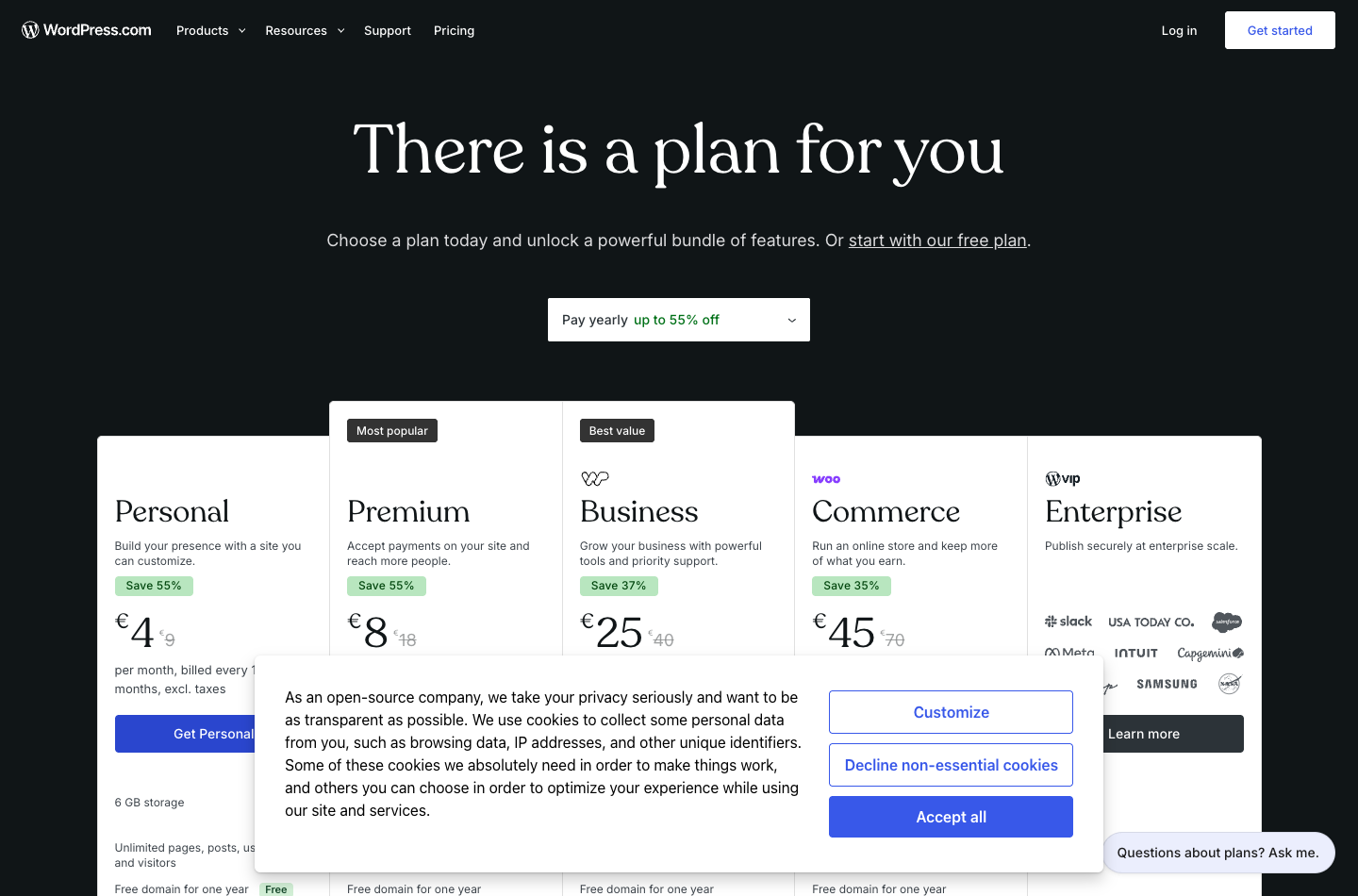
Capture of the official public pricing page. Source: https://wordpress.com/pricing/. Not a screenshot of a paid DigiOffly test account.
🖥️ WordPress.com Editor, Dashboard and Design Experience
The everyday WordPress.com workflow begins with a site, a theme and content blocks. You can create posts, build pages, adjust global styles and add navigation without opening a server terminal. For a small team, the benefit is a lower cognitive load: writers can learn the editor while an owner controls permissions, domains and the general publishing settings.
The block editor is especially useful when content must be reused. A restaurant can maintain opening-hour blocks, a consultant can update service pages and an author can publish long-form articles without recreating every heading. WordPress patterns can speed the process, but they do not replace a design system. Consistent typography, image crops, spacing and button behavior still need editorial care.
If you use a complex external plugin, test its core workflow on the chosen plan before importing a production site. A plugin being installable does not guarantee it works with every managed platform restriction, theme or other extension. Also verify the plan’s backup and restore options if the site will be updated by multiple people.
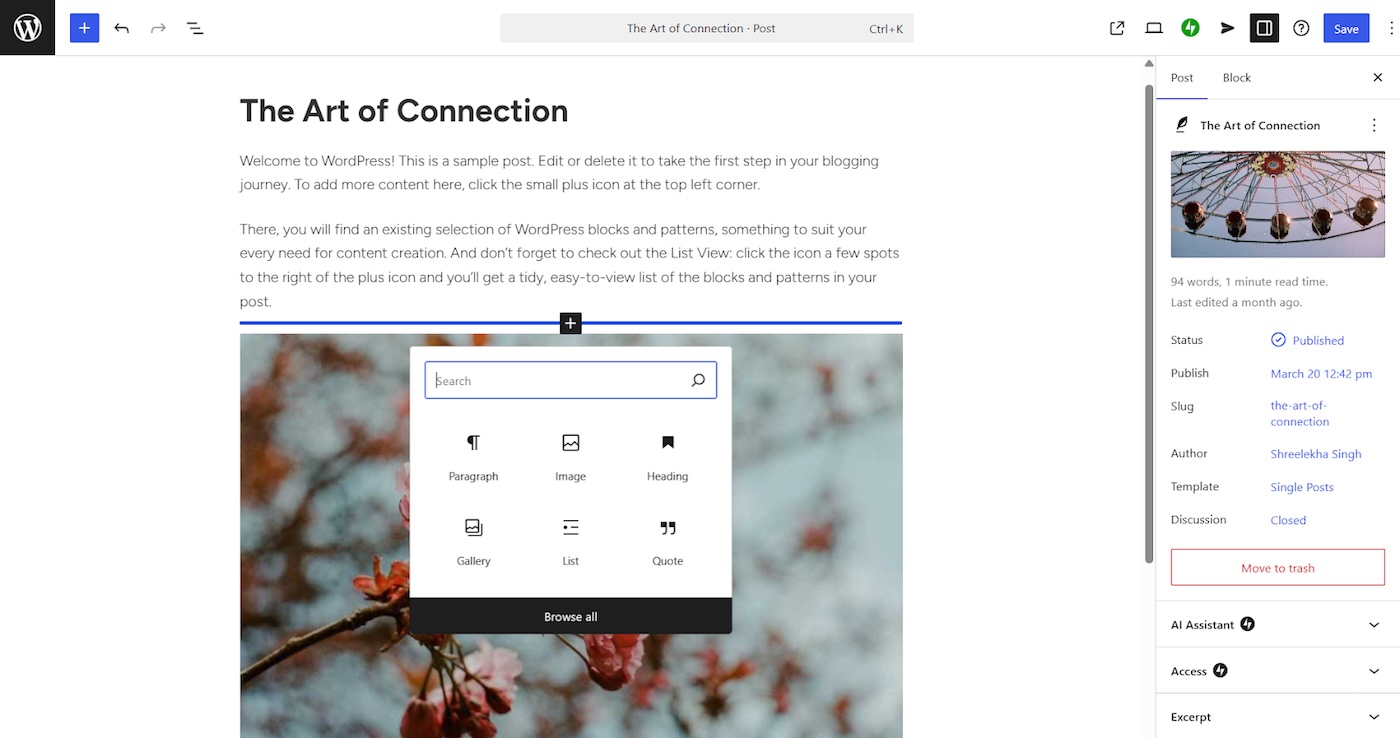
Official vendor documentation screenshot. Source: https://wordpress.com/blog/2025/04/25/how-to-design-a-blog/. Not a screenshot of a paid DigiOffly test account.
🔧 Key WordPress.com Features in 2026
WordPress.com Plugins on Personal and Premium
This is where old buying guides can actively mislead people. WordPress.com’s support page, reviewed October 22, 2026, says plugins can be installed on Personal, Premium, Business and Commerce. Free users must upgrade for plugin installation. That does not mean every enterprise workflow suddenly becomes available on Personal, but it changes what a budget blogger can build.
A useful example: someone writing a local travel guide may want an SEO plugin, image compression and a newsletter integration. Instead of automatically starting at Business on the outdated assumption that plugins are locked there, they should first check whether Personal meets their requirements and confirm compatibility with each selected extension.
Free website publishing
The WordPress.com free plan includes hosting, posts, pages, basic statistics and 1 GB media storage according to the plan documentation. It works well for experimenting with writing and organizing content. It is less suitable as a polished business destination if branding, a custom primary domain and ad-free presentation matter.
Business website features
Business is aimed at publishers and organizations that need more substantial capacity and developer-oriented capabilities, including stronger backup and management workflows. The exact plan matrix changes, so inspect the official feature comparison rather than interpreting the name “Business” as a universal requirement for commercial activity.
Commerce and WooCommerce
WordPress.com Commerce packages WooCommerce and an assortment of commercial extensions for selling physical and digital products, memberships or services. The vendor lists product bundles, gift cards, marketing capabilities and a streamlined store-management experience. These features save setup time when they match your use case, but a full cost model should still include payment processor fees, premium shipping providers, paid third-party integrations and sales tax obligations.
Domains, email and marketing
WordPress.com domain options on paid annual plans advertise a free registration for the first year, not permanent free domain registration. Renewal of the domain and registration privacy can create separate charges. Likewise, a branded email mailbox is a distinct item to verify: connecting a custom domain to a site does not automatically settle your business-email budget.
🧩 WordPress.com Plugin Reality: Capability Versus Compatibility
One of the biggest changes prospective customers should understand is that WordPress.com now offers plugin installation on every paid plan, including Personal. Older reviews often describe plugins as a Business-only feature; that is no longer a reliable description of the current policy. Yet access to the plugin installer does not mean that every plugin, external service or advanced server configuration will behave identically to a self-hosted WordPress installation. Before moving an important site, list your required plugins by business function: forms, search, caching, multilingual publishing, memberships, e-commerce and SEO. Verify the actual support boundaries for each one.
Test plugin compatibility in the order of business risk. A cookie notice or minor design enhancement is relatively easy to replace, while a membership billing gateway or a multilingual catalog can shape the architecture of the whole site. Examine whether the plugin needs custom PHP extensions, database access, background jobs or filesystem permissions. Check if its vendor supports the WordPress.com environment and whether a plugin relies on host-specific caching exceptions. For a nontechnical owner, the convenience of simple installation may be the headline; for an agency, the more important question is whether the finished stack can be safely maintained and moved.
Plugins are also an ongoing financial and security commitment. Premium add-ons frequently bill separately from WordPress.com, and a free plugin can introduce third-party data processing or ongoing update work. Maintain a small register of renewal dates, licenses and the personal information each integration handles. Choose the smallest useful set rather than installing overlapping functionality simply because it is available. A convenient managed host does not eliminate the obligation to review change logs and remove abandoned extensions. Think of the plugin policy as new flexibility, not a reason to stop treating the website as an application.
🎨 Building an Editorial Website: From Empty Canvas to Repeatable Publishing
A new site becomes difficult to maintain when every page is assembled from unrelated blocks. Before designing individual articles, define a small typography scale, a content width, two or three button styles and a reusable treatment for tables and callouts. WordPress.com’s block editor and site-design tools can support this approach, but the result depends on editorial discipline more than the number of available templates. Start with a theme that serves the site’s purpose; do not spend a month customizing a homepage while the article template and navigation remain inconsistent. A repeatable system makes each subsequent post cheaper to create.
Editors should agree on a publication checklist. Each article needs a descriptive title, a single clear H1, meaningful subheadings, a suitable featured image and accessible alternative text. Internal links should help readers continue a task rather than forming a random directory of related URLs. Check mobile reading width, captions, contrast and table overflow. Preview a post as both a visitor and an editor before scheduling it. If several people write for the site, create reusable patterns for author disclosures, comparison tables and FAQs so quality does not depend on remembering dozens of formatting instructions.
WordPress.com removes much of the infrastructure setup, but content architecture remains yours. Categories should represent topics readers genuinely browse; tags should not turn into thousands of near-identical archives. Establish canonical URL conventions and a clear policy for updating old posts. Decide how to handle redirects when the editorial taxonomy changes. Set up a simple performance baseline and watch whether images or embedded third-party widgets make important pages sluggish. A platform is useful when it lets a small editorial team spend its energy on trustworthy content instead of repetitive server administration.
🔄 Migration and Ownership: Avoid Lock-In Surprises
Moving a blog onto WordPress.com deserves the same care as a conventional host change, even though the user interface feels friendlier. Inventory all public URLs, image files, custom post types, menus, forms, plugins and analytics connections. If an existing website has earned search visibility, preserve slugs wherever practical and prepare redirects for anything that must move. Export original images at full quality and keep an independent copy of your content. Plan a period of parallel access rather than cancelling the old service on the day the new homepage appears.
A common misunderstanding is that WordPress.com and WordPress.org are different content formats. WordPress is the publishing software, while WordPress.com supplies a hosted operating environment around it. Standard posts and pages generally have familiar export routes, but complete design and behavior portability depends on the theme, plugins and host-specific services. A new host may require rebuilding an email form, replacing a proprietary pattern or reconfiguring a performance service. Ask whether your future business model needs server-level integrations. Portability is not merely the ability to download an XML export; it is the effort needed to make the result operational elsewhere.
Treat domains and business email as independent assets. A domain bundled with an initial hosting purchase may have registration terms and renewal dates that do not match the website subscription. Verify account ownership, DNS access and the process for transferring the domain later. Before switching name servers, record MX, SPF, DKIM and DMARC details so email delivery does not break. If a store is involved, map payment gateways, tax configuration, order records and transactional email. These practical details are where a theoretically simple migration can become an expensive interruption.
⚙️ Building or Migrating a Site to WordPress.com
A WordPress.com migration is not finished when posts appear in the editor. Check image URLs, forms, redirects, contributor permissions and email delivery. A WordPress.com custom domain also introduces DNS and renewal responsibilities that should be documented separately. Keep the original site accessible until the most important visitor journeys have been verified on the new platform.
1. Choose a starting point. For a personal blog, test Free or Personal. For a portfolio collecting customer enquiries, determine whether contact forms, analytics and plugins work on the less expensive plan. Do not buy Commerce merely because the site belongs to a company.
2. Define portability needs. A WordPress.com site migration requires an inventory of dependencies. If importing an existing WordPress installation, inventory custom plugins, shortcodes, builder layouts, theme licenses, redirects, SEO metadata and users. Export a current backup before changing anything.
3. Rebuild the critical journeys. Open posts, images and menus; submit enquiry forms; test signup emails and analytics; and verify indexing settings. A migrated site that looks correct on the homepage can still contain missing media or broken internal links.
4. Connect the domain deliberately. Verify DNS records, HTTPS, email MX records and redirects. Keep access to the old host until the new site functions in production. Only cancel after you have checked forms and account access under real traffic.
💵 WordPress.com Pricing 2026: Free to Commerce
A WordPress.com Personal plan is worth considering once the free tier’s domain and branding constraints no longer fit. The WordPress.com Premium plan addresses a different set of content and design needs. A WordPress.com Business plan becomes more interesting for larger editorial workflows and development access, while the WordPress.com Commerce plan should be evaluated around real orders, payment integrations and the cost of store operations.
| Plan | Pay monthly | Pay annually (monthly equivalent) | Approximate annual upfront cost |
|---|---|---|---|
| Free | $0 | $0 | $0 |
| Personal | $9/mo | $4/mo | $48 |
| Premium | $18/mo | $8/mo | $96 |
| Business | $40/mo | $25/mo | $300 |
| Commerce | $70/mo | $45/mo | $540 |
These are public US-dollar examples from October 24, 2026, before taxes, regional differences and separately billed products. A displayed “$4/month” annual plan normally requires a $48 annual payment, not twelve independent $4 monthly invoices. Likewise, Business at $25/month annual equivalent requires roughly $300 for that year. Check the checkout and automatic renewal disclosures before purchase.
The pricing decision is not simply “which plan is best?” For Personal, evaluate whether available storage and plugin compatibility serve the site. For Premium, consider media and monetization needs. Business earns its price when deeper site-management and development capabilities are regularly used. Commerce earns its price when bundled WooCommerce extensions replace tools you would otherwise purchase separately.

Official vendor documentation screenshot. Source: https://wordpress.com/support/plugins/install-a-plugin/. Not a screenshot of a paid DigiOffly test account.
🔍 The Hidden Cost of a Hosted Website
A low-cost plan can be surprisingly capable, especially now that paid WordPress.com plugin installation is more widely available. Yet the actual cost of a working business website includes domain renewal, business email, paid themes, external services, image or video needs, payment processing, backup expectations and any premium plugins.
Consider a local services business with an annual Personal subscription, a separately billed business mailbox and a booking plugin. If that plugin is compatible and the site fits the resource allocation, paying for a higher plan solely for the “Business” label wastes money. Conversely, a store requiring advanced recoverability and bundled selling features might end up spending more time assembling equivalents on Personal than it saves in fees.
The best WordPress.com plan therefore follows a feature checklist, not a blanket claim that everyone should choose Business. Model a twelve-month bill and a separate renewal-year bill in a spreadsheet before subscribing.
🎯 Who Should Use WordPress.com?
A first-time blogger: Start on Free to learn the editor, then upgrade when an ad-free site, a primary custom domain or additional storage becomes necessary.
A creator or professional: Personal and Premium are credible candidates. Compare premium themes, media allowances, analytics and payment needs. The expanded WordPress.com plugin policy can make these tiers materially more flexible than old reviews suggest.
A small company: Business may be justified where backups, site-management capabilities and ongoing development are part of normal operations. Estimate team maintenance costs alongside the subscription.
An online seller: Commerce deserves a serious look when the included WooCommerce tools align with the catalog. Test refunds, tax calculation, fulfilment, email receipts, shipping and checkout in the target market.
A developer running services beyond WordPress: Consider DigitalOcean or a managed cloud service if you need non-WordPress applications, custom daemons or root administration.
⚖️ WordPress.com Alternatives: Choosing the Correct Hosting Model
For WordPress.com vs Wix, ask an editor to publish the same article on both platforms and count how many steps require help. WordPress.com vs Squarespace is particularly relevant for portfolios and small businesses choosing between site design convenience and a broader plugin ecosystem. Evaluate WordPress.com hosting alternatives by testing your actual plugins and workflows, not a template gallery.
| Alternative | Best reason to compare | Important distinction |
|---|---|---|
| Wix | Visual all-in-one website building | Different editor, content model and extensibility |
| Squarespace | Curated site design and commerce | Hosted proprietary site-builder experience |
| Hostinger | Self-hosted WordPress with low entry offers | You manage WordPress within a separate hosting account |
| SiteGround | Site Tools and WordPress maintenance | Contract and resource model differ |
| Kinsta | Premium managed WordPress specialization | Pricing and usage allowances serve a different market |
WordPress.com versus WordPress.org is not an apples-to-apples price comparison until the latter includes hosting, maintenance, backups and incident response. The apparent cost of free open-source software can hide paid operational work, while a hosted platform can reduce that work but limit configuration choices.
💳 Pricing Scenarios: Personal Website, Small Business and Store
A personal writing site and an online shop should not be compared on the same monthly headline. The writer may need only a custom domain, enough design flexibility and a small number of plugins. A small business may additionally require analytics integrations, lead forms, branded email and a workflow for several contributors. A store needs payment configuration, product data, shipping and tax logic, refund handling and dependable transactional messages. Compare the plan’s actual included features against those operations, then add third-party subscription costs. The lowest WordPress.com tier is sensible only if its constraints fit the complete workflow.
When evaluating annual versus monthly subscriptions, separate the cash leaving the account today from the effective cost per month. Annual equivalents look tidy in pricing tables but require upfront commitment, and promotions may apply only to new customers. Create a two-year budget that includes renewals for the domain, plugins and outside marketing tools. Keep a note of which expenses are avoidable if you stop publishing or close the store. The goal is not to select the cheapest first-month experience; it is to avoid a stack that becomes unexpectedly expensive as soon as a second editor or additional business feature is needed.
Imagine a small professional firm with five main pages and a monthly educational article. Buying a complex commerce stack does little for it unless visitors can purchase services online. Conversely, a shop with thousands of products should evaluate checkout reliability, integrations and the cost of managing orders rather than optimizing solely for the price of hosting. WordPress.com Business and Commerce should be judged against actual service and selling requirements. A good purchase decision names which features will be used in the first ninety days and which are merely speculative.
📈 SEO, Analytics and Editorial Trust on WordPress.com
Search visibility starts with useful pages, consistent site structure and public accessibility. Confirm that the finished site is not accidentally set to private or configured to discourage indexing. Give every important page a readable title and an introduction that answers the visitor’s question. Review canonical URLs, sitemap availability, redirects and how shareable images appear in previews. WordPress.com includes baseline publishing and discovery tools, but third-party SEO extensions can add reporting and controls. Those tools are only helpful when the site’s information architecture and actual content deserve to rank.
Analytics should answer a business question, not simply inflate a dashboard of page views. Define valuable events: a contact submission, newsletter registration, brochure download or completed purchase. Check consent requirements for the audience you serve and avoid loading unnecessary trackers. During a migration, preserve event definitions and compare before-and-after data cautiously; a change in cookie banners or measurement scripts can produce an apparent traffic swing without a real audience change. A hosted platform can simplify installation, but the interpretation of those reports remains an editorial and business responsibility.
Authors and editorial disclosures matter especially for reviews, health content and commercial comparisons. Make clear when a recommendation is based on official documentation rather than a hands-on account test. Date-check prices, keep source links and distinguish sponsorship from independent evaluation. A site can look professional while concealing weak evidence; a repeatable research process is far more valuable than another animated homepage section. WordPress.com provides a convenient place to publish, but credibility is built by how the content is produced and maintained.
📋 WordPress.com Decision Checklist
Before subscribing, build a one-page requirements sheet: number of sites, anticipated authors, must-have plugins, custom domain, intended e-commerce features and any integrations requiring unusual server access. Check the vendor’s current comparison matrix, not a review published before the recent paid-plan plugin policy change. Ask for clarity on storage, backup behavior, support channels and export options. Select the narrowest plan that genuinely meets today’s requirements, with a clear upgrade path if the website begins to support more of the business.
Test the editor for an actual task. Create one representative long-form article with headings, images, a table, a form and an internal link block. Preview it on a narrow mobile screen and as a logged-out visitor. Ask another person on the team to make a correction without your help. If small editorial changes require workarounds, that friction will recur every week. Compare the same publishing exercise in WordPress.com, Wix and a standard self-hosted WordPress setup rather than judging a platform only by its template gallery.
WordPress.com is often a practical fit for individuals and teams that prefer an integrated hosted publishing experience. It is less straightforward when the project needs custom infrastructure, an elaborate deployment pipeline or plugin behavior tied to a particular server configuration. The decision depends on how much server control you need and which chores you want the host to handle. The best fit is where that convenience clearly saves work while the required business features remain available, documented and testable.
🧪 How We Evaluated WordPress.com
We reviewed the official WordPress.com plans page and support guides current in October 2026, including the updated October 22 plugin-installation guidance and the Commerce feature overview. We checked the annual-versus-monthly pricing logic and considered migration, branding, storage and customization as separate buying decisions.
This is an editorial research review. We did not create a paid WordPress.com account, run identical sites across competitors, test support response times or measure uptime. The screenshot placeholders require authentic capture and source labeling before publication. No numerical speed ranking or hands-on score is claimed.
🏆 Final Verdict: Should You Choose WordPress.com in 2026?
WordPress.com is a practical choice for someone who wants to publish on WordPress without running the hosting stack. The free tier is approachable, the paid tiers provide room to grow and the all-paid-plan plugin support is an important improvement for flexibility.
We would start with a list of must-have features and purchase the lowest plan that demonstrably supports them. Keep a backup and an export plan, budget the real annual payment rather than the monthly equivalent, and test any business-critical extensions. WordPress.com is worth paying for when the platform’s convenience matches your needs—not because its higher tier sounds more serious.
➡️ Compare official WordPress.com plans

Frequently Asked Questions
Is WordPress.com free in 2026?
Yes. There is a $0 plan with hosting and publishing, but it includes a platform address, ads and limited storage.
What is the difference between WordPress.com and WordPress.org?
WordPress.com is a hosted service. WordPress.org provides the open-source software, which you can run on compatible hosting that you choose and maintain.
Can I install plugins on WordPress.com Personal?
Yes. Official guidance reviewed October 22, 2026, says all paid WordPress.com plans support installing plugins, including Personal and Premium.
Does the free WordPress.com plan support plugins?
No. The official support instructions state that free sites need an upgrade to install plugins.
How much does WordPress.com Personal cost?
The public US pricing checked October 24, 2026, showed $4/month equivalent when billed annually or $9 with monthly billing, before tax and regional adjustments.
Does WordPress.com include web hosting?
Yes. Hosting and core WordPress maintenance are part of the hosted platform rather than a separate purchase from a third-party web host.
Can I use my own domain on WordPress.com?
Yes, on a paid plan. A qualifying annual subscription may include the domain registration for the first year, with renewal conditions to check.
Is WordPress.com Commerce the same as WooCommerce?
Not exactly. Commerce is a hosted plan with WooCommerce and selected extensions bundled into the platform. WooCommerce itself is also an open-source WordPress commerce plugin.
Is WordPress.com better than Wix?
It depends on priorities. WordPress.com offers a WordPress content and plugin ecosystem, while Wix has a different builder-first workflow. Test the actual editing experience.
Can I move my WordPress.com website elsewhere?
Many WordPress content types can be exported, but site design, plugin settings, commerce records and external connections may require additional migration work.
Which WordPress.com plan is best for a small business?
Choose by features, not label: Personal or Premium may be sufficient for a basic business site, while Business and Commerce add value for more demanding management or selling workflows.
🔔 DigiOffly Deal Alerts
To follow WordPress.com promotions, visit DigiOffly Deal Alerts and verify any offer’s eligibility and renewal terms.
EXPLORE NEXT ON DIGIOFFLY
🔍 Explore More on DigiOffly
Compare website and hosting options, model the full cost, and keep exploring the tools that support your next project.
Explore website options
- Hosting & Websites offers
- Wix website builder review
- Squarespace website builder review
- Development & DevOps — Explore reviews of code, APIs, app backends and deployments
- Railway — Deploy apps and manage running services
- Screaming Frog — Crawl audits, redirects and technical SEO checks
Plan your true website cost
Keep researching
- Compare software
- Software Directory
- Software Deals
- DreamHost — WordPress shared hosting, DreamPress and renewal-price comparison
- Namecheap — domain registration, Stellar cPanel hosting and 2026 renewals