

Editorial note: This independent review analyzes official product documentation, published plan information and decision criteria. Vendor screenshots show public webpages. We do not claim to have completed a private-account hands-on test or guaranteed a particular price.
Instead, consider whether Linear fits your current system of record, staff permissions, procurement terms, administrative resources and ability to leave later. Features and packages change, sometimes within a year, so use the official pricing page as the final authority for your region before checkout.
📊 Linear Review 2026: Editorial Verdict
| Decision question | Editorial assessment |
|---|---|
| Core use case | A focused issue and product-development workspace optimized around triage, cycles and product planning. |
| Team it suits | Software teams that want keyboard-efficient issue tracking and clear product planning without elaborate configuration. |
| Potential poor fit | A company whose main goal is general office documents, shared email or highly customized enterprise pmo forms. |
| Billing evidence | Vendor pricing — regional/tax/term details can vary |
| Suggested pilot | Two to four weeks, with sample tasks, real roles and exit criteria |
| Research status | Editorial assessment of public documentation; no private-account testing |
👍 What We Love
- ✅ Issues and projects: Work items have explicit owners, states and context.
- ✅ Triage and intake: Requests can be sorted before entering a team backlog so speculative items do not pollute delivery plans.
- ✅ Integrations and developer context: GitHub and other connections reduce context switching but only when issue links and commit hygiene are consistent.
- ✅ AI and agent workflows: Linear lists an agent platform, code intelligence and other features with credit conditions; inspect actual entitlement.
👎 Where It Falls Short
- ❌ Free plan limits on teams and total issues can matter earlier than user count.
- ❌ Business features are required for private teams and advanced insights.
- ❌ Not a generic email, files or meeting suite.
✅ Linear: BUYER FIT AT A GLANCE
Best for: software teams that want keyboard-efficient issue tracking and clear product planning without elaborate configuration.
🧠 What Linear Actually Solves
Evaluating Linear issue tracking for startups should begin with how the team triages requests and protects planned capacity. To evaluate Linear cycle planning and priorities, introduce an interruption that forces a choice between urgent fixes and roadmap commitments. A faster interface cannot substitute for an accountable product decision.
A six-developer startup may prefer Linear for its streamlined issue workflow rather than building a complex custom process. A new report enters triage, someone decides whether it is actionable, the highest-priority work enters a cycle, and a code change closes the loop. This sounds routine, but its value comes from the discipline of rejecting low-impact requests. A board containing every suggestion is not a roadmap. Keep customer feedback distinguishable from committed engineering work and document who can change priorities during a cycle. Then ask whether the team can follow a task from a report to its source and shipping record without switching through private conversations.
Linear makes a deliberate trade: fewer configurable surfaces in exchange for a concentrated issue and project workflow. For a product engineer, the benefit can be moving from triage to a planned cycle without navigating the kind of bespoke status labyrinth that larger Jira deployments sometimes acquire. That does not mean configuration is irrelevant. A startup still has to agree who may prioritize work, what qualifies for the backlog, how cycles are closed and which issues represent customer commitments. Linear is strongest when the team wants one relatively opinionated system rather than an internal platform-building project.

🛠️ Linear Features: What Matters in Real Team Work
Explore Linear GitHub pull request integration with one actual bug and a verified release note. A Linear triage inbox workflow should distinguish a reproducible defect from duplicate feedback and a speculative feature idea. Each accepted issue needs enough context for a developer to act without hunting through private chat.
Free access can sound generous when it includes many people, but Linear’s limits apply to teams and issues as well as seats. The published Linear Free plan currently lists two teams and 250 issues, Basic around $10 per member monthly equivalent billed yearly, and Business around $16. A rapidly growing engineering organization can reach an issue cap sooner than expected if it imports years of historical bug data. Separate current live work from archival records when planning migration, and check how old identifiers can still be referenced in customer or incident reports.
Issues and projects
Work items have explicit owners, states and context. Templates and disciplined naming keep intake navigable. Ask the employee responsible for two-week product cycle to demonstrate the outcome with synthetic data. When comparing Linear with Jira, check whether Jira’s additional workflow controls justify the extra setup time. A different product may be the safer choice if this exact scenario is the team’s dominant work.
Cycles and planning
When assessing cycles and planning, check how the final record moves between colleagues. Cycles encourage constrained work selection. If every item is urgent the cycle system becomes meaningless. A useful proof is one customer feedback to roadmap example whose requester and approver disagree about the final state. Any unverified permission or plan restriction should appear in the procurement notes. Opinionated workflow may not map cleanly to a custom enterprise governance process.
Triage and intake
Consider triage and intake before signing a Linear agreement. Requests can be sorted before entering a team backlog so speculative items do not pollute delivery plans. When assessing cross-repository delivery, examine how the next engineer picks up the work and finds its history. A task links design decisions, pull request and release notes to reduce scattered status checks. Record which edition was used, whether the external participant could see unrelated work, and whether a departing colleague could leave without losing the underlying content.
Buyers evaluating Linear should define written acceptance tests for triage and intake rather than relying on preference alone. Give an operator a scenario they did not configure beforehand.
Roadmaps and initiatives
Higher-level planning links upcoming outcomes to projects while preserving the details underneath. Keep the first experiment small enough to reverse: Route one reproducible defect from triage to code review and verify that an unfamiliar engineer can find its owner. Look for one human owner and one recoverable final artifact. A chat message alone cannot serve as a durable record of a completed action.
Integrations and developer context
The integrations and developer context capability looks simple when viewed in isolation, but it has dependencies. GitHub and other connections reduce context switching but only when issue links and commit hygiene are consistent. During the trial, let a guest perform only the authorized portion of two-week product cycle. Set a limit for repeat notifications and automatic actions; the organization should know who can change that limit and where failed actions can be inspected.
Linear Asks and support intake
A team may encounter linear asks and support intake first during onboarding, not during a vendor comparison. Business capabilities can connect requests through Slack, email and forms; determine ownership of customer data. Populate the pilot with realistic documents, permissions and handoffs. Try this realistic scenario: A feature request gets recorded, deduplicated and connected to a project without promising a ship date prematurely. At review time, compare the resulting artifact with the previous process. Do not award Linear credit for basic good project hygiene that could be achieved with a simpler tool.
AI and agent workflows
Examine how AI and agent workflows change the next step in the process. Plan and credit entitlements should be tested against a realistic engineering request, not inferred from a feature label. Find out which step of cross-repository delivery would have been invisible in the previous system. A task links design decisions, pull request and release notes to reduce scattered status checks. If AI or agent workflows process data from outside your team, examine the named account, sharing link, retention rule and export path separately.
For Linear, a buyer should turn ai and agent workflows into a written acceptance case, not a preference vote. Give an operator a scenario they did not configure beforehand.
Security and plan boundaries
Security and plan boundaries deserve scrutiny because not every invited colleague has the same rights. Private teams, admin roles, SAML/SCIM and advanced controls are not included equally across free and paid plans. Set an owner for the artifact created during bug triage. A release blocker should display its next action, severity and related pull request before QA takes over. An honest conclusion will depend on the exact user role and deployment, not a marketing claim about unlimited collaboration.
🧭 Four Practical Linear Workflows
Cycles are only useful when they represent intentional capacity decisions. A cycle stuffed with every open issue is an attractive dashboard of unfinished work. Ask the product lead to identify the three outcomes that matter, assign owners and acknowledge tasks that cannot fit. Then record what changed when a production incident interrupts the plan. The goal is not to optimize a burn-down chart; it is to make constraints visible and give engineers a defensible way to refuse unplanned scope. Linear’s concise interaction model supports this practice but does not enforce good prioritization by itself.
Bug triage
A developer receives a reproducible issue, tags a release, assigns a single owner and links the fix for review. The next participant should be able to identify the approved version, read the reason for the last change and act under their own account permissions. Cycles encourage constrained work selection. This is not evidence that Linear was privately benchmarked: it is a repeatable test design for a buyer. Not a generic email, files or meeting suite.
In the bug triage exercise, the test report for Linear should name the outgoing and incoming owner. Link an issue to the correct repository activity and preserve the rationale for the chosen priority. AI credits can change effective costs for agent-heavy usage.
Two-week product cycle
Imagine a colleague arrives halfway through two-week product cycle and must finish without asking the original author. The product lead prioritizes constrained work, engineers update issues and the team carries incomplete work forward transparently. To keep the test fair, provide the same sample brief in competing software and time the point where the reviewer can understand ownership. Higher-level planning links upcoming outcomes to projects while preserving the details underneath. Record not only what looked convenient but also the uncertainty that would block rollout. AI credits can change effective costs for agent-heavy usage.
Customer feedback to roadmap
Use customer feedback to roadmap as a way to test the actual collaboration boundary in Linear. A feature request gets recorded, deduplicated and connected to a project without promising a ship date prematurely. Document what happens when the usual approver is absent, a guest loses access, or a deadline changes. Business capabilities can connect requests through Slack, email and forms; determine ownership of customer data. A success condition should be specified before someone chooses their favorite interface.
The customer feedback to roadmap scenario offers a chance to check information continuity, not merely the number of features available in Linear. Verify whether private teams and external guests require Business for the specific organization. Migrating issue links and historical identifiers from Jira requires planning.
Cross-repository delivery
For a team using Linear in cross-repository delivery, a planned interruption is more revealing than a smooth demonstration. Treat Linear cycles as a capacity decision with explicit carry-over, not a promise that a board will make overdue work disappear. Ask the administrator to verify available AI credits and permissions for the intended workflow. A two-team or 250-issue cap may affect an active product backlog sooner than the number of workspace members does.
💰 Linear Pricing in 2026: Plans and Billing Caveats
Compare Linear Basic vs Business pricing with the number of teams and current issue history, not just members. The Linear free tier issue limit can matter quickly when importing a large backlog, even if many users can be invited. Linear Basic vs Business also changes privacy and insight options, so identify which control the team actually needs.
Linear Asks and connections to development tools can bridge customer feedback and engineering execution. A support agent can submit a request; triage should decide whether it describes a bug, a duplicate, a future feature or a documentation need. Not all requests deserve a public delivery promise. Check which Slack, email or form integrations are available in the selected plan and who can see the original customer context. Sensitive contact data belongs behind deliberate role boundaries, not in a broadly readable issue title or comment.
| Edition / plan | Published reference price | Billing and eligibility notes |
|---|---|---|
| Free | $0 | unlimited members, two teams and 250 issues |
| Basic | $10 | USD/user/month billed yearly; up to five teams |
| Business | $16 | USD/user/month billed yearly; private teams and insights |
| Enterprise | Custom | annual enterprise agreement |
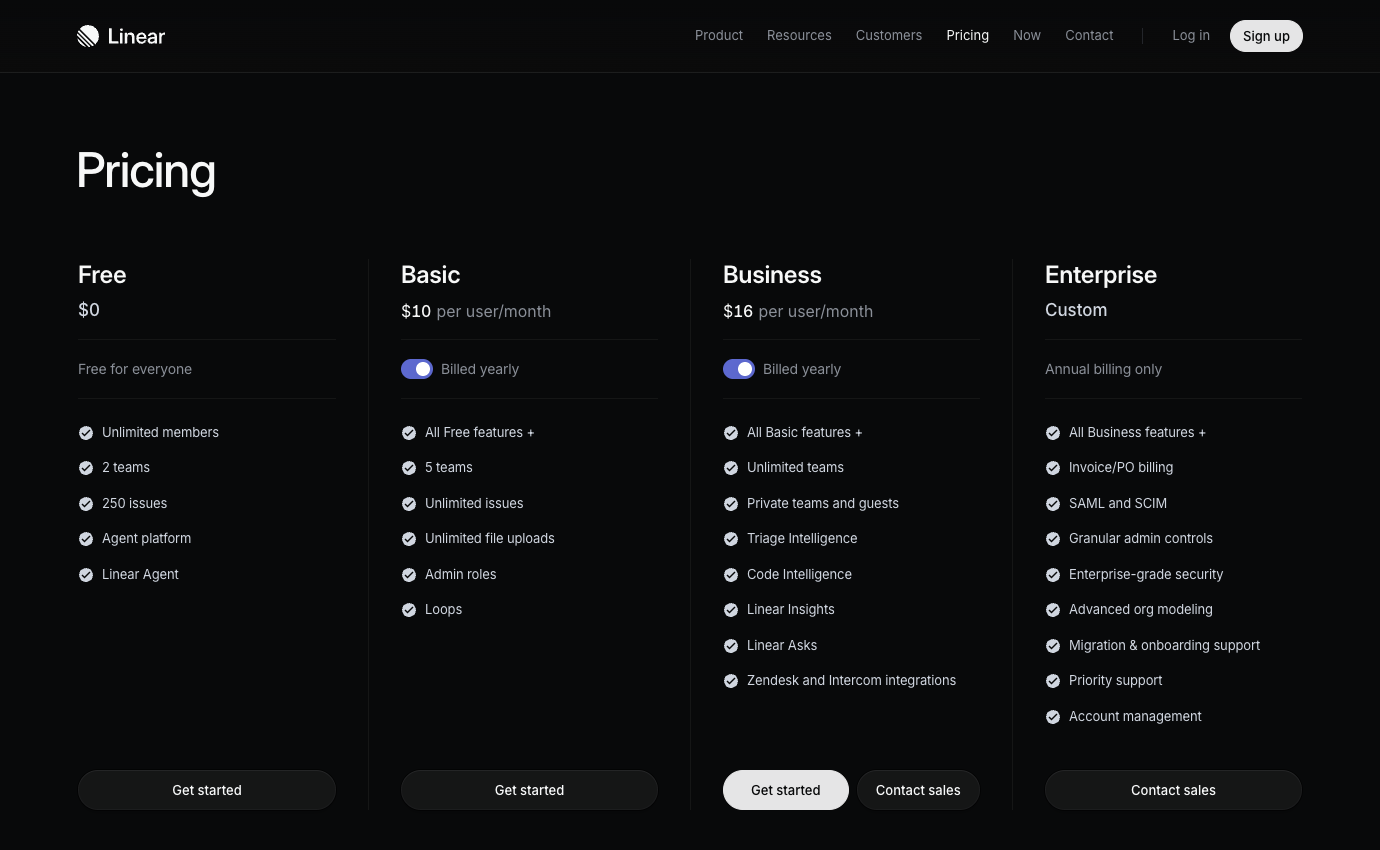
Always consult the official Linear pricing page for the country in which the account will be purchased. Some vendors personalize prices by geography or seat count. Where the public site shows a calculator instead of a fixed amount, we deliberately mark pricing as variable instead of inventing a precise figure. Discounts visible in a screenshot are not promises about your future contract.
🛡️ Security, Governance, Privacy and Exports
Test Linear private teams permissions with a project containing confidential partnership information. A Linear SAML and SCIM provisioning requirement must be verified against the selected paid offering before IT promises central account control. Prepare a safe export plan for issues whose identifiers are already referenced in incident and release reports.
Private teams and security administration are a decisive reason to compare Basic and Business. A small open product team may operate comfortably without extensive restrictions, while a business working on unreleased partnerships or regulated systems may require private planning and stronger authentication controls. The exact license entitlement for SAML, provisioning and analytics should be checked before procurement. Likewise, AI and agent functionality can introduce credit limits or new data flows. A product’s quiet, fast interface does not remove the organization’s obligation to govern accounts and data access.
⚠️ Limitations, Hidden Costs and Failure Modes
The costs of Linear do not stop at its published seat price. A growing backlog may require a paid tier even if the initial team is small. Check these buying risks against the actual edition and your own requirements.
1. Fast input can conceal missing issue detail
A lightweight issue tracker can feel faster partly because fewer fields must be entered. That advantage is lost if incoming requests lack enough context for the developer who receives them. Define what a reproducible bug requires and use triage to reject unclear items without turning every idea into a scheduled commitment.
2. Cycle planning and overcommitment
Cycle planning works when teams are willing to limit work in progress. A perfect-looking list of due dates does not make a department capable of delivering everything it accepts. Pilot an unexpected urgent fix and record which planned item moves out; that trade-off reveals more than a smooth backlog demonstration.
3. Free-tier limits during migration
Linear’s free tier can be helpful for evaluation, but its limits may interfere with importing an established issue history. Verify current issue, team and permission conditions before assuming a free-to-paid migration will be frictionless. Export a small set of old tickets with links and attachments to see what actually survives.
4. Pull-request events and real delivery
GitHub-linked issues make it easier to find code changes, but a merged pull request is not the same as a verified production release. Define which event closes work and who records support-facing release notes. A triage inbox should keep raw customer requests distinct from accepted engineering tasks.
5. Private teams and identity controls
Private teams and identity controls may determine the licensing tier for confidential product work. Invite a restricted user to a sensitive project and test that the person cannot infer unrelated roadmap details. SSO or provisioning should be evaluated as an IT requirement, not an optional enterprise badge.
6. Where simplicity beats Jira—and where it does not
A small engineering team can prefer Linear to a more configurable Jira setup without claiming it has objectively better performance. Run one real sprint handoff, code review and customer escalation in both systems. The deciding factor is whether the simpler workflow retains the release traceability that the team will eventually need.
⚖️ Linear vs Alternatives
A small product team may enjoy Linear’s streamlined triage until a customer escalation competes with a committed release. Test the interruption deliberately. Assign the new issue an owner, connect it to the relevant pull request and decide which planned item drops from the cycle. After deployment, ask support to locate the original complaint and the fix without searching personal DMs. This tells you whether fast issue creation is producing a useful record or just a cleaner-looking queue.
For Linear vs Jira developer workflows, use the same prioritization session and cross-repository issue to expose hidden administrative effort. A Linear alternative to complex Jira setups is useful only when simplified defaults preserve necessary traceability. Linear vs Jira should be judged on handoff clarity, accountability and migration effort, not on a claimed benchmark that was never run.
A fair Linear pilot includes one triage session, one short delivery cycle and one cross-repository feature. Give the team a realistic bug, link it to its code review and document where the final release note lives. Then invite a colleague who has never seen the workspace and ask them to find the reason behind prioritization. Compare the same path in Jira. Linear wins when the team’s workflow becomes simpler without losing necessary traceability; it loses if the organization must reinvent compliance, reporting or customer-service links in spreadsheets just to accommodate its defaults.
| Product | Where it may be preferable | Buying question |
|---|---|---|
| Linear | The documented core workflow evaluated in this review | Does it measurably reduce your biggest current bottleneck? |
| Jira | Jira offers more configurable workflows and a broader marketplace. | Would this replace an existing paid seat or add another system? |
| Trello | Simpler nonengineering Kanban. | Would this replace an existing paid seat or add another system? |
| Asana | Cross-functional campaign and operations planning. | Would this replace an existing paid seat or add another system? |
🧪 A Responsible Thirty-Day Evaluation Plan
The Free limit of two teams and 250 issues is meaningful even when unlimited members sounds generous. A startup importing old issue history can encounter that boundary before hiring more people. Basic and Business have distinct team, privacy and advanced integration entitlements; enterprise identity provisioning is another consideration. Before migrating, count active, archived and legally preserved issues; plan redirect behavior for old links in release notes. Compare against Jira using one cross-team feature and one production defect, not a speed contest based on keyboard shortcuts. Linear earns its place when its constraints make routine issue tracking clearer without losing required traceability or customer context.
Days 1–3 — baseline and requirements
Start the Linear evaluation with a baseline of five sample bug triage requests. Assign someone to record current completion time, missing information and repeat questions. The baseline matters because a successful pilot must improve an observed handoff, not just create a cleaner workspace.
Days 4–7 — permissions and procurement
Price the actual Basic and Business plans for your country and planned license count. For Linear, check external access separately. Confirm cancellation, data export and the authorization required for any paid AI usage before inviting more employees.
Week 2 — real but controlled tasks
Run a controlled two-week product cycle scenario in Linear: The product lead prioritizes constrained work, engineers update issues and the team carries incomplete work forward transparently. Create one realistic problem, one correction and one handoff under a non-admin account. A screenshot is not proof of success; ask another person to reconstruct the final decision without private explanations.
Week 3 — integrations and handoff
Use a safe integration case involving roadmaps and initiatives. In Linear, confirm what happens when two edits conflict, a notification fails, or a collaborator leaves. Document which system holds the authoritative version instead of copying the same status into multiple tools.
Week 4 — decision and exit test
Compare your Linear trial with the old process and Jira. Jira’s larger extension ecosystem is valuable only if your actual workflow needs it. Ask the requester and operator to identify what genuinely improved, then export the sample materials, record the subscription terms and decide whether a limited rollout is warranted.

Frequently Asked Questions
What is Linear best used for?
The strongest use case is a focused issue and product-development workspace optimized around triage, cycles and product planning. Consider it when the team is struggling with that specific outcome, then verify whether existing software already provides enough of the same functionality.
Does Linear offer a free plan?
The current published starting tier is Free ($0). Free versions may limit collaborators, history, functionality or number of workspaces. Check the official feature table for the exact restrictions in your region.
What is the cheapest paid Linear plan?
The first listed paid reference is Basic at $10 per the current vendor page, with these caveats: USD/user/month billed yearly; up to five teams. Confirm regional tax, seat count and renewal before payment.
Can I pay monthly rather than annually for Linear?
Term options vary. The published information notes USD/user/month billed yearly; up to five teams. Do not confuse an annual-commitment monthly equivalent with a month-to-month subscription. Inspect the actual checkout.
Is Linear suitable for a remote team?
It may be a good fit for software teams that want keyboard-efficient issue tracking and clear product planning without elaborate configuration. A remote trial should validate access from approved devices, external participants, time-zone handoffs, notifications and the location of durable decisions.
What feature should I evaluate first in Linear?
Start with issues and projects. Work items have explicit owners, states and context. Templates and disciplined naming keep intake navigable. A useful trial also includes permission and offboarding checks.
What is a common limitation of Linear?
Free plan limits on teams and total issues can matter earlier than user count. Treat this as a purchase risk to verify, not as a claim of firsthand failure. The exact impact depends on your team size and chosen edition.
How does Linear compare with Jira?
Jira supports deeper workflow configuration and a broader extension ecosystem than Linear. Select a representative workflow and evaluate both candidates with the same participant roles, retention expectations and costs.
Can external collaborators work with Linear?
Access policies depend on the selected tier and whether a person is a member, guest or viewer. Test invitation scope, deletion of access and whether external people consume billable seats.
Are AI features included with Linear?
Availability and usage limits are plan-specific. Review ai and agent workflows; do not assume an unlimited allowance from a marketing label. Check credit or request limits and security policies.
What should we verify before buying Linear?
Confirm official pricing, account roles, data export, required integrations, license minimums, renewals and the real outcome of a small pilot. A written owner should sign off on the decision.
🎯 Final Verdict: Who Should Choose Linear?
Use a limited pilot, insist on a written cost estimate and compare one credible alternative. The current vendor plan page should settle any price ambiguity. The objective is not to own the broadest possible software stack; it is to build a workflow where responsibility, documentation and communication are easy to find.
Our methodology: This review is written from public vendor documentation and transparent illustrative decision scenarios. The 2026 price references and both product screenshots were inspected on October 26, 2026. We did not log into a paid account or conduct private first-hand benchmark tests, and nothing here constitutes a guaranteed quote or security certification.
EXPLORE NEXT ON DIGIOFFLY
Build a Smarter Team Software Stack
Use focused reviews and our comparison tools to separate essential collaboration subscriptions from duplicated functionality.
Plan & organize
- Notion review — Compare docs, wikis and linked project databases.
- ClickUp review — Consider tasks, views and team execution.
- Airtable review — Explore connected records and shared workflows.
- Softr review — Build a client-facing portal on structured data.
- Compare workflow automation and no-code tools — See when you need a dedicated workflow builder instead of another task board.
- Development & DevOps — Explore reviews of code, APIs, app backends and deployments
- GitHub — Source hosting and repository governance
- GitLab — Merge requests and CI/CD workflow
Communicate & decide
- Loom review — Record asynchronous walkthroughs for teammates.
- Otter.ai review — Evaluate meeting transcripts and follow-ups.
- Grammarly review — Improve collaborative writing and editing.
- Microsoft Copilot review — Review productivity AI and licensing limits.
- Explore creator and streaming software — Connect Loom-style async walkthroughs with recording and editing workflows.
- Browse AI & Tech reviews — Evaluate AI writing, transcription and Microsoft Copilot alternatives.
Compare your software stack
- Software Directory — Discover our full software catalog.
- Compare Software — Check tools side by side by actual use case.
- Software Cost Calculator — Estimate monthly versus annual commitments.
- Best Value Advisor — Identify potential overlap before another purchase.
- Explore Growth software — Connect project delivery with CRM, outreach and marketing workflows.
- Productivity & Collaboration reviews — Compare the complete team software shortlist.
- Jira review — Compare sprint controls and issue administration for larger engineering teams.
- Trello review — Contrast streamlined issue cycles with lightweight Kanban boards.